Zavedení
Thank you for choosing the ACS APG8201 PINhandy 1 OTP Generator. This device is designed to provide secure One-Time Passwords (OTPs) for enhanced authentication in various applications. This manual provides essential information for the proper setup, operation, and maintenance of your OTP generator. Please read this manual thoroughly before using the device to ensure optimal performance and safety.
Bezpečnostní informace
- Chraňte zařízení před vodou a nadměrnou vlhkostí.
- Nevystavujte zařízení extrémním teplotám nebo přímému slunečnímu záření.
- Zabraňte pádu zařízení nebo jeho vystavení silným nárazům.
- Nepokoušejte se zařízení rozebírat ani opravovat sami. Obraťte se na kvalifikovaný servisní personál.
- Zařízení a jeho baterii zlikvidujte v souladu s místními předpisy.
Obsah balení
Po vybalení zkontrolujte obsah balení. Pokud některé položky chybí nebo jsou poškozené, ihned kontaktujte prodejce.
- 1 x ACS APG8201 PINhandy 1 OTP Generator
- 1 x USB Cable (for power/connection)
- 1 x Quick Start Guide (this document serves as the full manual)
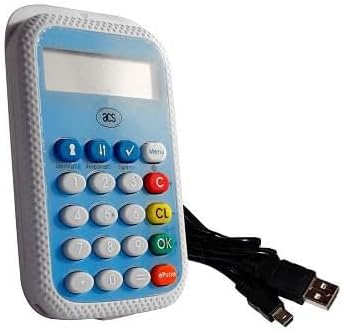
Image: The ACS APG8201 PINhandy 1 OTP Generator, a compact device featuring a display screen, a numeric keypad, and function buttons. A USB cable is shown connected to the device.
Nastavení
Počáteční zapnutí
- Connect the provided USB cable to the micro-USB port on the OTP generator.
- Connect the other end of the USB cable to a powered USB port on a computer or a USB wall adapter.
- The device display should light up, indicating it is receiving power.
Driver Installation (if applicable)
For certain applications, a driver may be required for the device to communicate with your computer. Refer to the software documentation provided by your service provider for driver installation instructions. Typically, modern operating systems may automatically install necessary drivers.
Návod k obsluze
Generating an OTP
- Ujistěte se, že je zařízení zapnuté.
- Press the designated OTP generation button (often labeled "OK" or a specific function key, refer to your service provider's instructions for the exact button).
- If prompted, enter your PIN using the numeric keypad. Press "OK" to confirm.
- The display will show the generated One-Time Password.
- Enter this OTP into the required application or website within the specified time limit.
Správa PIN
PIN management functions (e.g., changing PIN) are typically initiated through the service provider's application or website, which then interacts with the device. Follow the on-screen prompts from your service provider.
Údržba
Čištění zařízení
- Use a soft, dry, lint-free cloth to clean the exterior of the device.
- Nepoužívejte abrazivní čisticí prostředky, rozpouštědla ani aerosolové spreje.
- Zabraňte vniknutí vlhkosti do jakýchkoli otvorů.
Skladování
Pokud zařízení nepoužíváte, skladujte jej na chladném a suchém místě, mimo dosah přímého slunečního záření a extrémních teplot.
Odstraňování problémů
| Problém | Možná příčina | Řešení |
|---|---|---|
| Zařízení se nezapne. | Chybí napájení nebo je vadný USB kabel. | Ujistěte se, že je kabel USB bezpečně připojen k napájenému portu USB. Zkuste jiný port USB nebo kabel. |
| OTP not accepted. | Incorrect PIN, time synchronization issue, or expired OTP. | Verify the PIN entered. Ensure your system's time is synchronized. Generate a new OTP. Contact your service provider for time synchronization issues. |
| Displej je prázdný nebo nečitelný. | Device malfunction or low power. | Ensure adequate power supply. If problem persists, contact support. |
Specifikace
| Funkce | Detail |
|---|---|
| Model | APG8201-CAC |
| Značka | ACS |
| Konektivita | USB |
| Funkce | One-Time Password (OTP) Generation |
| Rozměry | (Refer to product packaging or official ACS webpřesné rozměry) |
| Provozní teplota | (Refer to product packaging or official ACS webweb) |
Záruka a podpora
ACS products typically come with a standard manufacturer's warranty. For specific warranty terms and conditions, please refer to the warranty card included with your product or visit the official ACS website. For technical support, product inquiries, or warranty claims, please contact your point of purchase or visit the official ACS support portal.
Official ACS Webmísto: www.acs.com.hk
Note: Support contact information may vary by region.


