Zavedení
This manual provides essential information for the safe and efficient operation of your Mistral 46-inch Blade-Free Fan with Air Purifier, Model MBFAP460. This appliance combines powerful airflow with advanced air purification technology, featuring a DC motor turbo system, HEPA13 filtration, and UV sterilization. Please read these instructions thoroughly before use and retain them for future reference.
Bezpečnostní pokyny
Abyste snížili riziko požáru, úrazu elektrickým proudem nebo zranění, vždy dodržujte tato základní bezpečnostní opatření:
- Zajistěte napájení objtage odpovídá štítku s výkonem na spotřebiči.
- Do not operate the appliance with a damaged cord or plug. If damaged, contact qualified service personnel.
- Keep the appliance away from water or other liquids. Do not immerse any part of the appliance in water.
- Před čištěním, údržbou nebo pokud spotřebič nepoužíváte, odpojte jej ze zásuvky.
- Do not insert fingers or foreign objects into any openings of the appliance.
- Tento spotřebič je určen pouze pro vnitřní použití v domácnosti.
- Dohlížejte na děti, aby si se zařízením nehrály.
Obsah balení
Ověřte, zda jsou v balení přítomny všechny položky:
- Mistral Blade-Free Fan with Air Purifier Main Unit
- Dálkové ovládání
- HEPA13 Filter (pre-installed or separate)
- Uživatelská příručka (tento dokument)
Nastavení
The Mistral MBFAP460 requires minimal assembly. Follow these steps to prepare your unit for operation:
- Rozbalení: Opatrně vyjměte všechny součásti z obalu. Uschovejte si obal pro budoucí skladování nebo přepravu.
- Základní upevnění (pokud je samostatné): If the base is separate, align it with the main unit and secure it according to the markings. Ensure it clicks into place or is fastened securely.
- Instalace filtru: If the HEPA13 filter is not pre-installed, locate the filter compartment (usually at the base or rear of the unit), remove the cover, insert the filter with the correct orientation, and replace the cover.
- Umístění: Place the fan on a firm, level surface, ensuring adequate space around the unit for optimal airflow and purification.

Obrázek 1: Přední strana view of the Mistral MBFAP460 Blade-Free Fan with Air Purifier.
Návod k obsluze
Your Mistral MBFAP460 can be operated using the control panel on the unit or the included remote control.
Konec ovládacího paneluview

Figure 2: Close-up of the control panel, showing the digital display and touch-sensitive buttons for various functions.
Základní operace
- Zapnutí/vypnutí: Stiskněte tlačítko napájení (U) na ovládacím panelu nebo dálkovém ovladači pro zapnutí nebo vypnutí jednotky.
- Režimy vzduchu: Cycle through the 5 available air modes: Auto, Turbo, Sleep, Natural, and Normal. Each mode adjusts fan speed and purification settings for different environments.
- Kmitání: Activate or deactivate the automatic left-right oscillation feature. Select from 30, 60, 90, or 120-degree oscillation angles to distribute air across a wider area.
- UV sterilizace: The unit features UV sterilization to kill up to 99.99% of most viruses, airborne bacteria, and mold. This function operates automatically with the air purification system.
- Indikátor výměny filtru: The control panel will display an indicator when the HEPA13 filter requires replacement. Refer to the Maintenance section for instructions.
Údržba
Regular maintenance ensures optimal performance and longevity of your Mistral MBFAP460.
Čištění jednotky
- Před čištěním jednotku vždy odpojte.
- Vnější povrchy otřete měkkým, damp tkanina. Nepoužívejte abrazivní čisticí prostředky nebo rozpouštědla.
- Zajistěte, aby se do vnitřních součástí nedostala voda.
HEPA13 Filter Replacement
The HEPA13 filter removes up to 99.97% of allergens, pollutants, and dust as small as 0.3 microns. Replace the filter when the filter replacement indicator illuminates on the control panel.
- Odpojte spotřebič ze zásuvky.
- Locate the filter compartment, usually at the base of the unit.
- Otevřete kryt přihrádky filtru.
- Vyjměte starý filtr a řádně jej zlikvidujte.
- Insert a new Mistral HEPA13 replacement filter, ensuring correct orientation.
- Bezpečně zavřete kryt přihrádky filtru.
- Plug in the unit and reset the filter indicator (refer to specific instructions in the full manual if a reset button is present).
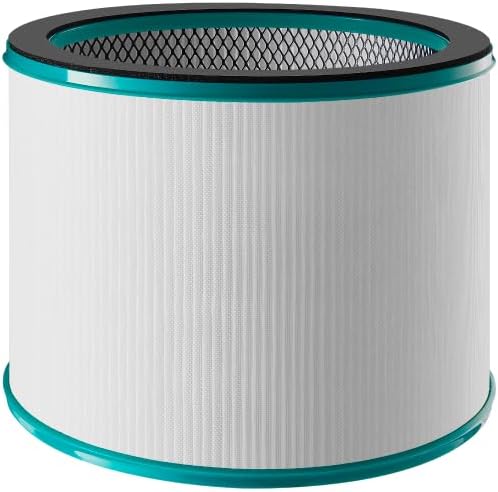
Figure 3: Mistral HEPA13 replacement filter, essential for maintaining air purification efficiency.
Odstraňování problémů
If you encounter issues with your Mistral MBFAP460, consult the following table for common problems and solutions.
| Problém | Možná příčina | Řešení |
|---|---|---|
| Jednotka se nezapne. | No power supply. Power cord not securely plugged in. | Check if the power cord is firmly plugged into a working outlet. Ensure the power switch (if any) is on. |
| Slabé nebo žádné proudění vzduchu. | Air intake/outlet blocked. Filter is dirty or clogged. | Ensure no obstructions are blocking the air intake or outlet. Check and replace the HEPA13 filter if dirty. |
| Neobvyklý hluk během provozu. | Unit not on a level surface. Foreign object inside. | Place the unit on a stable, level surface. Unplug and carefully inspect for any foreign objects. |
| Filter replacement indicator remains on after filter change. | Indikátor filtru se neresetoval. | Refer to the full manual for specific instructions on how to reset the filter replacement indicator. |
Pokud problém přetrvává i po vyzkoušení těchto řešení, kontaktujte zákaznickou podporu.
Specifikace
| Funkce | Detail |
|---|---|
| Model | MBFAP460 |
| Značka | MISTRAL |
| Rozměry produktu | 38 D x 35.8 W x 116.2 V centimetrů |
| Hmotnost položky | 5.5 kg |
| Zdroj napájení | Elektrický kabel |
| Kontrolní metoda | Vzdálený |
| Typ filtru | HEPA13 |
| Velikost retence částic | 0.3 mikronu |
| Pokrytí podlahové plochy | 700 čtverečních stop |
| Speciální funkce | DC Motor Turbo System, UV Sterilisation, 5 Air Modes, Auto Oscillation |
| Montáž Vyžadována | Ano |
| Certifikace Energy Star | Ano |
Záruka a podpora
This product comes with a manufacturer's warranty. Please refer to the warranty card included in your package for specific terms and conditions. For technical support, replacement parts, or service inquiries, please contact Mistral customer service through their official webwebu nebo kontaktních informací uvedených v záruční dokumentaci.


