1. Úvod
This manual provides essential information for the safe and efficient operation of your TELLUR Obia PRO 60W Bluetooth Speaker. Please read this manual thoroughly before using the product and retain it for future reference.
2. Bezpečnostní informace
- Nevystavujte reproduktor extrémním teplotám ani přímému slunečnímu záření po delší dobu.
- Vyvarujte se pádu reproduktoru nebo jej nevystavujte silným nárazům.
- Nepokoušejte se reproduktor rozebírat ani upravovat. Ztratíte tak záruku.
- Uchovávejte reproduktor mimo dosah zdravotnických prostředků.
- Ensure the charging port cover is securely closed when near water to maintain IPX6 water resistance.
- Používejte pouze určený nabíjecí kabel a napájecí adaptér.
3. Obsah balení
Ověřte, zda jsou v balení přítomny všechny položky:
- TELLUR Obia PRO 60W Bluetooth Speaker
- USB nabíjecí kabel
- 3.5mm audio kabel AUX
- Uživatelská příručka (tento dokument)
4. Konec produktuview a ovládací prvky
Familiarize yourself with the speaker's components and control buttons.

Obrázek 4.1: Přední view of the TELLUR Obia PRO speaker, showcasing the main grille, control panel, and integrated LED lights on the handle and side woofers.
4.1 Ovládací panel

Obrázek 4.2: Detailní view of the control buttons located on the top panel of the speaker.
- Snížení hlasitosti (-) / Předchozí skladba: Krátkým stisknutím snížíte hlasitost. Dlouhým stisknutím přejdete na předchozí skladbu.
- Zvýšení hlasitosti (+) / Další skladba: Krátkým stisknutím zvýšíte hlasitost. Dlouhým stisknutím přejdete na další skladbu.
- LED Light Mode Button: Press to cycle through different LED light modes.
- Vypínač: Press and hold to power on/off. Briefly press to play/pause music.
- TWS (True Wireless Stereo) Button: Press to activate TWS pairing mode.
- Tlačítko režimu (M): Stisknutím přepínáte mezi vstupními režimy Bluetooth, USB a AUX.
4.2 Vstupní/Výstupní porty
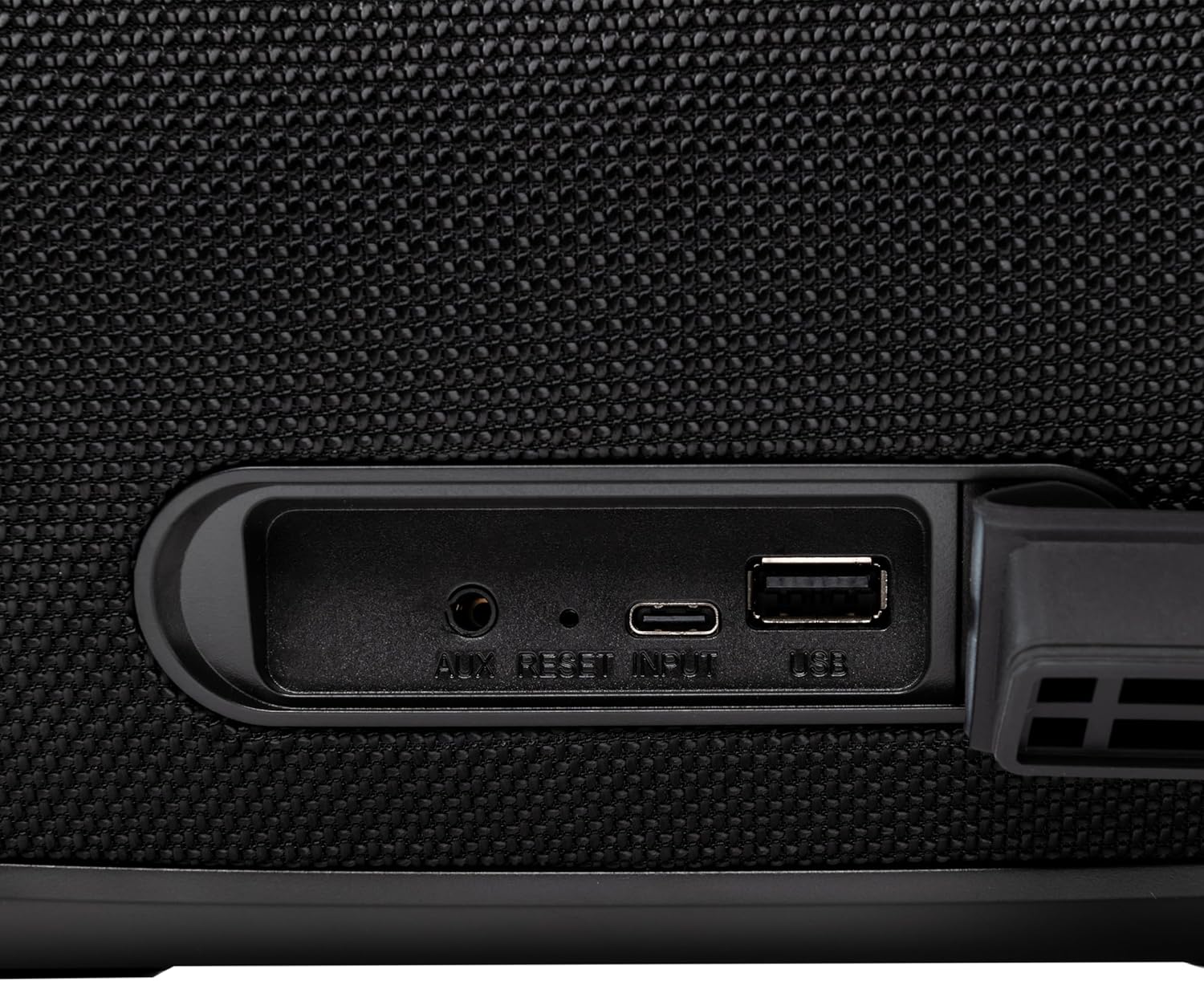
Obrázek 4.3: Close-up of the protected input/output ports on the rear of the speaker.
- Port AUX-IN: Pro připojení externích audio zařízení pomocí 3.5mm audio kabelu.
- Resetovací tlačítko: Use a thin object to press and reset the speaker if necessary.
- USB-C vstup: Pro nabíjení reproduktoru.
- Port USB-A: Pro přehrávání MP3 audio files from a USB drive or for power bank functionality.
5. Nastavení
5.1 Nabíjení reproduktoru
Before initial use, fully charge the speaker. The speaker also functions as a power bank to charge other devices via its USB-A port.
- Connect the USB charging cable to the USB-C input port on the speaker.
- Druhý konec kabelu připojte ke kompatibilnímu napájecímu adaptéru USB (není součástí balení).
- The charging indicator light will illuminate. It will turn off once charging is complete.
- The battery level can be displayed on your connected phone when paired via Bluetooth.
5.2 Zapnutí/vypnutí
- Zapnutí: Stiskněte a podržte Tlačítko napájení for approximately 3 seconds until you hear an audible prompt and the LED lights activate.
- Vypnutí: Stiskněte a podržte Tlačítko napájení for approximately 3 seconds until you hear an audible prompt and the LED lights turn off.
6. Návod k obsluze
6.1 Párování Bluetooth
The speaker uses Bluetooth v5.3 for stable wireless connection up to 10 meters.
- Ujistěte se, že je reproduktor zapnutý a v režimu Bluetooth (signalizováno blikající modrou LED diodou). Pokud ne, stiskněte tlačítko Tlačítko režimu (M) přepnete do režimu Bluetooth.
- Povolte Bluetooth na svém mobilním zařízení (chytrém telefonu, tabletu atd.).
- Hledat dostupná zařízení Bluetooth a vyberte „TELLUR Obia PRO“ ze seznamu.
- Once paired, the speaker will emit an audible confirmation, and the blue LED will stop flashing.
- Reproduktor se po zapnutí automaticky znovu připojí k poslednímu spárovanému zařízení, pokud je k dispozici.

Obrázek 6.1: The TELLUR Obia PRO speaker wirelessly connected to a smartphone, ready for audio playback.
6.2 Funkce True Wireless Stereo (TWS)
TWS allows you to pair two Obia PRO speakers for a stereo sound experience.
- Ensure both Obia PRO speakers are powered on and in Bluetooth mode, but not yet paired with any device.
- Na jednom reproduktoru (to bude primární reproduktor) stiskněte tlačítko Tlačítko TWS. The speaker will enter TWS pairing mode, indicated by a flashing light.
- The two speakers will automatically connect to each other. Once connected, you will hear an audible confirmation, and the TWS indicator light on both speakers will become solid.
- Now, connect your mobile device to the primary speaker via Bluetooth as described in Section 6.1. The audio will play in stereo across both speakers.
6.3 Multiple Link Technology
This technology allows connecting an unlimited number of Obia PRO speakers wirelessly for a synchronized audio experience. Refer to the manufacturer's website or specific instructions for detailed setup of Multiple Link.
6.4 Přehrávání z USB (MP3)
Přehrávejte zvuk MP3 files directly from a USB flash drive (up to 128GB).
- Vložte USB flash disk obsahující MP3 filedo portu USB-A.
- Stiskněte tlačítko Tlačítko režimu (M) to switch to USB mode. The speaker will automatically begin playing music from the USB drive.
- Použijte Zvýšení/snížení hlasitosti a Tlačítko napájení (for play/pause) to control playback.
6.5 Připojení AUX-IN
Connect non-Bluetooth devices using the 3.5mm AUX audio cable.
- Připojte jeden konec 3.5mm audio kabelu AUX do portu AUX-IN na reproduktoru.
- Druhý konec připojte k audio výstupu vašeho externího zařízení (např. MP3 přehrávače, notebooku).
- Stiskněte tlačítko Tlačítko režimu (M) pro přepnutí do režimu AUX.
- Ovládejte přehrávání a hlasitost z externího zařízení.
6.6 Volání handsfree
When connected to a smartphone via Bluetooth, the speaker's built-in microphone allows for hands-free calls.
- Přijmout/ukončit hovor: Krátce stiskněte Tlačítko napájení.
- Odmítnout hovor: Stiskněte a podržte Tlačítko napájení po dobu 2 sekund.
6.7 LED světelných režimů
The speaker features integrated LED lights with multiple display modes.
- Stiskněte tlačítko Tlačítko režimu osvětlení LED to cycle through available light patterns and colors.
- Stiskněte a podržte Tlačítko režimu osvětlení LED to turn the lights off or on.

Obrázek 6.2: A user interacting with the LED light mode button to change the speaker's lighting effects.
6.8 Equalizer Settings (Indoor/Outdoor)
The speaker allows for equalizer customization for different environments. Specific controls for this are not detailed in the provided data, but typically involve a dedicated button or a combination of existing buttons. Refer to the product's quick start guide or manufacturer's website for precise instructions on adjusting the equalizer.
7. Údržba
7.1 Čištění
- Otřete reproduktor měkkým, suchým hadříkem.
- Nepoužívejte abrazivní čisticí prostředky, alkohol ani chemická rozpouštědla.
7.2 Vodotěsnost (IPX6)
The Obia PRO speaker is rated IPX6, meaning it is protected against high-pressure water jets from any direction. This makes it suitable for outdoor use and environments where it might be exposed to splashes or rain.
- Ensure the rubber cover for the charging and AUX ports is securely closed before exposing the speaker to water.
- Neponořujte reproduktor do vody.
- Po kontaktu s vodou reproduktor před nabíjením otřete do sucha.
7.3 Péče o baterii
- Chcete-li prodloužit životnost baterie, vyvarujte se častého úplného vybíjení.
- Reproduktor pravidelně nabíjejte, i když jej nepoužíváte, aby se zachovala jeho životnost.
- Pokud reproduktor delší dobu nepoužíváte, skladujte jej na chladném a suchém místě.
8. Řešení problémů
| Problém | Možná příčina | Řešení |
|---|---|---|
| Reproduktor se nezapne. | Slabá baterie. | Plně nabijte reproduktor. |
| Nelze spárovat přes Bluetooth. | Reproduktor není v režimu párování; Bluetooth zařízení je vypnuté; zařízení je příliš daleko od reproduktoru. | Ensure speaker is in Bluetooth mode (flashing LED). Turn on Bluetooth on your device. Move device closer to speaker (within 10m). |
| Žádný zvuk. | Příliš nízká hlasitost; vybrán nesprávný režim; zařízení nepřehrává. | Zvyšte hlasitost reproduktoru a zařízení. Stiskněte Tlačítko režimu (M) to select correct input. Ensure audio is playing on the connected device. |
| Párování TWS selhalo. | Speakers already paired to a device; not both Obia PRO models. | Disconnect both speakers from any Bluetooth devices. Ensure both speakers are Obia PRO models. Try TWS pairing again. |
| Přehrávání z USB nefunguje. | USB disk není správně naformátován; není podporován file type; drive capacity too large. | Ujistěte se, že je USB disk naformátován na FAT32. Pouze MP3 files are supported. Max capacity 128GB. |
9. Specifikace
| Název modelu | Obia PRO |
| Značka | TELLUR |
| Výstupní výkon | 60W (2x 20W RMS subwoofers, 2x 10W RMS tweeters) |
| Verze Bluetooth | v5.3 |
| Bezdrátové Dosah | Až 10 metrů |
| Frekvenční odezva | 80 MHz (Note: This value is unusual for speaker frequency response and may be a typo in source data. Typically measured in Hz-kHz.) |
| Impedance | 4 ohmů |
| Zvukové režimy | Bluetooth, USB (MP3), AUX-IN |
| Podpora USB | USB 2.0/3.0, up to 128GB (MP3 format) |
| Voděodolnost | IPX6 |
| Kapacita baterie | 5400 XNUMX mAh |
| Doba přehrávání | Až 12 hodin (při střední hlasitosti) |
| Funkce powerbanky | Yes, via USB-A port |
| Rozměry (D x Š x V) | 37.7 x 17 x 18 cm |
| Hmotnost | 3.48 kg |
| Materiál | Plast |
| Barva | Černý |
Poznámka: Specifikace se mohou změnit bez předchozího upozornění.
10. Záruka a podpora
TELLUR products are manufactured to the highest quality standards. For information regarding warranty terms, technical support, or service, please refer to the warranty card included with your product or visit the official TELLUR webmísto.
Kontaktní údaje: Prosím navštivte www.tellur.com pro nejnovější informace o podpoře.


