1. Úvod
This manual provides comprehensive instructions for the installation, setup, operation, and maintenance of your Eonon Double Din Car Stereo X3PLUS. Please read this manual thoroughly before using the product to ensure proper functionality and safety.

Figure 1.1: Eonon Double Din Car Stereo X3PLUS showcasing the Apple CarPlay interface.
2. Bezpečnostní informace
Always prioritize safety. Improper installation or operation can lead to damage or injury. Observe the following precautions:
- Před instalací se ujistěte, že je vozidlo odpojeno od napájení.
- Pokud si nejste jisti některým krokem instalace, poraďte se s odborníkem.
- Neovládejte zařízení způsobem, který by vás odváděl od řízení.
- Avoid exposing the unit to extreme temperatures, moisture, or direct sunlight for prolonged periods.
- Používejte pouze určené příslušenství a díly.
3. Co je v krabici
Před zahájením instalace ověřte, zda jsou všechny komponenty přítomny:
- Eonon Double Din Car Stereo X3PLUS Unit
- Napájecí kabel
- Externí mikrofon
- Parking Brake Signal Wire
- Pojistka 10A
- Šrouby (8 kusů)
- Uživatelská příručka
- (Optional: Eonon A0125 AHD backup camera, if included with purchase)

Figure 3.1: Included accessories and main unit for the X3PLUS.
4. Instalace
The Eonon X3PLUS is designed for double din dashboards. Before installation, measure your dashboard opening. If it is approximately 178mm in width and 100mm in height, and your car has an ISO connector, direct installation is possible. Otherwise, an additional mounting kit or wire harness may be required.
4.1. Dashboard Compatibility

Figure 4.1: Dashboard measurement guide for X3PLUS installation.
If your dashboard dimensions differ from the standard 178mm x 100mm, an extra installation kit (not included) will be necessary. Ensure your car's factory radio uses an ISO connector for direct compatibility with the provided power cable. If not, an adapter cable (not included) will be needed.
4.2. Schéma zapojení
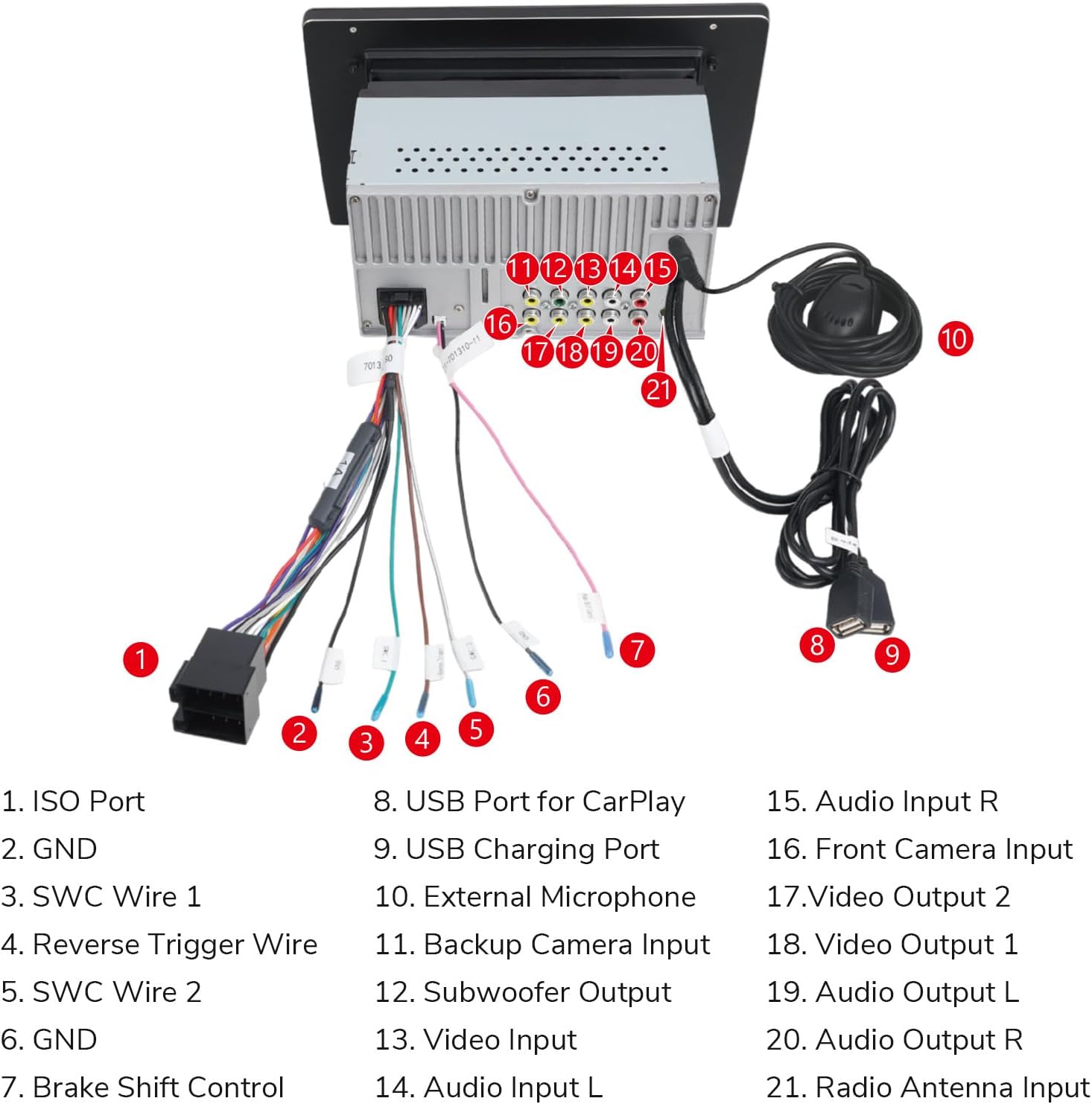
Refer to the following diagram for proper wiring connections. Ensure all connections are secure to prevent malfunctions.

Figure 4.2: Wiring connections for the X3PLUS unit.
Key connections include: ISO Port, GND (Ground), SWC (Steering Wheel Control) wires, Reverse Trigger Wire, USB Ports (for CarPlay and charging), External Microphone, Backup Camera Input, Subwoofer Output, Video Input/Output, Audio Input/Output, and Radio Antenna Input.
4.3. Screen Panel Removal (if needed)
In some installation scenarios or for maintenance, it may be necessary to remove the screen panel. Follow these steps:
Video 4.1: This video demonstrates how to safely remove the screen panel of the Eonon X3PLUS car radio. This process involves releasing clips and disconnecting the screen cable.
To remove the screen panel, pull the two clips on the back of the screen outwards on both sides, then lift the screen upwards. Unscrew the screws on the cable fixing clip and remove the clip. Carefully remove the clip that secures the screen cable and pull the screen cable out of the panel. Reassembly is the reverse of these steps.
5. Počáteční nastavení a konfigurace
5.1. Nastavení displeje
The 10.1-inch QLED display offers a vibrant 1280x720 resolution. You can adjust the screen for optimal viewing úhly.

Figure 5.1: QLED display features including resolution and viewing úhly.
5.2. Nastavení zvuku (DSP)
The unit features a built-in DSP (Digital Signal Processor) for enhanced audio. Customize your sound experience using the 16-band graphic equalizer and 7 EQ modes.

Figure 5.2: Audio customization options with DSP.
5.3. Nastavení ovládání na volantu
To enable steering wheel controls, navigate to the settings menu on the head unit. This unit supports analog SWC signals. Follow the on-screen prompts to map your steering wheel buttons to the stereo functions.
Video 5.1: This video provides a step-by-step guide on how to set up steering wheel controls for the Eonon car stereo, including wiring and programming the buttons.
5.4. Wireless Apple CarPlay Setup
Connect your iPhone wirelessly to the X3PLUS for Apple CarPlay functionality. Ensure Wi-Fi and Bluetooth are enabled on your iPhone.
Video 5.2: This video demonstrates the process of setting up wireless Apple CarPlay with the Eonon car stereo, showing the necessary phone and head unit settings.
5.5. Wireless Android Auto Setup
Connect your Android phone wirelessly to the X3PLUS for Android Auto functionality. Ensure your phone supports 5GHz Wi-Fi for wireless connection and that Wi-Fi and Bluetooth are enabled.
Video 5.3: This video guides users through the setup of wireless Android Auto on the Eonon car stereo, detailing the steps for phone pairing and connection.
6. Návod k obsluze
6.1. Apple CarPlay a Android Auto
Once connected, you can access navigation, messaging, calls, and music directly from the stereo's QLED display. Both wireless and wired (via USB) options are available.
Obrázek 6.1: Funkce bezdrátového CarPlay a Android Auto.
6.2. Funkce Bluetooth
Pair your smartphone via Bluetooth for hands-free calling and audio streaming. Navigate to the Bluetooth menu on the stereo to pair a new device.

Figure 6.2: Bluetooth and AM/FM radio interface.
6.3. Provoz rádia
The unit supports AM/FM radio with 18 FM and 12 AM station memory presets. Use the touch screen to scan for stations and save your favorites.
6.4. USB Quick Charge
Utilize the Type-C USB port for fast and secure phone charging with a maximum current of 1.5A.
6.5. Backup Camera Support
The stereo supports 720P AHD backup cameras, displaying the parking trajectory on the screen when reversing. Ensure the backup camera is properly connected to the dedicated input.
7. Údržba
To ensure the longevity and optimal performance of your Eonon X3PLUS, follow these maintenance guidelines:
- Čištění: K čištění obrazovky a zařízení používejte měkký, suchý hadřík. Nepoužívejte abrazivní čisticí prostředky ani rozpouštědla.
- Aktualizace firmwaru: Periodically check the official Eonon website for firmware updates to improve performance and add new features.
7.1. Postup aktualizace firmwaru
To update the firmware, you will need a USB flash drive (less than 64 GB, formatted to FAT32) and the firmware file from the Eonon website. Ensure a stable power supply during the update process.
Video 7.1: This video provides instructions on how to upgrade the firmware of your Eonon X3/X3PLUS car stereo using a USB flash drive.
8. Řešení problémů
If you encounter issues with your Eonon X3PLUS, refer to the following common problems and solutions:
| Problém | Možná příčina | Řešení |
|---|---|---|
| Jednotka se nezapne. | Incorrect wiring, blown fuse, insufficient power. | Check power cable connections, inspect the 10A fuse, ensure stable power supply. |
| Žádný zvuk nebo zkreslený zvuk. | Speaker wiring issues, incorrect audio settings. | Verify speaker connections, adjust DSP and EQ settings. |
| Bezdrátové připojení k CarPlay/Android Auto se nedaří. | Incorrect Wi-Fi/Bluetooth settings, phone incompatibility (5GHz Wi-Fi for wireless Android Auto). | Ensure Wi-Fi and Bluetooth are enabled on both devices. Check phone compatibility. Try wired connection. |
| Steering wheel controls not working or saving. | Incorrect wiring, improper programming. | Verify SWC wire connections. Re-program the steering wheel controls via the unit's settings menu. |
| Screen has lines or is unresponsive. | Screen cable issue, software glitch. | Check the screen cable connection (refer to screen panel removal section). Try a factory reset or firmware update. |
If the issue persists after attempting these solutions, please contact Eonon customer support for further assistance.
9. Specifikace
| Funkce | Detail |
|---|---|
| Číslo modelu | X3PLUS |
| Zobrazit | 10.1 Inch QLED Touchscreen |
| Rezoluce | 1280x720 |
| Konektivita | Bezdrátové Apple CarPlay, bezdrátové Android Auto, Bluetooth, Wi-Fi |
| Zvukový výstup | 4x45W Max Output, Built-in DSP, 16-band Graphic Equalizer, 7 EQ Modes |
| USB nabíjení | Type-C USB Quick Charge (1.5A) |
| Podpora fotoaparátu | 720P AHD Backup Camera |
| Ovládání na volantu | Supports Analog SWC Signals |
| Rozměry (balení) | 12.6 x 9.37 x 7.8 palce |
| Hmotnost položky | 5.94 libry |
10. Záruka a podpora
For warranty information and technical support, please refer to the warranty card included with your product or visit the official Eonon website. You can also contact Eonon customer service directly for assistance with product issues or inquiries.
Eonon Customer Support: support@eonon.com


