1. Úvod
This manual provides essential instructions for the safe and efficient operation of your GROVIEW Mini projektor Bluetooth, model Groview-B2D-US. Please read this manual thoroughly before using the projector and retain it for future reference.
Groview-B2D-US is a compact and portable projector featuring electric focus, Bluetooth 5.1 connectivity, and a fully sealed optical engine designed for reduced noise and extended lifespan. It supports Full HD 1080P input with a native 720P resolution and offers a digital zoom function.
2. Bezpečnostní informace
- Nedívejte se přímo do objektivu projektoru, když je zapnutýamp je zapnuto.
- Zajistěte dostatečné větrání kolem projektoru, abyste zabránili přehřátí. Neblokujte větrací otvory.
- Používejte pouze napájecí adaptér dodaný s projektorem.
- Nevystavujte projektor dešti, vlhkosti ani extrémním teplotám.
- Neumisťujte projektor na nestabilní povrchy.
- Nepokoušejte se projektor rozebírat ani opravovat sami. Požádejte o pomoc kvalifikovaný servisní personál.
- Udržujte projektor mimo dosah dětí a domácích zvířat.
3. Co je v krabici
Ověřte, zda jsou v balení přítomny všechny položky:
- 1 x Groview Electric Focus Projector
- 1 x HDMI kabel
- 1 x Napájecí kabel
- 1 x Dálkové ovládání
- 1 x Uživatelská příručka (tento dokument)
4. Konec produktuview
4.1 Součásti projektoru
The following image illustrates the main components of the Groview Mini Projector.

4.2 Vstupní/Výstupní porty
The rear panel of the projector features various ports for connecting external devices.
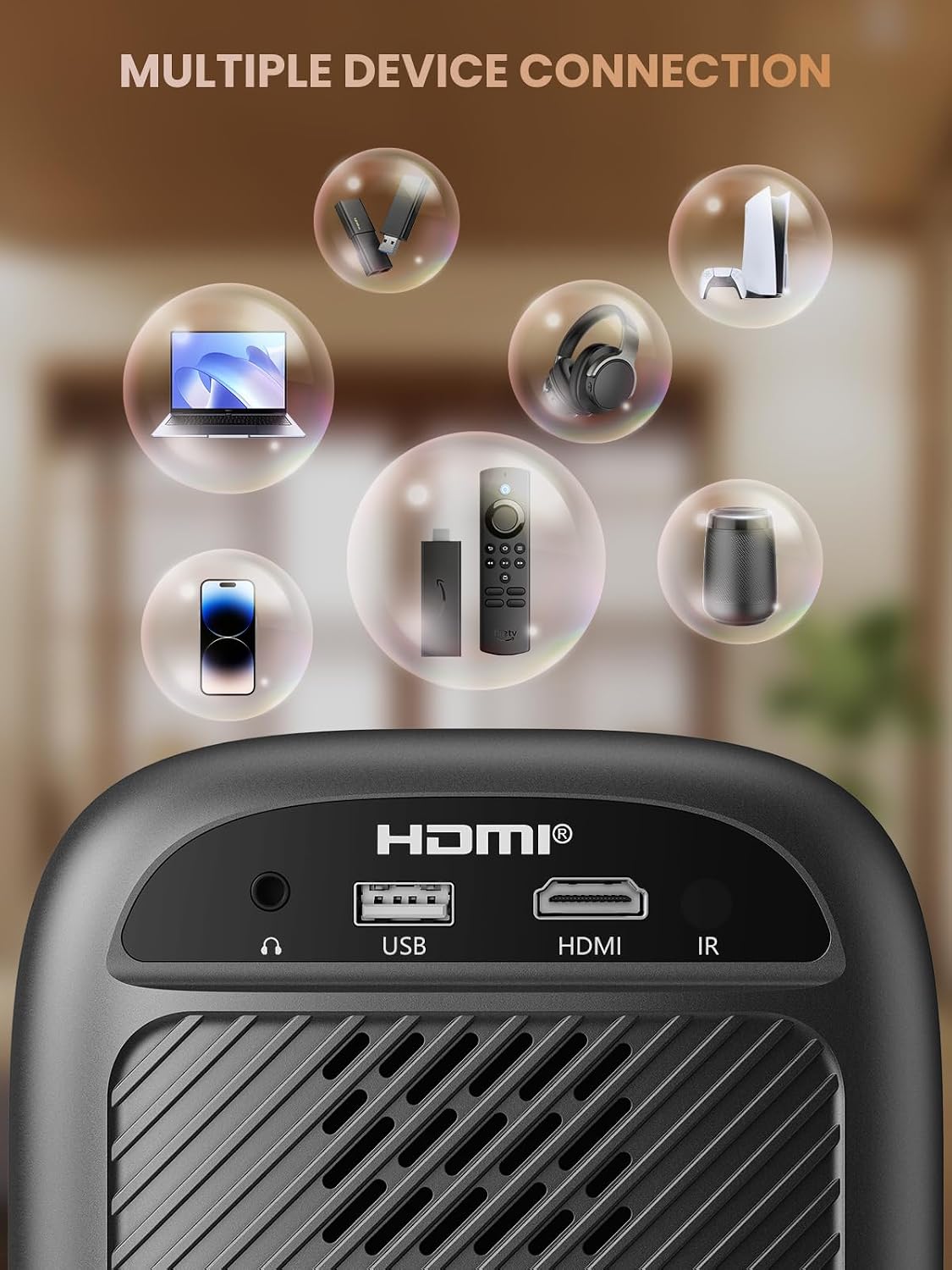
- Port HDMI: Connects to devices such as TV sticks, laptops, game consoles, and Blu-ray players.
- USB port: Connects to USB flash drives for media playback.
- Audio Port (3.5mm Jack): Připojuje se k externím reproduktorům nebo sluchátkům.
- IR přijímač: Pro signály dálkového ovládání.
5. Nastavení
5.1 Připojení napájení
- Připojte napájecí kabel k napájecímu vstupu projektoru.
- Zapojte druhý konec napájecího kabelu do elektrické zásuvky.
5.2 Umístění projektoru
Place the projector on a stable, flat surface. For optimal image quality, position the projector perpendicular to the projection surface (wall or screen). The projector can create a large image from a relatively short distance.
5.3 Nastavení zaostření
Groview-B2D-US features electric focus, allowing for precise image clarity adjustment using the remote control.

- Zapněte projektor.
- Point the remote control at the projector.
- Press the dedicated focus buttons (usually marked with 'F+' and 'F-' or similar icons) on the remote until the projected image is sharp and clear.
5.4 Korekce lichoběžníkového zkreslení
The projector includes a keystone adjustment slider on the rear panel. This allows you to correct trapezoidal distortion if the projector is not perfectly aligned with the screen. Adjust the slider until the image appears rectangular.
5.5 Počáteční zapnutí
Press the power button on the projector or the remote control to turn on the device. The projector will boot up and display the main interface.
6. Návod k obsluze
6.1 Připojení zařízení
Projektor nabízí několik možností připojení:
- HDMI: Connect an HDMI cable from your source device (e.g., TV Stick, laptop, game console) to the projector's HDMI port. Select the HDMI input source from the projector's menu.
- USB: Vložte USB flash disk do USB portu. Přehrávač médií projektoru obvykle disk automaticky rozpozná, což vám umožní procházet a přehrávat podporovaná média. files.
- Bluetooth 5.1: Připojte externí Bluetooth reproduktory nebo sluchátka pro vylepšený zvuk.

- Enable Bluetooth on your external audio device and set it to pairing mode.
- Na projektoru přejděte do nabídky nastavení Bluetooth.
- Vyberte zařízení ze seznamu dostupných zařízení, která chcete spárovat.
Note: Bluetooth does not support smartphone mirroring.
6.2 Smartphone Connection Methods
To connect a smartphone, an adapter is required:

- Zařízení iOS: Use a Lightning to HDMI adapter cable.
- Zařízení Android: Use a Micro USB/Type C to HDMI adapter cable or a Google Chromecast.
6.3 Navigace a menu
Use the arrow buttons on the remote control to navigate through the projector's on-screen menu. The 'OK' or 'Enter' button confirms selections, and the 'Back' or 'Return' button goes back to the previous menu.
6.4 Funkce digitálního zoomu
The projector features a digital zoom function, allowing you to adjust the image size from 75% to 100% without moving the projector.

Access the zoom settings through the projector's menu and use the remote control to adjust the desired size.
6.5 Použití dálkového ovládání
The included remote control operates the projector's functions. Ensure batteries are correctly installed. Note: A coin may be needed to open the battery compartment.
7. Údržba
7.1 Čištění
- Čočka: Jemně otřete čočku měkkým hadříkem bez žmolků, který je speciálně určen pro optické povrchy. Nepoužívejte abrazivní čisticí prostředky.
- Vnější: Otřete vnější povrch projektoru měkkým, suchým hadříkem. V případě odolných skvrn použijte lehceamp Lze použít hadřík a poté suchý.
7.2 Dust-proof Design
Groview-B2D-US features a fully sealed optical engine, which helps prevent dust and debris from entering the projector and affecting image quality or lifespan.

7.3 Skladování
When not in use, store the projector in a cool, dry place, away from direct sunlight and extreme temperatures. Use the lens cap to protect the lens from dust and scratches.
8. Řešení problémů
- Bez obrázku: Check power connection, input source selection, and ensure the lens cap is removed. Verify the connected device is powered on and outputting a signal.
- Rozmazaný obrázek: Adjust the electric focus using the remote control. Ensure the projector is placed at an appropriate distance from the screen.
- Žádný zvuk: Zkontrolujte nastavení hlasitosti na projektoru i na připojeném zdrojovém zařízení. Pokud používáte Bluetooth, ujistěte se, že je externí zvukové zařízení správně spárované a že je na něm nastavena hlasitost.
- Dálkové ovládání nefunguje: Zkontrolujte baterie v dálkovém ovladači a ujistěte se, že mezi dálkovým ovladačem a infračerveným přijímačem projektoru nejsou žádné překážky.
- Upozornění na přehřátí: Ensure ventilation openings are not blocked. Turn off the projector and allow it to cool down before restarting.
For further assistance, please contact Groview zákaznickou podporu.
9. Specifikace
| Funkce | Specifikace |
|---|---|
| Značka | Groview |
| Číslo modelu | Groview-B2D-US |
| Nativní rozlišení | 1280 x 720 pixelů |
| Podporované rozlišení | 1080P Full HD |
| Technologie připojení | 3.5mm Jack, Bluetooth 5.1, HDMI, USB |
| Speciální funkce | Electric Focus, Fully Sealed Optical Engine, Mini size & Lightweight, 150" Display, Digital Zoom (75%-100%) |
| Doporučená použití | Vnitřní/venkovní |
| Hmotnost položky | 2.99 libry |
| Rozměry produktu | 4.8 x 5.7 x 6.9 palce |
| Barva | Šedá |
10. Záruka a podpora
Groview products are designed for reliability and performance. For information regarding warranty coverage and customer support, please refer to the warranty card included with your purchase or visit the official Groview website. Our service team is available to assist with any product-related inquiries.


