1. Úvod
Thank you for choosing the iJoy Disney Lilo & Stitch Expressions Bluetooth Over-Ear Headphones. These wireless headphones are designed to provide a comfortable audio experience with the added charm of Lilo & Stitch designs. This manual will guide you through the setup, operation, and maintenance of your new headphones.

Image: iJoy Disney Lilo & Stitch Bluetooth Over-Ear Headphones.
2. Konec produktuview
Klíčové vlastnosti:
- Bezdrátové připojení Bluetooth: Enjoy audio without tangled cords.
- Vestavěný mikrofon: Pro jasnou komunikaci během hovorů.
- LED indikátory: Provide battery and connection status.
- Skládací design: Pro snadné přenášení a skladování.
- Micro SD Card Plug-in: Přehrávejte hudbu přímo z karty Micro SD.
- Built-in Radio Receiver: Nalaďte si své oblíbené rozhlasové stanice.
- Aux Cable Included: Option for wired listening when battery is low or Bluetooth is not available.
Co je v krabici:
- iJoy Disney Lilo & Stitch Expressions Bluetooth Over-Ear Headphones
- Ochranné pouzdro
- Nabíjecí kabel (USB)
- Auxiliary Audio Cable with Microphone
3. Nastavení
3.1 Nabíjení sluchátek
Before initial use, fully charge your headphones. Connect the provided USB charging cable to the charging port on the headphones and to a compatible USB power source. The LED indicator will show charging status and turn off or change color when fully charged. A full charge provides approximately 15 hours of playtime.

Image: Headphones highlighting 15 hours of playtime.
3.2 Párování Bluetooth
- Ujistěte se, že jsou sluchátka vypnutá.
- Stiskněte a podržte tlačítko napájení, dokud LED indikátor nezačne blikat modře a červeně, což signalizuje režim párování.
- Na svém zařízení (chytrém telefonu, tabletu atd.) povolte Bluetooth a vyhledejte dostupná zařízení.
- Select "iJoy Stitch Headphones" (or similar name) from the list.
- Po připojení bude LED indikátor obvykle svítit nepřerušovaně modře nebo pomalu modře blikat.

Image: Headphones demonstrating universal compatibility with Apple and Android devices.
4. Návod k obsluze
4.1 Ovládací prvky Overview
The headphone controls are located on the ear cup. Refer to the diagram below for button functions:
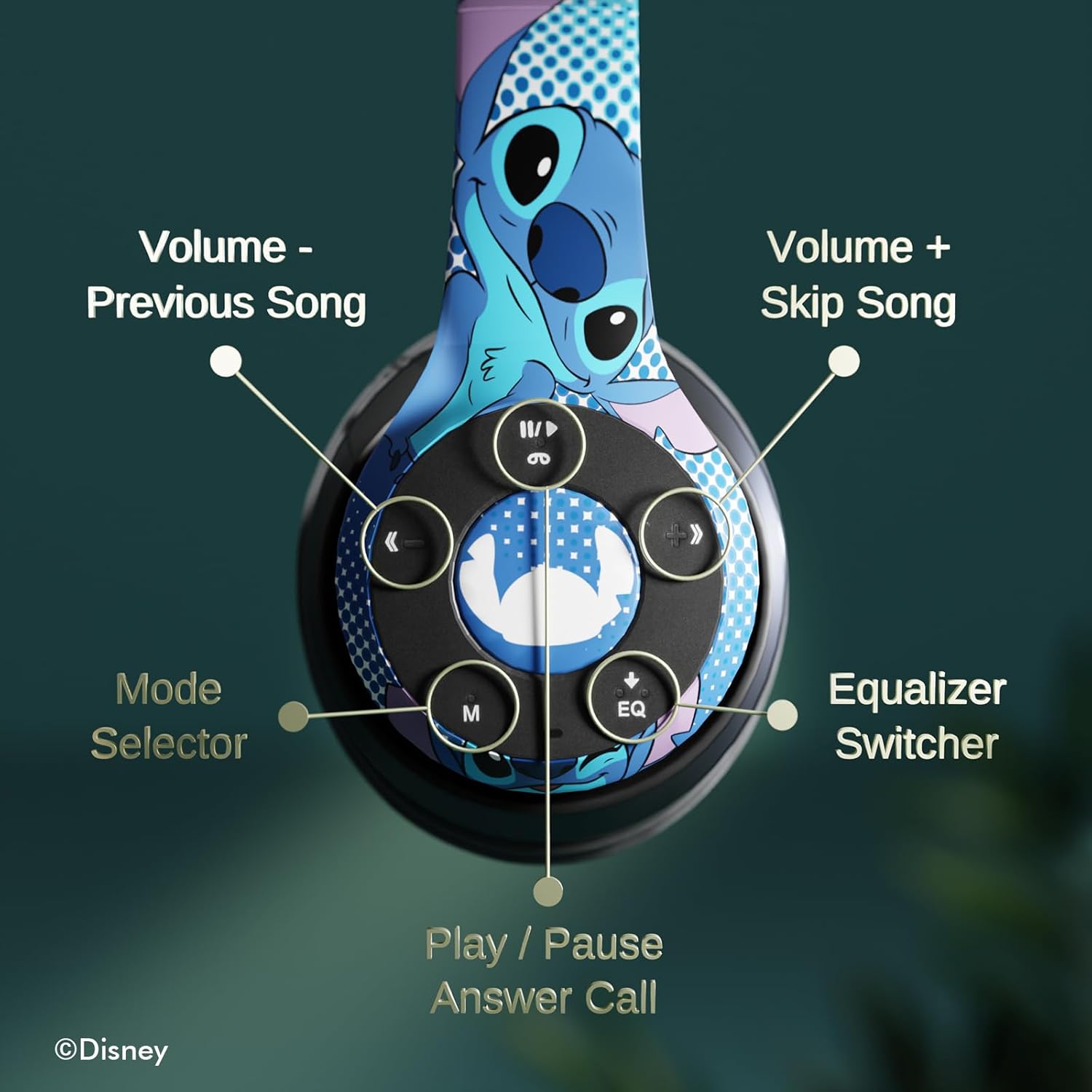
Obrázek: Podrobný view of the headphone controls, including Volume -, Previous Song, Volume +, Skip Song, Mode Selector, Equalizer Switcher, and Play/Pause/Answer Call buttons.
- Tlačítko Přehrát/Pozastavit/Přijmout hovor: Press once to play/pause music or answer/end a call. Press and hold to reject a call.
- Volume + / Skip Song Button: Press once for Volume Up. Press and hold to skip to the next song.
- Tlačítko Hlasitost - / Předchozí skladba: Press once for Volume Down. Press and hold to go to the previous song.
- Mode Selector (M): Press to switch between Bluetooth, Micro SD card, and FM Radio modes.
- Equalizer Switcher (EQ): Press to cycle through different equalizer presets.
4.2 Uskutečňování a přijímání hovorů
With the built-in microphone, you can make and receive calls when connected via Bluetooth:
- Přijmout/ukončit hovor: Press the Play/Pause/Answer Call button once.
- Odmítnout hovor: Press and hold the Play/Pause/Answer Call button.
4.3 Přehrávání hudby
- Režim Bluetooth: After pairing, music from your connected device will play through the headphones. Use the controls to manage playback.
- Režim Micro SD karty: Insert a Micro SD card with MP3 files into the designated slot. Press the 'M' button to switch to Micro SD card mode. The headphones will automatically begin playing music from the card.
4.4 Režim rádia FM
Press the 'M' button to switch to FM Radio mode. Use the Volume +/- buttons to scan for stations or adjust volume.
5. Údržba
- Čištění: K čištění sluchátek používejte měkký, suchý hadřík. Nepoužívejte agresivní chemikálie ani abrazivní materiály.
- Skladování: When not in use, store the headphones in the provided protective case. The foldable design allows for compact storage.
- Vyhněte se vlhkosti: Chraňte sluchátka před vodou a nadměrnou vlhkostí.
- Teplota: Nevystavujte sluchátka extrémním teplotám.

Image: Headphones demonstrating their foldable design for easy storage.
6. Řešení problémů
| Problém | Možné řešení |
|---|---|
| Sluchátka se nezapínají. | Ujistěte se, že jsou sluchátka plně nabitá. |
| Nelze spárovat se zařízením. | Ujistěte se, že sluchátka jsou v režimu párování (bliká modrá/červená LED). Vypněte a zapněte Bluetooth na zařízení. Přibližte se k zařízení. |
| Žádný zvuk. | Check volume levels on both headphones and connected device. Ensure headphones are correctly paired. Try using the auxiliary cable. |
| Špatná kvalita zvuku. | Move closer to the connected device to avoid interference. Check audio source quality. |
| Mikrofon nefunguje. | Ensure headphones are properly connected. Check microphone settings on your device. |
7. Specifikace
| Funkce | Detail |
|---|---|
| Název modelu | Disney Lilo & Stitch Expressions |
| Číslo modelu | DS20137 |
| Technologie připojení | Bezdrátové (Bluetooth) |
| Technologie bezdrátové komunikace | Bluetooth |
| Verze Bluetooth | 4.0 |
| Dosah Bluetooth | 10 metrů |
| Umístění uší | Přes ucho |
| Form Factor | Přes ucho |
| Kontrola hluku | Zvuková izolace |
| Typ ovládání | Ovládání hlasitosti, Dotykové |
| Speciální funkce | Built-in Radio Receiver, Foldable and Adjustable headband, Micro SD Card Plug-in, Microphone Included |
| Kompatibilní zařízení | Bluetooth-enabled devices (e.g. smartphones, tablets, laptops) |
| Materiál | Paměťová pěna, Plast |
| Hmotnost položky | 0.29 kilogramů (10.2 uncí) |
| Baterie | 1 lithium-polymerová baterie (součástí balení) |
| Rozměry balení | 8.78 x 6.26 x 3.62 palce |
| UPC | 810116712489 |
8. Oficiální video produktu
Video: Oficiální video s produktemasing the Disney Lilo & Stitch Bluetooth Headphones, highlighting their features and design.
9. Záruka a podpora
For warranty information and customer support, please refer to the documentation included with your product or visit the official iJoy webmísto. Uschovejte si doklad o koupi pro případ záručních reklamací.


