1. Úvod
The THIRDREALITY Smart Light Switch Gen3 is designed to convert existing toggle or rocker light switches into smart, app-controlled devices without requiring any electrical wiring. This device operates using the Zigbee 3.0 standard, allowing integration with various smart home ecosystems.
This manual provides detailed instructions for the installation, operation, and maintenance of your Smart Light Switch Gen3.
2. Klíčové vlastnosti
- Zigbee 3.0 Standard: Compatible with Zigbee hubs and Echo devices with built-in Zigbee hubs.
- Snadná instalace: No wiring required; snaps onto existing toggle or rocker switches.
- Hlasové ovládání: Alexa-enabled for voice commands and routine scheduling.
- Široká kompatibilita: Works with any voltage (12v, 24v, 110v, 220v) and is suitable for low-voltage spínače.
- Vylepšený design: Narrower and thinner than previous generations with lower battery consumption.
- Zahrnuté komponenty: Switch unit, batteries, mounting hardware (spacers, screws, protective film).
3. Instalační příručka
The THIRDREALITY Smart Light Switch Gen3 is designed for simple, no-wiring installation over existing toggle or rocker light switches.
3.1. Obsah balení
Před zahájením instalace se ujistěte, že jsou přítomny všechny komponenty:
- Smart Light Switch Gen3 unit
- AAA Batteries (8 included for a 4-pack)
- Mounting hardware (spacers, screws, protective film)
3.2. Kroky fyzické instalace
Prepare the Existing Switch: Ensure the existing light switch is in the OFF position. For safety, it is recommended to turn off power to the light switch at the circuit breaker.

Image: A hand unscrewing the bottom screw of a standard light switch plate.
Remove the Switch Plate: Carefully remove the screws holding your existing light switch plate and detach the plate. Keep the screws handy as they will be reused.

Image: A hand removing a white light switch plate from the wall, revealing the toggle switch underneath.
Vložte baterie: Open the battery compartment of the Smart Light Switch Gen3 and insert the provided AAA batteries, ensuring correct polarity.

Image: A close-up of the Smart Light Switch Gen3 with its back cover removed, showing two AAA batteries being inserted into the compartment.
Mount the Smart Switch: Place the Smart Light Switch Gen3 over your existing toggle or rocker switch. Use the provided spacers and longer screws (if necessary) to secure the smart switch to the wall plate, ensuring it is centered and the internal mechanism can freely operate the existing switch. The smart switch should snap securely over the existing switch.
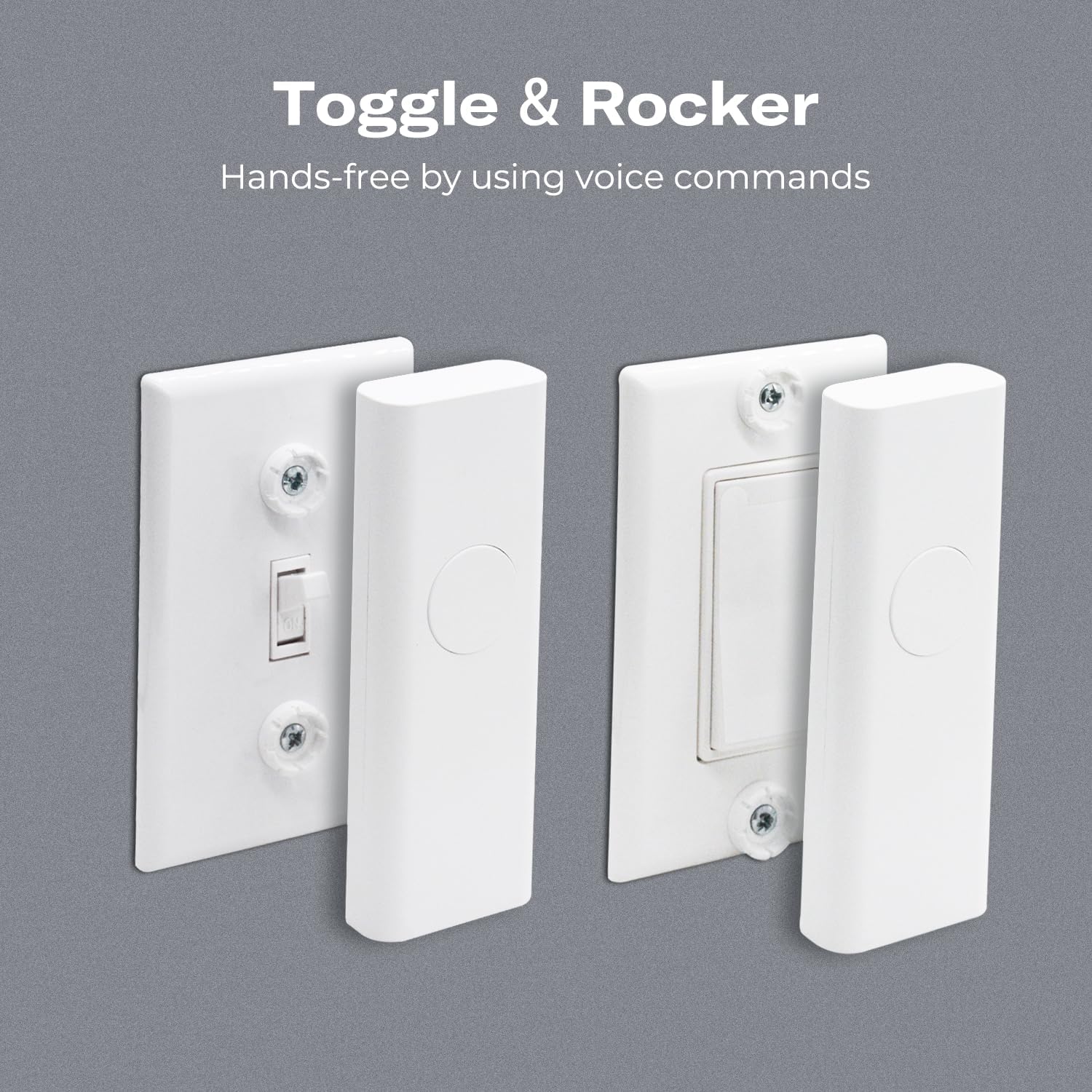
Image: Two THIRDREALITY Smart Light Switch Gen3 units installed over existing light switches, one toggle and one rocker, demonstrating how they fit over the original switch mechanism.
Testovací provoz: Once securely mounted, restore power at the circuit breaker. Manually press the button on the Smart Light Switch Gen3 to ensure it activates the underlying physical switch. Proceed to pairing with your Zigbee hub.
4. Párování s rozbočovačem Zigbee
The THIRDREALITY Smart Light Switch Gen3 operates on the Zigbee 3.0 standard and requires a compatible Zigbee hub for smart functionality. Compatible hubs include:
- Alexa Echo Devices with Zigbee Built-in (e.g., Echo (4th Gen), Echo Plus (1st & 2nd Gen), Echo Studio, Eero 6, Eero Pro 6)
- Domácí asistent
- SmartThings (2015/2018, Aeotec)
- Homey, Homey Bridge, Homey Pro
- hubitat
- Third Reality Hub
Refer to your specific Zigbee hub's instructions for adding new devices. Generally, the process involves:
- Put your Zigbee hub into pairing mode.
- On the Smart Light Switch Gen3, press and hold the main button for approximately 5-10 seconds until an indicator light flashes, signifying it is in pairing mode.
- Once successfully paired, the hub will confirm the new device, and the indicator light on the switch will stop flashing or turn solid.

Image: A diagram illustrating various compatible Zigbee hubs and devices, including Amazon Echo models, SmartThings, Homey, Hubitat, and Home Assistant.
5. Návod k obsluze
Once installed and paired, the Smart Light Switch Gen3 offers multiple ways to control your lights.
5.1. Ruční ovládání
Press the large central button on the Smart Light Switch Gen3 to toggle the connected light ON or OFF. This physically actuates the underlying switch.
5.2. Voice Control (via Alexa)
If paired with an Alexa-enabled device, you can use voice commands to control your lights. Ensure your device is named appropriately in the Alexa app (e.g., "Living Room Light").
- „Alexo, zapni [Název zařízení].“
- „Alexo, vypni [Název zařízení].“

Image: An Amazon Echo device on a table next to a sofa, with a speech bubble showing "Hey, Alexa, turn on the living room light." and another showing "OK", indicating voice control functionality.
5.3. Ovládání a plánování aplikací
Through your compatible Zigbee hub's application (e.g., Alexa app, SmartThings app, Home Assistant), you can remotely control your lights and set up schedules or routines.
- Dálkové ovládání: Turn lights on/off from anywhere using the app.
- Plánování: Create custom schedules for lights to turn on or off at specific times.
- Ovládání skupiny: Group multiple smart switches to control them simultaneously.

Image: A graphic displaying various features of the Smart Light Switch Gen3, such as schedule and timer, group control, voice control, Zigbee 3.0 standard, remote control, and no wiring/easy setup.
6. Údržba
6.1. Výměna baterie
The Smart Light Switch Gen3 is powered by AAA batteries. When the batteries are low, the device may indicate this through its indicator light or via your smart home app. To replace the batteries:
- Carefully detach the Smart Light Switch Gen3 from its mounting plate.
- Otevřete přihrádku na baterie.
- Remove the old batteries and insert new AAA batteries, observing correct polarity.
- Close the battery compartment and reattach the smart switch to its mounting plate.
7. Řešení problémů
7.1. Device Not Responding/Disconnected
- Zkontrolujte stav baterie: Ensure the batteries are not depleted. Replace if necessary.
- Zigbee Network Range: The device might be too far from your Zigbee hub. Try moving the hub closer or adding a Zigbee repeater.
- Oprava párování zařízení: Attempt to re-pair the device with your Zigbee hub following the pairing instructions in Section 4.
- Hub Firmware: Ensure your Zigbee hub's firmware is up to date.
7.2. Physical Switch Not Actuating Correctly
- Montážní zarovnání: Ensure the Smart Light Switch Gen3 is correctly aligned and securely mounted over the existing toggle or rocker switch. Adjust spacers if needed to ensure proper contact and movement.
- překážky: Check for any obstructions preventing the internal mechanism from fully pressing or releasing the physical switch.
7.3. Loud Operation Noise
Some users may notice a mechanical sound during operation. This is due to the internal mechanism physically actuating the existing switch. While generally normal, ensure the device is securely mounted and not vibrating against the wall plate, which could ampoživit zvuk.
8. Specifikace
| Atribut | Detail |
|---|---|
| Značka | TŘETÍ REALITA |
| Číslo modelu | 3RSS009Z |
| Materiál | Plast |
| Typ montáže | Držák na zeď |
| Počet položek | 4 (v tomto balení) |
| Jsou vyžadovány baterie | Yes (AAA, included) |
| Složení článků baterie | Alkalický |
| Provozní režim | ZAPNUTO VYPNUTO |
| Provozní svtage | 1.5 voltů |
| Typ přepínače | Rocker Switch/Toggle |
| Rozměry produktu | 4.5 x 1.96 x 11.99 cm; 100 g |
9. Záruka a podpora
Specific warranty information is not provided in the product details. For support, please refer to the manufacturer's official webwebu nebo se přímo obraťte na jejich zákaznický servis.
Manufacturer: Third Reality, Inc.


