1. Začínáme: Nastavení
Follow these steps to set up your Moukey Karaoke Machine and begin your audio experience.
1.1 Vybalení a úvodní kontrola
Opatrně vyjměte všechny součásti z obalu. Ujistěte se, že jsou přítomny následující položky:
- Moukey MTs10-2-W Karaoke Machine (Speaker)
- 2 x bezdrátové UHF mikrofony
- Dálkové ovládání
- Napájecí adaptér
- 3.5 mm AUX kabel
- Držák tabletu
- Uživatelská příručka (tento dokument)
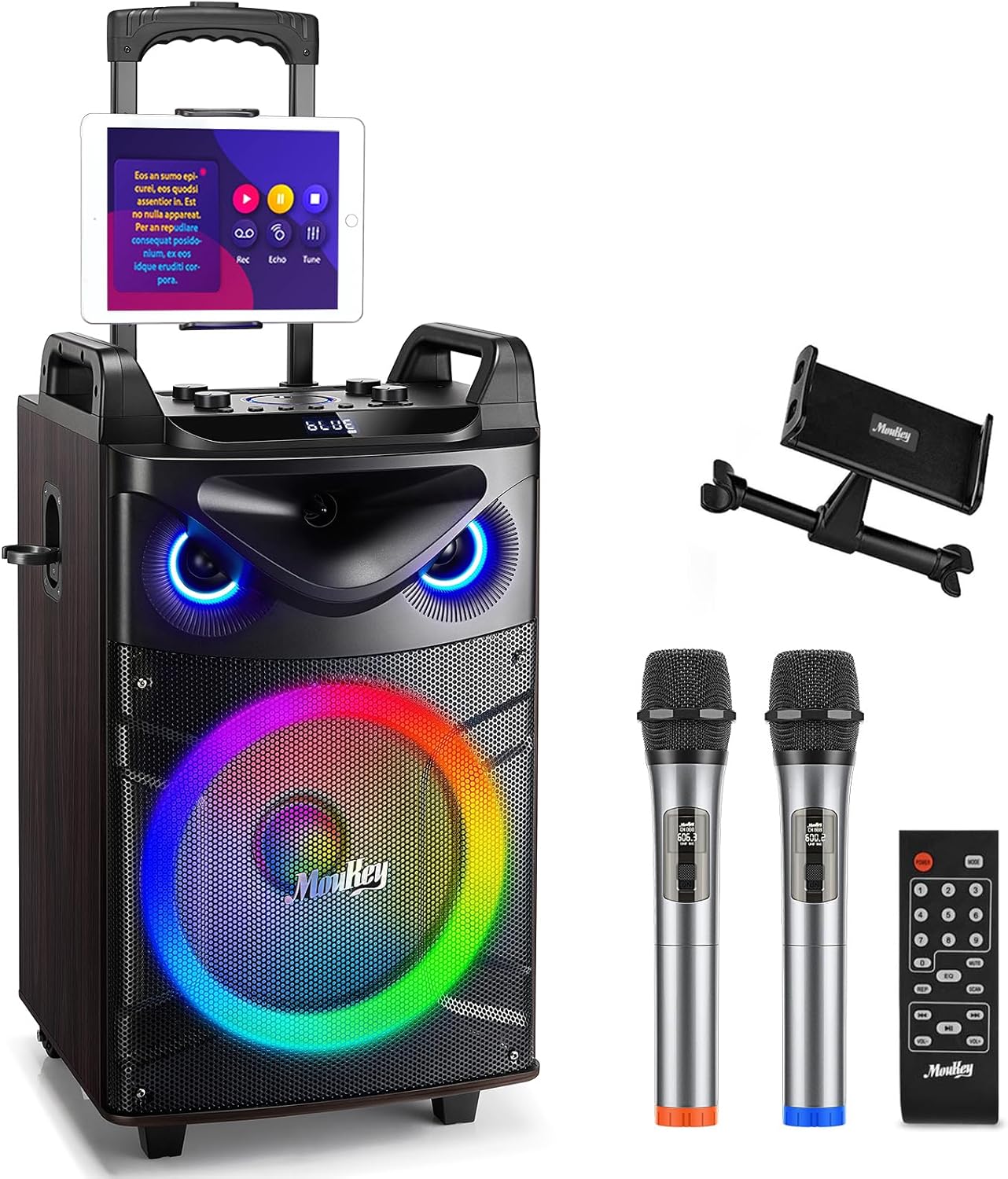
Figure 1: Moukey MTs10-2-W Karaoke Machine and included accessories.
1.2 Nabíjení jednotky
Before first use, fully charge the karaoke machine. Connect the provided power adapter to the charging port on the unit and plug it into a standard electrical outlet. The charging indicator light will show the charging status. A full charge provides approximately 14 hours of playing time.
1.3 Instalace baterií mikrofonu
Each wireless microphone requires 2 AA batteries (not included). Open the battery compartment on each microphone and insert the batteries, observing the correct polarity. Close the compartment securely.
1.4 Zapnutí
Press and hold the power button on the control panel to turn on the karaoke machine. The display will illuminate, and the LED lights will activate.
2. Součásti a ovládací prvky
Familiarize yourself with the main components and control panel of your Moukey Karaoke Machine.
2.1 Main Unit (Speaker)
The main unit features a 10-inch woofer and a 3-inch tweeter for powerful and clear sound output. It also includes integrated LED party lights and a retractable handle with durable wheels for easy portability.

Figure 2: Internal speaker components: 10-inch woofer and 3-inch tweeter.
2.2 Ovládací panel
The top-mounted control panel provides access to all functions and adjustments:
- Otočný knoflík hlasitosti mikrofonu: Upravuje hlasitost připojených mikrofonů.
- Knoflík ECHO: Ovládá efekt ozvěny pro mikrofony.
- Knoflík BASS: Adjusts the low-frequency sound output.
- Knoflík TREBLE: Upravuje vysokofrekvenční zvukový výstup.
- VOL (Master Volume) Knob: Controls the overall volume of the unit. This knob also features a light ring design.
- LIGHT FX Button: Cycles through different LED light modes.
- Tlačítko INST/TWS: Initiates True Wireless System (TWS) pairing.
- Tlačítko REC: Activates recording function.
- Ovládací tlačítka přehrávání: Previous track, Play/Pause/Scan, Next track.
- Tlačítko BT: Toggles Bluetooth mode.
- Tlačítko MODE: Switches between input modes (Bluetooth, AUX, USB, TF, FM Radio).
- USB port: For USB flash drive playback (up to 32GB).
- Slot na kartu TF: For Micro TF card playback (up to 32GB).
- Vstupní port AUX: Pro připojení externích audio zařízení pomocí 3.5mm kabelu.
- 6.35mm Microphone Jacks: Dva další vstupy pro kabelové mikrofony.
3. Návod k obsluze
3.1 Připojení Bluetooth
- Power on the Moukey Karaoke Machine.
- Stiskněte tlačítko MODE button until "BLUE" appears on the display, or press the BT button directly. The unit will enter Bluetooth pairing mode.
- On your mobile device (smartphone, tablet, laptop), enable Bluetooth and search for "Moukey MTs10-2-W" in the list of available devices.
- Select "Moukey MTs10-2-W" to pair. Once connected, you will hear an audible confirmation.
- You can now play audio from your device wirelessly through the karaoke machine.
3.2 Wired Connections (AUX, USB, TF)
The unit supports various wired input methods:
- AUX IN: Connect an external audio device (e.g., MP3 player, TV) using the provided 3.5mm AUX cable to the AUX IN port. Press the MODE button until "LINE" appears on the display.
- USB přehrávání: Insert a USB flash drive (up to 32GB, formatted to FAT32) containing audio files into the USB port. The unit will automatically switch to USB mode and begin playback. If not, press the MODE tlačítko.
- Přehrávání TF karty: Insert a Micro TF card (up to 32GB, formatted to FAT32) containing audio files into the TF card slot. The unit will automatically switch to TF mode and begin playback. If not, press the MODE tlačítko.

Figure 3: Multiple connectivity options for the MTs10-2-W.
3.3 Použití mikrofonu
The unit comes with two UHF wireless microphones. Simply power them on, and they will automatically connect to the karaoke machine. You can also connect additional wired microphones to the 6.35mm jacks.
- Upravte hlasitost mikrofonu pomocí MIC knoflík.
- Přidejte efekt ozvěny pomocí ECHO knoflík.
3.4 Nastavení zvuku
Fine-tune your audio output using the dedicated knobs:
- Knoflík BASS: Rotate clockwise to increase bass, counter-clockwise to decrease.
- Knoflík TREBLE: Rotate clockwise to increase treble, counter-clockwise to decrease.
- Knoflík VOL: Upravuje celkovou hlasitost.
3.5 LED párty světel
The integrated LED lights can change color with the beat of the music, creating a dynamic atmosphere. Press the LIGHT FX button to cycle through different light modes or turn them off.

Figure 4: Dynamic LED lighting effects.
3.6 True Wireless System (TWS) Function
The MTs10-2-W supports TWS, allowing you to connect two MTs10-2 units wirelessly for a stereo sound experience. (Note: This function requires two separate MTs10-2 units.)
- Ensure both MTs10-2 units are powered on and in Bluetooth mode.
- Na jedné jednotce stiskněte a podržte tlačítko INST/TWS tlačítko. Uslyšíte výzvu označující režim párování TWS.
- The two units will automatically connect. Once connected, you will hear a confirmation sound.
- Now, connect your mobile device to one of the paired units via Bluetooth. Audio will play through both speakers in stereo.
4. Údržba a péče
Správná údržba zajistí dlouhou životnost a optimální výkon vašeho karaoke stroje.
- Čištění: K čištění vnější strany jednotky používejte měkký, suchý hadřík. Nepoužívejte abrazivní čisticí prostředky ani rozpouštědla.
- Skladování: Přístroj skladujte na chladném a suchém místě mimo dosah přímého slunečního záření a extrémních teplot.
- Péče o baterie: For optimal battery life, fully charge the unit before long periods of storage. If storing for extended periods, charge the battery every 3-6 months to prevent deep discharge.
- Péče o mikrofon: Pokud mikrofony nebudete delší dobu používat, vyjměte je z nich, abyste zabránili jejich vytečení.
5. Řešení problémů
If you encounter issues with your Moukey Karaoke Machine, refer to the following common problems and solutions:
| Problém | Možná příčina | Řešení |
|---|---|---|
| Jednotka se nezapne. | Low battery; Power adapter not connected or faulty. | Charge the unit fully. Ensure power adapter is securely connected and working. |
| Žádný zvukový výstup. | Příliš nízká hlasitost; Nesprávný vstupní režim; Zařízení není správně připojeno. | Increase master volume. Press MODE button to select correct input. Reconnect Bluetooth or wired device. |
| Mikrofony nefungují. | Microphone batteries low/dead; Microphone not powered on; MIC volume too low. | Replace AA batteries in microphones. Ensure microphones are powered on. Increase MIC volume knob. |
| Nestabilní připojení Bluetooth. | Device too far from unit; Interference from other devices. | Move device closer to the unit (within 33 feet/10 meters). Avoid placing unit near other wireless devices. |
| LED světla nefungují. | Lights turned off; Unit malfunction. | Press the LIGHT FX button to turn on/cycle lights. If issue persists, contact customer support. |
6. Specifikace
Key technical specifications for the Moukey MTs10-2-W Karaoke Machine:
| Funkce | Detail |
|---|---|
| Číslo modelu | MTs10-2-W |
| Velikost wooferu | 10 palců |
| Velikost tweeteru | 3 palců |
| Maximální výstupní výkon | 160 Wattů |
| Konektivita | Bluetooth 5.0, AUX, USB, TF karta, FM rádio |
| Typ baterie | Lithium Ion (součástí balení) |
| Doba přehrávání | Až 14 hodin |
| Rozměry (D x Š x V) | 14.45 x 14.45 x 24.65 palce |
| Hmotnost položky | 21.8 libry |
| Materiál | Umělé dřevo |
7. Záruka a podpora
Moukey products are designed and manufactured to the highest quality standards. For information regarding warranty coverage, technical support, or service inquiries, please refer to the contact details provided on the official Moukey webwebu nebo obalu produktu.
Uschovejte si prosím doklad o koupi pro případné reklamace.


