1. Úvod
This manual provides essential information for the installation, operation, and maintenance of your ASUS TUF Gaming NVIDIA GeForce RTX 4080 Super OC Edition Graphics Card. Designed with the NVIDIA Ada Lovelace architecture, this graphics card offers advanced performance for gaming and demanding applications.
Mezi klíčové vlastnosti patří:
- Powered by NVIDIA DLSS 3, ultra-efficient Ada Lovelace architecture, and full ray tracing capabilities.
- Tensorová jádra 4. generace pro až 4x vyšší výkon s DLSS 3.
- 3rd Generation RT Cores for up to 2x ray tracing performance.
- OC mode clock speed of 2640 MHz (Default mode: 2610 MHz).
- Axial-tech fans with increased airflow for enhanced cooling.
- Dvojitá kuličková ložiska ventilátoru pro delší životnost.
- Military-grade Capacitors for improved power rail durability.
- Metal Exoskeleton for structural rigidity and heat dissipation.
- Auto-Extreme precision automated manufacturing for higher reliability.
- GPU Tweak III software for performance tuning and monitoring.
2. Obsah balení
Ověřte, zda jsou v balení produktu přítomny všechny položky:
- ASUS TUF-RTX4080S-O16G-GAMING Graphics card
- Sběratelská karta
- Speedsetup Manual (Quick Start Guide)
- Adapter cable (1 to 3)
- Držák grafické karty TUF
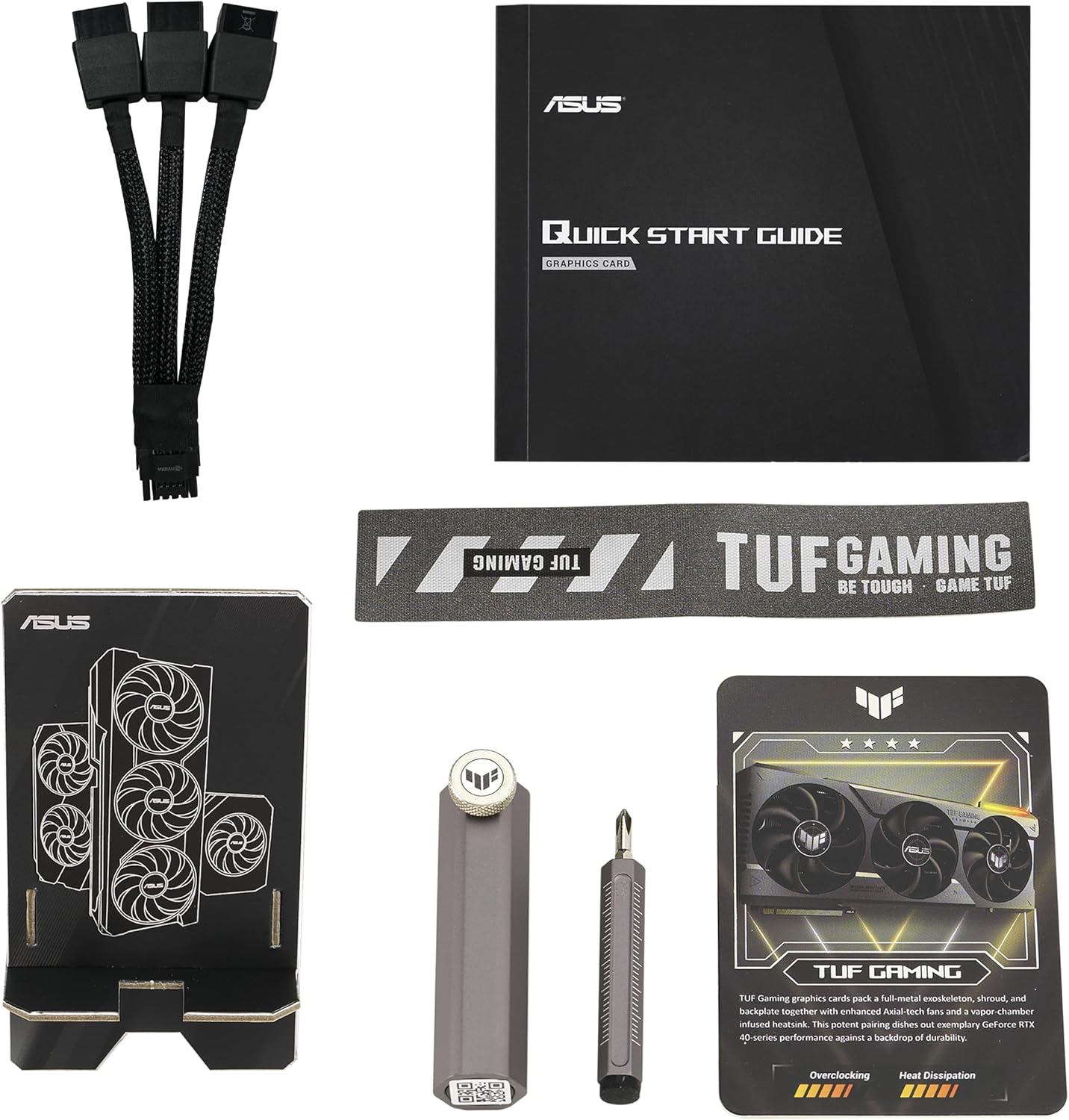
Image: Package contents including the graphics card, quick start guide, adapter cable, collection card, and a screwdriver tool.
3. Nastavení a instalace
3.1 Systémové požadavky
- Základní deska kompatibilní s PCI Express s jedním grafickým slotem x16.
- Minimální doporučený výkon napájecího zdroje (PSU)tage. Refer to the "Pair with a PSU" section for guidance.
- Operating system: Windows 10/11 64-bit or Linux 64-bit.
- Minimum 16GB system memory recommended.
3.2 Fyzická instalace
- Připravte si systém: Vypněte počítač a odpojte všechny kabely. Otevřete skříň počítače.
- Vyhledejte slot PCIe x16: Najděte na základní desce dostupný slot PCI Express x16.
- Remove expansion slot covers: Remove the necessary expansion slot covers from your computer case. This graphics card typically occupies 3 to 4 slots.
- Vložte grafickou kartu: Carefully align the graphics card with the PCIe x16 slot and press it firmly until it is securely seated. Ensure the retention clip on the motherboard engages.
- Zabezpečení karty: Fasten the graphics card to the computer case using the screws from the expansion slot covers.
- Připojte napájecí kabely: Connect the required power cables from your power supply unit to the graphics card. The ASUS TUF Gaming RTX 4080 Super OC Edition requires a 12VHPWR (12+4 pin) power connector. Use the included adapter cable if your PSU does not have a native 12VHPWR connector.
- Install GPU holder: Utilize the included TUF Graphics card holder to provide additional support and prevent sag, especially given the card's weight and size.
- Zavřete případ: Jakmile je karta bezpečně nainstalována a připojena k napájení, zavřete skříň počítače.

Image: Illustration of pairing the graphics card with a compatible power supply unit (PSU).
3.3 Instalace ovladače
- Connect display: Connect your monitor to one of the DisplayPort 1.4a or HDMI 2.1a outputs on the graphics card.
- Zapnout: Zapněte počítač.
- Stáhnout ovladače: Navštivte oficiální stránky NVIDIA webweb (www.nvidia.com/drivers) or the ASUS support page for your specific model to download the latest graphics drivers.
- Instalace ovladačů: Postupujte podle pokynů na obrazovce a dokončete instalaci ovladače. Může být vyžadován restart systému.

Image: Display output ports on the graphics card, including DisplayPort 1.4a and HDMI 2.1a.
4. Ovládání grafické karty
4.1 Režimy výkonu
Your graphics card supports different performance modes. The OC mode provides a boost clock of 2640 MHz, while the default mode operates at 2610 MHz. These modes are typically managed automatically by the driver or can be adjusted using ASUS GPU Tweak III software.
4.2 Software GPU Tweak III
The ASUS GPU Tweak III software allows for intuitive performance tweaking, thermal controls, and system monitoring. You can download this utility from the official ASUS support webmísto.
- Přetaktování: Adjust clock speeds and voltage for enhanced performance.
- Ovládání ventilátoru: Customize fan curves for optimal cooling and noise levels.
- Sledování: View real-time statistics such as GPU temperature, clock speed, and usage.

Image: ASUS GPU Tweak III software interface for performance and thermal management.
5. Údržba
Správná údržba zajistí dlouhou životnost a optimální výkon vaší grafické karty.
5.1 Čištění
- Odstranění prachu: Pravidelně čistěte prach z ventilátorů a chladiče pomocí stlačeného vzduchu. Před čištěním se ujistěte, že je systém vypnutý a odpojený od sítě.
- Čepele ventilátoru: Gently clean fan blades with a soft brush if necessary, being careful not to apply excessive force.

Image: Axial-tech fans designed for enhanced airflow and cooling.

Image: Large heatsink design for effective thermal management.
5.2 Aktualizace ovladačů
Regularly update your graphics drivers to ensure optimal performance, stability, and access to the latest features and game optimizations. Refer to the NVIDIA website for the most current drivers.
6. Řešení problémů
Pokud narazíte na problémy s grafickou kartou, zvažte následující kroky pro řešení problémů:
- Žádný výstup na displej:
- Ujistěte se, že je kabel monitoru bezpečně připojen ke grafické kartě i monitoru.
- Ověřte, zda je grafická karta zcela zasunuta do slotu PCIe.
- Check that all power cables are correctly connected to the graphics card and the power supply.
- Pokud je to možné, vyzkoušejte s jiným kabelem displeje nebo monitorem.
- Nestabilita nebo pády systému:
- Ujistěte se, že máte aktuální ovladače grafické karty.
- Check for adequate power supply wattage. Insufficient power can lead to instability.
- Monitor GPU temperatures using software like GPU Tweak III. Overheating can cause crashes.
- Pokud je přetaktováno, vraťte se k výchozímu nastavení a zkontrolujte stabilitu.
- Špatný výkon ve hrách/aplikacích:
- Ověřte, zda jsou nainstalovány nejnovější ovladače grafické karty.
- Check in-game settings to ensure they are appropriate for your system configuration.
- Ensure the graphics card is operating in OC mode if desired, and not throttled by temperature or power limits.
- Zavřete nepotřebné aplikace na pozadí.
7. Specifikace
| Funkce | Specifikace |
|---|---|
| Název modelu | TUF-RTX4080S-O16G-GAMING |
| Grafický koprocesor | NVIDIA GeForce RTX 4080 SUPER |
| Značka čipové sady | NVIDIA |
| Velikost RAM grafické karty | 16 GB GDDR6X |
| Rychlost paměti | 2640 MHz (režim OC) / 2610 MHz (výchozí režim) |
| Maximální rozlišení obrazovky | 7680x4320 pixelů |
| Video výstupní rozhraní | HDMI 2.1a, DisplayPort 1.4a (3x DisplayPort, 2x HDMI) |
| Hmotnost položky | 6.6 libry (přibližně 2.99 kg) |
| Rozměry produktu (DxŠxV) | 13.7 x 5.9 x 2.9 palce (přibližně 34.8 x 15.0 x 7.4 cm) |
| Výrobce | ASUS |
8. Záruka a podpora
Produkty ASUS jsou vyráběny podle nejvyšších standardů kvality. Podrobné informace o záruce naleznete v záruční kartě, která je součástí balení produktu, nebo navštivte oficiální stránky podpory ASUS. webmísto.
For technical support, driver downloads, and FAQs, please visit the ASUS support webmísto:
When contacting support, please have your product model number (TUF-RTX4080S-O16G-GAMING) and serial number ready.


