Zavedení
This manual provides comprehensive instructions for the setup, operation, and maintenance of your Blaupunkt 43QD7050 43-inch 4K Ultra HD QLED Google TV. Please read this manual thoroughly before using the television to ensure proper functionality and safety.

Obrázek: Přední strana view of the Blaupunkt 43QD7050 QLED Google TV, highlighting its display and features.
Důležité bezpečnostní informace
Always follow basic safety precautions when using this television to reduce the risk of fire, electric shock, and injury. Keep this manual for future reference.
- Nevystavujte televizor dešti ani vlhkosti.
- Nezakrývejte ventilační otvory.
- Zajistěte správné uzemnění napájecího kabelu.
- Během bouřek nebo pokud televizor delší dobu nepoužíváte, odpojte jej ze zásuvky.
- Veškeré opravy svěřte kvalifikovanému servisnímu personálu.
Co je v krabici
Verify that all components are present upon unpacking your television.
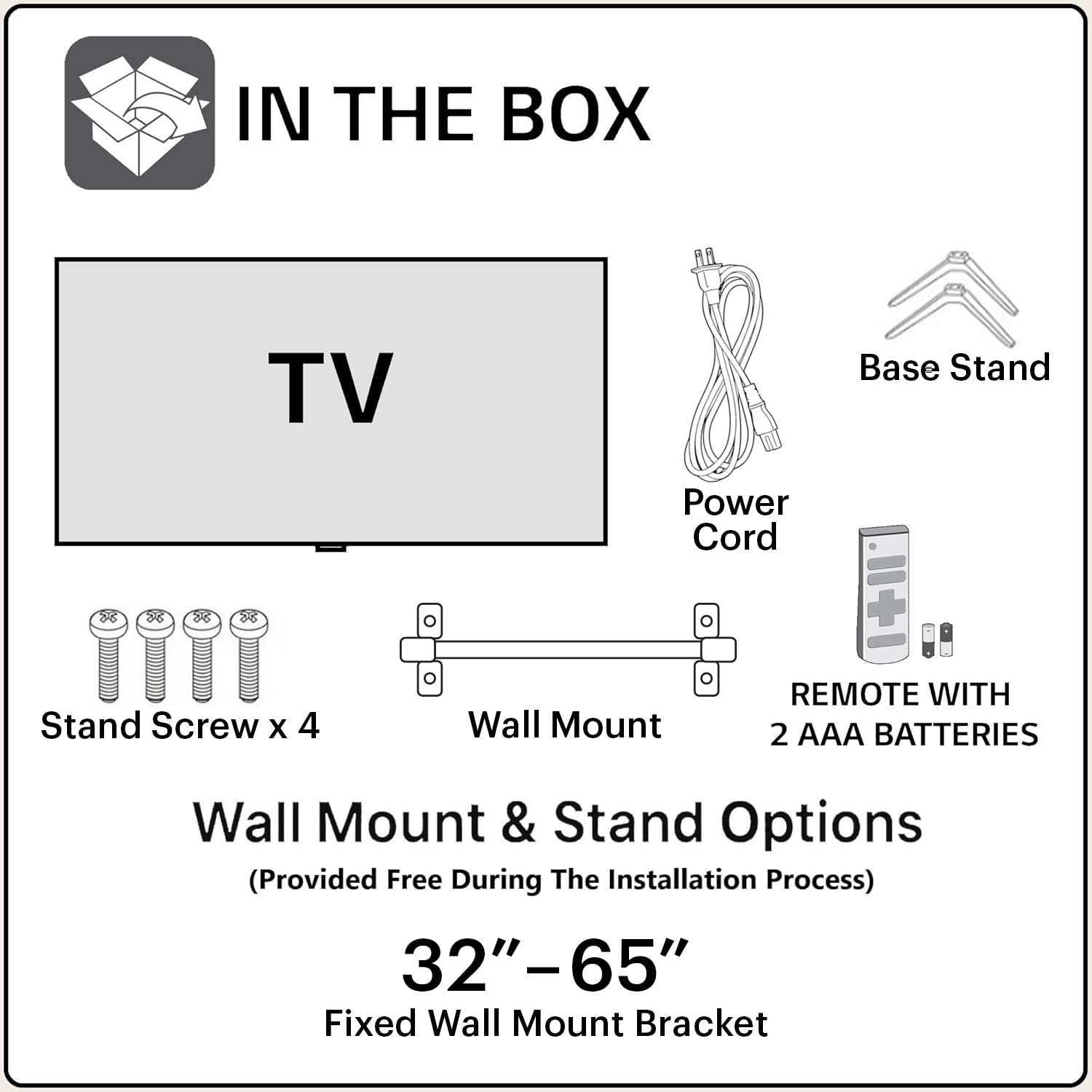
Image: Diagram showing the items included in the product packaging: TV, remote control, wall mount, stand screws, power cord, and AAA batteries.
- 1 x Blaupunkt 43QD7050 LED TV
- 1 x Dálkové ovládání
- 1 x Wall Mount Bracket (for 32"-65" models)
- 2 x AAA baterie (pro dálkové ovládání)
- 1 x Napájecí kabel
- 1 x Base Stand Set (with 4 stand screws)
- Uživatelská příručka (tento dokument)
Fyzické přesview
Přední View

Obrázek: Přední strana view televize, pořaduasing the screen and minimal bezels.
Strana View

Obrázek: Side profile of the television, illustrating its slim design.
Zadní View a porty

Obrázek: Zadní view of the television, detailing the location of various input and output ports.
The rear panel of the TV includes various ports for connectivity:
- HDMI porty (x3): For connecting devices like gaming consoles, set-top boxes, and Blu-ray players. One port supports eARC.
- USB porty (x2): Pro připojení paměťových zařízení USB.
- Ethernetový port: Pro kabelové připojení k internetu.
- Anténní/kabelový vstup: Pro připojení antény nebo kabelové televize.
- Audio výstup: Pro připojení externích audio systémů.
- Příkon: Pro připojení napájecího kabelu.
Průvodce nastavením
1. Instalace stojanu (volitelné)
If you choose to place the TV on a stand, follow these steps:
- Televizor opatrně položte obrazovkou dolů na měkký, rovný povrch, abyste zabránili poškození obrazovky.
- Align the base stands with the screw holes on the bottom of the TV.
- Každý stojan zajistěte dodanými šrouby.
2. Montáž na stěnu (volitelné)
The TV comes with a wall mount bracket. Professional installation is recommended for wall mounting. Ensure the wall can support the weight of the TV.
- Refer to the wall mount bracket's instructions for specific installation details.
- Ensure adequate ventilation around the mounted TV.
3. Připojení periferií
Připojte externí zařízení k příslušným portům na zadním panelu televizoru.
- HDMI: Use HDMI cables to connect devices like set-top boxes, gaming consoles, or Blu-ray players.
- USB: Vložte USB disky pro přehrávání médií.
- Ethernet: Pro stabilní kabelové připojení k internetu připojte ethernetový kabel.
- Moc: Zapojte napájecí kabel do napájecího vstupu televizoru a poté do zásuvky ve zdi.

Image: Visual representation of the TV's connectivity options including HDMI, Bluetooth, Dual Band Wi-Fi, and USB.
4. Počáteční zapnutí a nastavení Google TV
- Plug the TV into a power outlet.
- Stiskněte tlačítko napájení na dálkovém ovladači nebo na televizoru.
- Postupujte podle pokynů na obrazovce a dokončete počáteční nastavení, včetně výběru jazyka, síťového připojení (Wi-Fi nebo Ethernet) a přihlášení k účtu Google.
Návod k obsluze
Funkce dálkového ovládání

Image: Layout of the Blaupunkt TV remote control, showing buttons for power, navigation, volume, and quick access to streaming services.
The remote control allows you to navigate the TV's features:
- Vypínač: Zapíná nebo vypíná televizor.
- Navigační tlačítko (nahoru/dolů/vlevo/vpravo/OK): Pro navigaci v menu a výběr.
- Tlačítko Zpět: Vrátí se na předchozí obrazovku.
- Tlačítko Domů: Otevře domovskou obrazovku Google TV.
- Zvýšení/Snížení hlasitosti: Nastavuje úroveň hlasitosti.
- Tlačítko ztlumení: Vypne nebo vypne zvuk.
- Tlačítka pro rychlý přístup: Dedicated buttons for Netflix, Prime Video, YouTube, and other services.
- Tlačítko Google Assistant: Aktivuje hlasové ovládání.
Navigace v rozhraní Google TV
Google TV organizes your content from various streaming services into a personalized home screen.

Image: Screenshot of the Google TV interface, displaying personalized movie and show recommendations and a unified watchlist.
- Use the navigation pad to browse through recommended content, apps, and settings.
- Select an item by pressing the OK tlačítko.
- Access the full list of installed apps from the "Apps" tab.
Chytré funkce
- Hlasové ovládání (Google Assistant): Press the Google Assistant button on your remote and speak commands to search for content, control smart home devices, or get information.
- Zrcadlení obrazovky: Cast content from your compatible smartphone or tablet to the TV using the built-in casting feature.
- Aplikace a hry: Access a wide range of applications and games from the Google Play Store.

Image: Display of the TV screen showcasing a selection of over 10,000 available apps and games, including popular streaming services.
Údržba
- Čištění obrazovky: Obrazovku jemně otřete měkkým hadříkem, který nepouští vlákna. Na odolné skvrny použijte čistič obrazovek speciálně určený pro televizory, který nanášíte na hadřík, nikoli přímo na obrazovku.
- Čištění skříně: K otření televizní skříňky používejte měkký, suchý hadřík. Nepoužívejte abrazivní čisticí prostředky ani rozpouštědla.
- Aktualizace softwaru: The TV may receive automatic software updates. Ensure your TV is connected to the internet to receive these updates, which improve performance and add new features.
Odstraňování problémů
Řešení běžných problémů naleznete v této části.
| Problém | Možné řešení |
|---|---|
| Žádná síla | Ujistěte se, že je napájecí kabel bezpečně zapojený do televizoru i do funkční elektrické zásuvky. Zkontrolujte kontrolku napájení na televizoru. |
| Žádný obraz, ale zvuk je přítomný | Check the input source. Press the "Input" button on the remote to cycle through sources. Ensure external devices are powered on and connected correctly. |
| Žádný zvuk, ale obraz je přítomen | Check the volume level and ensure the TV is not muted. Verify audio settings in the TV menu. If using external speakers, check their connections and power. |
| Dálkové ovládání nefunguje | Vyměňte baterie v dálkovém ovladači. Ujistěte se, že mezi dálkovým ovladačem a infračerveným senzorem televizoru nejsou žádné překážky. |
| Špatná kvalita obrazu | Check the cable connections. Adjust picture settings (brightness, contrast, sharpness) in the TV menu. For external devices, ensure they are outputting at the correct resolution. |
| Problémy s připojením Wi-Fi | Restart your router and modem. Go to the TV's network settings and reconnect to your Wi-Fi network. Ensure the TV is within range of your router. |
Specifikace
Detailed technical specifications for the Blaupunkt 43QD7050 QLED Google TV.

Image: Diagram illustrating the physical dimensions of the Blaupunkt 43QD7050 TV, including screen size, width, height, and depth.
| Funkce | Detail |
|---|---|
| Model | 43QD7050 |
| Velikost obrazovky | 43 palce (108 cm) |
| Technologie displeje | QLED |
| Rezoluce | 4K Ultra HD (3840 2160 x XNUMX XNUMX) |
| Obnovovací frekvence | 60 Hz |
| Operační systém | Google TV |
| Zvukový výstup | 60 wattů |
| Zvukové funkce | Dolby Digital Plus, DTS TruSurround, CyberSound Gen2 Technology |
| Konektivita | Dual Band Wi-Fi, 3 HDMI ports (eARC support), 2 USB ports, Ethernet, Bluetooth |
| Speciální funkce | 4K HDR, Google Assistant, Screen Mirroring, HDR 10+ |
| Paměť (RAM/úložiště) | 2 GB RAM / 16 GB úložiště |
| Rozměry produktu (DxŠxV) | 97 x 10 x 55 cm (bez podstavce) |
| Hmotnost položky | 5.9 kg |
| Modelový rok | 2024 |

Image: Representation of the MediaTek MT9602 processor, highlighting its quad-core ARM Cortex A53 CPU and Mali-G52MC1 GPU for performance.
Záruka a podpora
Your Blaupunkt 43QD7050 television comes with a manufacturer's warranty.
- Záruka na produkt: 1 rok od data nákupu.
- Remote Accessories Warranty: 6 měsíců od data nákupu.
- Reklamace záruky: The brand warranty can be availed using the purchase invoice.
- Položky, na které se nevztahuje: Light bleeding and dot issues (Mura issues) occurring within acceptable Mura Inspection standards (2% guideline) are not considered panel defects and are not covered.
For customer support, service requests, or further inquiries, please contact:
- Bezplatný kontakt: 1800-274-4342
- ID e-mailu: consumercare@blaupunkttv.in
- Adresa výrobce: B-29,30,31, Phase-II, Noida, Gautam Buddha Nagar, Uttar Pradesh, 201301, India.
Please have your product model number (43QD7050) and purchase invoice ready when contacting support.


