1. Úvod a konecview
The Peavey FX 24 II is a professional 24-channel audio mixer console designed for live sound, studio recording, and various audio applications. It features a high-power dual DSP engine for enhanced digital effects, USB connectivity for recording and playback, 48V phantom power for condenser microphones, and comprehensive routing options including 6 auxiliary sends and 4 subgroups. This manual provides essential information for the safe and effective operation of your mixer.

Obrázek 1.1: Přední strana view of the Peavey FX 24 II mixer, highlighting 20 microphone inputs and 48V phantom power capability.
2. Bezpečnostní informace
Please read and understand all safety instructions before operating the Peavey FX 24 II mixer. Retain this manual for future reference.
- Zdroj napájení: Connect the unit only to the power supply type indicated on the unit. Ensure the power cord is not damaged or pinched.
- Větrání: Neblokujte žádné větrací otvory. Zajistěte dostatečné proudění vzduchu kolem jednotky, abyste zabránili přehřátí.
- Voda a vlhkost: Nevystavujte jednotku dešti ani vlhkosti. Nepokládejte na jednotku předměty naplněné tekutinami.
- Servis: Nepokoušejte se opravovat tento přístroj sami. Veškerý servis svěřte kvalifikovanému servisnímu personálu.
- Čištění: Clean only with a dry cloth. Avoid using liquid cleaners.
3. Obsah balení
Ověřte, zda jsou v balení přítomny všechny položky:
- Peavey FX 24 II 24-Channel Professional Audio Mixer Console
- Napájecí kabel
- Uživatelská příručka (tento dokument)
4. Nastavení
4.1 Připojení napájení
- Ujistěte se, že je vypínač mixéru v poloze VYPNUTO.
- Connect the provided power cord to the AC inlet on the rear panel of the mixer.
- Zapojte druhý konec napájecího kabelu do vhodné elektrické zásuvky.
4.2 Připojení audio vstupů
The FX 24 II offers 24 XLR microphone inputs and line inputs for various audio sources.
- Mikrofony: Connect dynamic or condenser microphones to the XLR inputs (1-24). For condenser microphones, activate 48V phantom power as described in Section 5.2.
- Zařízení na úrovni linky: Connect instruments, keyboards, or other line-level devices to the 1/4-inch TRS/TS inputs. The mixer also features 2 stereo channels with dual mic/line inputs.
4.3 Připojení audio výstupů
Connect your main speakers, monitors, or recording devices to the mixer's outputs.
- Hlavní výstupy: Use the XLR or 1/4-inch outputs for connecting to your main PA system or powered speakers.
- Pomocné odesílání: Connect monitor speakers or external effects processors to the 6 Aux Send outputs.
- Subgroup Outputs: Utilize the 4 subgroup outputs for routing groups of channels to external devices or for sub-mixing.

Figure 4.1: Rear panel connections of the Peavey FX 24 II mixer.
4.4 USB Connection for Recording/Playback
The mixer supports USB 2.0 connectivity for digital audio streaming and recording.
- USB 2.0 "A" Port: Connect a memory stick (not included) to record directly or play back audio files.
- USB 2.0 "B" Port: Connect to your computer for streaming digital audio out or for multi-track recording.

Figure 4.2: USB and computer connectivity for the Peavey FX 24 II mixer.
5. Návod k obsluze
5.1 Ovládání kanálů
Každý vstupní kanál má následující ovládací prvky:
- ZÍSKAT: Adjusts the input sensitivity for the connected microphone or line-level device.
- EQ (ekvalizér): 3-band EQ with sweepable mid-frequency allows for precise tonal shaping.
- AUX odesílá: Controls the amount of signal sent to each of the 6 auxiliary outputs.
- PÁNEV: Positions the channel's signal within the stereo field.
- ZTLUMIT: Ztiší kanál.
- Fader: 100mm fader controls the channel's output level to the main mix and subgroups.
5.2 Phantom Power Activation
To power condenser microphones, activate the 48V phantom power:
- Ensure all channel faders are at their minimum position.
- Connect condenser microphones to the XLR inputs.
- Vyhledejte 48V PHANTOMOVÉ NAPÁJENÍ switch (usually a global switch or per-channel, refer to the mixer's panel for exact location).
- Engage the switch. An indicator light will illuminate.
- Gradually raise the channel faders to the desired level.
Caution: Do not activate phantom power when dynamic microphones or non-phantom powered devices are connected, as this may cause damage.
5.3 Effects Processor Usage
The FX 24 II features a dual DSP engine with improved digital effects.
- Use the dedicated controls in the effects section to select and adjust various effects such as reverb, delay, chorus, etc.
- Apply effects to individual channels using the channel's FX send controls.

Obrázek 5.1: Nahoře view of the mixer, highlighting the effect program list and key features.
5.4 Nahrávání a přehrávání na USB
- Recording to Memory Stick: Insert a USB memory stick into the USB 2.0 "A" port. Use the mixer's USB controls to initiate and manage recording.
- Playback from Memory Stick: Insert a USB memory stick with audio files. Use the mixer's USB controls to select and play back tracks.
- Computer Streaming/Recording: Connect the USB 2.0 "B" port to your computer. The mixer will function as an audio interface, allowing you to stream digital audio or record multiple tracks into your Digital Audio Workstation (DAW).
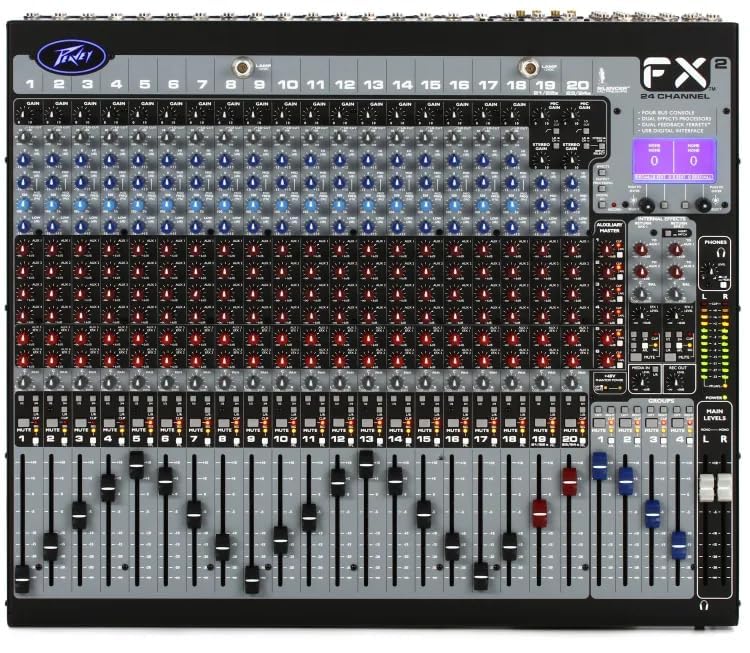
Obrázek 5.2: Detailní view of the mixer's control surface.
6. Údržba
Proper maintenance ensures the longevity and optimal performance of your Peavey FX 24 II mixer.
- Čištění: Regularly wipe the mixer's surface with a soft, dry, lint-free cloth. Do not use abrasive cleaners, solvents, or waxes.
- Ochrana proti prachu: When not in use, cover the mixer with a dust cover to prevent dust and debris from entering the controls and faders.
- Skladování: Mixér skladujte na chladném a suchém místě mimo dosah přímého slunečního záření a extrémních teplot.
- Správa kabelů: Ujistěte se, že všechny kabely jsou úhledně uspořádané a nejsou pod napětím, aby nedošlo k poškození konektorů a portů.
7. Řešení problémů
If you encounter issues with your Peavey FX 24 II mixer, refer to the following common problems and solutions:
| Problém | Možná příčina | Řešení |
|---|---|---|
| Žádný zvukový výstup | Power not connected; Master fader down; Channel fader down; Mute engaged; Incorrect output connection. | Check power, raise master and channel faders, disengage mute, verify output cables. |
| Zkreslený zvuk | Input gain too high; Output level too high; Damaged cable. | Reduce input gain and output levels, try a different cable. |
| Kondenzátorový mikrofon nefunguje | 48V phantom power not engaged; Faulty microphone or cable. | Engage 48V phantom power, test with another condenser mic or cable. |
| Problémy s nahráváním/přehráváním na USB | Incorrect USB port used; USB drive not formatted correctly; Driver issues (for computer connection). | Ensure correct USB port (A for stick, B for computer), format USB drive to FAT32, install necessary drivers for computer. |
Pokud problém přetrvává i po vyzkoušení těchto řešení, kontaktujte zákaznickou podporu.
8. Specifikace
| Funkce | Detail |
|---|---|
| Číslo modelu | Peavey FX 24 II |
| Počet kanálů | 24 |
| Mikrofonní vstupy | 24 XLR vstupy |
| Fantomová síla | 48V (for each channel input) |
| Aux odesílá | 6 |
| Stereo vstupy | 2 (with dual mic/line inputs) |
| Podskupiny | 4 |
| Fadery | 100 mm |
| DSP motor | High-power dual DSP with improved digital effects |
| EQ | 3-band with sweepable mid-frequency and variable low cut filters; 28-band GEQ/5-band PEQ (output processing) |
| USB připojení | USB 2.0 "A" (record/playback from memory stick), USB 2.0 "B" (streaming digital out & computer recording) |
| Zdroj napájení | Elektrický kabel |
| Rozměry balení | 54 x 52 x 29 cm |
| Hmotnost položky | 9.9 kg |
| Výrobce | Peavey Electronics Corporation |
| Země původu | USA |
9. Záruka a podpora
Produkty Peavey jsou navrženy pro spolehlivost a výkon. Konkrétní informace o záruce naleznete v záruční kartě dodané s produktem nebo na oficiálních webových stránkách Peavey. webmísto.
Zákaznická podpora:
For technical assistance, service, or parts, please contact:
- Výrobce: Peavey Electronics Corporation
- Indian Distributor/Service Partner: MX-MDR TECHNOLOGIES LIMITED
- Adresa: Plot 101, Sector 1, Gauraipada, Vasai (East), Palghar - 401208, Mumbai, INDIA.
- E-mail: info@mdrelectronics.com / dipesh@mdrelectronics.com
- Kontaktní číslo.: 9552529345/8805029016
- Webmísto: www.mdrelectronics.com


