1. Úvod
The Amazon Basics Thunderbolt4/USB4 Pro Docking Station is designed to expand the connectivity of your laptop, providing a single solution for multiple peripherals, external displays, and power delivery. This docking station is ideal for professionals and creators who require high-speed data transfer, advanced display capabilities, and efficient power management.
2. Bezpečnostní informace
- Ensure the docking station is placed on a stable, flat surface.
- Nevystavujte zařízení vodě, vlhkosti ani extrémním teplotám.
- Používejte pouze dodaný napájecí adaptér a kabely.
- Keep ventilation openings clear to prevent overheating. When fully loaded, the docking station may reach 122°F/50°C, which is normal for such products.
- Zabraňte pádu zařízení nebo jeho vystavení silným nárazům.
3. Obsah balení
Prosím, ověřte, zda jsou v balení přítomny všechny položky:
- Dokovací stanice Thunderbolt 4
- Kabel Thunderbolt 4
- Napájecí adaptér
- Stručný návod k obsluze
4. Konec produktuview
The Amazon Basics Thunderbolt4/USB4 Pro Docking Station offers a variety of ports to enhance your workstation setup.

Obrázek 4.1: Přední a zadní View of the Docking Station with Port Labels. This image highlights the various input and output ports available on the docking station, including Thunderbolt 4, USB-A, HDMI, Ethernet, and the SD card slot.
Přední porty:
- Slot pro SD kartu: For high-speed data transfer from SD cards.
- USB-A 3.2 (10 Gb/s): Pro připojení zařízení s rozhraním USB-A.
- 3.5mm audio jack: Pro sluchátka nebo reproduktory.
- Thunderbolt 4/USB-C (To Host): The primary connection to your laptop, supporting 96W Power Delivery.
Zadní porty:
- DC IN: Power input from the provided adapter.
- HDMI 2.1 Output: Supports up to 8K@30Hz display.
- 2x Thunderbolt 4/USB-C (40Gbps, 15W max charging, 4K@60Hz display): For connecting additional Thunderbolt devices or external displays.
- Ethernet RJ45 (Up to 2.5Gbps): Pro vysokorychlostní kabelové připojení k síti.
- 2x USB-A 3.1: For connecting additional USB-A devices.
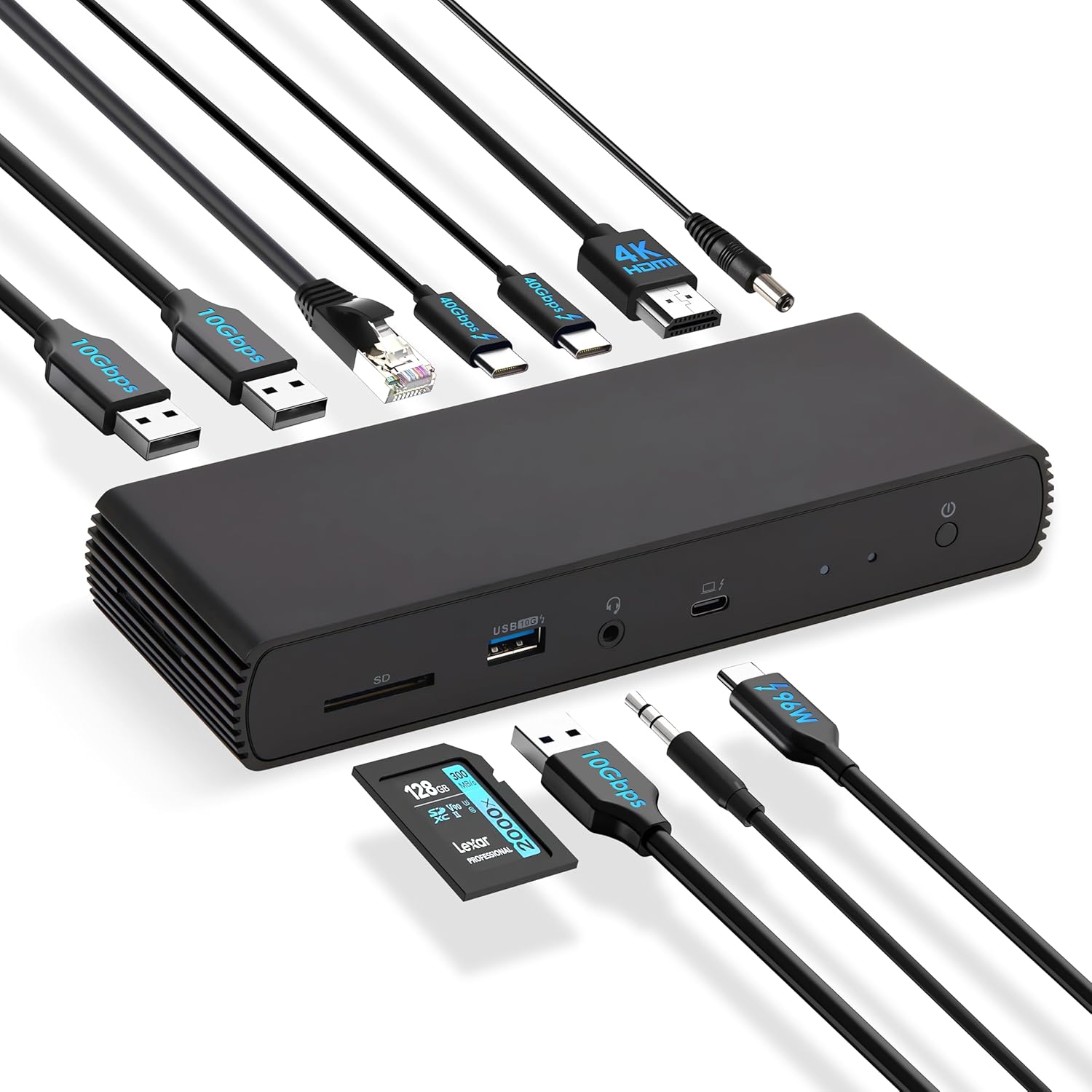
Obrázek 4.2: The docking station connected to various peripherals and a laptop, demonstrating its comprehensive connectivity options.
5. Nastavení
Follow these steps to set up your Amazon Basics Thunderbolt4/USB4 Pro Docking Station:
- Připojte napájení: Connect the provided power adapter to the "DC IN" port on the rear of the docking station, then plug it into a wall outlet.
- Připojení k notebooku: Use the provided black Thunderbolt 4 cable to connect the "Thunderbolt 4/USB-C (To Host)" port on the front of the docking station to a Thunderbolt 4 port on your laptop.
- Připojení displejů:
- For a single 8K@30Hz display, connect your monitor to the HDMI 2.1 port.
- For dual 4K@60Hz displays, connect your monitors to the two Thunderbolt 4 USB-C ports on the rear.
- Poznámka: Verify your laptop's Thunderbolt ports support dual 4K@60Hz output. Ensure your graphics card has the latest drivers. Confirm your monitors support 4K@60Hz display. Use high-quality Thunderbolt 4 or USB4 cables for connection (not included for monitors). Avoid connecting the HDMI port first to prevent resolution downgrade due to bandwidth limitations.
- Připojení periferií: Připojte zařízení USB (klávesnici, myš, externí disky), ethernetový kabel a zvuková zařízení k odpovídajícím portům na dokovací stanici.
- Zapnutí: Press the power button on the docking station. Ensure the Green Power LED and Blue Thunderbolt LED turn on.
5.1 video: How to Use the Amazon Basics Thunderbolt4/USB4 Pro Docking Station. This video provides a visual guide to connecting the docking station, including power, displays, and peripherals, and demonstrates its functionality.
If the laptop fails to detect the docking station, please ensure that your Thunderbolt 4 cable is firmly connected and wait for 60 seconds to complete the setup.
6. Návod k obsluze
Once set up, the docking station provides seamless integration with your laptop for various functions:
- Rozšíření pro zobrazení: Extend or mirror your laptop's display to up to two external monitors.
- Dodávka energie: The docking station supports dynamic Power Delivery (PD) up to 96W to charge your connected laptop.
- Vysokorychlostní přenos dat: Utilize the Thunderbolt 4 ports for up to 40Gbps data transfer and USB-A 3.2 ports for 10Gbps data transfer.
- Síťové připojení: The Ethernet RJ45 port supports up to 2.5Gbps (approximately 300 Megabytes per sec) for stable and fast wired internet access.
- Audio konektivita: Connect your headphones or speakers via the 3.5mm audio jack.

Obrázek 6.1: Dual 4K@60Hz Display Setup. This image illustrates a laptop connected to two external monitors, showcasing the docking station's capability to support extended desktop environments for increased productivity.

Obrázek 6.2: High-Speed Data Transfer. This image visually represents the rapid data transfer capabilities of the Thunderbolt 4 connection, emphasizing its efficiency for moving large files rychle.
7. Kompatibilita
This docking station is compatible with:
- Laptops running Windows 10 OS or later which have a Thunderbolt 4 port.
- Non-M1/M2 chip MacBooks running macOS 11 (Big Sur) or later.
It is backwards compatible with Thunderbolt 3 laptops, but with limited functionality (e.g., may not support dual display).
Není kompatibilní s:
- Linux or Chrome OS laptops.
- M1/M2 chip MacBooks running macOS 10.16 or earlier.

Obrázek 7.1: Konec kompatibilityview. This chart provides a quick reference for supported operating systems and laptop types, ensuring users can confirm device compatibility.
8. Údržba
Pro zajištění dlouhé životnosti a optimálního výkonu vaší dokovací stanice:
- Čištění: K čištění vnější strany dokovací stanice používejte měkký, suchý hadřík. Nepoužívejte tekuté čisticí prostředky ani aerosoly.
- Větrání: Ensure the docking station has adequate airflow around it. Do not cover the ventilation holes.
- Skladování: Pokud dokovací stanici delší dobu nepoužíváte, skladujte ji na chladném a suchém místě mimo dosah přímého slunečního záření.
9. Řešení problémů
Pokud narazíte na problémy s dokovací stanicí, podívejte se na následující běžné problémy a jejich řešení:
| Problém | Možná příčina | Řešení |
|---|---|---|
| Žádný výstup na displeji nebo blikání obrazovky. | Incorrect cable connection, outdated drivers, incompatible display settings, or bandwidth limitations. | Ensure all display cables are firmly connected. Update your laptop's graphics drivers. Verify your monitors support the desired resolution (e.g., 4K@60Hz). If using dual displays, ensure your laptop's Thunderbolt ports support dual 4K@60Hz output. Avoid connecting HDMI first if using multiple displays. |
| Laptop not charging or charging slowly. | Laptop power requirements exceed 96W, or incorrect connection. | Check your laptop manufacturer's power supply specifications. If requirements exceed 96W, the docking station may activate overload protection. Ensure the provided Thunderbolt 4 cable is used and connected to the correct upstream port. |
| Docking station not detected by laptop. | Loose Thunderbolt 4 cable connection. | Ensure the Thunderbolt 4 cable is firmly connected to both the docking station and your laptop. Wait for 60 seconds for the system to recognize the device. |
| Pomalá rychlost sítě. | Thunderbolt bandwidth shared across devices. | Thunderbolt bandwidth is shared across devices. Display resolution and LAN speed may decrease with multiple high-bandwidth connections. Disconnect other high-bandwidth devices if maximum LAN speed is critical. |
10. Specifikace
| Funkce | Detail |
|---|---|
| Značka | Základy Amazonu |
| Číslo modelu | 1336 DBD |
| Rozměry (DxŠxV) | 7.86 x 2.95 x 1.23 palce |
| Hmotnost | 2.15 libry |
| Barva | Černý |
| Hardwarové rozhraní | USB, Thunderbolt |
| Celkový počet portů USB | 3 (USB-A) + 2 (Thunderbolt 4/USB-C) |
| Celkový počet portů HDMI | 1 2.1 (HDMI XNUMX) |
| Dodávka energie | Až 96W |
| Rychlost Ethernetu | 2.5 Gbps |
| Podpora zobrazení | Dual 4K@60Hz (via TBT4) or Single 8K@30Hz (via HDMI 2.1) |
11. Záruka a podpora
This Amazon Basics product is covered by a limited warranty. For detailed warranty information, please refer to the Warranty (PDF) document provided with your product or visit the Amazon Basics support page.
For technical support, troubleshooting assistance, or to inquire about replacement parts, please visit the Amazon customer support website or contact their customer service directly. Have your product model number (DBD1336) and purchase information ready.
Uživatelská příručka (PDF): Stáhnout zde
Uživatelská příručka (PDF): Stáhnout zde
Záruka (PDF): Stáhnout zde


