Zavedení
Welcome to the iRobot Roomba i1 (1152) Robot Vacuum user manual. This guide provides essential information for setting up, operating, maintaining, and troubleshooting your robot vacuum. The Roomba i1 is designed to efficiently clean hard floors and carpets, utilizing Wi-Fi connected mapping technology to navigate your home.
Důležité bezpečnostní informace
Before using your Roomba i1 robot vacuum, please read all safety instructions carefully. Failure to follow these instructions may result in electric shock, fire, or serious injury.
- Tento spotřebič mohou používat děti ve věku 8 let a starší a osoby se sníženými fyzickými, smyslovými nebo duševními schopnostmi nebo nedostatkem zkušeností a znalostí, pokud jsou pod dohledem nebo jsou poučeny o používání spotřebiče bezpečným způsobem a chápou související nebezpečí. .
- Children should not play with the appliance. Cleaning and user maintenance shall not be made by children without supervision.
- Používejte pouze tak, jak je popsáno v tomto návodu.
- Nepoužívejte venku nebo na mokrém povrchu.
- Nedovolte, aby byl používán jako hračka. Při používání dětmi nebo v jejich blízkosti je nutná zvýšená pozornost.
- Nepoužívejte s poškozeným kabelem nebo zástrčkou. Pokud spotřebič nefunguje tak, jak by měl, upadl na zem, byl poškozen, byl ponechán venku nebo spadl do vody, vraťte jej do servisního střediska.
- Netahejte ani nepřenášejte za kabel, nepoužívejte kabel jako rukojeť, nezavírejte na kabel dvířka ani netahejte za kabel kolem ostrých hran nebo rohů. Nepřejíždějte spotřebičem přes kabel. Udržujte kabel mimo dosah horkých povrchů.
- Neodpojujte tahem za kabel. Při odpojování uchopte zástrčku, nikoli kabel.
- Nemanipulujte se zástrčkou nebo spotřebičem mokrýma rukama.
- Do otvorů nevkládejte žádné předměty. Nepoužívejte se zablokovaným otvorem; chraňte před prachem, žmolky, vlasy a vším, co by mohlo omezit proudění vzduchu.
- Udržujte vlasy, volné oblečení, prsty a všechny části těla v dostatečné vzdálenosti od otvorů a pohyblivých částí.
- Nesbírejte nic, co hoří nebo kouří, jako jsou cigarety, zápalky nebo horký popel.
- Nepoužívejte k vysávání hořlavých nebo hořlavých kapalin, jako je benzín, ani je nepoužívejte v oblastech, kde se mohou vyskytovat.
- Nepoužívejte bez nasazeného sáčku na prach a/nebo filtrů.
- Zabraňte neúmyslnému spuštění. Před připojením k baterii, zvednutím nebo přenášením spotřebiče se ujistěte, že je vypínač v poloze vypnuto.
- Nabíjejte pouze nabíječkou specifikovanou výrobcem. Nabíječka, která je vhodná pro jeden typ baterie, může při použití s jinou baterií způsobit nebezpečí požáru.
- Používejte zařízení pouze se speciálně určenými bateriemi. Použití jiných baterií může způsobit zranění a požár.
- Pokud baterii nepoužíváte, uchovávejte ji mimo dosah jiných kovových předmětů, jako jsou kancelářské sponky, mince, klíče, hřebíky, šrouby nebo jiné malé kovové předměty, které mohou způsobit spojení mezi kontakty. Zkratování svorek baterie může způsobit popáleniny nebo požár.
- Za nevhodných podmínek může z baterie unikat kapalina; vyhnout se kontaktu. Pokud náhodou dojde ke kontaktu, opláchněte vodou. Pokud se kapalina dostane do očí, vyhledejte navíc lékařskou pomoc. Kapalina vytékající z baterie může způsobit podráždění nebo popáleniny.
- Nepoužívejte baterii nebo zařízení, které je poškozené nebo upravené. Poškozené nebo upravené baterie mohou vykazovat nepředvídatelné chování vedoucí k požáru, výbuchu nebo riziku zranění.
- Nevystavujte baterii nebo zařízení ohni nebo nadměrné teplotě. Vystavení ohni nebo teplotám nad 130 ° C (265 ° F) může způsobit výbuch.
- Dodržujte všechny pokyny pro nabíjení a nenabíjejte baterii ani zařízení mimo teplotní rozsah uvedený v pokynech. Nesprávné nabíjení nebo při teplotách mimo specifikovaný rozsah může poškodit baterii a zvýšit riziko požáru.
- Opravu svěřte kvalifikovanému opraváři, který bude používat pouze identické náhradní díly. Tím zajistíte zachování bezpečnosti produktu.
- Neupravujte ani se nepokoušejte opravovat zařízení nebo baterii (podle potřeby), kromě případů uvedených v návodu k použití a údržbě.
Obsah balení
Verify that all original components are included in your package:
- iRobot Roomba i1 Robot Vacuum
- Nabíjecí stanice Home Base
- Linkový kabel
- 1 lithium-iontová baterie (předinstalovaná)
- Boční štětec
- Filter (Cloth Type)
- Dual Multi-Surface Rubber Brushes
Nastavení
Follow these steps to set up your Roomba i1 robot vacuum for first use:
- Vyberte místo pro domovskou základnu: Place the Home Base charging station against a wall in an open, uncluttered area. Ensure there is at least 1.5 feet (0.5 meters) of clear space on each side of the Home Base and 4 feet (1.2 meters) in front of it.
- Připojte napájecí kabel: Plug the line cord into the Home Base and then into a wall outlet. Ensure the Home Base is powered on.
- Nabijte robota: Place your Roomba i1 onto the Home Base. The robot will emit a tone to confirm it is properly docked and charging. Allow the robot to charge for at least 3 hours before its first cleaning mission. The light ring around the CLEAN button will pulse white while charging and turn solid white when fully charged.
- Stáhněte si aplikaci iRobot Home: For full functionality, download the iRobot Home App on your smartphone or tablet. The app will guide you through connecting your robot to your Wi-Fi network and setting up cleaning schedules.
- Připojení k Wi-Fi: Follow the in-app instructions to connect your Roomba i1 to your home Wi-Fi network. This enables smart features like mapping, scheduling, and integration with voice assistants.

Operating Your Roomba i1
Your Roomba i1 is designed for intelligent and efficient cleaning. Here's how to operate it:
Starting a Cleaning Job
- Použití tlačítka CLEAN: Press the large CLEAN button on top of the robot once to wake it up, then press it again to start a cleaning cycle.
- Používání aplikace iRobot Home: Open the app and tap the "CLEAN" button to start a cleaning job from anywhere. You can also schedule cleaning times and customize cleaning preferences through the app.
- Hlasové ovládání: The Roomba i1 is compatible with Google Home. Once connected via the iRobot Home App, you can use voice commands like "Hey Google, ask Roomba to start cleaning."
Funkce čištění
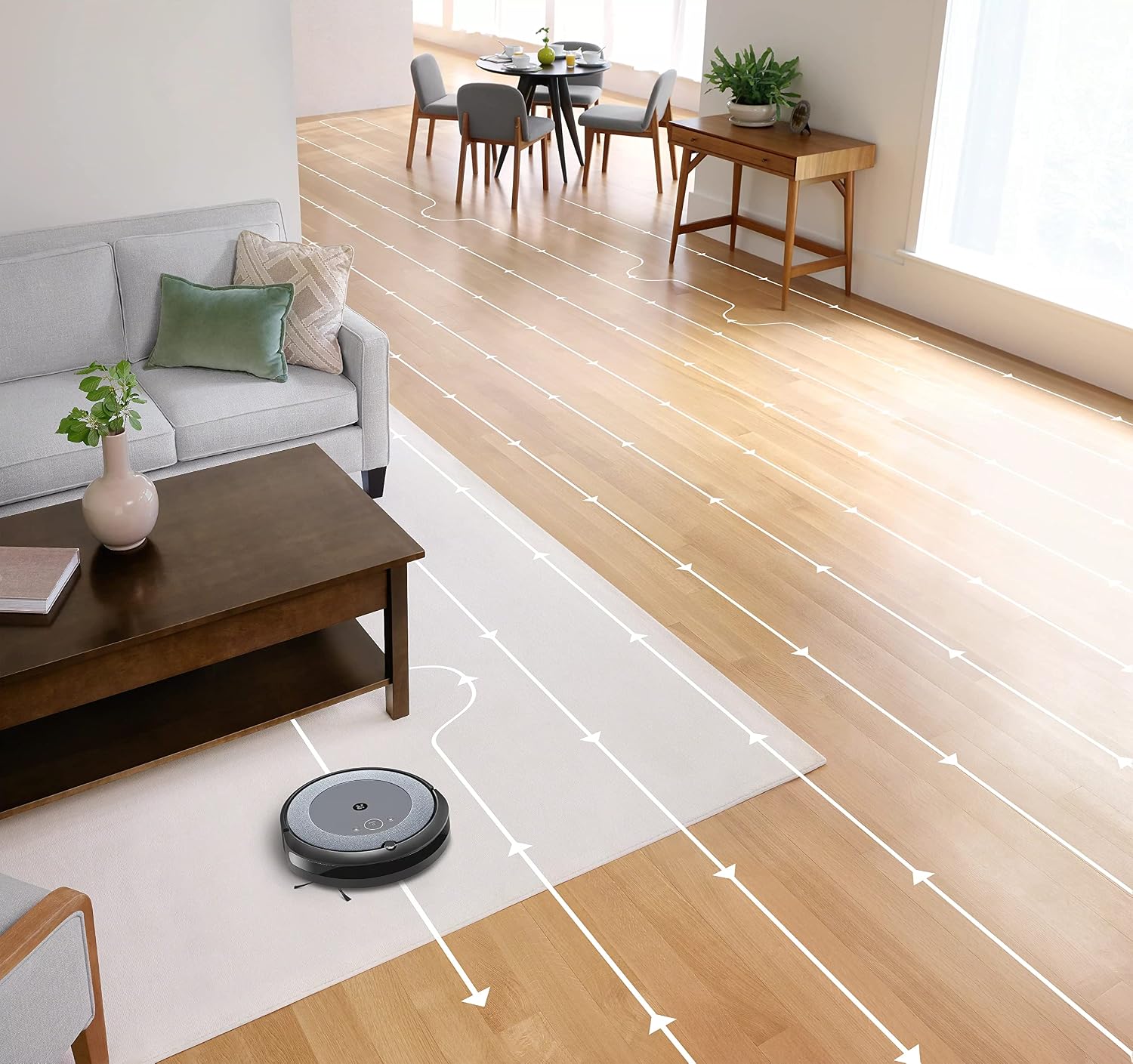
- Inteligentní navigace: The robot cleans in neat, efficient rows, adapting to different floor types including carpets and hard floors.
- Dvojité gumové kartáče pro více povrchů: These brushes are designed to prevent tangles with pet hair and effectively pick up dirt and debris from various surfaces.
- Dirt Detect™ Technology: The robot uses acoustic and optical sensors to find dirtier areas and spends more time cleaning them.
- Automatic Dirt Disposal (with compatible Clean Base): If you have a compatible Clean Base (sold separately), the robot will automatically empty its dustbin into an enclosed bag, allowing for weeks of hands-free cleaning.


Údržba
Regular maintenance ensures your Roomba i1 operates at peak performance. Always turn off the robot and disconnect it from the Home Base before performing any maintenance.
Vyprazdňování popelnice
- Press the bin release button and pull out the bin.
- Open the bin door and empty debris into a trash can.
- Tap the bin against the trash can to dislodge any trapped debris.
Cleaning the Filter (Cloth Type)
- Vyjměte filtr z nádoby na prach.
- Tap the filter against a trash can to remove debris. Do not wash the filter.
- Replace the filter every 2 months, or more frequently if you have pets.
Čištění štětců
- Pinch the yellow brush release tabs to lift the brush frame.
- Remove the brushes and remove any hair or debris wrapped around them or trapped beneath the yellow caps.
- Reinstall the brushes, ensuring they click into place.
Čištění bočního kartáče
- Use a coin or small screwdriver to remove the screw holding the side brush.
- Remove the side brush and clean any hair or debris from the brush and its post.
- Namontujte zpět boční kartáč a utáhněte šroub.
Čištění senzorů a nabíjecích kontaktů
- Wipe the charging contacts on the robot and Home Base with a clean, dry cloth.
- Wipe the cliff sensors (located on the bottom of the robot) and the front bumper sensor window with a clean, dry cloth.
Odstraňování problémů
If your Roomba i1 encounters an issue, the robot will play an audible alert and the light ring around the CLEAN button will flash. Consult the iRobot Home App for specific error messages and solutions.
Běžné problémy a řešení:
- Robot se nenabíjí: Ensure the Home Base is plugged in and the robot is properly docked. Clean the charging contacts on both the robot and Home Base.
- Robot stuck or trapped: Clear obstacles from the robot's path. If it frequently gets stuck in the same area, consider using Virtual Wall Barriers (sold separately) or adjusting furniture.
- Špatný čisticí výkon: Empty the dust bin, clean or replace the filter, and clean the main brushes and side brush. Ensure the robot's sensors are clean.
- Robot se nepřipojuje k Wi-Fi: Ensure your Wi-Fi router is on and within range. Restart your router and the robot. Follow the Wi-Fi setup instructions in the iRobot Home App again.
- Robot vydává neobvyklé zvuky: Check the brushes and wheels for any trapped debris or hair. Clean them thoroughly.
For more detailed troubleshooting, refer to the iRobot Home App or the iRobot support webmísto.
Specifikace
| Značka | iRobot |
| Název modelu | Roomba i1 (1152) |
| Speciální funkce | Smart, Wi-Fi Connected Mapping |
| Barva | Černá/šedá |
| Zahrnuté komponenty | Robot Vacuum, Home Base, Line Cord, Battery, Side Brush, Filter, Dual Multi-Surface Rubber Brushes |
| Typ filtru | Tkanina |
| Zdroj napájení | Napájení z baterie |
| Baterie | 1 lithium-iontová baterie (součástí balení) |
| Kontrolní metoda | App |
| Kompatibilní zařízení | Domovská stránka Google |
| Form Factor | Robotický |
| Rozměry produktu | 13.5 x 3.6 x 13.4 palce |
| Hmotnost položky | 13.2 libry |
| Doporučení pro povrch | Koberce, tvrdé podlahy |
| UPC | 657768820809 |
| ASIN | B0CPQ3RVDK |
Záruka a podpora
This product is sold as a renewed item. Please refer to the specific warranty terms provided by the seller or Amazon Renewed at the time of purchase. For technical support, troubleshooting assistance, or to purchase replacement parts, please visit the official iRobot support website or contact iRobot customer service. You can also find helpful resources within the iRobot Home App.
Online podpora: www.irobot.com/support