1. Úvod
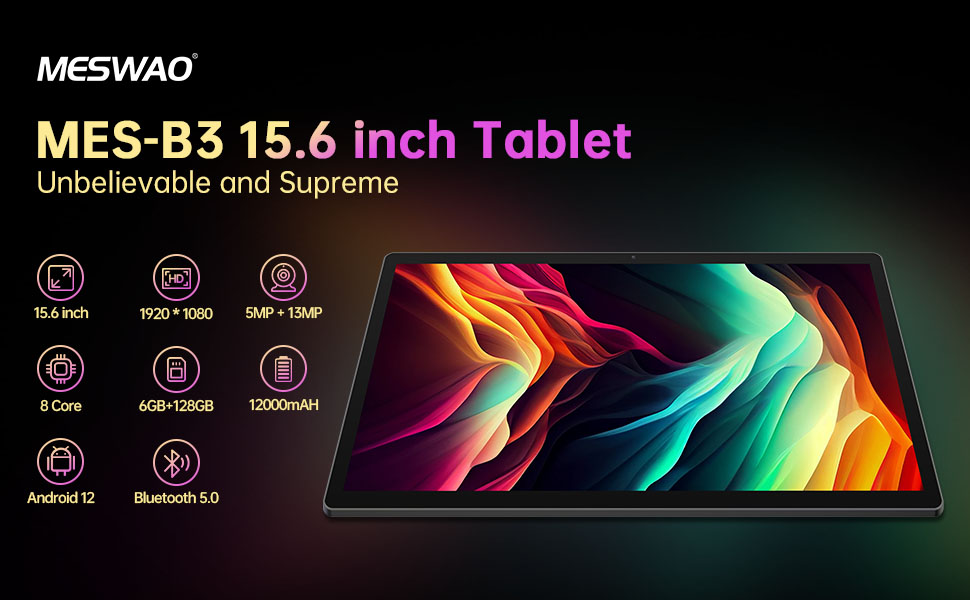
Welcome to the user manual for your MESWAO MES-B3 15.6-inch Android 13 Tablet. This document provides essential information for setting up, operating, maintaining, and troubleshooting your device. The MES-B3 tablet features a large 15.6-inch IPS HD display, an Octa-Core processor, 6GB RAM, 128GB internal storage (expandable), and a 12000mAh battery, designed for a versatile user experience.

Figure 1: MESWAO MES-B3 Tablet Overview
2. Bezpečnostní informace
Please read all safety instructions carefully before using your tablet to prevent injury or damage to the device. Keep this manual for future reference.
- Bezpečnost baterie: Do not attempt to replace the battery yourself. Do not expose the tablet to extreme temperatures, direct sunlight, or fire. Do not puncture, drop, or disassemble the battery.
- Voda a vlhkost: This tablet is not waterproof. Avoid exposing it to water, rain, or high humidity.
- Čištění: Use a soft, dry cloth to clean the tablet. Do not use liquid cleaners or aerosols.
- Zacházení: Avoid dropping the tablet or subjecting it to strong impacts.
- Ochrana sluchu: When using headphones, set the volume to a moderate level to avoid hearing damage.
3. Obsah balení
Ověřte, zda jsou v balení přítomny všechny položky:
- MESWAO MES-B3 15.6-inch Android 13 Tablet
- Napájecí adaptér
- USB-C kabel
- Uživatelská příručka (tento dokument)
4. Zařízení skončiloview
Familiarize yourself with the physical components of your MESWAO MES-B3 tablet.

Figure 2: Buttons and Connectors
- Vypínač: Press and hold to turn the tablet on or off. Press briefly to turn the screen on or off.
- Tlačítka hlasitosti: Upravte hlasitost zvuku.
- Přední kamera: Pro videohovory a selfie (5MP).
- Rear Camera with Flashlight: Pro pořizování fotografií a videí (13MP).
- Port typu C: Pro nabíjení tabletu a připojení k počítači.
- Slot na kartu TF: Insert a MicroSD card to expand storage.
- Stereo reproduktory: Poskytněte zvukový výstup.
5. Nastavení
5.1 Nabíjení tabletu
Before first use, fully charge your tablet. Connect the USB-C cable to the tablet's Type-C port and the other end to the power adapter. Plug the adapter into a wall outlet. The battery indicator on the screen will show charging status.
5.2 Zapnutí/vypnutí
- Zapnutí: Press and hold the Power Button until the MESWAO logo appears.
- Vypnutí: Press and hold the Power Button until the power options appear, then select 'Power off'.
- Restartovat: Press and hold the Power Button until the power options appear, then select 'Restart'.
5.3 Průvodce počátečním nastavením
Po prvním zapnutí vás tablet provede procesem počátečního nastavení:
- Vyberte preferovaný jazyk.
- Připojte se k síti Wi-Fi.
- Přihlaste se pomocí svého účtu Google nebo si vytvořte nový.
- Review a přijměte obchodní podmínky.
- Nastavení zámku obrazovky (PIN, vzorec, heslo).
5.4 Vložení karty MicroSD
To expand the tablet's storage, you can insert a MicroSD card (up to 256GB, as per some product information, though 1TB is also mentioned in images, please verify with product packaging for exact maximum). Locate the TF card slot on the side of the tablet. Gently insert the MicroSD card with the gold contacts facing down until it clicks into place.

Figure 3: Storage Expansion with MicroSD Card
6. Ovládání tabletu
6.1 Základní navigace
The MESWAO MES-B3 runs on Android 13, offering an intuitive touch interface.
- Klepněte na: Vyberte položku nebo otevřete aplikaci.
- Výpad: Procházejte obrazovky, procházejte seznamy nebo zavírejte oznámení.
- Přiblížení/zvětšení prsty: Zvětšení nebo zmenšení obsahu na obrazovce.
- Domovská obrazovka: Access your apps and widgets. Swipe down from the top for notifications and quick settings.
Obrázek 4: Rozhraní systému Android 13
6.2 Wi-Fi připojení
- Přejít na Nastavení > Síť a internet > Internet.
- Zapněte Wi-Fi.
- Vyberte požadovanou síť ze seznamu a v případě potřeby zadejte heslo.
6.3 Párování Bluetooth
The tablet supports Bluetooth 5.0 for connecting wireless accessories.
- Přejít na Nastavení > Připojená zařízení > Předvolby připojení > Bluetooth.
- Zapněte Bluetooth.
- Ujistěte se, že je vaše zařízení Bluetooth v režimu párování.
- Select your device from the 'Available devices' list and follow on-screen prompts to pair.
6.4 Správa aplikací
- Instalace aplikací: Otevřete aplikaci Obchod Google Play, vyhledejte požadovanou aplikaci a klepněte na tlačítko „Instalovat“.
- Odinstalovat aplikace: Press and hold an app icon on the home screen or app drawer, then drag it to 'Uninstall' or select 'App info' and choose 'Uninstall'.
- Správa aplikací: Přejít na Nastavení > Aplikace na view, force stop, or clear data for installed applications.
6.5 Nastavení zobrazení
Přizpůsobte si svůj viewzkušenosti:
- Přejít na Nastavení > Zobrazit.
- Upravit Úroveň jasu.
- Soubor Časový limit obrazovky (sleep duration).
- Přeměna Velikost písma a Velikost displeje.
- Umožnit Tmavé téma for reduced eye strain.
6.6 Správa baterie
The MES-B3 features a 12000mAh battery for extended use.

Obrázek 5: Prodloužená životnost baterie
- Přejít na Nastavení > Baterie na view usage and optimize settings.
- Umožnit Spořič baterie režim pro prodloužení výdrže baterie v případě potřeby.
- Zavřete nepoužívané aplikace běžící na pozadí.
- Snižte jas obrazovky.
7. Údržba
7.1 Čištění
- K jemnému otření obrazovky a těla použijte měkký hadřík, který nepouští vlákna.
- Na odolné šmouhy lehce otřeteampOtřete hadřík vodou nebo čističem obrazovek speciálně určeným pro elektroniku.
- Avoid using abrasive materials, alcohol, or chemical solvents.
7.2 Skladování
- Tabletu skladujte na chladném a suchém místě mimo dosah přímého slunečního záření a extrémních teplot.
- Pokud baterii skladujete delší dobu, ujistěte se, že je nabita přibližně na 50 %, abyste prodloužili její životnost.
7.3 Aktualizace softwaru
Pravidelně kontrolujte aktualizace softwaru, abyste zajistili optimální výkon a zabezpečení.
- Přejít na Nastavení > Systém > Aktualizace systému.
- Tablet zkontroluje dostupné aktualizace. Postupujte podle pokynů na obrazovce a stáhněte a nainstalujte všechny aktualizace.
8. Řešení problémů
Zde jsou řešení běžných problémů, se kterými se můžete setkat:
| Problém | Řešení |
|---|---|
| Tablet se nezapne | Ensure the tablet is charged. Connect it to the charger for at least 30 minutes, then try powering it on again. |
| Problémy s připojením Wi-Fi | Restart your Wi-Fi router and the tablet. Go to Settings > Network & internet > Internet, forget the network, and reconnect. |
| Pomalý výkon | Close unused apps. Clear cache for frequently used apps (Settings > Apps > [App Name] > Storage & cache > Clear cache). Restart the tablet. |
| Baterie se rychle vybíjí | Reduce screen brightness. Disable Wi-Fi/Bluetooth when not in use. Close background apps. Check battery usage in Settings > Battery to identify power-hungry apps. |
| Aplikace padá nebo zamrzávají | Force stop the app (Settings > Apps > [App Name] > Force stop). Clear the app's cache. If the problem persists, uninstall and reinstall the app. |
9. Specifikace
Detailed technical specifications for the MESWAO MES-B3 tablet:

Obrázek 6: Klíčové vlastnosti a specifikace
| Funkce | Specifikace |
|---|---|
| Značka | MESWAO |
| Číslo modelu | MES-B3 |
| Operační systém | Android 13 |
| Procesor | MediaTek Octa-Core (MTK6789) |
| BERAN | 6 GB |
| Interní úložiště | 128 GB |
| Rozšiřitelné úložiště | Up to 256 GB (via TF/MicroSD card) |
| Velikost obrazovky | 15.6 palce |
| Rozlišení obrazovky | 1920 x 1080 pixelů (IPS HD) |
| Přední kamera | 5 MP |
| Zadní kamera | 13 MP |
| Kapacita baterie | 12000 XNUMX mAh |
| Životnost baterie | Přibližně 10 hodin (v závislosti na používání) |
| Konektivita | Bluetooth 5.0, Wi-Fi (802.11ac, 2.4G/5G) |
| Porty | USB Type-C, TF Card Slot |
| Barva | Šedá |
| Rozměry (D x Š x V) | 36.85 x 22.25 x 0.93 cm |
| Hmotnost | 1.1 kg |
10. Záruka a podpora
Your MESWAO MES-B3 tablet is covered by a standard manufacturer's warranty. Please refer to the warranty card included in your package for specific terms and conditions, including warranty duration and coverage details.
For technical support, troubleshooting assistance beyond this manual, or warranty claims, please contact MESWAO customer service through the retailer where you purchased the product or visit the official MESWAO webstránky pro kontaktní informace.


