Zavedení
This manual provides detailed instructions for the Ajazz AK33 3-in-1 Wired Gaming Keyboard and Mouse Set. This set includes an 82-key mechanical keyboard, a lightweight gaming mouse, and a mouse pad, designed for a comprehensive gaming and typing experience. Please read this manual thoroughly before using the product to ensure proper setup and operation.

Image: The Ajazz AK33 3-in-1 Gaming Keyboard and Mouse Set, featuring the 82-key keyboard with green backlighting, the honeycomb shell mouse with RGB lighting, and a black mouse pad.
Obsah balení
- Ajazz AK33 82-Key Mechanical Gaming Keyboard
- Ajazz Wired Gaming Mouse with Honeycomb Shell
- Podložka pod myš
- Detachable Type-C USB Cable (for keyboard)
- Stahovač klíčů
- Čisticí kartáč
- Uživatelská příručka (tento dokument)
Pokyny pro nastavení
- Připojení klávesnice: Locate the Type-C port on the back of the keyboard. Connect one end of the provided Type-C USB cable to the keyboard and the other end to an available USB port on your computer.
- Připojte myš: Connect the USB cable of the gaming mouse to another available USB port on your computer.
- Umístění podložky pod myš: Position the mouse pad on your desk for optimal mouse performance.
- Instalace ovladače: The keyboard and mouse are plug-and-play for basic functionality. For advanced customization (e.g., programmable mouse buttons, specific RGB settings), you may need to download the official driver software from the Ajazz webwebu. Viz pokyny výrobce website for driver availability and installation instructions.

Image: Illustration showing the detachable Type-C cable connecting to the keyboard's port.
Once connected, your operating system should automatically detect and install the necessary drivers for basic functionality. The devices are compatible with Windows 98 / 2000 / 2003 / 7 / 8 / 10 / XP / Vista / MAC, etc.

Image: Visual representation of the product's compatibility with Windows XP, Windows 7/8, Windows 10/11, macOS, and Linux operating systems.
Návod k obsluze
Funkce klávesnice
The Ajazz AK33 keyboard features an 82-key compact layout with mechanical blue switches, offering tactile feedback and an audible click. It includes anti-ghosting technology for simultaneous key presses.

Obrázek: Detailní záběr view of the Ajazz AK33 82-key mechanical keyboard, highlighting its compact form factor and green backlighting.
Ovládání podsvícení
- The keyboard features 8 different backlight effects. Use the designated function keys (often in combination with the Fn key) to cycle through these effects.
- Adjust backlight brightness and speed using specific key combinations, typically involving the Fn key and arrow keys or other designated keys. Refer to the keyboard's keycap legends for specific controls.
Multimediální klávesové zkratky
The keyboard includes 12 multimedia shortcut keys, accessible by pressing the Fn key in combination with the F1-F12 keys. These keys provide quick access to functions such as volume control, media playback, and more.

Image: Diagram illustrating the 12 multimedia shortcut functions available on the keyboard, activated by combining the Fn key with F1-F12.
Funkce myši
The gaming mouse features an ergonomic design with a honeycomb shell for lightweight performance (approximately 65 grams). It offers up to 12000 DPI and includes 7 buttons, 6 of which are programmable.

Image: The lightweight gaming mouse with its honeycomb shell design, showcasindíky svému ergonomickému tvaru a RGB osvětlení.
Úprava DPI
- Use the DPI loop +/- button (typically located near the scroll wheel) to cycle through different DPI settings. The mouse supports a range from 800 to 12000 DPI.
- The current DPI setting may be indicated by a change in the mouse's RGB lighting pattern or color.
Programovatelná tlačítka
The mouse features 7 buttons, including Left, Right, Mid (scroll wheel click), Forward, Backward, and DPI Loop +/-. Six of these buttons are programmable. To customize these buttons, you will need to install the official mouse driver software from the Ajazz webmísto.

Image: Diagram labeling the six main buttons on the gaming mouse: DPI Loop +/-, Backward Button, Right Button, Mid Button, Forward Button, and Left Button.
RGB Backlight Effects (Mouse)
The mouse offers 26 kinds of backlight effects. These can typically be cycled through using a dedicated button on the mouse (often on the bottom) or customized via the driver software.
Pokročilé funkce
- Hot-Swappable Mechanical Switches: The keyboard's PCB supports both 3-pin and 5-pin mechanical switches. This allows users to replace switches without soldering, enabling customization of typing feel and extending the keyboard's lifespan. The included switches are blue switches, known for their clicky and tactile feedback.
- Plná ochrana proti ghostingu: All keys on the keyboard are conflict-free, meaning multiple key presses are registered simultaneously and accurately, which is beneficial for gaming and fast typing.
- Ergonomic and Lightweight Mouse Design: The mouse's honeycomb shell reduces its weight to approximately 65 grams, contributing to faster movements and reduced fatigue during extended use. Its ergonomic shape is designed for comfortable grip.
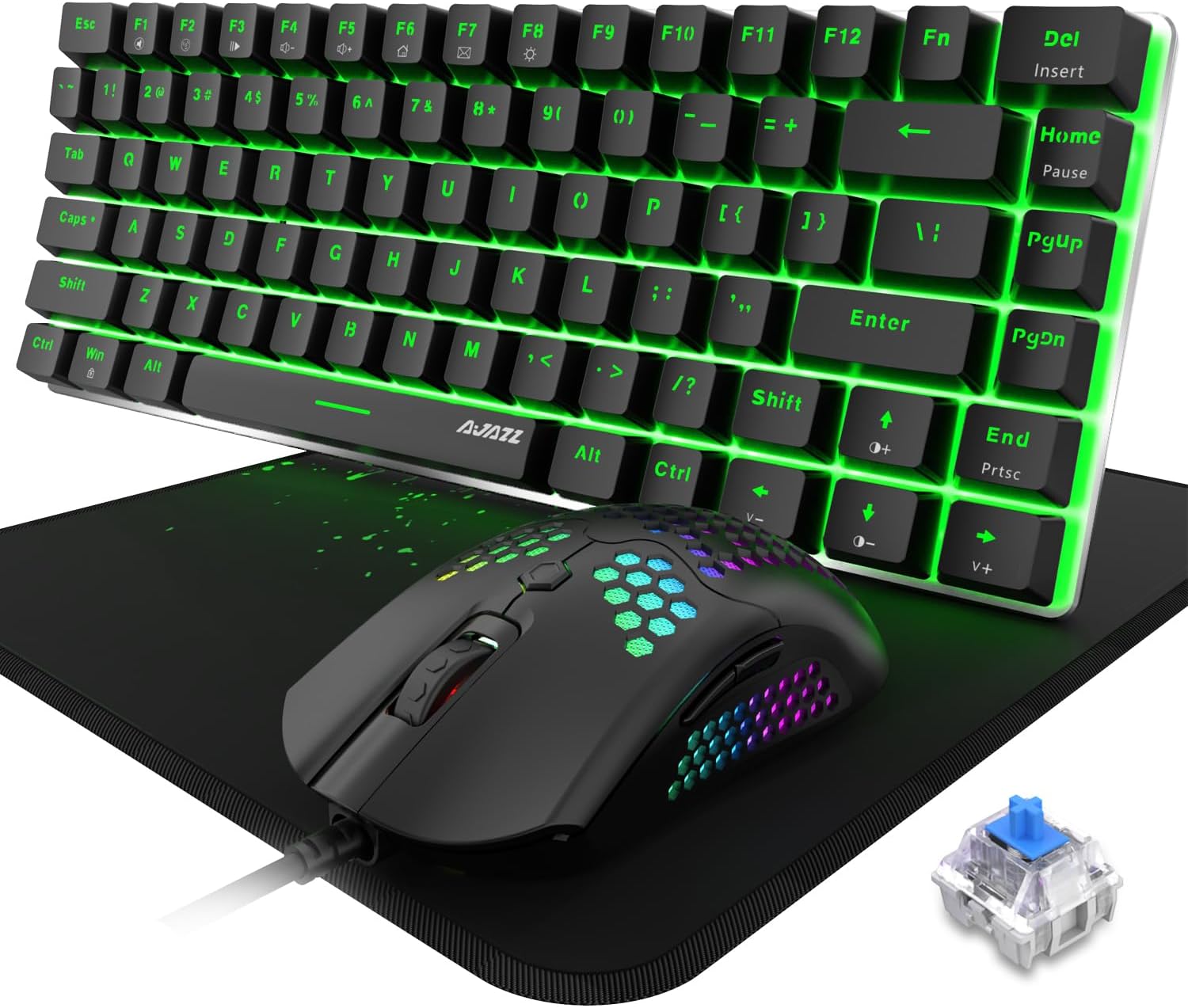
Image: The Ajazz AK33 keyboard and mouse set, with a close-up inset of a blue mechanical switch, illustrating the hot-swappable feature.
Údržba
- Čištění klávesnice:
- Pro důkladné vyčištění kláves použijte dodaný stahovák na klávesy a opatrně je odstraňte.
- Use the cleaning brush to remove dust and debris from between the keys and switches.
- Otřete klávesy měkkým hadříkemamp cloth. Ensure the keyboard is completely dry before reattaching keycaps and using.
- Čištění myši:
- K otření povrchu myši použijte měkký, suchý hadřík.
- For the honeycomb shell, use a soft brush or compressed air to remove dust and debris from the perforations.
- Obecná péče: Avoid exposing the devices to excessive moisture, extreme temperatures, or direct sunlight. Do not use harsh chemicals or abrasive materials for cleaning.
Odstraňování problémů
| Problém | Možná příčina | Řešení |
|---|---|---|
| Klávesnice/myš nereaguje | Volné USB připojení, vadný USB port, problém s ovladačem. |
|
| Podsvícení nefunguje nebo je nesprávné | Backlight settings, software conflict. |
|
| Mouse DPI not changing | DPI button malfunction, driver issue. |
|
| Programovatelná tlačítka nefungují | Driver not installed or configured. |
|
Specifikace
| Funkce | Detail |
|---|---|
| Název produktu | Ajazz AK33 3-in-1 Wired Gaming Keyboard and Mouse Set |
| Model | AK33 |
| Rozložení klávesnice | 82 kláves, kompaktní |
| Typ přepínače klávesnice | Mechanical Blue Switch (Hot-Swappable 3-pin/5-pin compatible) |
| podsvícení klávesnice | Rainbow LED Backlit (8 effects) |
| Funkce klávesnice | Full Anti-Ghosting, 12 Multimedia Buttons, Detachable Type-C Cable |
| Design myši | Ergonomic, Lightweight (65g), Honeycomb Shell |
| DPI myši | Až 12 000 DPI (nastavitelné) |
| Tlačítka myši | 7 tlačítek (6 programovatelných) |
| Podsvícení myši | RGB podsvícení (26 efektů) |
| Konektivita | Kabelové USB |
| Kompatibilita | Win98 / 2000 / 2003 / 7 / 8 / 10 / XP / Vista / MAC, etc. |
| Hmotnost položky | 2 libry (celkové balení) |
| Rozměry balení | 12 x 6 x 3 palce |
Záruka a podpora
Informace o záruce a technickou podporu získáte od oficiálního prodejce Ajazz. webnebo se obraťte přímo na jejich zákaznický servis. Uschovejte si účtenku jako doklad o koupi pro případné reklamace.
Official Ajazz Webmísto: www.ajazz.com (Poznámka: Toto je zástupný symbol URL as the actual URL was not provided in the product data. Please replace with the correct URL if available.)


