Zavedení
Welcome to the world of classic arcade gaming with your new ARCADE1UP Galaga Deluxe Arcade Machine. This manual provides essential information for setting up, operating, and maintaining your machine to ensure years of nostalgic entertainment.
Co je zahrnuto
- One (1) ARCADE1UP Galaga Deluxe Arcade Machine Cabinet
- Napájecí adaptér
- Montážní hardware a nástroje
- Metal Certificate of Authenticity

Figure 1: Included Parts and Hardware for Assembly
Nastavení
Montážní návod
Your Arcade1Up machine comes with pre-assembled components for a straightforward setup. Follow the included detailed instructions for step-by-step assembly. Ensure all connections are secure before powering on the unit.
Warning: Adult assembly required. Keep small parts away from children.

Figure 2: Assembled Galaga Deluxe Arcade Machine
Počáteční zapnutí
- Connect the power adapter to the machine's power input and then to a standard AC outlet.
- Locate the On/Off button, typically on the control panel or rear of the machine, and press it to power on.
- The 17-inch BOE Color Monitor will illuminate, and the system will begin loading.
Operace
Výběr hry
Your Galaga Deluxe Arcade Machine features 14 classic games:
- Galaga
- galaxický
- Galaga '88
- PAC-Man
- PAC & PAL
- Super PAC-MAN
- PAC-MAN Plus
- PAC-LAND
- PAC-MANIA
- Dig Dug
- Dig Dug II
- Rompers
- Rolling Thunder
Use the joystick and buttons on the control panel to navigate the on-screen game selection menu. Select your desired game to begin playing.

Obrázek 3: Ovládací panel nadview
Žebříčky Wi-Fi
This machine supports Wi-Fi Leaderboards, allowing you to post your high scores and compete with players globally. To connect:
- Access the network settings from the main menu.
- Select your Wi-Fi network and enter the password if prompted.
- Once connected, your scores will automatically be uploaded to the online leaderboards.
The machine also features dual speakers for authentic arcade sound effects.
Údržba
Čištění
To keep your arcade machine in optimal condition:
- Wipe down the cabinet and screen with a soft, dry cloth.
- Na odolné skvrny použijte lehceamp cloth with a mild, non-abrasive cleaner. Avoid harsh chemicals.
- Do not spray cleaning solutions directly onto the screen or control panel.
Skladování
When not in use for extended periods, store the machine in a cool, dry place away from direct sunlight and extreme temperatures.
Odstraňování problémů
Žádná síla
- Ensure the power adapter is securely connected to both the machine and a working AC outlet.
- Check if the On/Off button is in the 'On' position.
- Otestujte zásuvku pomocí jiného zařízení, abyste se ujistili, že je pod proudem.
Žádný zvuk
- Verify the volume settings are not muted or set too low in the system menu.
- Ensure no external audio devices are connected that might override the internal speakers.
Problémy s připojením Wi-Fi
- Ověřte, zda je vaše síť Wi-Fi aktivní a v dosahu.
- Double-check the Wi-Fi password if you are prompted to re-enter it.
- Zkuste restartovat Wi-Fi router.
Specifikace
| Funkce | Detail |
|---|---|
| Název produktu | ARCADE1UP Galaga Deluxe Arcade Machine |
| Číslo modelu | 1237971 |
| Značka | ARCADE1UP |
| Velikost obrazovky | 17 Inches (BOE Color Monitor) |
| Počet her | 14 klasických her |
| Konektivita | Žebříčky Wi-Fi |
| Zdroj napájení | Zdroj střídavého proudu |
| Materiál | Metal (cabinet components) |
| Hmotnost položky | 33 kg (přibližně 72.6 libry) |
| Doporučený věk | 14 let a více |
| Datum vydání | 28. listopadu 2023 |
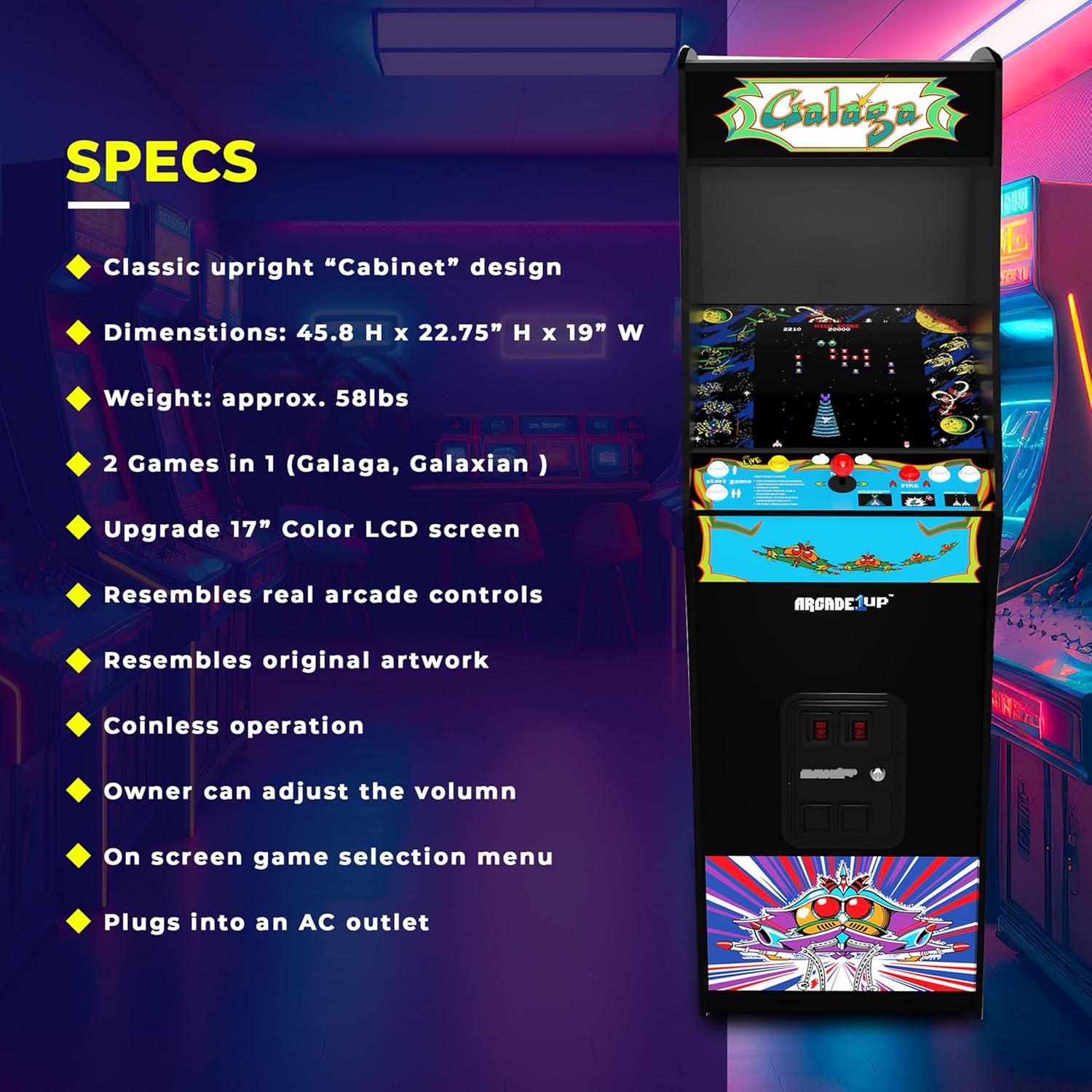
Obrázek 4: Specifikace produktu

Obrázek 5: Rozměry stroje
Záruka a podpora
For warranty information, technical support, or replacement parts, please visit the official ARCADE1UP webnebo kontaktujte jejich oddělení zákaznických služeb. Podrobnosti lze obvykle nalézt na obalu produktu nebo na etiketě výrobce. webmísto.
ARCADE1UP Store: Navštivte obchod ARCADE1UP na Amazonu
Zákaznická podpora
For direct assistance, refer to the contact information provided with your purchase or on the manufacturer's official support channels.


