Zavedení
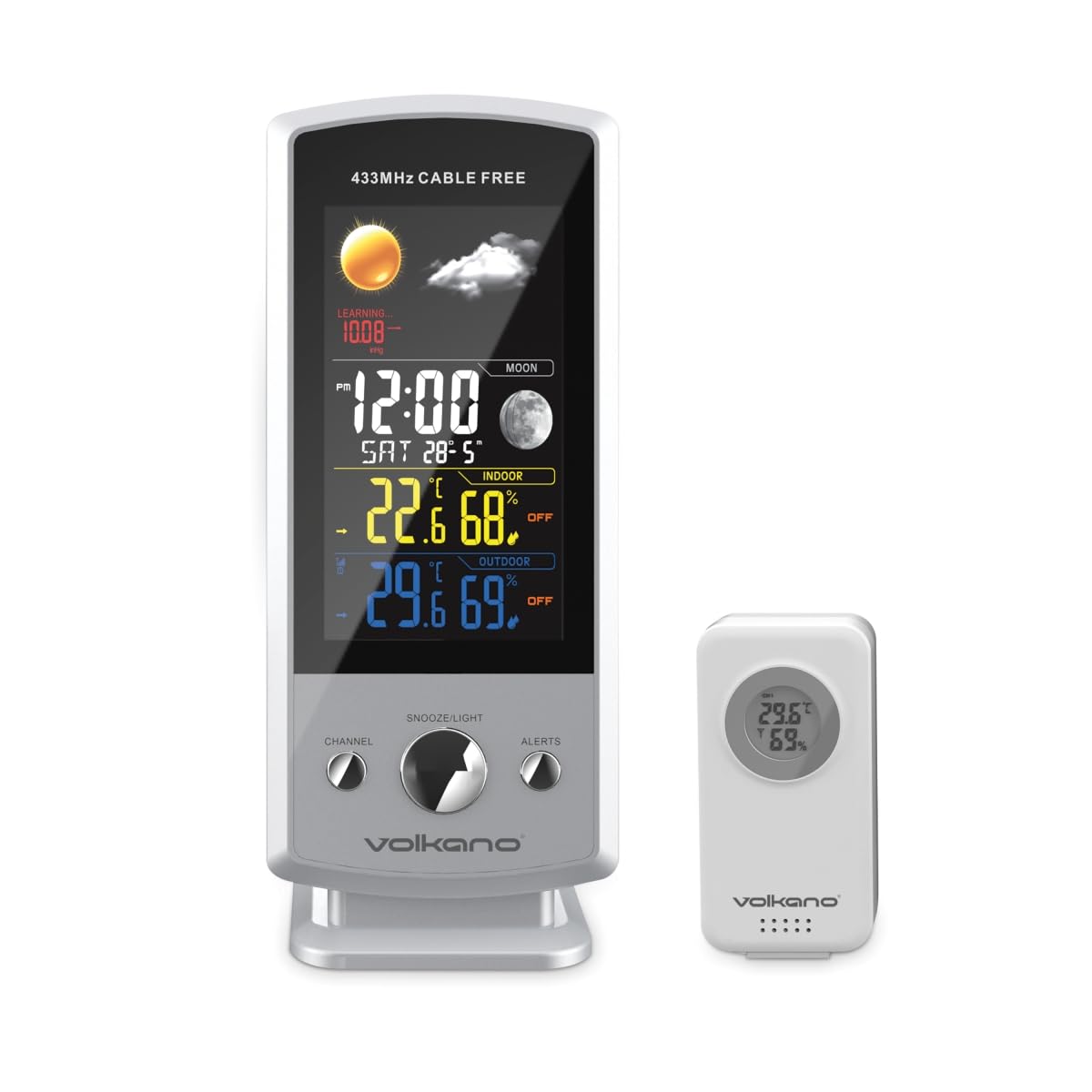
The Volkano VK-6301 Drizzle Series Weather Station is a wireless device designed to provide accurate and up-to-date weather information. It features a large, easy-to-read display that shows indoor and outdoor temperature, humidity, and atmospheric pressure. Additionally, it provides a weather forecast, current time, and date. The system includes an outdoor sensor unit that wirelessly transmits environmental data to the main indoor display unit.
Obsah balení
- Volkano Drizzle Series Main Display Unit
- Wireless Outdoor Sensor Unit
- Napájecí kabel USB
- Uživatelská příručka
Klíčové vlastnosti
- Wireless weather station with an outdoor sensor unit.
- Large, easy-to-read display showing indoor and outdoor temperature, humidity, and pressure.
- Displays weather forecast, current time, and date.
- Outdoor sensor unit can be placed up to 100 meters away from the indoor display unit.
Pokyny pro nastavení
1. Main Display Unit Setup
- Připojení napájení: Connect the provided USB power cable to the main display unit and plug the other end into a suitable USB power adapter (not included) or a powered USB port. The unit will power on and the display will illuminate.
- Počáteční nastavení: Upon first power-up, the unit may prompt you to set the time, date, and measurement units (Celsius/Fahrenheit). Use the control buttons (typically located on the back or side) to adjust these settings. Refer to the 'Operating Instructions' section for detailed button functions.
2. Wireless Outdoor Sensor Unit Setup
- Instalace baterie: Open the battery compartment on the back of the outdoor sensor unit. Insert 2x AAA batteries (not included), ensuring correct polarity (+/-). Close the compartment securely.
- Umístění: Position the outdoor sensor in a shaded area, protected from direct sunlight and rain, to ensure accurate temperature and humidity readings. Ensure it is within 100 meters of the main display unit and free from major obstructions that could interfere with the wireless signal.
- Párování: The outdoor sensor should automatically pair with the main display unit within a few minutes. If the outdoor readings do not appear, press the 'SYNC' or 'CHANNEL' button on the main unit (refer to specific button layout) to initiate a manual search for the sensor.

Návod k obsluze
Zobrazit přesview
Hlavní zobrazovací jednotka poskytuje komplexní přehledview aktuální informace o počasí a čase:
- Čas a datum: Displays the current time (12/24-hour format) and date.
- Vnitřní teplota a vlhkost: Shows the temperature and relative humidity measured by the main unit.
- Venkovní teplota a vlhkost: Shows the temperature and relative humidity transmitted from the wireless outdoor sensor.
- Atmosférický tlak: Zobrazuje aktuální barometrický tlak.
- Předpověď počasí: An icon-based forecast (e.g., sunny, cloudy, rainy) predicts upcoming weather conditions based on pressure changes.
- Fáze Měsíce: Ukazuje aktuální fázi Měsíce.
Funkce tlačítek (obecné)
While specific button labels may vary, most weather stations include the following common functions:
- MODE/SET: Používá se pro vstup do režimu nastavení a potvrzení výběru.
- NAHORU/DOLŮ (nebo +/-): Used to adjust values during settings or to toggle between display modes (e.g., min/max temperature).
- POPLACH: To set or activate/deactivate alarms.
- SNOOZE/LIGHT: To temporarily silence an alarm or activate the backlight.
- KANÁL/SYNCHRONIZACE: To switch between multiple outdoor sensors (if supported) or manually initiate sensor pairing.
- C/F: Přepínání mezi jednotkami teploty Celsia a Fahrenheita.
Refer to the specific button layout on your device for exact functions and sequences.
Údržba
- Čištění: Otřete displej a venkovní senzor měkkým hadříkem.amp hadříkem. Nepoužívejte abrazivní čisticí prostředky ani rozpouštědla, protože by mohly poškodit povrch.
- Battery Replacement (Outdoor Sensor): When the battery indicator on the main display shows low battery for the outdoor sensor, replace the batteries promptly to ensure continuous data transmission. Use fresh AAA batteries.
- Placement Check: Periodically check the outdoor sensor's placement to ensure it remains protected from extreme weather and maintains a clear signal path to the main unit.
Odstraňování problémů
| Problém | Možná příčina | Řešení |
|---|---|---|
| Na hlavní jednotce se nezobrazuje žádný displej. | Napájecí kabel není připojen nebo je vadný. | Ensure USB power cable is securely connected and power adapter is working. |
| Venkovní teplota/vlhkost se nezobrazuje. | Outdoor sensor batteries low or dead; sensor out of range; interference; sensor not paired. | Replace sensor batteries. Move sensor closer to main unit. Reduce interference sources. Manually re-pair sensor (refer to 'Setup Instructions'). |
| Inaccurate outdoor readings. | Snímač vystavený přímému slunečnímu záření nebo dešti. | Relocate sensor to a shaded, protected area. |
| Předpověď počasí se zdá být nepřesná. | Forecast is based on local atmospheric pressure changes, not satellite data. | Understand that the forecast is a local prediction and may not always match official forecasts. Allow time for the unit to calibrate. |
Specifikace
- Model: VK-6301-WT
- Značka: Volkano
- Bezdrátový dosah: Až 100 metrů (v otevřeném prostoru)
- Napájení (hlavní jednotka): Napájecí kabel USB
- Napájení (venkovní senzor): 2x AAA baterie (nejsou součástí balení)
- Zobrazit: Large, easy-to-read color display
- Funkce: Indoor/Outdoor Temperature, Indoor/Outdoor Humidity, Atmospheric Pressure, Weather Forecast, Time, Date, Moon Phase
- Rozměry (balení): Přibližně 24.2 x 20.4 x 12.2 cm
- Hmotnost položky: Přibližně 540 g
Záruka a podpora
Všechny produkty Volkano jsou kryty 1leté omezené krytí and lifetime customer support. You can extend your coverage by registering your product to receive an additional 12-month extension, totaling 24 months of coverage by Volkano.
For support with products or services, please message us via the official Volkano Page or visit the Volkano webstránky pro kontaktní informace.