Zavedení
Thank you for choosing the Rohnson Genius 16 Dehumidifier. This appliance is designed to efficiently remove excess moisture from your indoor environment, improve air quality, and create a healthier living space. With its advanced features, including Wi-Fi control, a powerful dehumidification capacity of up to 16 liters per day, and an ultra-quiet operation, the Genius 16 is an ideal solution for rooms up to 100 square meters. Please read this manual thoroughly before operating the unit to ensure safe and optimal performance.
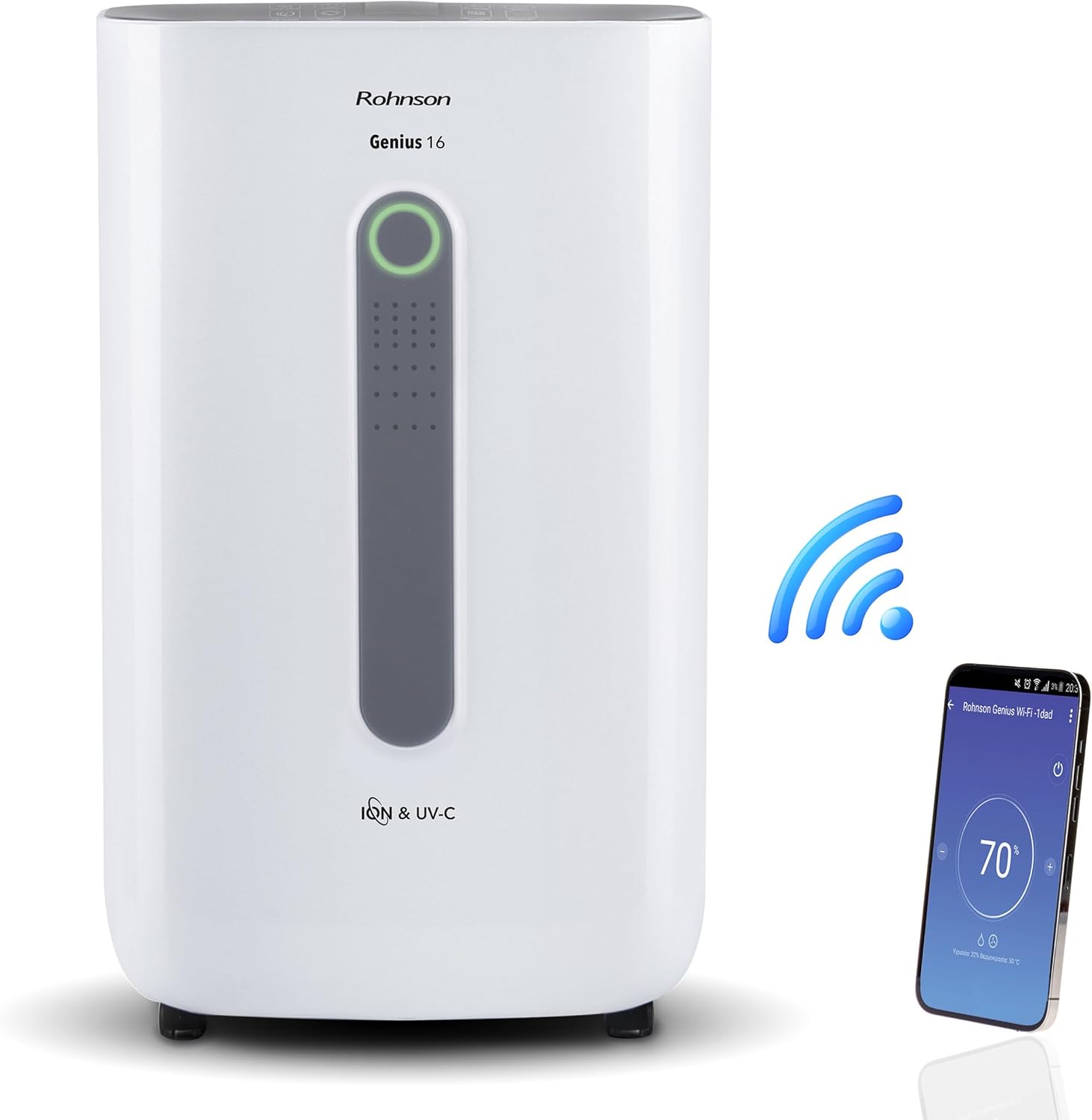
Image: The Rohnson Genius 16 Dehumidifier, a white rectangular unit with a central display, shown alongside a Wi-Fi symbol and a smartphone displaying the control app. This illustrates the unit's smart connectivity.
Bezpečnostní pokyny
Při používání elektrických spotřebičů vždy dodržujte základní bezpečnostní opatření, abyste snížili riziko požáru, úrazu elektrickým proudem a zranění.
- Ujistěte se, že napájecí zdroj odpovídá objtaguvedené na štítku s výkonem jednotky.
- Neprovozujte jednotku s poškozeným kabelem nebo zástrčkou.
- Udržujte jednotku mimo zdroje tepla a přímého slunečního světla.
- Neblokujte vstupy nebo výstupy vzduchu.
- Před čištěním nebo prováděním údržby vždy odpojte jednotku ze sítě.
- Uchovávejte mimo dosah dětí.
Konec produktuview
The Rohnson Genius 16 Dehumidifier is equipped with several features to enhance your indoor air quality and comfort.
- Účinné odvlhčování: Removes up to 16 liters of moisture per day, suitable for areas up to 100 m².
- Advanced Air Purification: Features UV-C light and a dual ionizer to eliminate bacteria and odors. An optional HEPA 13 + Activated Carbon filter can remove 99.7% of particles, smoke, chemicals, and allergens.
- Ultra tichý provoz: Operates at a low noise level of 36 dB(A) in low fan mode, ideal for bedrooms and living areas.
- Inteligentní ovládání: Wi-Fi enabled for remote control via the Rohnson App (Android and iOS compatible). Includes a touch control panel, 1-24 hour timer, and automatic restart after power failure.
- Energeticky úsporný design: Powerful yet energy-efficient with only 240W power consumption. Features a Turbo-Boost mode for fast clothes drying and automatic shut-off when the water tank is full.
- Digital Humidity Display: A color indicator (Blue, Green, Red) shows current humidity levels for easy monitoring.

Image: The Rohnson Genius 16 Dehumidifier positioned in a living room, illustrating its compact size. Key features are overlaid, including its 16L/day dehumidification capacity, anti-frost system, digital humidity display, smart Wi-Fi control, UV-C light and ionizer, silent 36dB operation, and 6.5L water tank.
Nastavení
1. Vybalování
Carefully remove the dehumidifier from its packaging. Inspect the unit for any signs of damage. Retain the packaging for future storage or transport.
2. Umístění
Place the dehumidifier on a firm, level surface in the area where dehumidification is desired. For optimal performance, ensure there is at least 20 cm (8 inches) of space around all sides of the unit to allow for proper airflow. The unit is effective for rooms up to 100 m². For best air circulation, consider placing it centrally within the room.

Image: A diagram illustrating the optimal placement of the dehumidifier in different household areas such as a laundry room, bedroom, living room, office, and basement, emphasizing central positioning for maximum effectiveness in rooms up to 100 m².
3. Připojení napájení
Plug the power cord into a grounded electrical outlet. Ensure the outlet meets the electrical requirements of the unit (230 Volts AC).
4. Filter Installation (Optional HEPA 13 + Activated Carbon Filter)
The Rohnson Genius 16 comes with an optional HEPA 13 + Activated Carbon filter for enhanced air purification.
- Locate the filter compartment, typically at the back or side of the unit.
- Otevřete kryt filtru.
- Insert the HEPA 13 + Activated Carbon filter, ensuring it is correctly oriented.
- Pevně zavřete kryt filtru.
5. Možnosti odvodnění
Jednotka nabízí dva způsoby odvodnění:
- Nádrž na vodu: The unit has a 6.5-liter water tank. When the tank is full, the unit will automatically shut off and an indicator will light up. Empty the tank and reinsert it to resume operation.
- Nepřetržité odvodňování: For continuous operation without needing to empty the tank, connect a drainage hose (not included) to the continuous drainage port on the unit. Route the hose to a suitable drain or larger container.
Návod k obsluze
1. Ovládací panel
The Rohnson Genius 16 features an intuitive touch control panel and a digital display.
- Vypínač: Zapíná nebo vypíná jednotku.
- Výběr režimu: Cycle through different operating modes (e.g., Dehumidification, Turbo-Boost, Night Mode).
- Rychlost ventilátoru: Adjust fan speed (low, medium, high).
- Nastavení vlhkosti: Set your desired humidity level. The unit will operate until this level is reached.
- Tlačítko časovače: Set a timer for automatic shut-off (1-24 hours).
- UV-C/Ionizer Button: Activates or deactivates the UV-C light and dual ionizer.
- Digitální displej: Shows current humidity, temperature, and selected settings.

Image: A visual representation of the digital humidity control feature, showing the dehumidifier and its color-coded humidity indicators. Blue indicates humidity below 55%, Green for 55-70%, and Red for above 70%, providing an easy visual cue for air moisture levels.
2. Ovládání aplikací přes Wi-Fi
Control your Rohnson Genius 16 from anywhere using the Rohnson App.
- Download the "Rohnson" app from the App Store (iOS) or Google Play Store (Android).
- Zaregistrujte si účet a přihlaste se.
- Follow the in-app instructions to add your Rohnson Genius 16 dehumidifier. This typically involves putting the unit into pairing mode and connecting it to your home Wi-Fi network.
- Once connected, you can remotely monitor humidity, adjust settings, set schedules (hourly, daily, weekly), and control all functions of the dehumidifier.

Image: A banner illustrating the smart connectivity of the dehumidifier, showing the unit and a smartphone displaying the Rohnson app. This highlights the ability to control the room climate remotely, schedule operations, and monitor humidity via a smartphone, compatible with both Android and iOS.
3. Speciální režimy
- Turbo-Boost Mode (Laundry Drying): This mode provides a powerful airflow to quickly dry clothes indoors. Position the unit near the laundry for efficient drying.
- Noční režim: Snižuje otáčky ventilátoru a ztlumuje podsvícení displeje pro tichý provoz během spánku.

Image: The Rohnson Genius 16 Dehumidifier positioned in a room with a clothes drying rack, illustrating its effectiveness in drying laundry indoors, especially useful during rainy weather or in apartments without balconies.
Údržba
Pravidelná údržba zajišťuje dlouhou životnost a efektivní provoz vašeho odvlhčovače. Před čištěním vždy odpojte přístroj ze zásuvky.
1. Čištění exteriéru
Otřete vnější část jednotky měkkým, damp hadříkem. Nepoužívejte agresivní chemikálie, abrazivní prostředky ani rozpouštědla, protože by mohly poškodit povrch.
2. Čištění/výměna filtrů
The air filter should be cleaned regularly (e.g., every two weeks or as needed) to maintain optimal performance. If using the optional HEPA 13 + Activated Carbon filter, refer to its specific replacement schedule.
- Vypněte a odpojte odvlhčovač.
- Remove the filter cover and carefully take out the filter(s).
- For washable filters, rinse with lukewarm water and mild detergent. Allow to air dry completely before reinserting.
- For HEPA/Activated Carbon filters, these are typically not washable and should be replaced according to manufacturer recommendations or when visibly dirty.
- Reinsert the clean/new filter(s) and close the cover.
3. Vyprázdnění vodní nádrže
When the water tank is full, the unit will stop operating.
- Opatrně vytáhněte nádržku na vodu z jednotky.
- Opatrně vylijte nahromaděnou vodu.
- Clean the tank with mild soap and water if necessary, then rinse thoroughly.
- Reinsert the empty tank firmly into the unit until it clicks into place. The unit will resume operation.
Odstraňování problémů
Než kontaktujete zákaznickou podporu, prostudujte si prosím následující běžné problémy a jejich řešení.
| Problém | Možná příčina | Řešení |
|---|---|---|
| Jednotka se nezapne. | Žádné napájení, uvolněný napájecí kabel, nádržka na vodu je plná nebo není správně zasunutá. | Check power connection. Empty and reinsert water tank securely. |
| Neshromážděná voda / Nízké odvlhčování. | Room humidity too low, air filter clogged, temperature too low, unit size too small for room. | Check current humidity setting. Clean or replace air filter. Ensure room temperature is above 5°C (41°F). |
| Jednotka je hlučná. | Jednotka není na rovném povrchu, ventilátor je ucpaný, filtr je znečištěný. | Place unit on a flat, stable surface. Check for obstructions in fan area. Clean filter. |
| Problémy s připojením k Wi-Fi. | Incorrect Wi-Fi password, unit too far from router, app not updated. | Ensure correct Wi-Fi password. Move unit closer to router. Update Rohnson App. Refer to app's troubleshooting guide. |
Specifikace
| Funkce | Detail |
|---|---|
| Značka | Rohnson |
| Číslo modelu | R-9916W |
| Odvlhčovací kapacita | Až 16 litrů/den |
| Doporučená plocha místnosti | Až 100 m² |
| Kapacita vodní nádrže | 6.5 litrů |
| Úroveň hluku | 36 dB(A) (low fan mode) |
| Spotřeba energie | 240 W |
| svtage | 230 voltů (AC) |
| Rozměry produktu (D x Š x V) | 28 x 38 x 64 cm |
| Hmotnost položky | 16 kg |
| Speciální funkce | Digital Display, Wi-Fi Control, UV-C Light, Dual Ionizer, Optional HEPA 13 Filter, Turbo-Boost Mode, Auto Shut-off, Auto Restart |
| Barva | Bílý |
Záruka a podpora
For information regarding warranty coverage and customer support, please refer to the warranty card included with your product or visit the official Rohnson webwebu. Uschovejte si účtenku jako doklad o koupi.
If you encounter issues not covered in this manual, please contact Rohnson customer service for assistance.


