
1. Úvod
Thank you for choosing the SANODESK S1Q Electric Standing Desk. This desk is designed to provide a versatile and ergonomic workspace, allowing you to easily switch between sitting and standing positions. Its robust construction and intelligent features aim to enhance your comfort and productivity. Please read this manual thoroughly before assembly and operation to ensure safe and correct use of your new desk.
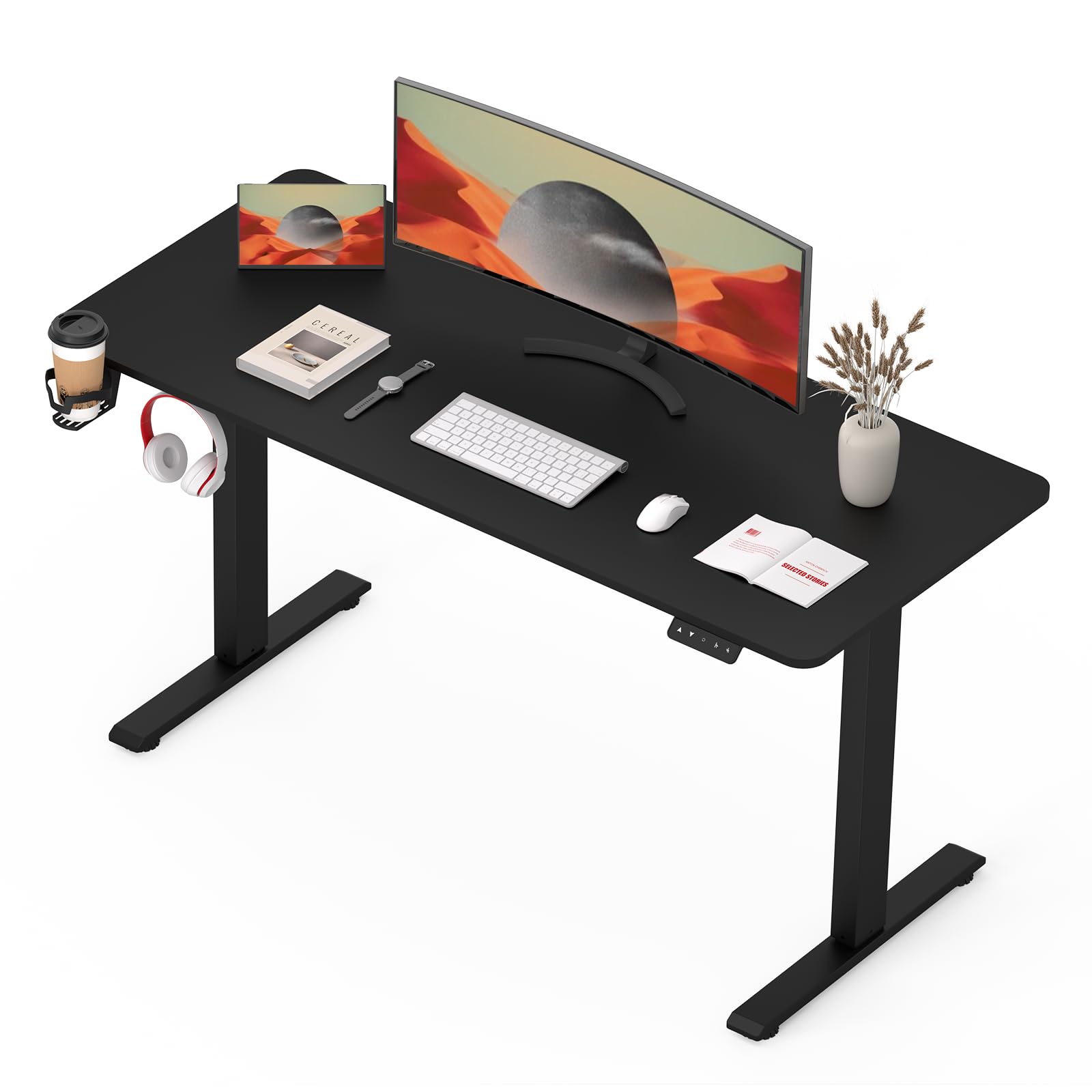
Image: The SANODESK S1Q Electric Standing Desk, showcasing its minimalist design and ample workspace, equipped with dual monitors and a comfortable chair.
2. Bezpečnostní pokyny
To ensure safe operation and prolong the lifespan of your SANODESK S1Q, please observe the following safety guidelines:
- Před použitím se ujistěte, že jsou všechny součásti bezpečně upevněny.
- Během práce držte děti a domácí zvířata v dostatečné vzdálenosti od stolu, abyste předešli zranění.
- Do not overload the desk. The maximum weight capacity is 70 kg (154 lbs).
- Zabraňte přímému kontaktu tekutin s ovládacím panelem nebo součástmi motoru.
- Nerozebírejte ani neupravujte elektrické součásti stolu. Pro opravy se obraťte na kvalifikovaný personál.
- Ensure there are no obstructions in the desk's path during height adjustment. The anti-collision system is designed to prevent damage, but manual checks are recommended.
- Používejte pouze napájecí adaptér dodaný se stolem.

Image: Detail of the desk's safe round corner design and environmental certifications (CARB, TSCA Title VI), highlighting product safety and quality.
3. Montážní návod
While the SANODESK S1Q is designed for straightforward assembly, it is recommended to have two people for certain steps. Please ensure all parts are present before beginning.
3.1 Obsah balení
Before assembly, verify that you have received all the following components:
- Desktop Surface (1)
- Leg Columns (2)
- nohy (2)
- Ovládací skříňka (1)
- Ruční ovladač/Ovládací panel (1)
- Napájecí adaptér (1)
- Napájecí kabel (1)
- Hardware Kit (screws, Allen wrenches, cable ties)
3.2 Montážní kroky
- Rozbalte komponenty: Opatrně vyjměte všechny díly z obalu a položte je na čistý, měkký povrch, abyste zabránili poškrábání.
- Attach Feet to Leg Columns: Securely fasten the feet to the bottom of each leg column using the provided screws.
- Attach Leg Columns to Desktop: Place the desktop upside down. Attach the leg columns to the pre-drilled holes on the underside of the desktop. Ensure they are aligned correctly.
- Instalace ovládací jednotky: Mount the control box to the designated area under the desktop using the provided screws.
- Připojit kabely: Connect the motor cables from the leg columns to the control box. Connect the handset cable to the control box. Finally, connect the power adapter to the control box.
- Mount Handset: Attach the control panel to the front edge of the desktop in a comfortable position.
- Správa kabelů: Use the included cable ties to organize and secure all cables, preventing them from dangling or getting caught.
- Otočte stůl: With assistance, carefully flip the desk upright onto its feet.
- Počáteční zapnutí: Zapojte napájecí kabel do zásuvky ve zdi.
4. Návod k obsluze
The SANODESK S1Q features an intuitive control panel for easy height adjustment and memory functions.
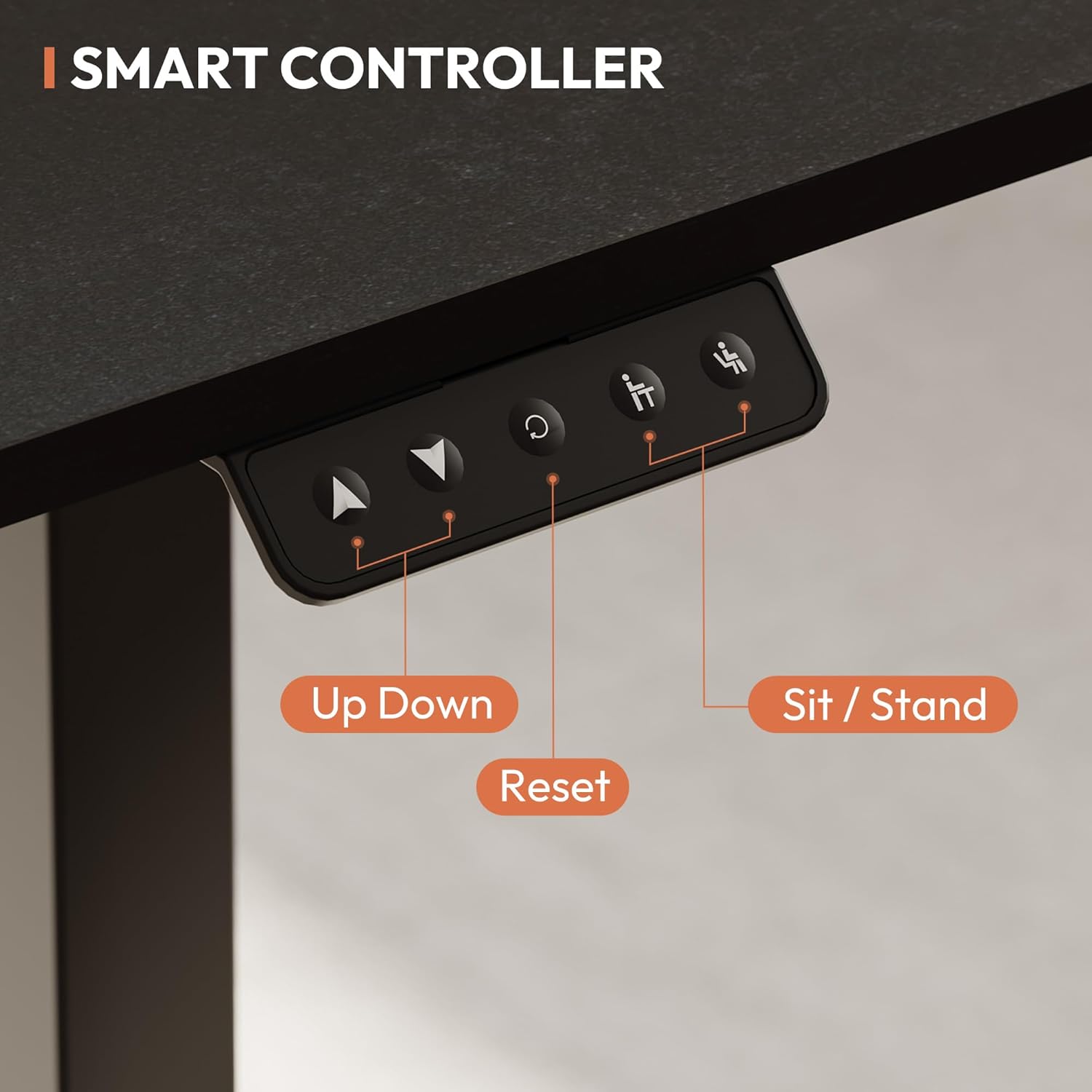
Image: The smart controller of the SANODESK S1Q, showing the clearly labeled buttons for height adjustment, reset, and two memory presets for sitting and standing positions.
4.1 Základní nastavení výšky
- Stiskněte a podržte Nahoru (▲) tlačítko pro zvednutí stolu.
- Stiskněte a podržte Dolů (▼) tlačítko pro spuštění stolu.
- Uvolněte tlačítko v požadované výšce.

Image: Comparison of two SANODESK desks demonstrating the height adjustment range from a minimum of 71 cm to a maximum of 116 cm, accommodating various user heights.
4.2 Předvolby paměti
The control panel features two memory preset keys (labeled with a sitting and standing icon) to store your preferred sitting and standing heights.
- Nastavení pozice v paměti:
- Nastavte stůl do požadované výšky pomocí tlačítek Nahoru/Dolů.
- Stiskněte tlačítko „M“ button (or the button with a circle icon, depending on model variation) once. The display will show "S-".
- Within 3 seconds, press one of the preset buttons (sitting or standing icon). The display will show "S-1" or "S-2" to confirm the height is saved.
- Vyvolání pozice z paměti:
- Simply press the desired preset button (sitting or standing icon). The desk will automatically move to the saved height.
4.3 Funkce reset
If the desk encounters an error or does not operate correctly, a reset may be required.
- Stiskněte a podržte Reset (R) button (or the button with a circle icon, if it functions as reset) for approximately 5 seconds until the desk moves to its lowest position and then slightly back up. Release the button. The desk is now reset.
4.4 Protikolizní systém
The SANODESK S1Q is equipped with an anti-collision system to prevent damage. If the desk encounters an obstruction during height adjustment, it will automatically stop and reverse slightly. Remove the obstruction before resuming operation.
The desk operates with an ultra-quiet motor, typically below 51 dB, ensuring a distraction-free environment.

Image: A visual representation of the desk's quiet operation, indicating noise levels below 50 dB, which is quieter than typical office sounds.
5. Údržba
Pravidelná údržba zajistí dlouhou životnost a optimální výkon vašeho stolu.
- Čištění: Otřete pracovní plochu a rám měkkým hadříkemamp hadříkem. Nepoužívejte abrazivní čisticí prostředky ani agresivní chemikálie.
- Správa kabelů: Periodically check and reorganize cables to prevent tangles and damage.
- Spojovací materiál: Občas zkontrolujte všechny šrouby a vruty, zda jsou pevně utažené. V případě potřeby je dotáhněte.
- Kontrola motoru: Listen for any unusual noises during operation. If you detect any, discontinue use and contact support.
6. Řešení problémů
If you encounter issues with your SANODESK S1Q, refer to the following common problems and solutions:
| Problém | Možná příčina | Řešení |
|---|---|---|
| Stůl se nehýbe. | Power cable disconnected, control box issue, motor issue. | Check power connections. Perform a reset (see Section 4.3). If problem persists, contact support. |
| Stůl se pohybuje nerovnoměrně nebo vydává neobvyklé zvuky. | Overload, loose connections, obstruction. | Reduce weight on desk. Check all connections. Perform a reset. Ensure no obstructions. |
| Protikolizní systém se často spouští. | Obstruction in path, sensor sensitivity. | Ensure clear path for desk movement. |
| Předvolby paměti nefungují. | Předvolby nebyly správně uloženy. | Re-save your desired memory positions (see Section 4.2). |
7. Specifikace
Key technical specifications for the SANODESK S1Q Electric Standing Desk:
- Název modelu: Set EP1E
- Značka: SANODESK
- Rozměry pracovní plochy: 110 cm x 60 cm (přibližně 43.31 x 23.62 palce)
- Rozsah nastavení výšky: 71 cm (28 palců) až 117 cm (46 palců)
- Maximální nosnost: 70 kg (154 lb)
- Hladina hluku: Pod 51 dB
- Barva: Černý
- Vlastnosti: Electric height adjustment, 2 memory presets, anti-collision system, quiet operation.
- GTIN/UPC: 810072847669
- ASIN: B0CMPSX4TN

Image: The SANODESK S1Q demonstrating its robust build and 60kg load capacity, indicating strong support for various office equipment.
8. Záruka a podpora
SANODESK is committed to providing high-quality products. For warranty information, technical support, or any questions regarding your S1Q Electric Standing Desk, please refer to the contact information provided at the point of purchase or visit the official SANODESK webmísto.
Please have your model number (Set EP1E) and ASIN (B0CMPSX4TN) ready when contacting support.