Konec produktuview
The R-Volution Player ONE 8k is an advanced media player and server designed to deliver a revolutionary home cinema experience. It supports impressive image quality with Dolby Vision and HDR10+, powered by a robust Realtek RTD1619DR chipset. This device allows streaming content to other R_volution devices within your network using the exclusive R_share Advanced Streaming Protocol.
Mezi klíčové vlastnosti patří:
- Support for Dolby Vision and HDR10+ for superior image quality.
- Internal storage capacity for up to 32 TB (expandable via USB).
- Two HDMI outputs for versatile connectivity.
- UHD 4K content support and upscaling to 4K Ultra HD (3840 x 2160).
- Automatic volume leveling.
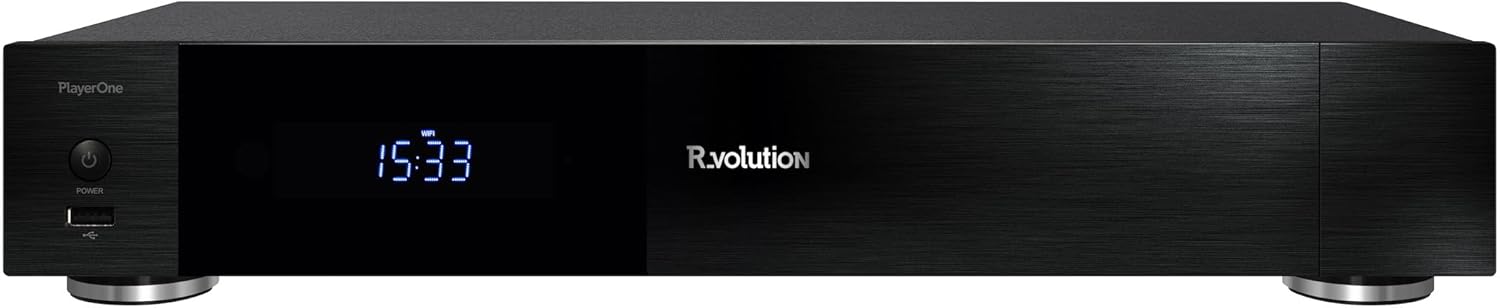
Obrázek 1: Přední strana view of the R-Volution Player ONE 8k. This image displays the sleek black design of the media player, featuring a power button on the left, a front USB port, and a central digital display showing the time.
Nastavení
Connecting Your Player ONE 8k
Before operating your R-Volution Player ONE 8k, ensure all necessary connections are made. Refer to the rear panel diagram for port identification.

Figure 2: Rear panel connections of the R-Volution Player ONE 8k. This image shows the comprehensive array of ports on the back of the device, including HDMI outputs, USB ports, Ethernet, optical, coaxial, and analog audio outputs, along with Wi-Fi and Bluetooth antennas.
Popis portů:
- HDMI OUT (Audio Only): Connects to an audio receiver for dedicated audio output.
- HDMI OUT (Main): Connects to your TV, monitor, or projector for video and audio.
- USB porty: 3.0 Pro připojení externích paměťových zařízení nebo jiných periferií USB.
- USB Type-C: Additional high-speed connectivity.
- Ethernet (LAN): Pro kabelové síťové připojení.
- Wi-Fi antény: Pro bezdrátové síťové připojení.
- Bluetooth anténa: For connecting Bluetooth devices.
- Optical (SPDIF) & Coaxial Audio Outputs: For digital audio connections to compatible audio systems.
- RCA Audio Outputs (L/R): For analog stereo audio connections.
- AC IN: Vstupní napájení zařízení.
Initial Connection Steps:
- Connect the Player ONE 8k to your display (TV, monitor, or projector) using an HDMI cable from the HDMI OUT (hlavní) přístav.
- If using a separate audio receiver, connect it via the HDMI OUT (pouze zvuk) port or digital/analog audio outputs.
- For network access, connect an Ethernet cable to the LAN port or ensure Wi-Fi antennas are attached for wireless setup.
- Připojte napájecí kabel k AC IN portu a zapojte jej do elektrické zásuvky.
- Stiskněte tlačítko napájení na předním panelu nebo na dálkovém ovladači pro zapnutí zařízení.
Návod k obsluze
Funkce dálkového ovládání
The included remote control provides full command over your Player ONE 8k. Familiarize yourself with its layout and button functions.

Figure 3: Remote control for the R-Volution Player ONE 8k. This image displays the ergonomic design of the remote, with clearly labeled buttons for power, volume, navigation, media playback controls, and dedicated R.video and Explorer buttons.
Key Remote Buttons:
- Vypínač: Zapíná nebo vypíná zařízení.
- Navigační tlačítko (nahoru/dolů/vlevo/vpravo/OK): Pro navigaci v menu a výběr.
- Hlasitost +/-: Upravuje hlasitost zvuku.
- Ovládání přehrávání (Přehrát, Pozastavit, Zastavit, Rychle vpřed, Přetočit zpět, Přeskočit): Standardní funkce přehrávání médií.
- R.video: Accesses the R.video media library interface.
- Badatel: Přístupy file browser for local or network storage.
- Numerická klávesnice: For direct input or specific functions.
Media Playback and Interface
The Player ONE 8k features an intuitive interface for managing and playing your media content. The R.video application provides a rich visual experience for your movie and TV show collection.

Figure 4: R.video user interface in action. This image illustrates the Player ONE 8k connected to a display, showcasing the R.video media management system with movie details, cover art, and playback options.
To play media:
- Ujistěte se, že vaše média files are accessible, either on an internal hard drive, connected USB storage, or a network share.
- Přejděte na R.video application for an organized library view, or use Badatel procházet files přímo.
- Select your desired movie, TV show, or music file a stiskněte OK zahájíte přehrávání.
- Utilize the playback controls on the remote for pause, fast forward, rewind, and chapter navigation.
Pokročilé funkce
- Dolby Vision a HDR10+: The Player ONE 8k supports these advanced HDR formats, providing deeper blacks, brighter highlights, and a wider color gamut. Ensure your display is compatible to fully experience these features. The player supports direct playback of Blu-ray Disc Images in Dolby Vision and various other formats.
- 4K Ultra HD Upscaling: Even if your content is not native 4K, the player can upscale videos to a resolution of 4K Ultra HD (3840 x 2160) for enhanced visual clarity on compatible displays.
- Interní úložiště: The device accommodates an internal hard drive of up to 32 TB, allowing for a vast local media library. Additional storage can be connected via USB.
- R_share Advanced Streaming Protocol: Stream content seamlessly to other R_volution devices within your home network.
Údržba
To ensure the longevity and optimal performance of your R-Volution Player ONE 8k, follow these maintenance guidelines:
- Čištění: K čištění vnější strany zařízení používejte měkký, suchý hadřík. Nepoužívejte tekuté čisticí prostředky ani abrazivní materiály.
- Větrání: Ensure the player is placed in a well-ventilated area. Do not block any ventilation openings.
- Prostředí: Chraňte zařízení před přímým slunečním zářením, zdroji tepla a nadměrnou vlhkostí.
- Aktualizace firmwaru: Periodically check for firmware updates from the R_volution official webwebu, abyste měli k dispozici nejnovější funkce a opravy chyb.
Odstraňování problémů
If you encounter issues with your Player ONE 8k, refer to the following common troubleshooting steps:
| Problém | Možná příčina / řešení |
|---|---|
| Žádné napájení / Zařízení se nezapne. |
|
| Žádný video výstup. |
|
| Žádný audio výstup. |
|
| Dálkové ovládání nereaguje. |
|
| Problémy s připojením k síti. |
|
Specifikace
| Funkce | Detail |
|---|---|
| Název modelu | Player ONE 8k |
| Značka | R_volution |
| ASIN | B0CM2JRBR6 |
| Rozměry produktu | 16L x 43B x 8H cm (16 x 43 x 8 cm) |
| Barva | Schwarz (černý) |
| Technologie připojení | Bluetooth, USB, HDMI, WLAN (Wi-Fi) |
| Typ konektoru | HDMI |
| Rezoluce | 3840 x 2160 (4K Ultra HD) |
| Speciální funkce | Automatische Volumennivellierung (Automatic Volume Leveling) |
| Podpora typů médií | DVD, Blu-Ray-Disc (playback of images/files) |
| Režim zvukového výstupu | Stereo (supports various multi-channel formats via HDMI passthrough) |
| Interní úložiště | Supports up to 32 TB internal hard drive (not included) |
Záruka a podpora
For warranty information and technical support, please refer to the official R_volution webnebo se obraťte přímo na jejich zákaznický servis. Uschovejte si účtenku jako doklad o koupi pro případ reklamace.
Poznámka: Konkrétní záruční podmínky a kanály podpory se mohou lišit v závislosti na regionu.


