Zavedení
Děkuji za nákupasing the Baseus S-09 Pro Series Car FM Transmitter. This device allows you to stream audio from your smartphone or other devices to your car's FM radio, and also provides fast charging capabilities. Please read this manual carefully before use to ensure proper operation and to maximize the product's lifespan.
Konec produktuview
The Baseus S-09 Pro Series Car FM Transmitter is designed to enhance your in-car audio experience and provide convenient charging. Key features include:
- FM Transmitter Functionality: Broadcasts audio to your car's FM radio.
- Připojení Bluetooth 5.3: For stable wireless audio streaming from compatible devices.
- Flash Drive Playback: Supports audio playback directly from a flash drive (up to 512GB).
- Rychlé nabíjení: Equipped with a USB-C port supporting PD 18W (Max) fast charging.
- Dual-Mic System: Provides premium sound quality and clear calls.
- Large LED Screen with Dual Display: Shows frequency band and battery voltage alternately.
- Triple Charging Ports: Offers multiple charging options.
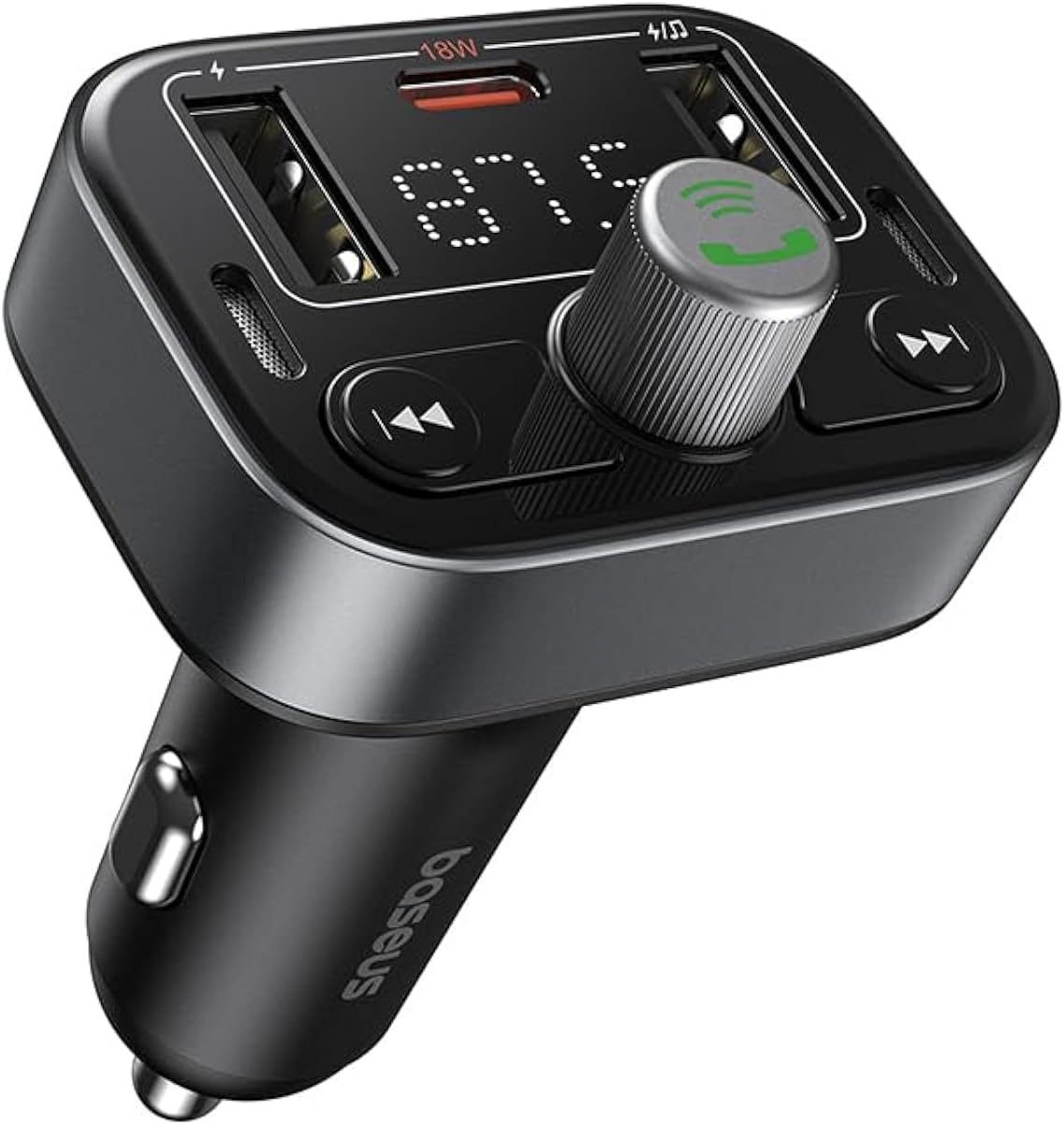
Obrázek 1: Přední strana view of the Baseus S-09 Pro Series Car FM Transmitter, showing the display, control knob, and USB ports.
Obsah balení
Zkontrolujte prosím balení, zda neobsahuje následující položky:
- Baseus S-09 Pro Series Car FM Transmitter
- Návod k použití (tento dokument)

Figure 2: The Baseus S-09 Pro Series Car FM Transmitter shown in its retail packaging.
Nastavení
- Vložení do zásuvky zapalovače cigaret v autě: Plug the Baseus S-09 Pro Series Car FM Transmitter firmly into your car's 12V/24V cigarette lighter socket. The device will power on automatically, and the LED display will light up.
- Nalaďte si FM frekvenci:
- On the FM Transmitter, press and hold the multi-function knob (the large central knob) until the FM frequency on the LED display starts flashing.
- Rotate the multi-function knob left or right to adjust the frequency. Choose an empty FM frequency (one with no radio station broadcasting) to minimize interference.
- On your car's FM radio, tune to the exact same empty frequency you selected on the transmitter.
- Once matched, the transmitter is ready to broadcast audio to your car stereo.
- Bluetooth párování:
- After the device powers on, it will automatically enter Bluetooth pairing mode. The Bluetooth icon on the display may flash.
- On your smartphone or Bluetooth-enabled device, open the Bluetooth settings and search for available devices.
- Select "Baseus S-09 Pro" (or similar name) from the list to connect. Once connected, the Bluetooth icon on the transmitter's display will stop flashing and remain solid.

Figure 3: Illustration showing connection options: via flash drive and Bluetooth 5.3 pairing with a smartphone.
Návod k obsluze
Přehrávání zvuku
- Bluetooth audio: Once paired, play music or audio from your smartphone. The audio will be transmitted to your car's FM radio.
- Flash Drive Audio: Insert a USB flash drive (up to 512GB, formatted to FAT32) containing MP3 audio files into the designated USB port on the transmitter. The device will automatically detect and play the audio files.
- Ovládací tlačítka:
- Multifunkční knoflík: Rotate to adjust volume. Press once to play/pause.
- Tlačítko Předchozí skladba (◀◀): Stisknutím přejdete na předchozí skladbu.
- Tlačítko Další skladba (▶▶): Stisknutím přejdete na další skladbu.
Hands-free volání
- Přijmout/ukončit hovor: Press the multi-function knob once to answer an incoming call or end an ongoing call.
- Odmítnout hovor: Press and hold the multi-function knob for 2 seconds to reject an incoming call.
- Znovu vytočit poslední číslo: Double-press the multi-function knob to redial the last dialed number.
- Přepnout hovor na telefon: During a call, press and hold the multi-function knob for 2 seconds to switch the call between the transmitter and your phone.

Figure 4: The device highlighting its dual-mic system for premium sound quality during calls and music playback.
Nabíjecí zařízení
- The transmitter features multiple USB ports for charging your devices.
- Port USB-C: Supports Power Delivery (PD) 18W (Max) fast charging. Use a compatible USB-C to USB-C or USB-C to Lightning cable for fast charging supported devices.
- Porty USB-A: Provide standard charging for various devices.

Figure 5: The transmitter connected via its USB-C port to an iPhone for fast charging.
Zobrazení informací
- The large LED screen alternately displays the current FM frequency and the car battery voltage.
- Frekvence FM: Indicates the frequency the transmitter is broadcasting on.
- Baterie Voltage: Zobrazuje objem v reálném časetage of your car's battery, allowing you to monitor its health.

Figure 6: The LED screen displaying both the FM frequency (87.5) and the car battery voltage (12.5 V).
Údržba
- Uchovávejte zařízení v suchu. Nevystavujte jej vlhkosti ani extrémním teplotám.
- Zařízení čistěte měkkým, suchým hadříkem. Nepoužívejte agresivní chemikálie ani abrazivní čisticí prostředky.
- Zabraňte pádu zařízení nebo jeho vystavení silným nárazům.
- Pokud se nepoužívá, skladujte na chladném a suchém místě.
Odstraňování problémů
| Problém | Možná příčina | Řešení |
|---|---|---|
| Není napájení/Vypnutý displej | Not properly inserted into cigarette lighter; Car socket fuse blown. | Ensure firm connection. Check car's fuse box. |
| Static/Poor audio quality | FM frequency interference; Volume too low. | Change to a different, empty FM frequency. Increase volume on both transmitter and car stereo. |
| Bluetooth nelze spárovat | Device not in pairing mode; Bluetooth disabled on phone. | Ensure transmitter is in pairing mode. Enable Bluetooth on your phone and search again. |
| Rychlé nabíjení nefunguje | Cable not compatible; Device does not support fast charging. | Use a certified fast-charging cable. Ensure your device supports PD 18W. |
Specifikace
- Název modelu: S-09 Pro Series
- Číslo modelu: C10762200113-00
- Hardwarové rozhraní: Bluetooth
- Kompatibilní zařízení: Car Stereo System, Smartphone, Tablet
- Speciální vlastnosti: FM vysílač
- Zvukový vstup: 3.5 mm AUX
- Režim výstupu zvuku: Stereo
- Typ zvukového výstupu: Rádio FM, Bluetooth
- svtage: 12 V (DC)
- Zdroj napájení: Elektrický kabel
- Typ bezdrátového připojení: Bluetooth
- Verze Bluetooth: 5.3
- Podporovaný typ média: MP3 (from flash drive)
- Rozměry balení: 17 x 11.6 x 3.9 cm
- Hmotnost položky: 80 gramů
- Barva: Černý
Záruka a podpora
Baseus products typically come with a standard manufacturer's warranty. Please refer to the warranty card included in your product packaging or visit the official Baseus webpodrobné záruční podmínky naleznete na webu.
For technical support, troubleshooting assistance, or warranty claims, please contact Baseus customer service through their official channels or the retailer from whom you purchased the product.
Více informací a podpory naleznete na Obchod Baseus na Amazonu.


