1. Úvod
Thank you for choosing the Verbatim 500GB USB 3.2 Gen 1 Portable External Hard Drive. This device provides a high-speed, high-capacity storage solution, ideal for expanding your computer's storage or backing up important files. Its compact 2.5-inch form factor makes it highly portable, allowing you to carry your data wherever you go. This manual will guide you through the setup, operation, and maintenance of your new hard drive.
2. Bezpečnostní informace
- Nevystavujte zařízení vlhkosti, extrémním teplotám ani přímému slunečnímu záření.
- Zabraňte pádu zařízení nebo jeho vystavení silným nárazům.
- Nepokoušejte se zařízení rozebírat ani opravovat sami. Obraťte se na kvalifikovaný servisní personál.
- Během provozu zajistěte dostatečné větrání v okolí zařízení.
- Always safely eject the hard drive from your computer before disconnecting the USB cable to prevent data loss or corruption.
3. Obsah balení
Ověřte, zda váš balíček obsahuje následující položky:
- Verbatim 500GB Portable External Hard Drive
- USB kabel

Obrázek 3.1: Přední strana view of the Verbatim Portable Hard Drive packaging. The packaging displays the product name, capacity (500GB), USB 3.2 Gen 1 interface, and an image of the black hard drive with a green accent band. It also highlights 'Eco Friendly Packaging' and 'Nero Backup Software'.
4. Konec produktuview
The Verbatim Portable Hard Drive is a sleek, compact device designed for easy data storage and transfer. It features a durable casing and a standard USB port for connectivity.

Obrázek 4.1: Nahoře view of the Verbatim Portable Hard Drive. The drive is black with a textured surface and features a distinctive green band across its width.
5. Systémové požadavky
To use your Verbatim Portable Hard Drive, your computer must meet the following minimum requirements:
- Operační systém: Windows (Windows 10, 8, 7) or Mac OS (Mac OS X 10.6 or higher)
- USB port: USB 3.2 Gen 1 (also compatible with USB 2.0 ports, but at reduced speeds)
6. Nastavení a instalace
The Verbatim Portable Hard Drive is designed for plug-and-play operation, requiring no additional drivers for most modern operating systems.
- Locate an available USB port on your computer. For optimal performance, use a USB 3.2 Gen 1 (or USB 3.0) port.
- Connect the small end of the provided USB cable to the USB port on the Verbatim Portable Hard Drive.
- Connect the larger end of the USB cable to the USB port on your computer.
- Your operating system should automatically detect and install the necessary drivers. The drive will appear as a new storage device in 'My Computer' (Windows) or 'Finder' (Mac OS).
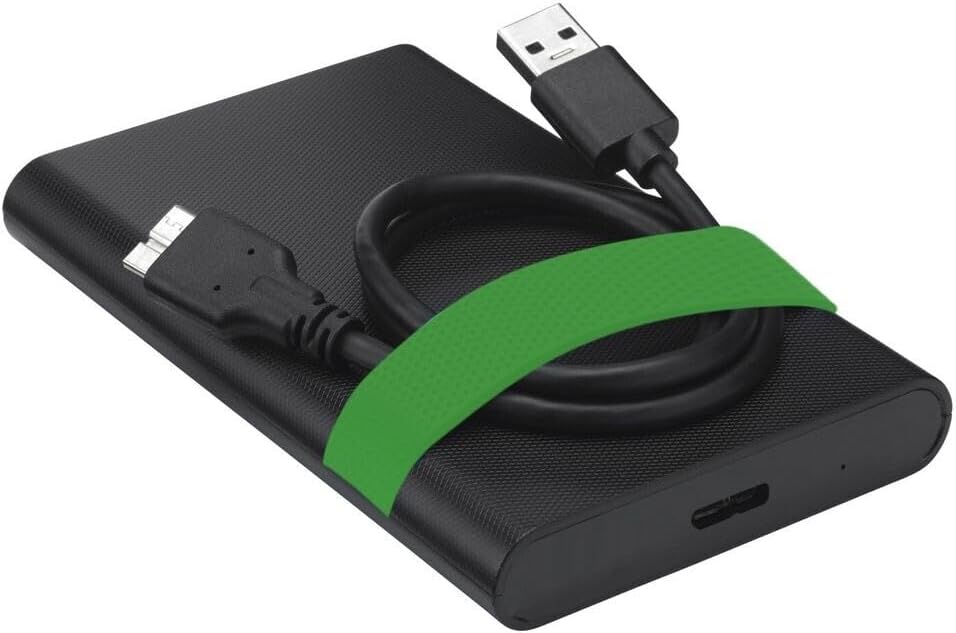
Image 6.1: The Verbatim Portable Hard Drive with its USB cable connected, illustrating the connection point on the drive.
7. Návod k obsluze
7.1 Přenos dat
Po připojení můžete přenášet files to and from the hard drive just like any other storage device:
- Drag and Drop: Klikněte a přetáhněte files or folders from your computer to the hard drive's icon, or vice versa.
- Kopírovat a vložit: Klikněte pravým tlačítkem na files/folders, select 'Copy', then navigate to the desired location on the hard drive, right-click, and select 'Paste'.
7.2 Ejecting the Drive Safely
To prevent data corruption, always safely eject the hard drive before disconnecting it.
- Windows: Click the 'Safely Remove Hardware and Eject Media' icon in the system tray, then select your Verbatim drive. Wait for the 'Safe to Remove Hardware' message.
- Operační Systém Mac: Drag the hard drive icon from your desktop to the Trash, or right-click the icon and select 'Eject'.
8. Údržba a péče
- Keep the hard drive clean by wiping it with a soft, dry cloth. Avoid liquid cleaners.
- Store the drive in a cool, dry place away from magnetic fields.
- Regularly back up important data from the portable drive to another storage medium.
- Periodically check the drive's health using your operating system's disk utility tools.
9. Řešení problémů
| Problém | Možné řešení |
|---|---|
| Počítač nerozpoznal disk. |
|
| Pomalé rychlosti přenosu dat. |
|
| Error message during file převod. |
|
10. Specifikace
| Funkce | Detail |
|---|---|
| Značka | Doslovně |
| Číslo modelu | 53111 |
| Digitální kapacita úložiště | 500 GB |
| Pevný disk Form Factor | 2.5 palců |
| Typ pevného disku | Mechanical Hard Disk Drive (HDD) |
| Rozhraní | USB 3.2 Gen 1 (compatible with USB 2.0) |
| Rychlost otáčení | 5400 ot./min |
| Maximální rychlost přenosu dat | 5000 Mbit/s (5 Gbit/s) |
| Technologie připojení | USB |
| Kompatibilní zařízení | Computers with Windows OS, Computers with Mac OS |
| Hmotnost položky | 220 g |
11. Záruka a podpora
Verbatim products are designed and manufactured to the highest quality standards. For information regarding warranty coverage, technical support, or service, please refer to the official Verbatim webwebu nebo se obraťte přímo na jejich zákaznickou podporu. Uschovejte si účtenku jako doklad o koupi pro případ reklamace.
Online podpora: Návštěva www.verbatim.com for FAQs, driver downloads, and contact information.