1. Úvod
Thank you for choosing the Hiwill HW210 Soundbar with Subwoofer. This 2.1 channel surround sound system is designed to enhance your audio experience for televisions, PCs, gaming consoles, and other compatible devices. This manual provides detailed instructions for setup, operation, and maintenance to ensure optimal performance and longevity of your product. Please read this manual thoroughly before use and retain it for future reference.

Image 1.1: The Hiwill HW210 Soundbar and Subwoofer system, shown with a television for illustrative purposes.
2. Bezpečnostní informace
Abyste snížili riziko úrazu elektrickým proudem, požáru nebo poškození jednotky, dodržujte prosím následující bezpečnostní opatření:
- Nevystavujte toto zařízení dešti nebo vlhkosti.
- Nepokládejte na spotřebič předměty naplněné tekutinami, jako například vázy.
- Zajistěte dostatečné větrání. Neblokujte žádné větrací otvory.
- Neinstalujte v blízkosti zdrojů tepla, jako jsou radiátory, tepelné regulátory, kamna nebo jiná zařízení (včetně amplifikátory), které produkují teplo.
- Chraňte napájecí kabel před šlapáním nebo přiskřípnutím, zejména u zástrček, zásuvek a v místě, kde vychází ze zařízení.
- Používejte pouze nástavce/příslušenství určené výrobcem.
- Odpojte tento spotřebič během bouřky s blesky nebo když jej nebudete delší dobu používat.
- Veškeré opravy svěřte kvalifikovanému servisnímu personálu. Servis je nutný, pokud bylo zařízení jakýmkoli způsobem poškozeno, například je poškozen napájecí kabel nebo zástrčka, pokud do zařízení vnikla tekutina nebo do něj spadly předměty, zařízení bylo vystaveno dešti nebo vlhkosti, nefunguje normálně. , nebo byla vypuštěna.
3. Obsah balení
Zkontrolujte prosím, zda jsou všechny položky přítomny a v dobrém stavu:
- Hiwill Soundbar
- Kabelový subwoofer
- Dálkové ovládání
- Napájecí adaptér
- Optical Cable (may vary by region)
- AUX Cable (may vary by region)
- Sada pro montáž na zeď (šrouby, hmoždinky)
- Uživatelská příručka (tento dokument)
4. Konec produktuview
Funkce soundbaru 4.1
- Ultra-slim design (3.8 cm height)
- Integrated orbital aluminum diaphragm speakers
- Built-in HiFi and DSP technology for immersive 3D surround sound
- Maximum output power: 120 Watts
- Hladina akustického tlaku: 106 dB
- Bluetooth 5.3 for wireless streaming
- Multiple input options: HDMI ARC, Optical, AUX, USB
- 3 adjustable EQ modes: Game, Movie, Music
- Adjustable bass and treble levels
4.2 Subwoofer Features
- 9-liter capacity for deep, resonant bass
- Wired connection to the soundbar for stable audio transmission
4.3 Ovládací prvky a indikátory
The soundbar features an integrated display and control buttons, typically located on the top or front panel. The remote control provides full functionality.
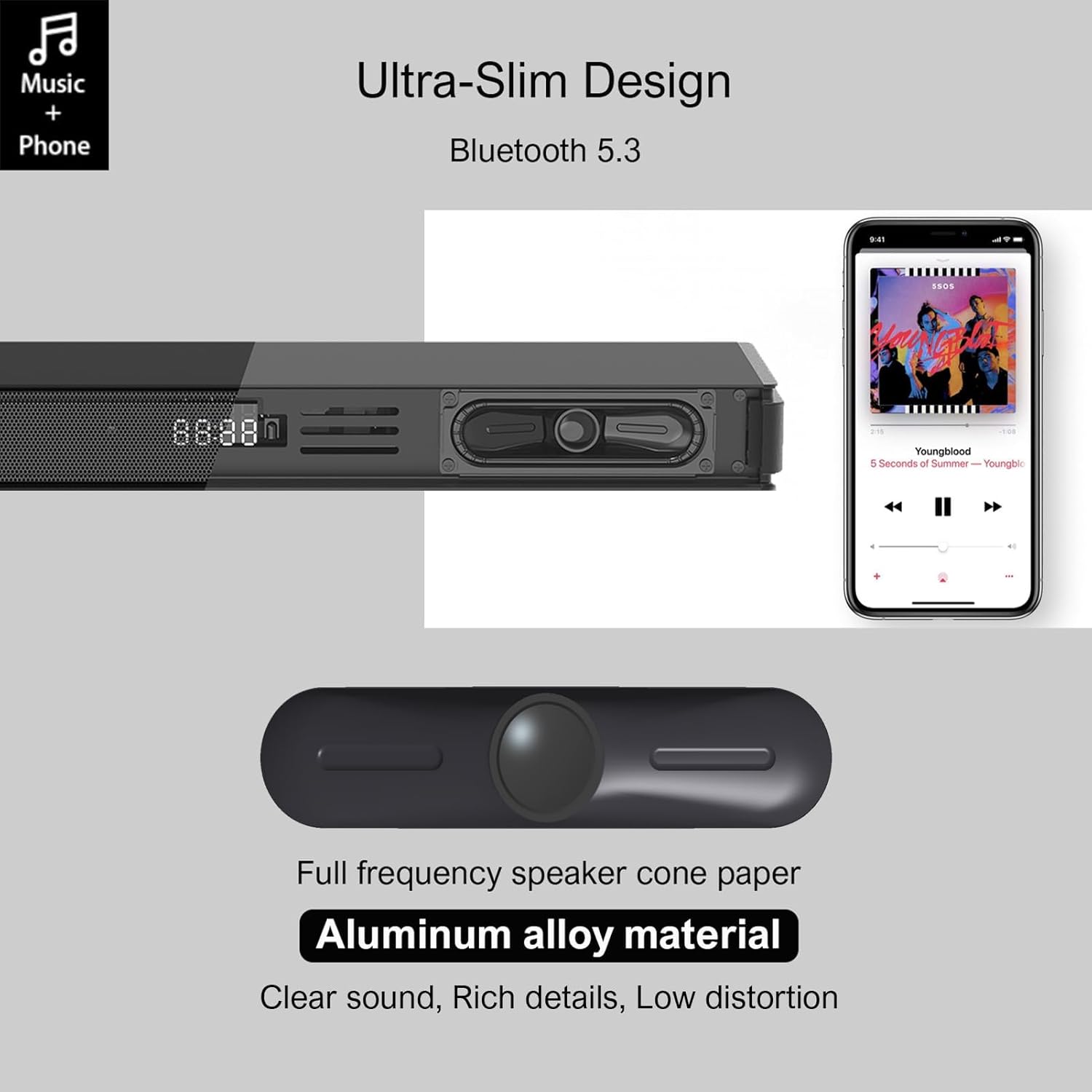
Image 4.1: Detail of the soundbar's ultra-slim design, showing the front display and integrated speakers.
4.4 Připojení zadního panelu
The rear panel of the soundbar provides various ports for connecting to your audio sources and power.

Obrázek 4.2: Zadní strana view of the soundbar showing input ports: AUX, HDMI ARC, USB, Optical, Subwoofer Out, and DC In.
- AUX (3.5mm): Pro připojení zařízení s 3.5mm audio výstupem.
- ARC (HDMI): For connecting to a TV's HDMI ARC port. Supports CEC for unified control.
- USB: Pro přehrávání zvuku filez USB disku.
- OPTICKÝ: For connecting to a TV or other device with an optical audio output.
- SUB OUT: For connecting the wired subwoofer.
- DC IN: Pro připojení napájecího adaptéru.
5. Nastavení
5.1 Možnosti umístění
The Hiwill HW210 soundbar offers flexible placement options to suit your home entertainment setup.

Image 5.1: Illustrates placing the soundbar on a tabletop in front of the TV or mounting it on the wall below the TV.
- Umístění na stůl: Place the soundbar on a stable, flat surface directly in front of your TV. Ensure it does not obstruct the TV's remote sensor.
- Montáž na stěnu: The soundbar can be mounted on the wall below your TV. Use the provided wall mounting kit and follow these steps:
- Mark the desired mounting positions on the wall, ensuring the soundbar is centered with your TV.
- Na vyznačených místech vyvrtejte vodicí otvory.
- Insert wall anchors (if necessary for your wall type).
- Secure the mounting brackets (if separate) or the soundbar directly using screws.
- Umístění subwooferu: Place the subwoofer on the floor near the soundbar. Experiment with placement to find the best bass response for your room.
5.2 Připojení k napájení
- Connect the power adapter to the DC IN port on the soundbar's rear panel.
- Zapojte druhý konec napájecího adaptéru do elektrické zásuvky.
- Connect the wired subwoofer cable to the SUB OUT port on the soundbar.
5.3 Připojení ke zdrojům zvuku
Choose one of the following connection methods based on your device:
- HDMI ARC (doporučeno pro televizory):
- Connect one end of an HDMI cable (not included) to the ARC port on the soundbar.
- Druhý konec připojte k portu HDMI ARC na televizoru.
- Ensure HDMI CEC is enabled in your TV's settings for unified control.
- Optický:
- Connect the optical cable (included) to the OPTICAL port on the soundbar.
- Connect the other end to the optical audio output port on your TV or other device.
- Ensure your TV's audio output is set to "PCM" if you experience no sound.
- AUX (3.5mm):
- Connect the 3.5mm AUX cable (included) to the AUX port on the soundbar.
- Connect the other end to the headphone jack or AUX output of your device.
- USB:
- Vložte USB flash disk obsahující zvuk filedo USB portu na soundbaru.
6. Návod k obsluze
6.1 Zapnutí/vypnutí
- Stiskněte tlačítko Moc tlačítko na soundbaru nebo dálkovém ovladači pro zapnutí nebo vypnutí jednotky.
6.2 Výběr vstupního zdroje
- Stiskněte tlačítko Vstup button on the remote control or the soundbar to cycle through available input sources (ARC, OPT, AUX, USB, BT). The selected input will be displayed on the soundbar's screen.
6.3 Párování Bluetooth
- Turn on the soundbar and select the "BT" input source. The soundbar will enter pairing mode, indicated by a flashing "BT" on the display.
- Na svém mobilním zařízení povolte Bluetooth a vyhledejte dostupná zařízení.
- Select "Hiwill HW210" (or similar name) from the list of devices.
- Once paired, the soundbar will emit a confirmation tone, and "BT" will stop flashing.
- To disconnect, turn off Bluetooth on your device or select a different input source on the soundbar.
6.4 Ovládání hlasitosti
- Použijte Zvýšení hlasitosti (+) a Snížit hlasitost (-) buttons on the soundbar or remote control to adjust the master volume.
- Stiskněte tlačítko Ztlumit tlačítko na dálkovém ovladači pro ztlumení nebo zapnutí zvuku.
6.5 EQ Modes and Tone Adjustment
The soundbar features three preset equalizer modes and adjustable bass/treble settings.

Image 6.1: Visual representation of the three equalizer modes: Game, Movie, and Music, optimized for different audio content.
- Stiskněte tlačítko EQ button on the remote control to cycle through the preset modes: Hra, Filma Hudba.
- Použijte Basy +/- buttons on the remote control to adjust the bass level.
- Použijte Výšky +/- buttons on the remote control to adjust the treble level.
7. Údržba
- Čištění: Use a soft, dry cloth to clean the surface of the soundbar and subwoofer. Do not use liquid cleaners or abrasive materials.
- Skladování: Pokud budete přístroj skladovat delší dobu, odpojte jej ze zásuvky a uložte jej na chladném a suchém místě.
- Vyhněte se překážkám: Ensure that the speaker grilles and ventilation openings are not blocked by dust or other objects.
8. Řešení problémů
| Problém | Možná příčina | Řešení |
|---|---|---|
| Žádná síla | Napájecí kabel není připojen; Zásuvka není aktivní | Ujistěte se, že je napájecí kabel bezpečně připojen; zkuste jinou zásuvku. |
| Žádný zvuk | Incorrect input source selected; Volume too low; Cables not connected properly; TV audio output settings incorrect. | Select the correct input source; Increase volume; Check all audio cables are securely connected; For Optical/ARC, ensure TV audio output is set to PCM. |
| Párování Bluetooth se nezdařilo | Soundbar není v režimu párování; Zařízení je příliš daleko; Rušení. | Ensure soundbar is in BT mode and flashing; Move device closer; Turn off other Bluetooth devices. |
| Dálkové ovládání nefunguje | Vybité baterie; Překážka mezi dálkovým ovladačem a soundbarem. | Replace remote control batteries; Ensure clear line of sight to the soundbar's sensor. |
| Špatná kvalita zvuku | Incorrect EQ mode; Source audio quality; Cable issues. | Adjust EQ modes and bass/treble settings; Try a different audio source; Check/replace audio cables. |
9. Specifikace
| Název modelu | Hiwill HW210 Soundbar |
| Typ reproduktoru | Soundbar s kabelovým subwooferem |
| Konfigurace prostorového zvuku | 2.1 kanál |
| Maximální výstupní výkon reproduktoru | 120 wattů |
| Technologie připojení | Bluetooth 5.3, HDMI ARC, AUX (3.5mm), USB, Optical |
| Režim zvukového výstupu | Surround |
| Speciální funkce | High-resolution audio support, 3 EQ modes, Adjustable Bass/Treble, Wall-mountable |
| Doporučená použití | TV, Gaming Consoles, Computers, Smartphones, Tablets, Music Players, DVD Players, Home Theater |
10. Záruka a podpora
Hiwill products are designed and manufactured to the highest quality standards. For detailed warranty information, please refer to the warranty card included in your package or visit the official Hiwill website. If you encounter any issues or require technical assistance, please contact Hiwill customer support through the contact information provided on the product packaging or webmísto.
Please have your model number (HW210) and purchase date ready when contacting support.


