
BOLOXA A17
Uživatelská příručka bezdrátových sluchátek BOLOXA A17
Model: A17 | Brand: BOLOXA
Zavedení
Thank you for choosing the BOLOXA A17 Wireless Earbuds. These Bluetooth headphones are designed for an exceptional audio experience, offering extended playback, robust water resistance, and a secure fit ideal for sports and active lifestyles. This manual provides detailed instructions to help you get the most out of your new earbuds.

The BOLOXA A17 Wireless Earbuds and their charging case.
Obsah balení
Zaškrtněte prosím políčko u následujících položek:
- Wireless Earbud (Left & Right)
- Wireless Charging Case with Dual Digital Display
- Eartips (Sizes: Small, Medium, Large)
- Nabíjecí kabel USB-C
- Uživatelská příručka (tento dokument)
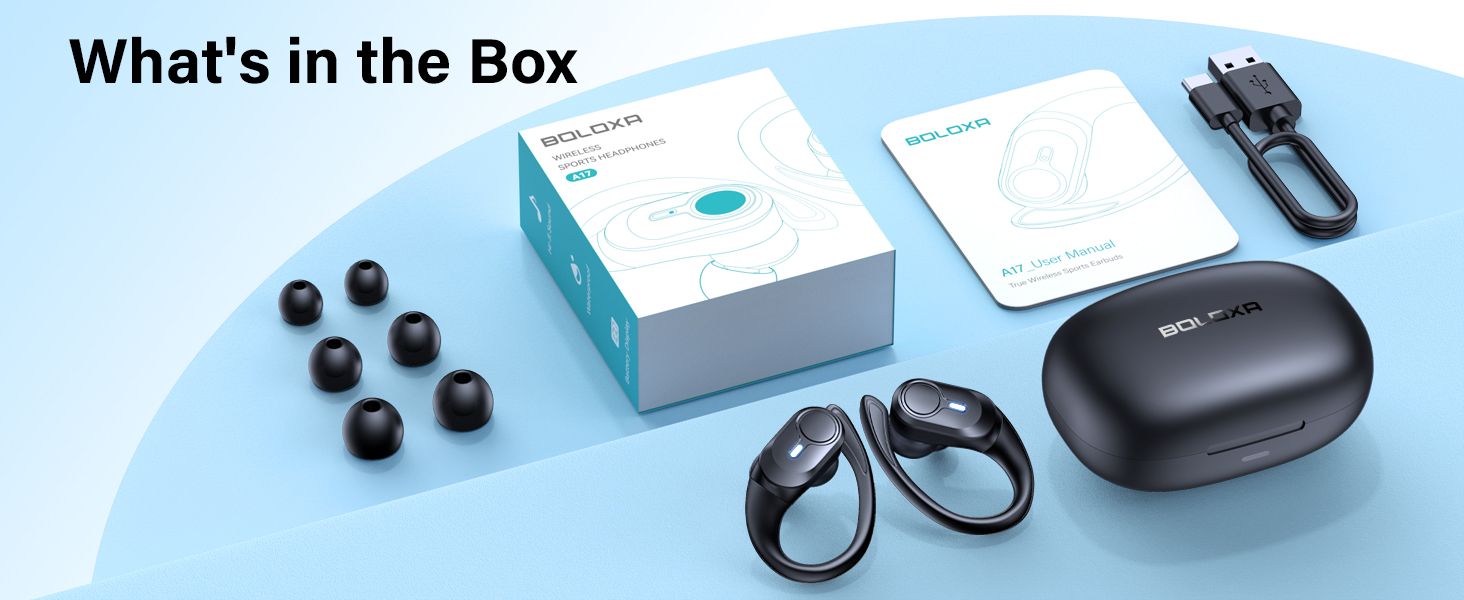
All components included in the BOLOXA A17 Wireless Earbuds package.
Klíčové vlastnosti
- Prodloužená hrací doba: Enjoy up to 9 hours of playback on a single charge, with the wireless charging case extending total usage to an impressive 70 hours. The dual LED display on the case will show real-time power levels for both the case and individual earbuds.

Visual representation of the extended battery life and charging case capacity.
- Bezpečné a pohodlné nošení: Designed with flexible ear hooks and three sizes of soft ear tips (S, M, L), these earbuds provide a secure and comfortable fit, making them ideal for vigorous workouts, daily commutes, and extended listening sessions without discomfort.

The ergonomic earhook design ensures a stable fit during physical activity.
- IPX7 voděodolnost: Built to withstand sweat and rain, the IPX7 waterproof rating ensures durability and reliability during intense workouts or outdoor activities.

The IPX7 rating protects your earbuds from moisture.
- Křišťálově čistý zvuk: Featuring 13mm chamber speaker driver units, the A17 earbuds deliver exceptional audio performance with deep bass and clear high notes. Built-in microphones ensure clear voice transmission for hassle-free calls.

The 13mm drivers provide rich, high-fidelity sound.
- Možnosti duálního nabíjení: The charging case supports both USB-C charging (cable included) and advanced wireless charging, offering convenience and flexibility. A quick 15-minute charge provides one hour of use.

Charge your earbuds conveniently with either USB-C or wireless charging.
- Bluetooth 5.3 & Auto Pairing: Utilizing Bluetooth 5.3, the earbuds offer a faster and more stable connection. They automatically pair with your device after the first successful connection simply by taking them out of the charging case.

Quick and seamless pairing with Bluetooth 5.3 technology.
Průvodce nastavením
1. Počáteční nabíjení
Before first use, ensure your BOLOXA A17 earbuds and charging case are fully charged. Place the earbuds into the charging case. The LED display on the case will indicate the charging status.
- Nabíjení USB-C: Připojte dodaný kabel USB-C k nabíjecímu portu na pouzdře a ke zdroji napájení.
- Bezdrátové nabíjení: Umístěte nabíjecí pouzdro na kompatibilní bezdrátovou nabíjecí podložku (není součástí balení).
A full charge for the earbuds provides approximately 9 hours of playback. The case provides multiple charges for a total of 70 hours.
2. Párování Bluetooth
- Ujistěte se, že jsou vaše sluchátka nabitá.
- Otevřete nabíjecí pouzdro. Sluchátka se automaticky přepnou do režimu párování.
- Na svém zařízení (chytrý telefon, tablet, počítač) přejděte do nastavení Bluetooth a zapněte Bluetooth.
- Hledat "A17" in the list of available devices and select it to connect.
- Po připojení uslyšíte potvrzovací tón a sluchátka budou připravena k použití.
After the initial successful pairing, the earbuds will automatically connect to your last paired device when taken out of the case.
Návod k obsluze
The BOLOXA A17 earbuds feature a multi-functional button for easy control of various functions:
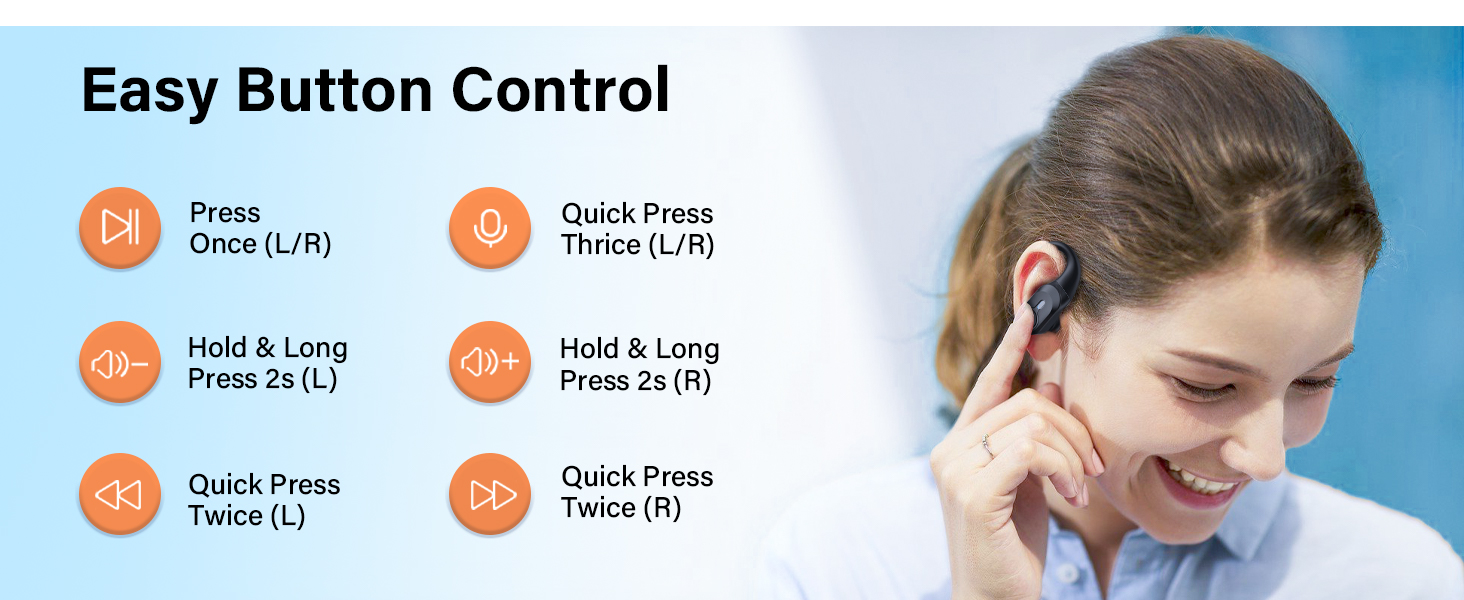
Nadview of the easy button controls on the earbuds.
| Akce | Funkce |
|---|---|
| Press Once (L/R) | Přehrát/Pozastavit hudbu, Přijmout/Ukončit hovor |
| Quick Press Thrice (L/R) | Aktivujte hlasového asistenta |
| Hold & Long Press 2s (Left Earbud) | Snížit hlasitost |
| Hold & Long Press 2s (Right Earbud) | Zvýšení hlasitosti |
| Quick Press Twice (Left Earbud) | Předchozí stopa |
| Quick Press Twice (Right Earbud) | Další stopa |
Using Mono Mode
The earbuds support both binaural (stereo) and mono modes. You can use either the left or right earbud independently for music or calls. Simply take one earbud out of the case, and it will automatically connect.
Údržba a péče
- Čištění: Regularly clean the earbuds and charging contacts with a soft, dry cloth. Avoid using harsh chemicals or abrasive materials.
- Voděodolnost: While IPX7 rated for water resistance against sweat and rain, the earbuds are not designed for swimming or submersion. Ensure earbuds are dry before placing them back in the charging case to prevent damage to charging points.
- Skladování: Když sluchátka nepoužíváte, uložte je do jejich nabíjecího pouzdra, abyste je ochránili a udrželi nabitá.
- Teplota: Nevystavujte sluchátka extrémním teplotám (horkým nebo nízkým) ani přímému slunečnímu záření po delší dobu.
Odstraňování problémů
- Sluchátka se nepárují/nepřipojují:
- Ujistěte se, že jsou obě sluchátka nabitá.
- Vypněte Bluetooth na zařízení a poté jej znovu zapněte.
- Zapomeňte na „A17“ ze seznamu Bluetooth vašeho zařízení a zkuste spárování zopakovat.
- Place both earbuds back into the charging case, close the lid for a few seconds, then open it to reset.
- Funguje pouze jedno sluchátko:
- Ujistěte se, že jsou obě sluchátka nabitá.
- Vložte obě sluchátka zpět do nabíjecího pouzdra, zavřete víko a poté ho znovu otevřete. Často se tak sluchátka znovu synchronizují.
- Check if the earbuds are properly seated in the charging case and making contact with the charging pins.
- Nízká hlasitost nebo špatná kvalita zvuku:
- Upravte hlasitost na zařízení i na sluchátkách.
- Ensure the ear tips are clean and free of debris.
- Try different sizes of ear tips to ensure a proper seal in your ear canal.
- Problémy s nabíjením:
- Ensure the USB-C cable is securely connected or the wireless charging pad is properly aligned.
- Check the charging contacts on both the earbuds and the case for any dirt or obstruction.
- Zkuste jiný nabíjecí kabel nebo zdroj napájení.
Specifikace
| Funkce | Detail |
|---|---|
| Název modelu | A17 |
| Značka | BOLOXA |
| Technologie připojení | Bezdrátové připojení (Bluetooth 5.3) |
| Umístění uší | Přes ucho |
| Form Factor | Přes ucho |
| Kontrola hluku | Zvuková izolace |
| Výdrž baterie (sluchátka) | Až 9 hodin |
| Celková doba přehrávání s pouzdrem | Až 70 hodin |
| Úroveň odolnosti proti vodě | IPX7 Voděodolný |
| Velikost zvukového ovladače | 13 milimetrů |
| Frekvenční rozsah | 20 Hz - 20,000 XNUMX Hz |
| Dosah Bluetooth | 10 metrů |
| Typ ovládání | Volume Control, Button Control |
| Materiál | Plast |
| Hmotnost položky | 163.3 gramů (5.8 unce) |
Záruka a podpora
BOLOXA products are manufactured to the highest quality standards. For information regarding warranty coverage, technical support, or customer service, please refer to the contact information provided on the product packaging or visit the official BOLOXA webmísto.
For additional assistance, you may also contact the seller directly through the platform where the product was purchased.
Ask a question about this manual
Ask about setup, troubleshooting, compatibility, parts, safety, or missing instructions. Manuals+ will review the question and use this page’s manual context to help answer it.