Zavedení
Děkuji za nákupasing the Lenco CR-650 DAB+ Alarm Clock Radio. This device combines a modern DAB+ and FM radio with an alarm clock, Bluetooth connectivity, USB/Micro SD playback, and a convenient wireless charging pad. This manual provides detailed instructions for setup, operation, maintenance, and troubleshooting to ensure optimal performance and longevity of your device.
Bezpečnostní informace
Please read these safety instructions carefully before using the device and keep them for future reference. Improper use may result in electric shock, fire, or other hazards.
- Do not expose the device to rain, moisture, or direct sunlight.
- Zajistěte dostatečné větrání kolem jednotky. Neblokujte žádné větrací otvory.
- Neumísťujte zařízení do blízkosti zdrojů tepla, jako jsou radiátory, tepelné regulátory, kamna nebo jiná zařízení (včetně amplifikátory), které produkují teplo.
- Používejte pouze nástavce/příslušenství určené výrobcem.
- Odpojte zařízení během bouřky nebo když se delší dobu nepoužívá.
- Veškerý servis svěřte kvalifikovanému servisnímu personálu. Je -li zařízení jakýmkoli způsobem poškozeno, je nutná údržba.
Obsah balení
Ověřte, zda jsou v balení přítomny všechny položky:
- Lenco CR-650 DAB+ Alarm Clock Radio
- Napájecí adaptér
- Uživatelská příručka (tento dokument)
Konec produktuview
Přední View

Obrázek 1: Přední strana view of the Lenco CR-650, highlighting the LCD display and speaker grilles.
The front of the CR-650 features a clear LCD display that shows time, radio station information, and various settings. The large speaker grilles on either side of the display provide audio output.
Nahoru View (Controls and Wireless Charging)
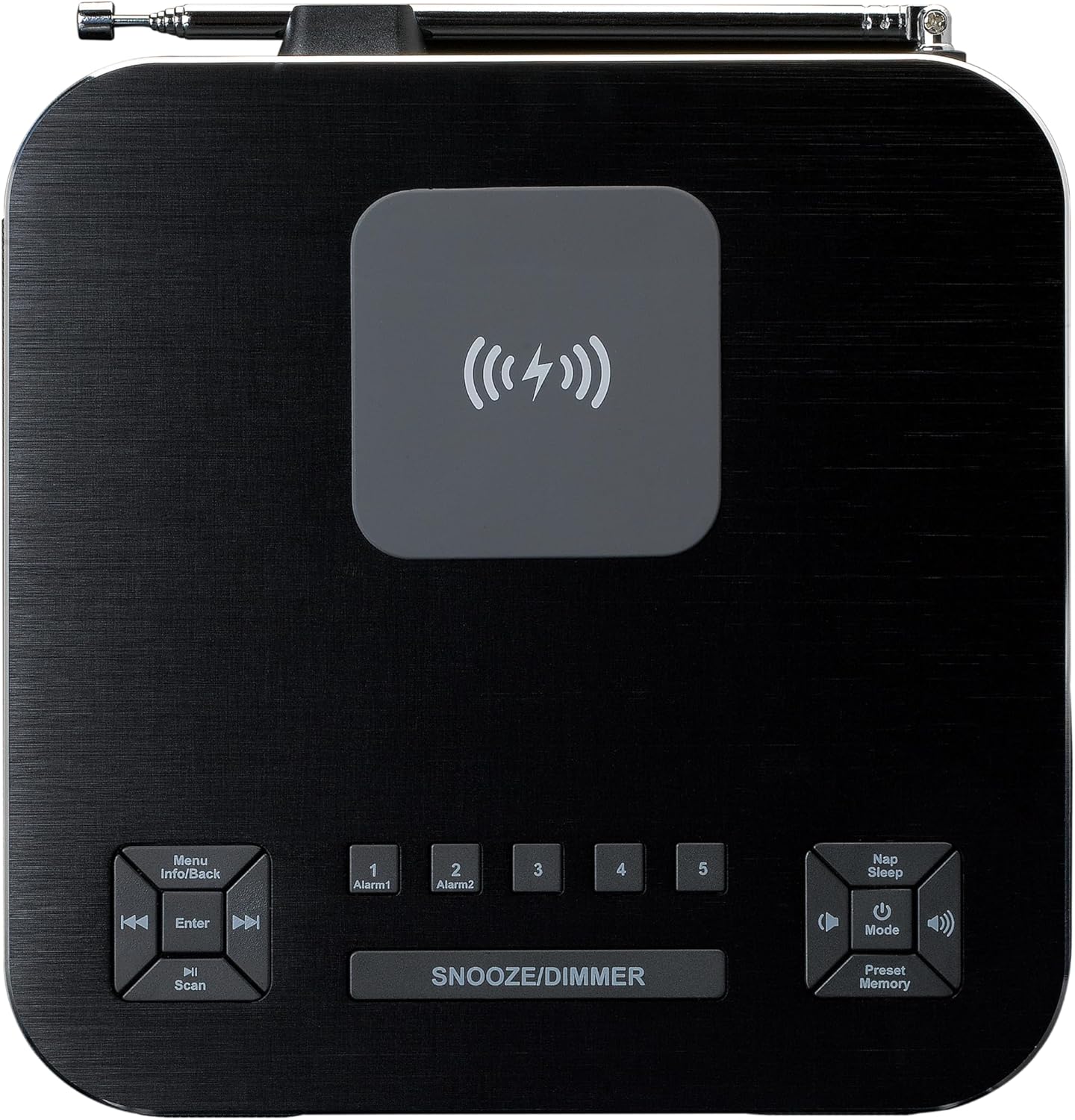
Obrázek 2: Nahoře view of the Lenco CR-650, illustrating the control buttons and the central wireless charging area.
The top panel houses all the control buttons and the integrated wireless charging pad. Key controls include:
- Menu/Info/Back: Navigates menus, displays information, or goes back.
- Enter/Scan: Confirms selections or initiates station scans.
- Alarm 1 / Alarm 2: Buttons for setting and activating the two independent alarms.
- Odložení/Stmívání: Activates snooze during an alarm or adjusts display brightness.
- Nap/Sleep: Sets a short nap timer or sleep timer.
- Power/Mode/Volume: Power on/off, switches between modes (DAB+, FM, Bluetooth, USB, Micro SD, AUX), and adjusts volume.
- Preset/Memory: Accesses and saves radio presets.
- Bezdrátová nabíjecí podložka: Central area for Qi-compatible device charging.
Zadní View (Connections)

Obrázek 3: Zadní view of the Lenco CR-650, detailing the various input ports and the telescopic antenna.
The rear panel provides essential connection ports:
- Slot pro kartu Micro SD: Pro přehrávání zvuku files from a Micro SD card.
- USB port: Pro přehrávání zvuku filez USB disku.
- AUX vstup (3.5 mm): Pro připojení externích audio zařízení.
- Vstup DC 5V: Připojuje se k dodanému napájecímu adaptéru.
- Teleskopická anténa: For optimal DAB+ and FM radio reception.
Nastavení
- Připojení napájení: Insert the DC plug of the provided power adapter into the DC 5V input port on the rear of the CR-650. Plug the other end of the adapter into a standard wall outlet.
- Nastavení antény: Fully extend the telescopic antenna located on the rear of the unit for best radio reception. Adjust its position as needed to improve signal quality.
- Počáteční zapnutí: Stiskněte tlačítko Napájení/režim button on the top panel to turn on the device. The display will light up.
- Nastavení času a data: The device should automatically set the time and date via DAB+ signal. If not, refer to the "Operating Instructions - System Settings" section to set it manually.
Návod k obsluze
Radio Functions (DAB+/FM)
The CR-650 supports both DAB+ digital radio and traditional FM radio.
- Přepínací režimy: Stiskněte tlačítko Režim button repeatedly to cycle between DAB+ and FM radio modes.
- Vyhledávání stanic:
- V režimu DAB+ stiskněte Skenovat button to perform a full scan for available DAB+ stations. The display will show "Station scan".
- V režimu FM stiskněte a podržte tlačítko Skenovat button to auto-scan and stop at the next strong station.
- Ruční ladění: Použijte Předchozí/Další buttons to manually tune frequencies in FM mode or navigate through DAB+ stations.
- Ukládání předvoleb:
- Nalaďte požadovanou stanici.
- Stiskněte a podržte Předvolba/paměť tlačítko.
- Použijte Předchozí/Další tlačítky vyberte číslo předvolby (1–20).
- Stiskněte Vstupte pro potvrzení a uložení stanice.
- Vyvolání předvoleb: Krátce stiskněte Předvolba/paměť tlačítko, poté použijte Předchozí/Další buttons to select the desired preset and press Vstupte.

Figure 4: Display during DAB+ station scanning.
Provoz Bluetooth
Streamujte zvuk bezdrátově ze zařízení s podporou Bluetooth.
- Vstup do režimu Bluetooth: Stiskněte tlačítko Režim button until "Bluetooth" appears on the display. The device will enter pairing mode, indicated by a blinking Bluetooth icon.
- Párování: On your smartphone or other Bluetooth device, enable Bluetooth and search for "Lenco CR-650". Select it to pair. Once connected, the Bluetooth icon will stop blinking.
- Přehrávání: Start playing audio on your connected device. The sound will be streamed to the CR-650. Use the volume controls on the CR-650 or your device to adjust the sound level.

Figure 5: Display showing Bluetooth pairing name.
Přehrávání USB/Micro SD
Přehrát zvuk files directly from a USB flash drive or Micro SD card.
- Vložit médium: Insert a USB flash drive into the USB port or a Micro SD card into the Micro SD slot on the rear of the unit.
- Vyberte režim: Stiskněte tlačítko Režim button until "USB" or "Micro SD" appears on the display. The device will automatically start playing compatible audio files.
- Ovládání: Použijte Předchozí/Další buttons to skip tracks. Use the Přehrát/Pozastavit button (often integrated with Power/Mode or Enter) to pause/resume playback.
Funkce alarmu
The CR-650 features dual alarms and various wake-up options.
- Nastavení budíků:
- Stiskněte buď Poplach 1 or Poplach 2 tlačítko.
- Použijte Předchozí/Další tlačítka a Vstupte to set the alarm time, alarm source (DAB+, FM, Buzzer, Nature Sounds), and alarm volume.
- Confirm settings to activate the alarm. An alarm icon will appear on the display.
- Funkce odložení: Když zazní alarm, stiskněte tlačítko Odložit/ztlumit button to temporarily silence the alarm for a set period (e.g., 9 minutes). The alarm will sound again after the snooze period.
- Stopping an Alarm: Chcete-li vypnout zvukový alarm, stiskněte tlačítko Moc tlačítko. Budík se resetuje na následující den.
- Disabling Alarms: To completely disable an alarm, press the corresponding Poplach 1 or Poplach 2 tlačítko, dokud ikona alarmu nezmizí z displeje.
Nastavení zobrazení
Adjust the brightness of the LCD display for comfortable viewIng.
- Nastavení jasu: Krátce stiskněte Odložit/ztlumit button to cycle through different brightness levels (e.g., High, Medium, Low, Off).
Wireless Charging (Qi)
The Lenco CR-650 features a built-in Qi wireless charging pad on its top surface.

Figure 6: Smartphone wirelessly charging on the Lenco CR-650.
- Umístění: Place your Qi-compatible smartphone or device directly onto the wireless charging pad located in the center of the top panel.
- Indikátor nabíjení: Your device's screen should indicate that it is charging. Ensure the phone is centered on the pad for optimal charging.
- Troubleshooting Charging: If your device does not charge, try repositioning it. Remove any thick cases that might interfere with wireless charging.
Údržba
- Čištění: Use a soft, dry cloth to clean the surface of the unit. Do not use abrasive cleaners, waxes, or solvents.
- Skladování: Pokud budete přístroj skladovat delší dobu, odpojte jej ze zásuvky a uložte jej na chladném a suchém místě.
- Péče o anténu: Handle the telescopic antenna carefully to prevent bending or breaking.
Odstraňování problémů
| Problém | Možná příčina | Řešení |
|---|---|---|
| Žádná síla | Power adapter not connected or outlet is dead. | Ujistěte se, že je napájecí adaptér bezpečně zapojený do zařízení a do funkční zásuvky. |
| Špatný příjem rádia | Anténa není vysunutá nebo je v oblasti slabý signál. | Fully extend the telescopic antenna and try repositioning the unit. Perform a full station scan. |
| Zařízení Bluetooth se nespáruje | CR-650 not in pairing mode or device too far. | Ensure CR-650 is in Bluetooth mode and blinking. Move devices closer. Forget "Lenco CR-650" on your device and try pairing again. |
| Bezdrátové nabíjení nefunguje | Phone not aligned or case is too thick. | Reposition the phone on the charging pad. Remove thick phone cases. Ensure phone is Qi-compatible. |
| Alarm nezazní | Budík není aktivován nebo je hlasitost příliš nízká. | Check if the alarm icon is displayed. Verify alarm time and source. Increase alarm volume. |
Specifikace
| Funkce | Detail |
|---|---|
| Číslo modelu | CR-650 (A004976) |
| Značka | Lenco |
| Rádiový tuner | DAB+, FM |
| Předvolby | 20 (5 quick dial) |
| Verze Bluetooth | 5.0 |
| Dosah Bluetooth | Až 10 metrů |
| Výstupní výkon | 2 x 2W RMS |
| Zobrazit | 2-inch LCD with adjustable brightness |
| Konektivita | USB, Micro SD, AUX (3.5mm), Bluetooth |
| Bezdrátové nabíjení | Kompatibilní s Qi |
| Rozměry (V x Š x H) | 75 x 170 x 180 mm (přibližně 2.95 x 6.69 x 7.09 palce) |
| Hmotnost | 1.34 kg (cca 2.95 lb) |
| Materiál | Hliník |
Záruka a podpora
Lenco products are designed and manufactured to the highest quality standards. In the unlikely event of a problem with your product, please refer to the warranty terms provided with your purchase documentation or visit the official Lenco webmísto pro podporu a kontaktní informace.
For technical assistance or service inquiries, please contact Lenco customer support. Keep your proof of purchase for warranty claims.


