1. Úvod
This manual provides essential instructions for the safe operation, setup, maintenance, and troubleshooting of your CREATE THERA MATIC TOUCH automatic coffee machine. Please read this manual thoroughly before first use and retain it for future reference.
Bezpečnostní informace
Always observe basic safety precautions when using electrical appliances to reduce the risk of fire, electric shock, and injury. Ensure the appliance is placed on a stable, level surface. Do not immerse the appliance, power cord, or plug in water or other liquids. Keep out of reach of children. Unplug the machine before cleaning or when not in use for extended periods.
2. Konec produktuview
The CREATE THERA MATIC TOUCH is a fully automatic coffee machine designed to deliver fresh coffee from whole beans. It features a 20-bar pressure system, an integrated grinder, a 1.5-liter water tank, and a steam wand for milk frothing and hot water dispensing. The touch control panel allows for easy operation and customization of coffee intensity and volume.
Hlavní komponenty
- Coffee Bean Hopper with integrated grinder
- Nádrž na vodu (objem 1.5 l)
- Stiskněte ovládací panel
- Výlevka kávy
- Parní tryska / Dávkovač horké vody
- Odkapávací tác a nádoba na kávovou sedlinu

Obrázek 2.1: Přední strana view of the coffee machine, showing the coffee spout, drip tray, and touch control panel.

Obrázek 2.2: Úhlové view of the coffee machine, illustrating the removable water tank.

Obrázek 2.3: Přesview of the machine's removable parts for cleaning and maintenance.
3. Nastavení
3.1 Vybalení a počáteční čištění
- Z kávovaru opatrně odstraňte veškerý obalový materiál.
- Wash the water tank, drip tray, and coffee grounds container with warm soapy water, then rinse thoroughly and dry.
- Otřete vnější část stroje reklamouamp tkanina.
3.2 Plnění vodní nádrže
- Vyjměte nádržku na vodu z boku stroje.
- Naplňte nádržku čerstvou, studenou pitnou vodou po značku hladiny MAX.
- Vraťte nádržku na vodu zpět na její místo a ujistěte se, že je bezpečně usazena.
3.3 Přidávání kávových zrn
- Otevřete víko zásobníku na kávová zrna, který se nachází na horní straně kávovaru.
- Pour whole coffee beans into the hopper. The hopper has a capacity of 180g.
- Pro zachování čerstvosti zrn bezpečně zavřete víko.

Figure 3.1: Adding coffee beans to the integrated hopper.
3.4 První použití / Základní nátěr
- Zapojte stroj do uzemněné elektrické zásuvky.
- Press the power button on the touch control panel. The machine will perform an initial rinse cycle.
- Place a container under the coffee spout and steam wand to collect the water.
- Jakmile je cyklus oplachování dokončen, je stroj připraven k použití.
4. Návod k obsluze
4.1 Stiskněte Ovládací panel
The touch control panel provides access to all machine functions. Indicators will illuminate to show status or warnings such as 'no beans', 'no water', 'cleaning required', or 'drip tray full'.
4.2 Příprava kávy
- Ensure the water tank is filled and the bean hopper contains enough coffee beans.
- Umístěte šálek pod výpust kávy.
- Select your desired coffee type (e.g., Espresso, Lungo) from the touch panel.
- You can adjust the coffee intensity and volume via the touch panel before brewing.
- Press the start button. The machine will grind the beans, brew, and dispense the coffee.
4.3 Používání parní trysky
The steam wand can be adjusted between 0° and 42° for optimal milk frothing or hot water dispensing.
4.3.1 Napěnění mléka
- Naplňte džbán na mléko studeným mlékem.
- Umístěte parní trysku do mléka, těsně pod hladinu.
- Select the steam function on the touch panel.
- Pohybujte džbánem nahoru a dolů, abyste vytvořili pěnu.
- Once desired foam is achieved, turn off the steam function.
- Immediately clean the steam wand after use.
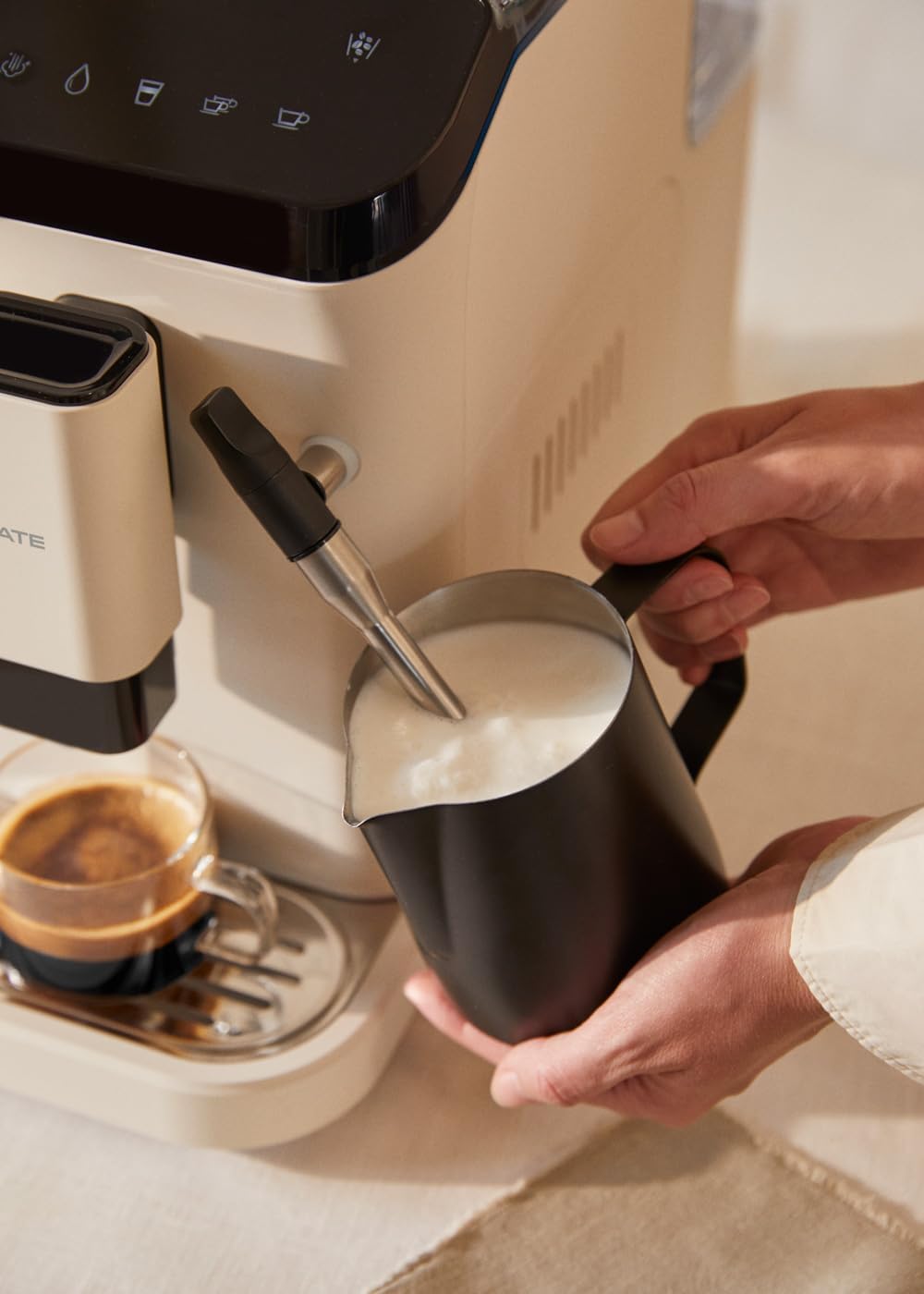
Figure 4.1: Frothing milk using the adjustable steam wand.
4.3.2 Výdej horké vody
- Umístěte šálek pod parní trysku.
- Select the hot water function on the touch panel.
- The machine will dispense hot water for teas or other infusions.

Figure 4.2: Dispensing hot water for beverages.
5. Údržba a čištění
Pravidelné čištění a údržba zajistí optimální výkon a dlouhou životnost vašeho kávovaru.
5.1 Funkce samočištění
The machine is equipped with a self-cleaning function. Follow the prompts on the touch control panel when the cleaning indicator illuminates. This cycle helps maintain internal hygiene.
5.2 Drip Tray and Coffee Grounds Container
- When the 'drip tray full' indicator appears, carefully remove the drip tray.
- Empty the liquid from the drip tray and the used coffee grounds from the container.
- Wash both components with warm soapy water, rinse, and dry before reinserting.
5.3 Čištění parní trysky
Po každém použití otřete parní tryskuamp cloth to remove any milk residue. Periodically, remove the outer nozzle and rinse it under running water to prevent blockages.
5.4 Odvápnění
Over time, mineral deposits can build up in the machine. The machine will indicate when descaling is required. Use a suitable descaling solution designed for coffee machines and follow the instructions provided with the descaling product and the machine's display prompts.
6. Řešení problémů
V této části naleznete běžné problémy a jejich řešení. Pokud problém přetrvává, kontaktujte zákaznickou podporu.
| Problém | Možná příčina | Řešení |
|---|---|---|
| Žádná káva | Water tank empty / No coffee beans / Clogged coffee spout | Refill water tank / Add coffee beans / Clean coffee spout |
| Slabá káva | Insufficient coffee quantity / Coarse grind setting | Adjust coffee intensity setting / Adjust grinder to a finer setting |
| Stroj se nezapíná | Not plugged in / Power outage | Check power connection / Check circuit breaker |
| 'No water' indicator | Water tank empty or not properly inserted | Refill water tank and ensure it is correctly seated |
| 'No beans' indicator | Zásobník na fazole prázdný | Refill coffee bean hopper |
| 'Cleaning' indicator | Self-cleaning cycle required | Initiate the self-cleaning program as per display instructions |
| 'Drip tray full' indicator | Drip tray or coffee grounds container is full | Empty and clean the drip tray and coffee grounds container |
7. Specifikace
| Funkce | Specifikace |
|---|---|
| Značka | VYTVOŘIT |
| Název modelu | THERA MATIC TOUCH |
| Číslo modelu | 161966_361774 |
| Barva | Cream-white |
| Rozměry produktu (D x Š x V) | 32.5 x 19 x 44 cm |
| Hmotnost | 9.05 kg |
| Kapacita vodní nádrže | 1.5 litrů |
| Kapacita zásobníku na kávová zrna | 180 gramů |
| Tlak | 20 baru |
| Výkon/Wattage | 1350 wattů |
| svtage | 240 voltů |
| Materiál | AS + ABS |
| Speciální funkce | Removable tank, Milk frother, Integrated grinder, Self-cleaning function, Touch control panel |
8. Záruka a podpora
8.1 Informace o záruce
Your CREATE THERA MATIC TOUCH coffee machine is covered by a manufacturer's warranty. Please refer to the warranty card included with your purchase for specific terms, conditions, and duration. Retain your proof of purchase for warranty claims.
8.2 Zákaznická podpora
For technical assistance, spare parts, or any questions regarding your product, please contact CREATE customer support. Contact details can typically be found on the manufacturer's webmístě nebo na obalu produktu.
Note: Specific contact information is not provided in this manual. Please refer to your product packaging or the official CREATE webstránky pro podrobnosti o podpoře.