Zavedení
Thank you for choosing the Xiaomi Robot Vacuum E12. This intelligent robotic vacuum cleaner is designed to provide efficient and thorough cleaning for your home, featuring powerful suction, smart navigation, and app control. This manual provides essential information for the safe and effective operation, maintenance, and troubleshooting of your device. Please read this manual carefully before use and retain it for future reference.
Konec produktuview
Klíčové vlastnosti
- Výkonné sání: Up to 4000 Pa suction power for effective cleaning on various surfaces.
- Ovládání aplikace: Manage and schedule cleaning tasks conveniently via the Xiaomi Home app.
- Efficient Cleaning Route: Intelligent navigation system ensures organized and comprehensive cleaning coverage.
- Intelligent Water Tank: Automatically dispenses water for effective mopping.
- Komplexní senzory: Equipped with multiple sensors for obstacle avoidance and complete area coverage.
Komponenty
Familiarize yourself with the main components of your Xiaomi Robot Vacuum E12.

Obrázek 1: Nahoře view of the Xiaomi Robot Vacuum E12, showing the main unit and an included mop pad.

Obrázek 2: Přední strana view of the robot vacuum, highlighting the bumper and sensor area.
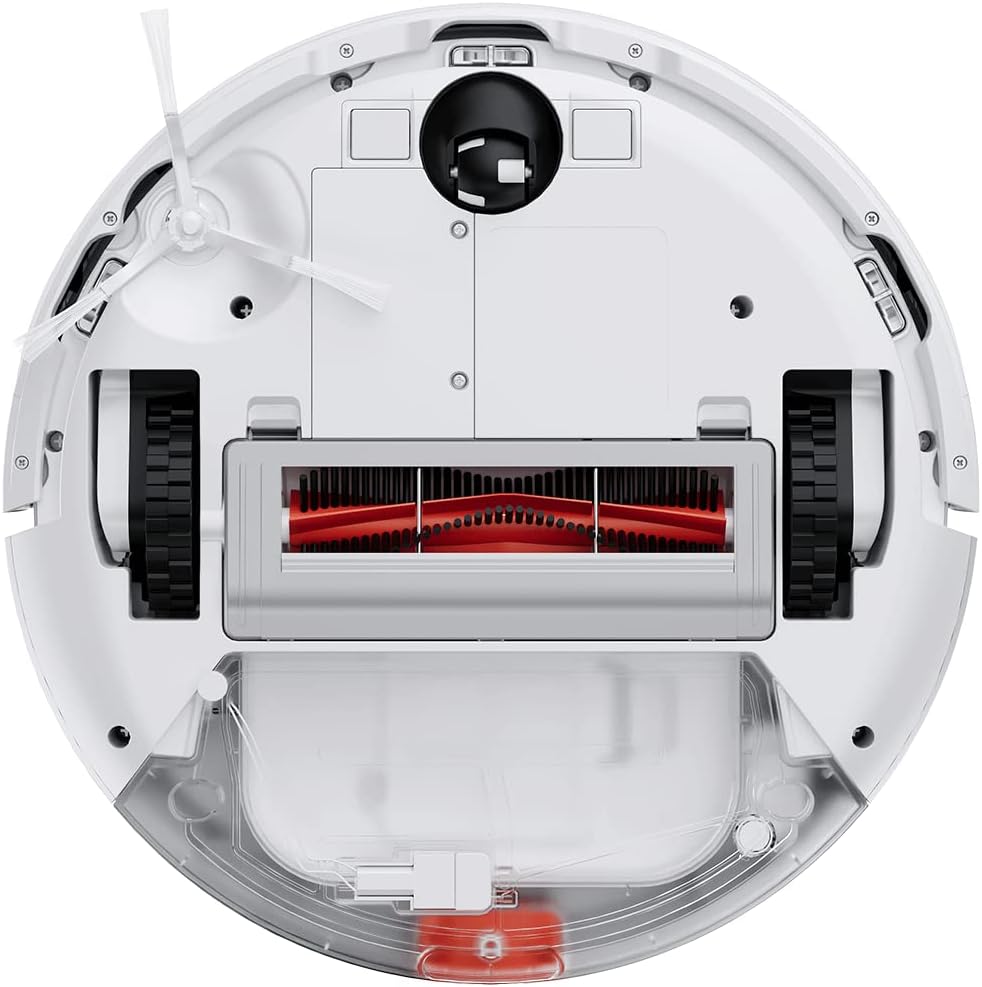
Figure 3: Underside of the robot vacuum, showing the main brush, side brushes, wheels, and dustbin/water tank compartment.

Figure 4: The robot vacuum with the mop attachment installed, ready for wet cleaning.
Nastavení
1. Vybalování
- Opatrně vyjměte všechny součásti z obalu.
- Odstraňte všechny ochranné fólie a balicí materiály z robota a nabíjecí stanice.
- Ujistěte se, že je přítomno veškeré příslušenství uvedené v dodacím listu.
2. Umístění nabíjecí stanice
- Umístěte nabíjecí stanici ke zdi na tvrdý a rovný povrch.
- Ujistěte se, že je po obou stranách doku alespoň 0.5 metru (1.6 stopy) volného prostoru a 1.5 metru (4.9 stopy) před ním.
- Připojte napájecí adaptér k nabíjecí stanici a zapojte jej do elektrické zásuvky.
- Ensure the power cable is neatly tucked away to prevent entanglement.
3. Počáteční poplatek
- Place the robot vacuum onto the charging dock, ensuring the charging contacts align.
- The robot will automatically power on and begin charging. Allow it to fully charge before first use (approximately 4-6 hours).
- The indicator light on the robot will show charging status.
4. Xiaomi Home App Connection
- Download the "Xiaomi Home" app from your mobile device's app store (Google Play Store or Apple App Store).
- Open the app and create a Xiaomi account or log in if you already have one.
- Klepněte na ikonu „+“ v pravém horním rohu pro přidání zařízení.
- Follow the on-screen instructions to connect your robot vacuum to the app. This typically involves resetting the Wi-Fi on the robot and connecting your phone to the robot's temporary Wi-Fi network.
- Po připojení můžete robota ovládat, view cleaning maps, set schedules, and access additional features.
Návod k obsluze
Spuštění čisticího cyklu
- Prostřednictvím tlačítek robota: Press the Power button once to start a general cleaning cycle. Press it again to pause. Press and hold to send the robot back to the charging dock.
- Prostřednictvím aplikace Xiaomi Home: Open the app, select your robot vacuum, and tap the "Clean" button. You can also select specific cleaning modes (e.g., Spot Clean, Edge Clean) or adjust suction power.

Figure 5: Illustration of the robot vacuum following an efficient, organized cleaning path to cover the entire floor area.
Použití funkce vytírání
- Fill the water tank with clean water. Do not use detergents or corrosive liquids.
- Attach the mop pad securely to the water tank module.
- Install the water tank module into the robot vacuum according to the instructions.
- Start a cleaning cycle. The robot will automatically dispense water for mopping.
- Poznámka: The mopping function is best suited for hard floors. Avoid using it on carpets or rugs.
Plánování úklidů
Use the Xiaomi Home app to set up cleaning schedules. You can specify cleaning times, days of the week, and even cleaning modes for automated cleaning.

Figure 6: The robot vacuum's low profile allows it to clean effectively under beds and other furniture.
Údržba
Regular maintenance ensures optimal performance and extends the lifespan of your robot vacuum. Always power off the robot before performing any maintenance.
1. Vyprázdnění popelnice
- Stiskněte tlačítko pro uvolnění prachového koše a vytáhněte prachový koš.
- Otevřete víko popelnice a vysypte její obsah do odpadkového koše.
- V případě potřeby opláchněte nádobu na prach vodou a před opětovnou instalací se ujistěte, že je zcela suchá.
2. Čištění filtru
- Vyjměte filtr z nádoby na prach.
- Tap the filter gently to remove dust. You can also rinse it under running water.
- Allow the filter to air dry completely for at least 24 hours before re-installing. Do not use a dryer or direct sunlight.
- Vyměňujte filtr každé 3–6 měsíců, v závislosti na používání.
3. Čištění hlavního kartáče
- Otočte robota a sejměte kryt hlavního kartáče.
- Vyjměte hlavní kartáč.
- Pomocí čisticího nástroje (pokud je součástí dodávky) nebo nůžek odstřihněte a odstraňte vlasy nebo nečistoty zamotané kolem kartáče.
- Re-install the main brush and cover.
4. Čištění bočního kartáče
- Jemně zatáhněte za boční kartáč a vyjměte ho.
- Odstraňte veškeré vlasy nebo nečistoty.
- Re-attach the side brush, ensuring it clicks into place.
5. Čištění senzorů a nabíjecích kontaktů
- Wipe the cliff sensors (located on the bottom of the robot) and wall sensors (on the side bumper) with a clean, dry cloth.
- Očistěte nabíjecí kontakty na robotu i nabíjecí stanici suchým hadříkem.

Figure 7: Diagram illustrating the function of the cliff sensors, which prevent the robot from falling down stairs or off ledges.
Odstraňování problémů
Pokud se u vašeho robotického vysavače vyskytne problém, podívejte se na následující běžné problémy a jejich řešení.
| Problém | Možná příčina | Řešení |
|---|---|---|
| Robot se nezapne. | Low battery; not properly charged. | Umístěte robota na nabíjecí stanici a ujistěte se, že je plně nabitý. |
| Robot se nemůže vrátit do nabíjecí stanice. | Charging dock is obstructed or out of reach; low battery. | Ensure the charging dock is in an open area. Manually place the robot on the dock if needed. |
| Špatný čisticí výkon. | Plný odpadkový koš; zamotané kartáče; ucpaný filtr. | Empty dustbin, clean main brush and side brushes, clean or replace filter. |
| Robot se často zasekává. | Překážky (kabely, koberce); znečištěné senzory. | Z čištěné oblasti uvolněte překážky. Vyčistěte všechny senzory. |
| Funkce mopování nefunguje. | Water tank empty; mop pad not attached correctly. | Fill the water tank. Ensure the mop pad is securely attached. |
| Problémy s připojením k aplikaci. | Incorrect Wi-Fi password; robot too far from router; temporary network glitch. | Ensure correct Wi-Fi details. Move robot closer to router. Restart robot and router. Try re-pairing via the app. |
For persistent issues not covered here, please refer to the Xiaomi Home app's help section or contact Xiaomi customer support.
Specifikace
| Funkce | Detail |
|---|---|
| Značka | XIAOMI |
| Číslo modelu | BHR7331EU |
| Rozměry produktu | 12.6 cm D x 3.15 cm Š x 12.6 cm V |
| Hmotnost položky | 10.14 libry |
| Sací výkon | Až 4000 Pa |
| Zdroj napájení | Napájení baterií (1 lithium-iontová baterie je součástí balení) |
| Kontrolní metoda | App (Xiaomi Home) |
| Speciální funkce | Programovatelné |
| Zahrnuté komponenty | Robot Vacuum, Charging Dock, Power Adapter, Water Tank, Mop Pad, Side Brush, Cleaning Tool |
Bezpečnostní informace
Please read and follow all safety instructions to prevent injury or damage.
- Tento spotřebič mohou používat děti ve věku 8 let a starší a osoby se sníženými fyzickými, smyslovými nebo duševními schopnostmi nebo nedostatkem zkušeností a znalostí, pokud jsou pod dohledem nebo jsou poučeny o používání spotřebiče bezpečným způsobem a chápou související nebezpečí. .
- Děti si se spotřebičem nesmějí hrát. Čištění a uživatelskou údržbu nesmějí provádět děti bez dozoru.
- Nepoužívejte robotický vysavač na mokrých površích nebo v oblastech se stojatou vodou.
- Nepoužívejte robota k vysávání velkých předmětů, ostrých předmětů nebo hořících/kouřících materiálů.
- Udržujte vlasy, volné oblečení, prsty a všechny části těla v dostatečné vzdálenosti od otvorů a pohyblivých částí.
- Ensure the charging dock is placed in a stable location to prevent tipping.
- Only use the original power adapter and charging dock provided with the product.
- Do not expose the robot to direct sunlight or extreme temperatures.
- The product contains batteries that are only replaceable by skilled persons.
- Důležitá poznámka: This robot vacuum is primarily designed for hard floors. It is not recommended for cleaning carpets, especially thick pile carpets, as stated in some product information.
Záruka a podpora
Informace o záruce naleznete v záruční kartě dodané s produktem nebo na oficiálních stránkách Xiaomi. webmísto.
If you require technical support or have questions regarding your Xiaomi Robot Vacuum E12, please contact Xiaomi customer service through their official website or the Xiaomi Home app. Provide your model number (BHR7331EU) and purchase details when contacting support.
Oficiální Xiaomi Webmísto: www.mi.com


