1. Úvod
The Xoopar Multi Cable USB 3-in-1 Connector is designed for versatile charging and data transfer across a wide range of devices. This cable features multiple connector types to ensure compatibility with various smartphones, tablets, and computers, providing a convenient solution for your connectivity needs.

This image displays the Xoopar Multi Cable, a versatile 3-in-1 charging and data transfer cable. It features a USB-A input, a USB-C output, and a Lightning output, all integrated into a single red cable with a compact housing.
2. Nastavení a připojení
To begin using your Xoopar Multi Cable, identify the appropriate connectors for your devices. The cable includes a USB-A input, a USB-C output, and a Lightning output.
2.1 Identifying Connectors
- Vstup USB-A: Standard rectangular USB connector, typically used for power adapters, computers, or power banks.
- USB-C výstup: Reversible oval-shaped connector, compatible with modern Android devices, laptops, and other USB-C enabled electronics.
- Bleskový výstup: Proprietary Apple connector, compatible with iPhones, iPads, and other Apple devices.
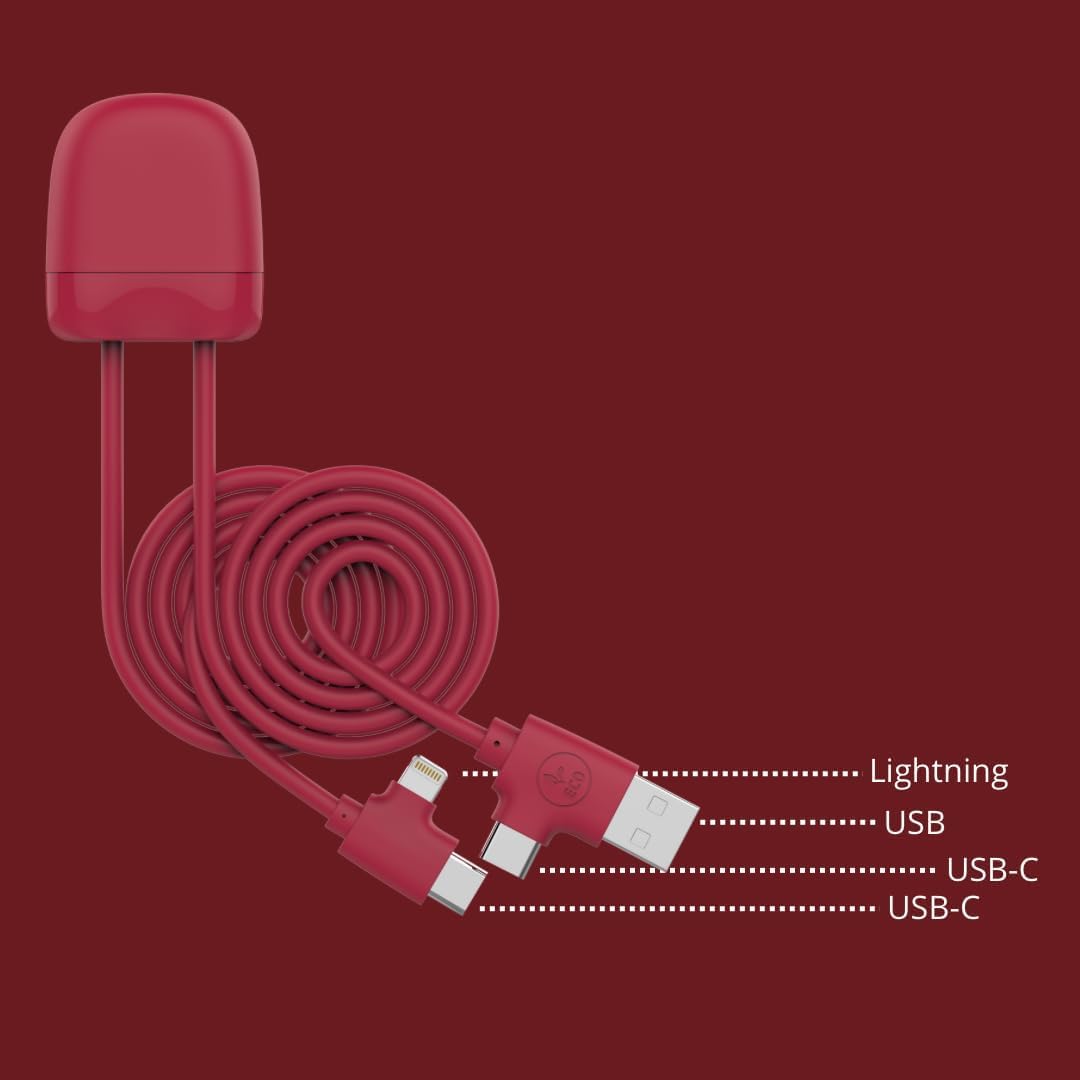
Detailní view of the Xoopar Multi Cable's connector ends, clearly indicating the Lightning, USB-A, and USB-C ports for various device connections.
2.2 Připojení zařízení
- Připojte USB-A vstup of the Xoopar Multi Cable to a power source (e.g., wall adapter, computer USB port, power bank).
- Select the appropriate output connector (USB-C or Blesk) for your device.
- Insert the selected output connector into your smartphone, tablet, or other compatible device.
- Ensure all connections are secure for optimal performance.
3. Návod k obsluze
The Xoopar Multi Cable supports both charging and data transfer functionalities.
3.1 Nabíjecí zařízení
Once connected to a power source and your device, the cable will initiate charging automatically. The cable is designed to support fast charging for compatible devices, provided the power source also supports fast charging protocols.

A smartphone is depicted charging from a laptop, highlighting the cable's function for power delivery. The image also indicates the cable's 1-meter length, providing ample dosah.
3.2 Přenos dat
To transfer data, connect the USB-A input to a computer's USB port and the appropriate output (USB-C or Lightning) to your device. Your computer should recognize the connected device, allowing you to transfer files, sync data, or perform backups.

The Xoopar Multi Cable is shown in use, connecting a laptop to a smartphone, illustrating its capability for both charging and data synchronization between devices.
3.3 CarPlay Functionality
For devices supporting CarPlay, connect your iPhone to a compatible car infotainment system using the Lightning connector. This enables integrated access to navigation, music, messages, and other apps directly from your car's display.

This image demonstrates the cable's compatibility with in-car systems, showing a smartphone connected and utilizing the CarPlay feature for integrated navigation and media.
4. Údržba
Proper care extends the life of your Xoopar Multi Cable.
- Skladování: Store the cable in a clean, dry place away from extreme temperatures. Avoid tightly coiling or bending the cable at sharp angles, especially near the connectors, to prevent internal damage.
- Čištění: Use a soft, dry cloth to gently wipe the cable and connectors. Do not use harsh chemicals or abrasive materials. Ensure connectors are free of dust and debris before use.
- Zacházení: Při zapojování nebo odpojování kabelu vždy uchopte za konektor, netahejte za samotný kabel.
5. Řešení problémů
If you encounter issues with your Xoopar Multi Cable, consider the following:
- Zařízení se nenabíjí:
- Ujistěte se, že je zdroj napájení aktivní a funguje správně.
- Verify that the cable is securely connected to both the power source and your device.
- Zkontrolujte, zda kabel nebo konektory nejsou viditelně poškozené.
- Zkuste použít jiný napájecí adaptér nebo port USB.
- Pomalé nabíjení:
- Ensure your power adapter provides sufficient output for fast charging, if applicable.
- Close unnecessary applications on your device that may consume significant power.
- Data Transfer Failure:
- Confirm the cable is connected to a computer's data-enabled USB port, not just a charging port.
- Ensure your device is unlocked and set to allow data transfer (e.g., 'File Transfer' mode on Android).
- Restartujte počítač i zařízení.
6. Specifikace
| Číslo modelu | XP 61137 |
| Značka | Xoopar |
| Délka kabelu | 1 Meter (approximately 3.3 feet) |
| Typy konektorů | USB-A (Input), USB-C (Output), Lightning (Output) |
| Kompatibilní zařízení | Smartphones, Tablets, Power Banks, Smart Watches, Computers with USB, USB-C, or Lightning ports |
| Speciální funkce | Data Transfer, Fast Charging, High Speed, Lightweight, CarPlay Functionality |
| Materiály | 14% recycled ABS plastic, 41% recycled RPET |
| Rozměry produktu | 5.91 x 1.26 x 0.47 palce |
| Hmotnost položky | 1.41 unce |
7. Záruka a podpora
Xoopar products are manufactured with quality and reliability in mind. For specific warranty information regarding your Xoopar Multi Cable, please refer to the warranty card included with your purchase or visit the official Xoopar webmísto.
If you require technical assistance or have questions not covered in this manual, please contact Xoopar customer support through their official channels. Contact information can typically be found on the product packaging or the Xoopar webmísto.


