Konec produktuview
The EBTOOLS LGA 1155 Motherboard is designed for desktop PC systems, offering robust performance and extensive connectivity. It features a multiphase power chipset for stable CPU performance and supports 2nd/3rd generation LGA1155 Pin Series Processors. This Mini ITX motherboard provides a high-definition visual experience through its VGA and HD Multimedia Interface outputs.
Mezi klíčové vlastnosti patří:
- LGA 1155 CPU Slot: Designed for stable performance with compatible processors.
- Multiphase Power: Ensures stable and accurate power delivery to the CPU.
- HD Interfaces: Equipped with VGA and HD Multimedia Interface for digital HD video output.
- Channel DDR3: Features a DDR3 memory slot to enhance motherboard performance.
- Rozsáhlá konektivita: Includes 6 USB2.0 interfaces and 4 SATA2.0 interfaces for various peripherals and storage devices.
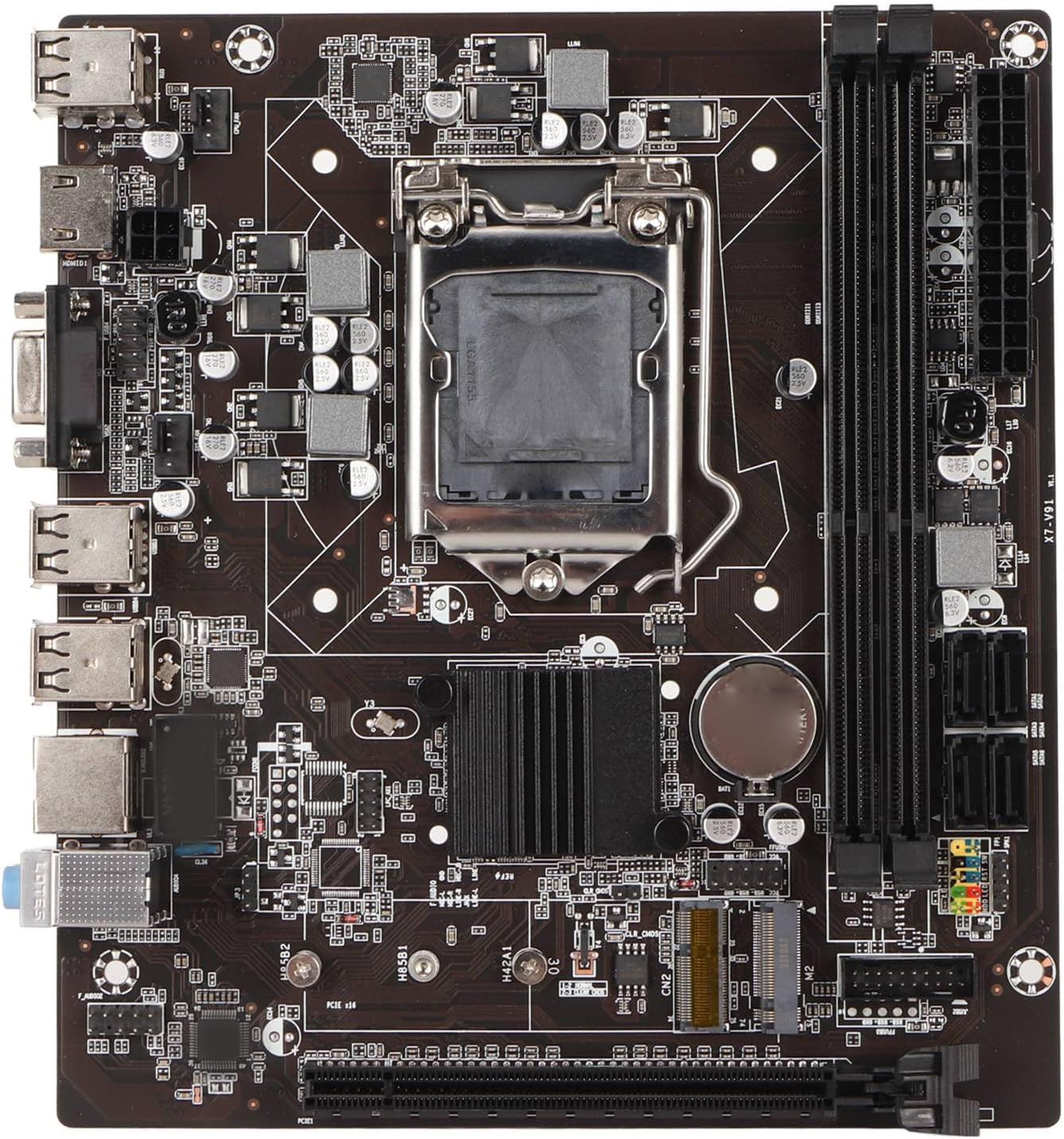
Obrázek 1: Shora dolů view of the EBTOOLS LGA 1155 Motherboard, showing the CPU socket, RAM slots, and various ports.
Nastavení a instalace
This section provides instructions for installing your EBTOOLS LGA 1155 Motherboard into a compatible PC case and connecting essential components.
Obsah balení
Before beginning installation, ensure all components listed below are present in your package:
- 1 x LGA 1155 Motherboard
- 1 x Metal I/O Plate
- 1 x Connecting Wire (likely SATA data cable)

Figure 2: The motherboard alongside its included metal I/O plate and a connecting wire, typically a SATA data cable.
Kroky instalace
- Připravte si případ: Ensure your PC case is compatible with Mini ITX motherboards. Install the metal I/O plate into the designated slot at the rear of the case.
- Nainstalujte procesor: Carefully open the CPU socket retention arm. Align the triangular marker on your LGA 1155 processor with the corresponding marker on the motherboard's socket. Gently place the CPU into the socket, ensuring it sits flush. Close the retention arm to secure the CPU.
- Instalace chladiče CPU: Apply thermal paste to the CPU (if not pre-applied on the cooler). Mount your compatible LGA 1155 CPU cooler according to its manufacturer's instructions.
- Instalace RAM: Open the clips on the DDR3 memory slots. Align the notch on your DDR3 RAM module with the key in the slot. Press firmly on both ends of the RAM module until the clips snap into place. This motherboard supports 2 x DDR3 slots.
- Montáž základní desky: Carefully place the motherboard into the PC case, aligning the screw holes on the motherboard with the standoffs in the case. Secure the motherboard with screws.
- Připojte napájení: Connect the 24-pin ATX power connector from your power supply to the motherboard. Connect the 4-pin or 8-pin CPU power connector (if applicable) to the motherboard.
- Připojení úložných zařízení: Use the provided connecting wire (SATA cable) to connect your SATA storage devices (HDD/SSD) to the SATA2.0 ports on the motherboard. This motherboard has 4 SATA2.0 interfaces.
- Připojení kabelů předního panelu: Connect the power button, reset button, USB ports, and audio jacks from your PC case's front panel to the corresponding headers on the motherboard. Refer to your case manual for specific pin layouts.
- Instalace rozšiřujících karet: If using a dedicated graphics card or other expansion cards, insert them into the PCIE X16 slot or other extended interfaces (1 x , 1 x M.2) as needed.
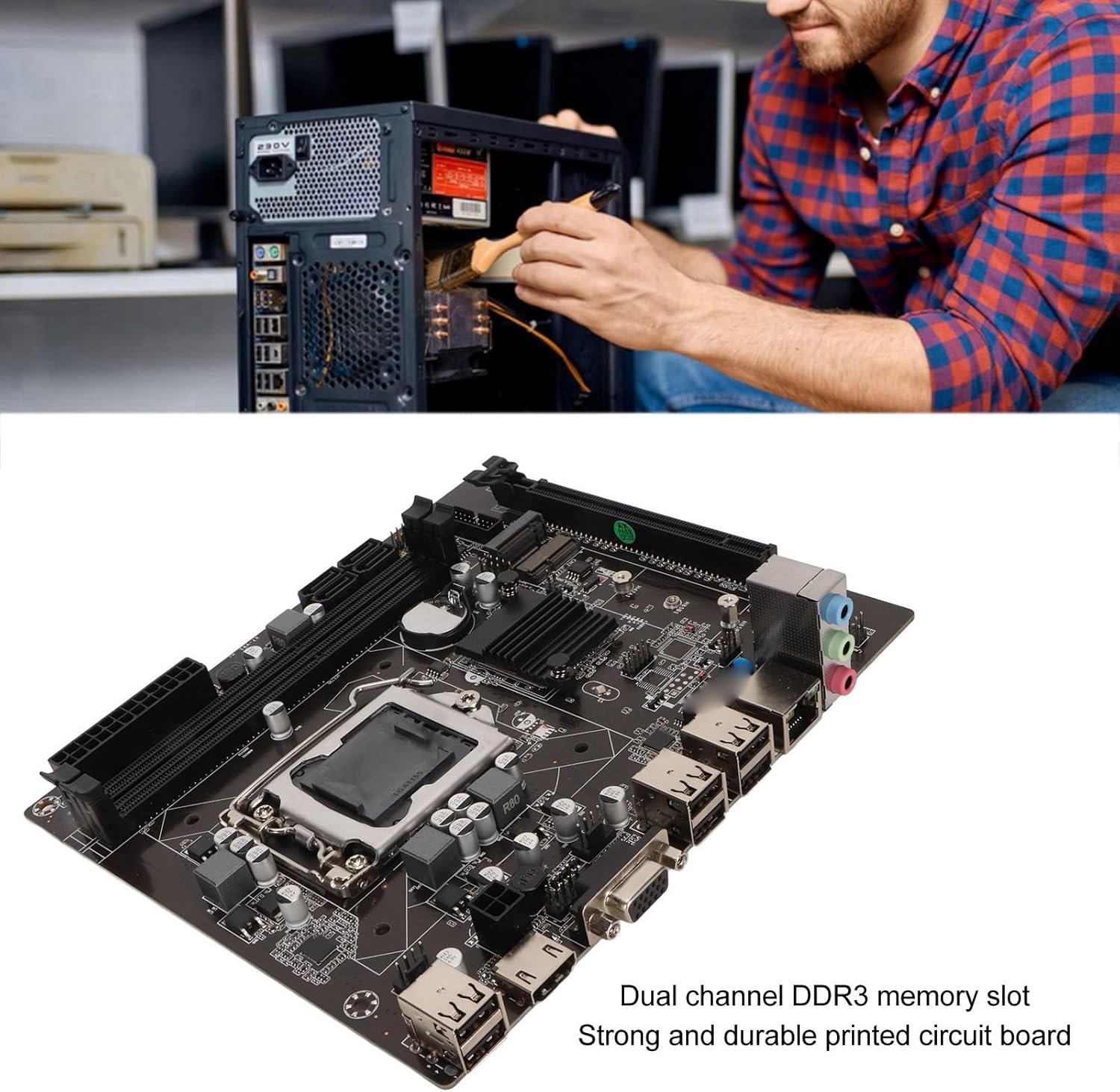
Figure 3: A user performing an installation within a PC case, demonstrating the typical environment for motherboard setup.

Obrázek 4: Detailní view of the LGA 1155 CPU socket and adjacent DDR3 memory slots, crucial areas for component installation.
Provozní směrnice
Once the motherboard and other components are installed, the system is ready for operation. This motherboard supports various operating systems compatible with 2nd/3rd Gen LGA1155 processors.
Konfigurace BIOSu/UEFI
Upon first boot, you may need to enter the BIOS/UEFI setup to configure boot order, system time, and other settings. Typically, you can access the BIOS by pressing DEL or F2 during the initial boot screen.
Instalace ovladače
After installing your operating system, it is essential to install the necessary drivers for the motherboard's components, including chipset, network card, and integrated graphics (if used). These drivers are usually provided on a CD/DVD with the motherboard or can be downloaded from the manufacturer's webmísto.
Konektivita
Utilize the available ports for your peripherals:
- USB porty: 2.0 For connecting keyboards, mice, external drives, and other USB devices.
- VGA/HD Multimedia Interface: Pro připojení displejů.
- Ethernetový port: For wired network connectivity (100M Netword Card).
- Audio konektory: Pro reproduktory, sluchátka a mikrofony.
Údržba
Proper maintenance can extend the lifespan of your motherboard and ensure stable system performance.
- Udržujte to čisté: Regularly clean dust from inside your PC case, especially from the motherboard and CPU cooler fins, using compressed air. Dust accumulation can lead to overheating.
- Zajistěte správné proudění vzduchu: Make sure your PC case has adequate ventilation and that fans are functioning correctly to prevent heat buildup.
- Aktualizace BIOSu: Pravidelně kontrolujte informace od výrobce webweb pro aktualizace systému BIOS/UEFI. Aktualizace mohou zlepšit kompatibilitu, stabilitu a výkon. Pečlivě dodržujte pokyny k aktualizaci.
- Aktualizace ovladačů: Udržujte ovladače systému aktualizované, abyste zajistili optimální výkon a kompatibilitu s novým softwarem a hardwarem.
- Baterie CMOS: The motherboard uses a CR2032 battery for CMOS settings. If your system consistently loses time or BIOS settings, the battery may need replacement.
Odstraňování problémů
Tato část se zabývá běžnými problémy, se kterými se můžete setkat u své základní desky.
- Žádné napájení/žádné spuštění:
- Zkontrolujte všechna napájecí připojení (24pinový ATX, napájení CPU).
- Ujistěte se, že je napájecí zdroj funkční a zapnutý.
- Ověřte připojení tlačítka napájení na předním panelu k základní desce.
- Bez displeje:
- Ensure the monitor is connected to the correct video output (VGA or HD Multimedia Interface).
- Reseat RAM modules. Try booting with one RAM stick if you have multiple.
- Reseat the CPU and check for bent pins (handle with extreme care).
- If using a dedicated graphics card, ensure it is properly seated and has power.
- Nestabilita/pády systému:
- Zkontrolujte teplotu CPU a GPU. Zajistěte dostatečné chlazení.
- Spusťte diagnostické nástroje paměti a zkontrolujte, zda není RAM vadná.
- Ujistěte se, že všechny ovladače jsou správně nainstalovány a aktuální.
- Check for loose connections or components.
- USB zařízení nerozpoznána:
- Ujistěte se, že jsou nainstalovány ovladače USB.
- Vyzkoušejte různé porty USB.
- Zkontrolujte nastavení BIOSu pro povolení řadiče USB.
Specifikace
Detailed technical specifications for the EBTOOLS LGA 1155 Motherboard:
| Funkce | Specifikace |
|---|---|
| Typ položky | Základní deska LGA 1155 |
| Materiál | Printed Circuit Board, Metal |
| Vestavěná baterie | CR2032 x 1 (240mAh) |
| Podpora CPU | 2nd/3rd Gen LGA1155 Pin Series Processors (for Celeron, for , for Core) |
| Čipová sada | H61 Chipset Series |
| Paměťový slot | 2 x DDR3 |
| Maximální kapacita paměti | 16 GB |
| Rozhraní USB | 6 x USB2.0, USB Pin x 1 |
| Rozhraní SATA | 4x SATA2.0 |
| Síťová karta | 100M Network Card |
| Slot grafické karty | 1 x PCIE X16 |
| Rozšířené rozhraní | 1 x , 1 x M.2 |
| Rozměry balení | 10.2 x 7.83 x 2.05 palce |
| Hmotnost položky | 1.16 libry |
| Číslo modelu | EBTOOLSpxvk7fmb38 |
| ASIN | B0CKVL89BD |

Figure 5: An angled perspective of the motherboard, showcasing its compact Mini ITX form factor and port layout.
Záruka a podpora
For warranty information and technical support, please refer to the official EBTOOLS webnebo kontaktujte jejich zákaznický servis. Uschovejte si účtenku jako doklad o koupi.
While specific warranty details are not provided in this manual, general product warranties typically cover manufacturing defects for a limited period from the date of purchase.
Pro dodatečnou ochranu zvažte dostupné plány ochrany:
- Dvouletý ochranný plán
- Dvouletý ochranný plán
- Kompletní ochrana (měsíční tarif)
These plans are offered separately and provide extended coverage beyond the standard manufacturer's warranty.
Výrobce: EBTOOLS
Datum první dostupnosti: 11. října 2023
Oficiální videa produktů
Pro tento produkt momentálně nejsou k dispozici žádná oficiální produktová videa od prodejce.