1. Úvod
The Lenco SCD-860 is a versatile portable audio device featuring DAB+ and FM radio reception, Bluetooth connectivity for wireless audio streaming, and a top-loading CD player. It includes a 2.4-inch TFT color display, dual alarm functions, and stereo speakers. This manual provides essential information for the safe and efficient operation of your device.
2. Bezpečnostní informace
Please read these safety instructions carefully before using the device and retain them for future reference. Incorrect use may result in electric shock, fire, or other hazards.
- Nevystavujte jednotku dešti ani vlhkosti, abyste předešli požáru nebo úrazu elektrickým proudem.
- Zajistěte dostatečné větrání kolem jednotky. Neblokujte větrací otvory.
- Používejte pouze napájecí adaptér dodaný s jednotkou.
- Do not open the unit casing. Veškerý servis svěřte kvalifikovanému personálu.
- Baterie zlikvidujte zodpovědně v souladu s místními předpisy.
3. Obsah balení
Při vybalení ověřte, zda jsou všechny položky přítomny:
- Lenco SCD-860 Unit
- Síťový napájecí kabel
- Uživatelská příručka (tento dokument)
4. Konec produktuview
Familiarize yourself with the main components and controls of your Lenco SCD-860.
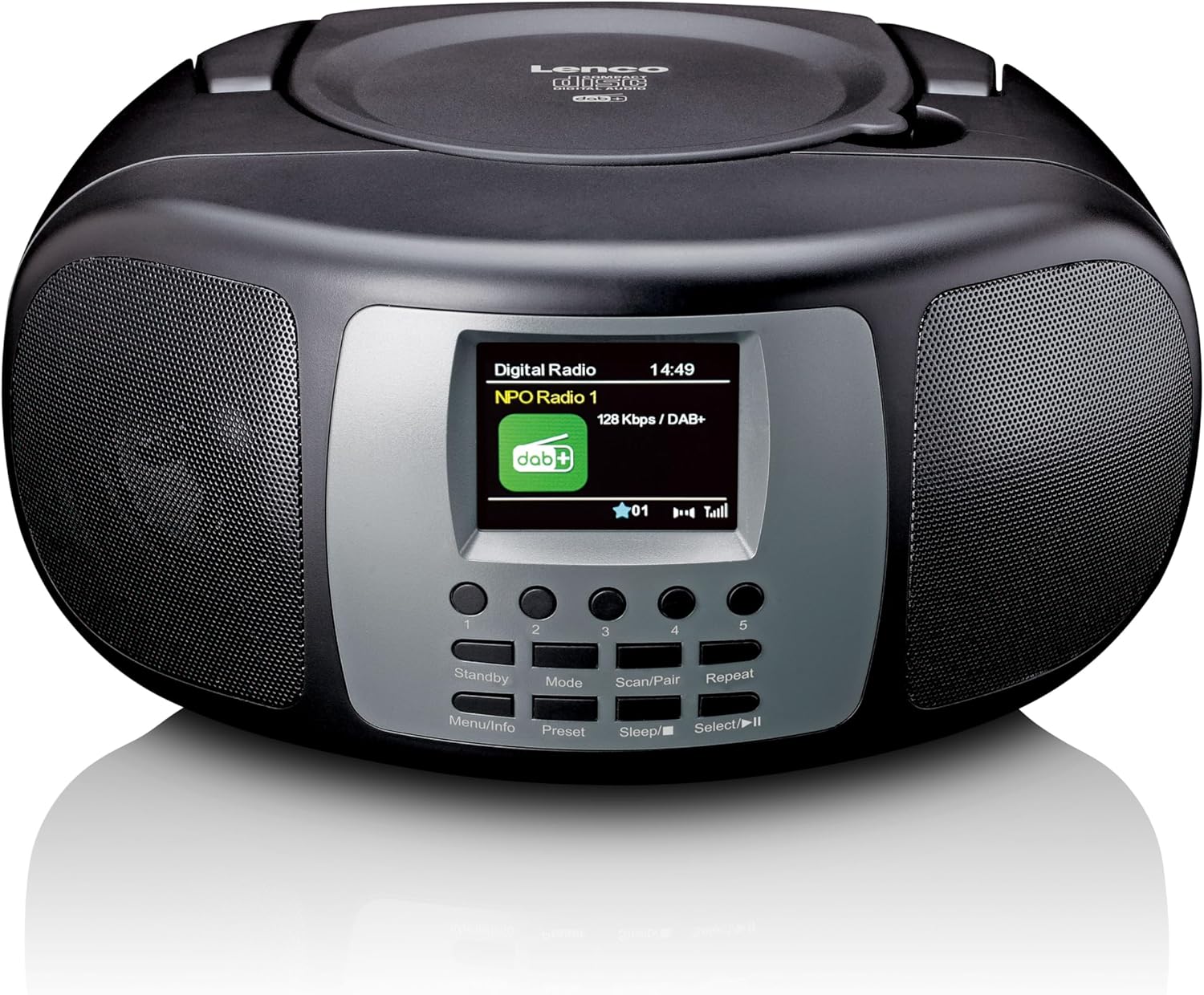
Obrázek 4.1: Přední strana View. This image displays the front of the Lenco SCD-860, highlighting the central 2.4-inch TFT color display, the array of control buttons below it, and the two integrated speakers on either side. The top-loading CD compartment is visible on the upper surface.

Figure 4.2: CD Compartment Open. This image shows the Lenco SCD-860 with its top-loading CD compartment lid open, revealing a compact disc placed inside, ready for playback. The display and control buttons are also visible.

Figure 4.3: Left Side Controls. This image illustrates the left side of the Lenco SCD-860, featuring the headphone output jack, the power ON/OFF switch, and the rotary volume control knob.
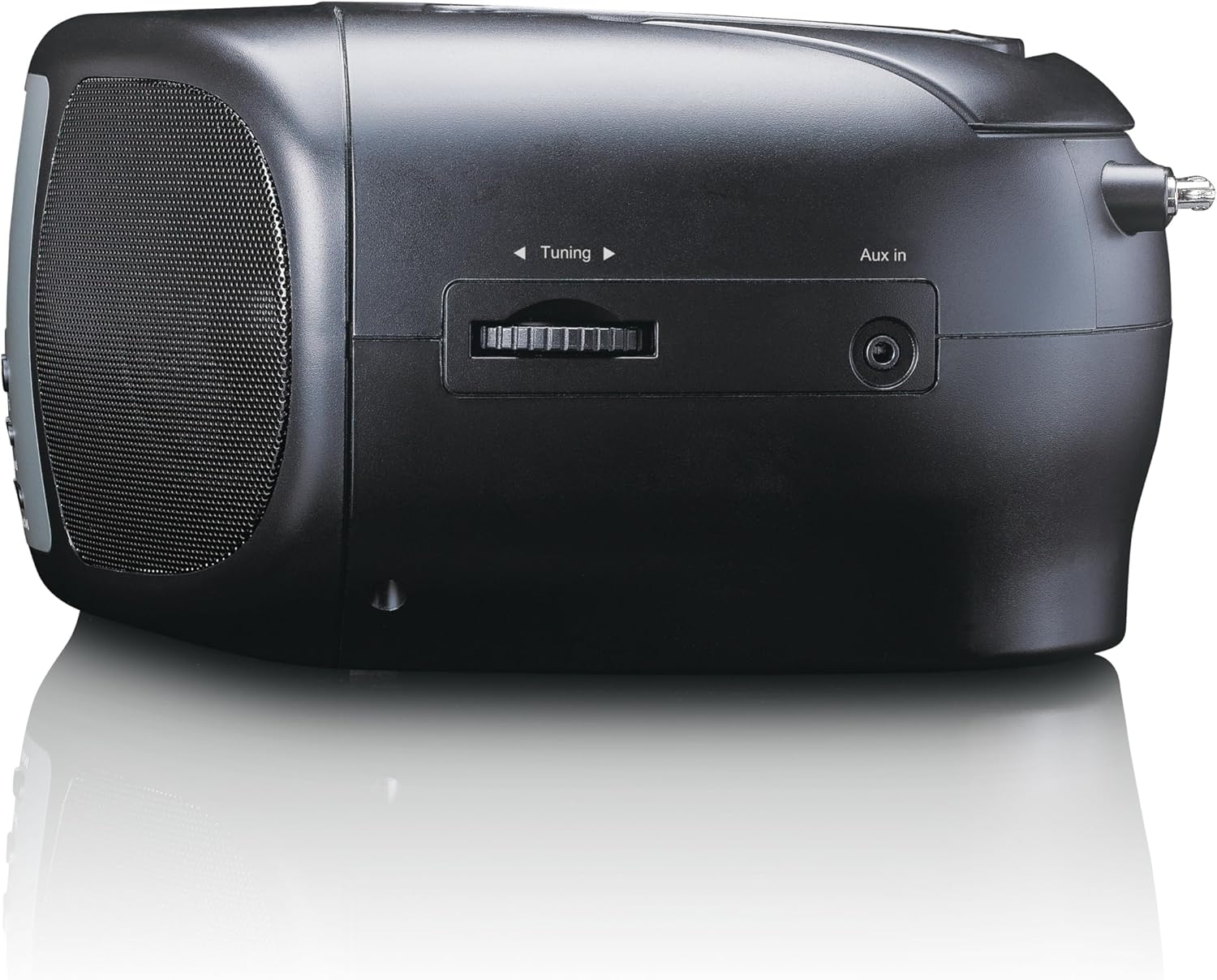
Figure 4.4: Right Side Controls. This image shows the right side of the Lenco SCD-860, highlighting the rotary tuning knob for radio frequency selection and the AUX input jack for connecting external audio devices.

Obrázek 4.5: Zadní View. This image displays the rear of the Lenco SCD-860, featuring the AC power input socket and the fully extended telescopic antenna for improved radio reception.
4.1. Ovládací tlačítka
- Standby/Menu/Info: Power on/off, access menu, display information.
- Mode/Preset: Switch between modes (DAB+, FM, CD, Bluetooth, AUX), save/recall radio presets.
- Scan/Pair/Sleep: Scan for radio stations, pair Bluetooth devices, activate sleep timer.
- Repeat/Select/Play/Pause: Repeat CD track/all, confirm selection, play/pause CD/Bluetooth.
- Knoflík ladění: Adjust radio frequency, navigate menus.
- Knoflík hlasitosti: Upravte úroveň zvukového výstupu.
- Tlačítka 1-5: Direct access to preset radio stations.
5. Nastavení
5.1. Napájení zařízení
The SCD-860 can be powered by AC mains or batteries.
5.1.1. Napájení střídavým proudem
- Connect the supplied AC power cable to the AC IN socket on the rear of the unit (refer to Figure 4.5).
- Zapojte druhý konec kabelu do standardní zásuvky.
5.1.2. Síla baterie
For portable use, the unit requires 6 x 'C' size batteries (not included).
- Otevřete kryt přihrádky na baterie na spodní straně jednotky.
- Insert 6 'C' size batteries, ensuring correct polarity (+/-).
- Bezpečně zavřete kryt bateriového prostoru.
5.2. Nastavení antény
For optimal DAB+ and FM radio reception, fully extend the telescopic antenna located at the rear of the unit (refer to Figure 4.5). Adjust its position for the best signal quality.
6. Návod k obsluze
6.1. Zapnutí/vypnutí
Posuňte Moc switch on the left side of the unit to the ON position. Press the Pohotovostní button on the front panel to turn the unit on or put it into standby mode.
6.2. Výběr režimu
Stiskněte tlačítko Režim button repeatedly to cycle through available modes: DAB+, FM, CD, Bluetooth, AUX.
6.3. Provoz DAB+ rádia
- Switch to DAB+ mode using the Režim tlačítko.
- The unit will automatically scan for available DAB+ stations upon first use or if no stations are found. To initiate a manual scan, press the Skenovat tlačítko.
- Použijte Ladicí knoflík to scroll through the list of available stations. Press Vybrat (often integrated with Repeat/Select/Play/Pause button) to confirm your selection.
- Chcete-li stanici uložit jako předvolbu, stiskněte a podržte tlačítko Přednastaveno button (often integrated with Mode button), then use the Ladicí knoflík to select a preset number (1-5) and press Vybrat potvrdit.
- To recall a preset, briefly press the corresponding numbered button (1-5).
6.4. Provoz rádia FM
- Přepněte do režimu FM pomocí Režim tlačítko.
- Pro automatické vyhledávání stanic stiskněte a podržte Skenovat tlačítko. Rádio začne prohledávat a zastaví se na další silné stanici.
- For manual tuning, rotate the Ladicí knoflík pro úpravu frekvence.
- Saving and recalling presets works similarly to DAB+ mode, using the Přednastaveno button and numbered buttons (1-5).
6.5. Provoz Bluetooth
- Přepněte do režimu Bluetooth pomocí Režim button. The display will show "Bluetooth Pairing" or similar.
- Activate Bluetooth on your external device (smartphone, tablet, etc.).
- Hledat "SCD-860" in your device's Bluetooth list and select it to pair.
- Once paired, you can stream audio from your device to the SCD-860. Use the Přehrát/Pozastavit button on the unit or your external device to control playback.
6.6. Ovládání CD přehrávače
- Přepněte do režimu CD pomocí Režim tlačítko.
- Open the top-loading CD compartment cover (refer to Figure 4.2).
- Vložte CD potištěnou stranou nahoru.
- Close the CD compartment cover. The unit will read the CD and begin playback automatically.
- Použijte Přehrát/Pozastavit tlačítko pro pozastavení nebo obnovení přehrávání.
- Stiskněte tlačítko Opakovat button to cycle through repeat modes (repeat one track, repeat all tracks).
- The unit supports programmable CD playback for up to 20 tracks. Refer to the full manual for detailed programming instructions.
6.7. Vstup AUX
Připojte externí audio zařízení (např. MP3 přehrávač) k Vstup AUX jack on the right side of the unit (refer to Figure 4.4) using a 3.5mm audio cable (not included). Switch to AUX mode using the Režim button. Audio will play through the SCD-860 speakers.
6.8. Funkce alarmu
The SCD-860 features a dual alarm function. Detailed instructions for setting and managing alarms are typically found in the full product manual. Generally, you will access the alarm settings via the Menu (long press Standby/Menu/Info) and use the Ladicí knoflík a Vybrat button to configure alarm times, sources (buzzer, radio, CD), and volume.
6.9. Použití sluchátek
Connect headphones to the 3.5mm headphone jack on the left side of the unit (refer to Figure 4.3) for private listening. The internal speakers will be muted automatically.
7. Údržba
- Čištění: Otřete přístroj měkkým, suchým hadříkem. Nepoužívejte abrazivní čisticí prostředky ani rozpouštědla.
- Péče o CD: S CD manipulujte za okraje. Znečištěná CD čistěte měkkým hadříkem, který nepouští vlákna, a otírejte je od středu směrem ven.
- Skladování: If not used for extended periods, remove batteries and store the unit in a cool, dry place.
8. Řešení problémů
| Problém | Možná příčina | Řešení |
|---|---|---|
| Žádná síla | Napájecí kabel není připojen; Baterie jsou vybité nebo nesprávně vložené. | Check AC cable connection; Replace batteries or ensure correct polarity. |
| Žádný zvuk | Příliš nízká hlasitost; Připojena sluchátka; Vybrán nesprávný režim. | Increase volume; Disconnect headphones; Select correct mode (DAB+, FM, CD, Bluetooth, AUX). |
| Špatný příjem rádia | Antenna not extended or poorly positioned; Weak signal area. | Zcela vysuňte a nastavte teleskopickou anténu; zkuste jednotku přesunout na jiné místo. |
| CD se nepřehrává | CD inserted incorrectly; CD is dirty or scratched; Incorrect mode. | Ensure CD is label-side up; Clean or replace CD; Select CD mode. |
| Párování Bluetooth se nezdařilo | Bluetooth not enabled on external device; SCD-860 not in pairing mode; Devices too far apart. | Enable Bluetooth on your device; Ensure SCD-860 is in Bluetooth mode; Move devices closer (within 10m). |
9. Specifikace
| Funkce | Popis |
|---|---|
| Číslo modelu | SCD-860BK |
| Značka | Lenco |
| Technologie připojení | Bluetooth |
| Speciální funkce | Bluetooth, DAB+/FM Radio, CD Player, Color Display, Dual Alarm |
| Kompatibilní zařízení | Headphones, Earphones, MP3 Player, Smartphone, Laptop, Speaker, Tablet, USB Stick |
| Výstupní výkon | 2 x 2 W rms |
| Zobrazit | 2.4-inch TFT LCD Color Display |
| CD Memory | Programmable for 20 tracks |
| Podporovaná rádiová pásma | DAB+ (Band III 174-240 MHz), FM |
| Zdroj napájení | AC Mains, 6 x 'C' Batteries (not included) |
| Spojení | AUX Input, 3.5mm Audio Output (Headphone) |
| Rozměry (D x Š x V) | 24 cm x 22 cm x 11.5 cm (přibližně) |
| Barva | Černý |
10. Záruka a podpora
For warranty information and technical support, please refer to the warranty card included with your product or visit the official Lenco webUschovejte si doklad o koupi pro případné reklamace.
For further assistance, please contact Lenco customer service through their official channels.


