Zavedení
The Volkano Robo Series Kids Money Saving Vault (Model VK-5700-PK) provides an engaging and secure method for children to learn about saving money. This vault features a secret pincode, simulated fingerprint access, automatic door opening, and plays 10 musical sound effects to enhance the saving experience. This manual provides essential information for the safe and effective use of your new money-saving vault.
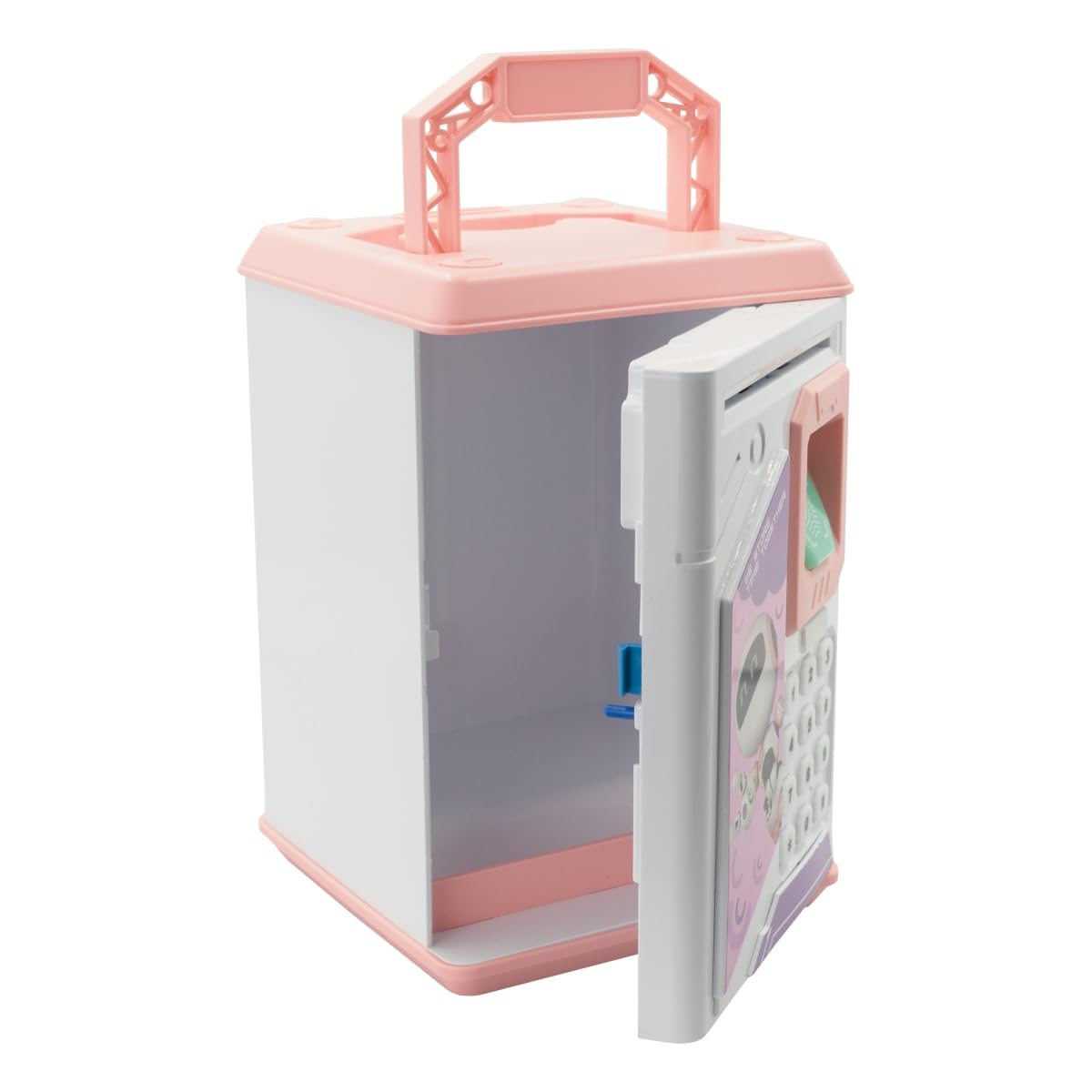
Image: The Volkano VK-5700-PK Robo Series Kids Money Saving Vault in pink, featuring a robotic design.
Bezpečnostní upozornění
- Keep the product away from naked flames or direct heat sources to prevent damage or injury.
- This product is recommended for ages 36 months to 12 years. Adult supervision is advised for younger children.
- Do not attempt to disassemble or modify the vault, as this may void the warranty and cause malfunction.
- Ensure batteries are inserted correctly according to polarity markings. Remove batteries if the product will not be used for an extended period.
Obsah balení
Zkontrolujte prosím balení, zda jsou všechny položky přítomny:
- 1 x Volkano VK-5700-PK Robo Series Kids Money Saving Vault
- 1 x Návod k obsluze (tento dokument)
Nastavení
1. Instalace baterie
- Locate the battery compartment on the back or bottom of the vault.
- Pomocí šroubováku (není součástí balení) otevřete kryt přihrádky na baterie.
- Insert the required batteries (type and quantity not specified in product data, typically AA) according to the polarity indicators (+/-). Poznámka: Baterie nejsou součástí dodávky.
- Nasaďte kryt prostoru pro baterie a zajistěte jej šroubem.
- The vault should power on, indicated by a sound or light.
2. Initial PIN Code Setup
Upon first use or after battery replacement, the vault will typically have a default PIN code (e.g., "0000"). It is recommended to change this immediately.
- Enter the default PIN code (e.g., 0000) and press the '#' or 'ENTER' button. The door will open automatically.
- While the door is open, press and hold the '*' button.
- Enter your new 4-digit PIN code.
- Press the '#' or 'ENTER' button to confirm.
- Close the door. Your new PIN code is now set.
Návod k obsluze
1. Opening the Vault
- Using PIN Code: Enter your 4-digit PIN code and press the '#' or 'ENTER' button. The door will automatically open.
- Using Fingerprint (Simulated): After entering the correct PIN, place your finger on the fingerprint scanner. The door will open. Note that this is a simulated fingerprint recognition feature for interactive play.
2. Depositing Money
- Inserting Notes: Feed banknotes into the slot at the top of the vault. The vault will automatically draw them in.
- Inserting Coins: Drop coins into the coin slot on the top of the vault.
3. Changing the PIN Code
To change your PIN code, follow these steps:
- Open the vault using your current PIN code.
- While the door is open, press and hold the '*' button.
- Enter your new 4-digit PIN code.
- Press the '#' or 'ENTER' button to confirm.
- Close the door. Test the new PIN code to ensure it is set correctly.
4. Zvukové efekty
The vault plays 10 musical sound effects. These typically activate upon successful PIN entry, door opening, or other interactions.
Údržba
- Čištění: Wipe the exterior of the vault with a soft, dry cloth. Do not use abrasive cleaners or immerse the product in water.
- Výměna baterie: When the vault's sounds become faint or the door mechanism slows, it's time to replace the batteries. Follow the battery installation steps in the Setup section.
- Skladování: Store the vault in a cool, dry place away from direct sunlight and extreme temperatures.
Odstraňování problémů
| Problém | Možná příčina | Řešení |
|---|---|---|
| Vault does not power on. | Baterie jsou vybité nebo nesprávně nainstalované. | Vyměňte baterie za nové, dbejte přitom na správnou polaritu. |
| Door does not open after entering PIN. | Incorrect PIN entered; batteries are low. | Re-enter PIN carefully. If issue persists, replace batteries. If PIN is forgotten, refer to "Forgot PIN" solution below. |
| Forgot PIN code. | PIN code has been forgotten. | Remove batteries for a few seconds and then reinsert them. This will reset the PIN to the default (e.g., "0000"). You will then need to set a new PIN. |
| Banknotes are not drawn in. | Banknote is creased or inserted incorrectly; low batteries. | Ensure banknotes are flat and inserted straight. Replace batteries if necessary. |
Specifikace
| Číslo modelu | VK-5700-PK |
| Rozměry produktu (D x Š x V) | 20 x 13.5 x 13.5 cm |
| Hmotnost | 680 g |
| Materiál | Plast |
| Barva | Růžový |
| Jsou vyžadovány baterie | Yes (Type and quantity not specified, typically AA) |
| Doporučený věk | 36 měsíců - 12 roky |
Záruka a podpora
Volkano products are typically backed by a 1-year limited warranty. You may be able to extend this coverage by registering your product.
- Záruční krytí: This product is covered by a 12-Month Limited Coverage.
- Rozšířené pokrytí: Register your product to get an additional 12-Month extension, for a total of 24 Months coverage by Volkano.
- Zákaznická podpora: For assistance with products or services, please message Volkano via their official page. You can often find this link on the product's retail page or the brand's webmísto.
For the most up-to-date warranty information and support options, please visit the official Volkano webwebu nebo se přímo obraťte na jejich zákaznický servis.


