1. Úvod
Thank you for choosing the Havit H2038U RGB Wired Gaming Headset. This manual provides essential information for setting up, operating, and maintaining your headset. Please read it carefully to ensure optimal performance and longevity of your product.
Důležité bezpečnostní informace:
- Vyhněte se delšímu poslechu při vysoké hlasitosti, abyste předešli poškození sluchu.
- Nevystavujte sluchátka extrémním teplotám, vlhkosti ani korozivním látkám.
- Keep the headset away from water and liquids.
- Nepokoušejte se rozebírat ani upravovat sluchátka. Zrušíte tak platnost záruky.
2. Konec produktuview
2.1 Obsah balení
- Havit H2038U RGB Wired Gaming Headset
- Odnímatelný mikrofon
- Uživatelská příručka (tento dokument)
2.2 Součásti náhlavní soupravy
The Havit H2038U headset features a comfortable over-ear design with soft earcups and an adjustable headband. It includes a detachable microphone for clear communication and integrated RGB lighting for an enhanced gaming experience.

Obrázek 2.1: Přední view of the Havit H2038U RGB Wired Gaming Headset. This image displays the white over-ear headphones with RGB lighting elements on the earcups and the adjustable headband.
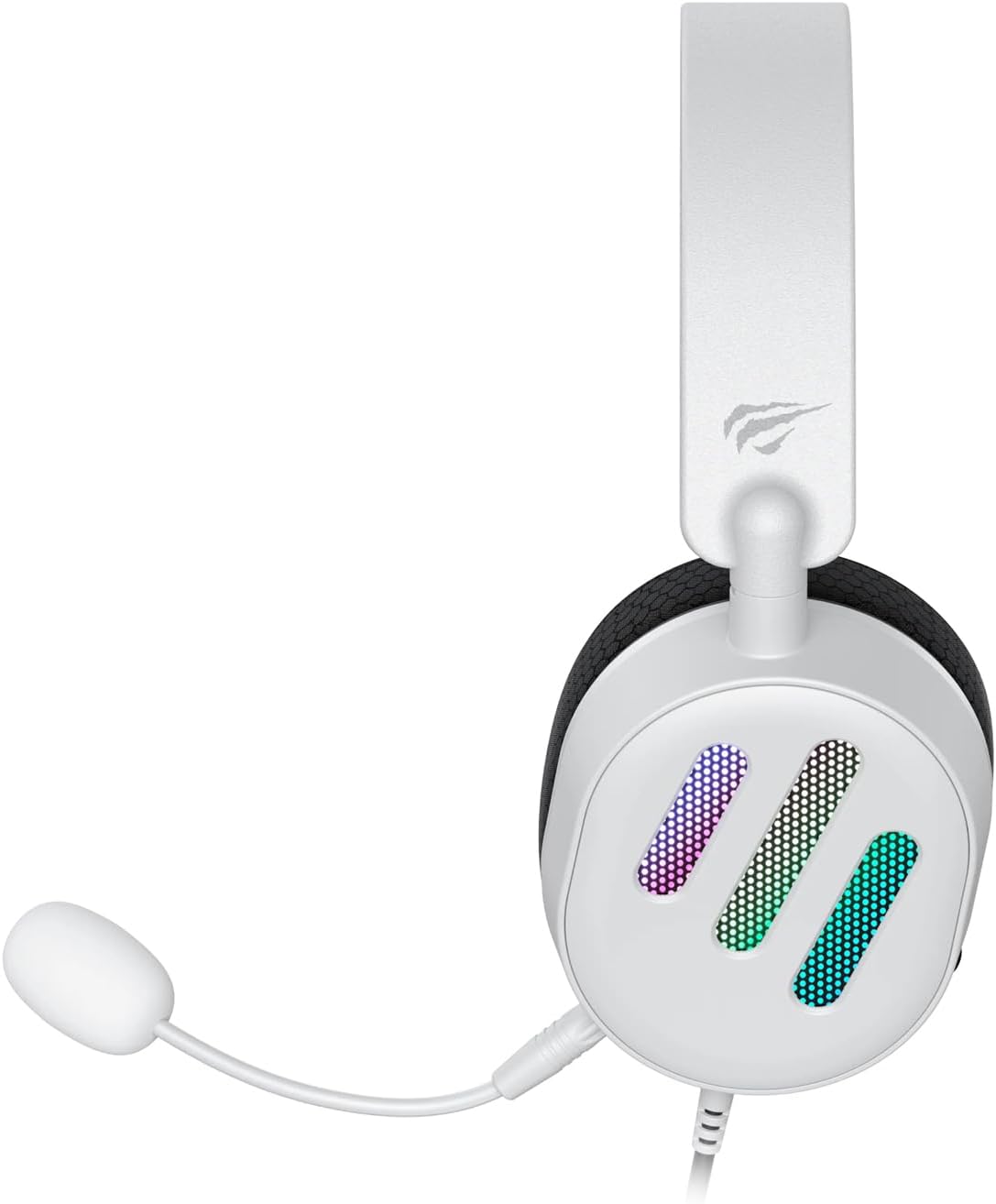
Obrázek 2.2: Strana view of the Havit H2038U RGB Wired Gaming Headset, showing the detachable microphone connected to the left earcup. The volume control wheel is also visible on the earcup.

Obrázek 2.3: Nahoru view of the Havit H2038U RGB Wired Gaming Headset, highlighting the adjustable headband and the soft, breathable earcups.
3. Nastavení
The Havit H2038U headset utilizes a dual-connection system for full functionality: a 3.5mm jack for audio and a USB connection for RGB lighting and virtual 7.1 surround sound.

Obrázek 3.1: Detailní záběr view illustrating the detachable microphone connection (3.5mm jack) and the USB connection for the Havit H2038U headset. This image also indicates 360-degree sound direction and 7.1 USB connectivity.
- Připojte mikrofon: Insert the detachable microphone into the 3.5mm microphone jack located on the left earcup until it clicks into place. Ensure it is securely connected.
- Connect for Audio: Plug the 3.5mm audio jack from the headset into the corresponding audio output port on your computer, gaming console, or mobile device.
- Connect for RGB Lighting and 7.1 Surround Sound: Plug the USB connector from the headset into an available USB port on your computer or gaming console. This connection powers the RGB lighting and enables the virtual 7.1 surround sound feature.
- Nastavení velikosti headsetu: Adjust the headband to ensure a comfortable and secure fit over your ears. The earcups should fully enclose your ears for optimal sound isolation.
- System Configuration (for PC):
- Zvukový výstup: Go to your operating system's sound settings and ensure the Havit H2038U is selected as the default playback device.
- Vstup pro mikrofon: In the sound settings, select the Havit H2038U as the default recording device.
- 7.1 Prostorový zvuk: If applicable, install any necessary drivers from the Havit official website to enable and configure the virtual 7.1 surround sound feature.
4. Návod k obsluze
4.1 Ovládání hlasitosti
The headset features an integrated volume control wheel, typically located on the left earcup or inline on the cable. Rotate the wheel to increase or decrease the audio volume.
4.2 Použití mikrofonu
The detachable microphone can be positioned for optimal voice pickup. Adjust its flexible arm to bring the microphone close to your mouth, ensuring clear communication. For privacy, you may mute the microphone using software settings on your device if no physical mute button is present on the headset.
4.3 RGB osvětlení
The RGB lighting on the earcups is powered via the USB connection. Once connected, the lighting will activate automatically. Specific control options for lighting patterns or colors may be available through dedicated software, if provided by Havit.

Obrázek 4.1: The Havit H2038U RGB Wired Gaming Headset displayed with its active RGB lighting feature, showcasing the illuminated earcups.
4.4 Virtual 7.1 Surround Sound
When connected via USB, the headset supports virtual 7.1 surround sound. This feature enhances spatial audio awareness in games and media. Ensure relevant drivers are installed and configured through your system's sound settings or Havit's software for optimal experience.

Obrázek 4.2: An illustrative image demonstrating the virtual 7.1 surround sound capability of the Havit H2038U headset, enhancing immersive audio experiences.
5. Údržba
5.1 Čištění
- Use a soft, dry cloth to wipe the exterior surfaces of the headset.
- Náušníky jemně otřete lehceamp hadříkem a před použitím nechte zcela uschnout na vzduchu.
- Nepoužívejte agresivní chemikálie, rozpouštědla ani abrazivní čisticí prostředky.
5.2 Skladování
When not in use, store the headset in a clean, dry place, away from direct sunlight and extreme temperatures. Avoid tangling the cables to prevent damage.
6. Řešení problémů
| Problém | Možná příčina | Řešení |
|---|---|---|
| Žádný zvuk z náhlavní soupravy | 3.5mm jack not fully inserted; incorrect audio output selected; volume too low. | Ensure 3.5mm jack is fully connected. Check system sound settings to select Havit H2038U as default playback device. Increase volume using the headset's control wheel and system volume. |
| Mikrofon nefunguje | Microphone not fully inserted; incorrect input device selected; microphone muted. | Ensure microphone is securely attached. Check system sound settings to select Havit H2038U as default recording device. Unmute microphone in software settings. |
| RGB podsvícení nefunguje | USB cable not connected; faulty USB port. | Ujistěte se, že je kabel USB bezpečně zapojený do funkčního portu USB. Zkuste jiný port USB. |
| 7.1 Surround Sound not active | USB cable not connected; drivers not installed/configured. | Ensure the USB cable is connected. Install and configure necessary drivers from the Havit official webmísto. |
7. Specifikace
| Funkce | Specifikace |
|---|---|
| Model | H2038U |
| Technologie připojení | Wired (3.5mm Jack + USB) |
| Sluchátka Form Factor | Přes ucho |
| Impedance | 24 ohmů |
| Frekvenční odezva | 20 Hz - 20 kHz |
| Citlivost | 114 dB |
| Typ ovládání | Volume Control, Push Button |
| Materiál | Plast |
| Hmotnost položky | 550 g |
| Rozměry produktu | 11.2 x 21.9 x 28.5 cm |
| Barva | Bílý |
| Speciální funkce | RGB Lighting, Detachable Microphone, Virtual 7.1 Surround Sound |
8. Záruka a podpora
Havit products are designed for reliability and performance. For information regarding warranty coverage, technical support, or service, please refer to the warranty card included with your product or visit the official Havit webUschovejte si účtenku jako doklad o koupi pro případ reklamace.
Kontaktní údaje:
- Official Havit Webmísto: www.havit.com (Zkontrolujte prosím regionální webstránky pro konkrétní podporu)


