1. Úvod
This manual provides comprehensive instructions for the installation, operation, and maintenance of your CORN 1300Mbps USB Wifi Adapter. This device offers high-speed dual-band wireless connectivity for your computer, supporting both 2.4GHz and 5.8GHz frequencies.

Image: The CORN 1300Mbps USB Wifi Adapter featuring its rotatable 5dBi antenna, capable of 90 and 360-degree adjustments for optimal signal reception.
2. Obsah balení
Ověřte prosím, zda jsou ve vašem balení obsaženy všechny níže uvedené položky:
- 1300Mbps USB WiFi adaptér
- One Detachable 5dBi Antenna
- Uživatelská příručka
- Ovladač CD
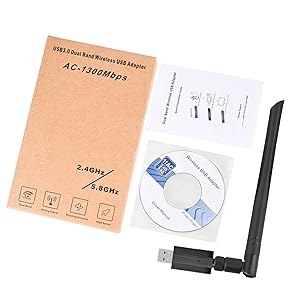
Image: Contents of the product package, showing the USB WiFi adapter, detachable antenna, user manual, and driver CD.
3. Klíčové vlastnosti
- Dual Band 802.11ac: Supports up to 1300Mbps Wi-Fi speeds (867Mbps on 5GHz and 400Mbps on 2.4GHz) for reduced latency during streaming and gaming.
- Detachable 5dBi Antenna with Beamforming+ Technology: High-gain, long-range antenna designed to improve connectivity even in areas with weak signals.
- Superrychlé USB 3.0: Offers data transfer rates up to 5.8Gbps, which is 10 times faster than USB 2.0, ensuring maximum throughput and a stable internet connection. It is also backward compatible with USB 2.0 and 1.1 devices.
- Široká kompatibilita: Compatible with Windows 11/10/8/8.1/7/Vista/XP/2000 and Mac OS 10.9-10.15. (Note: Not compatible with Mac OS 11.1 or newer versions, Linux, or TV operating systems).
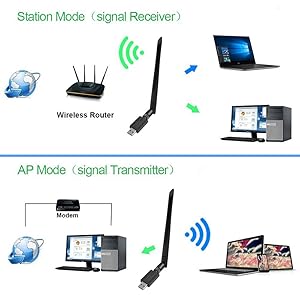
Image: Illustration of the 5dBi high gain antenna's enhanced signal penetration and coverage, demonstrating its ability to transmit through obstacles.

Image: Details on the secure technology, highlighting the 5dBi oxygen-free copper antenna for stable signal and WPS (Wi-Fi Protected Setup) for one-key encryption.

Image: A visual comparison demonstrating the superior speed of USB 3.0 (5120Mbps) compared to USB 2.0 (480Mbps).
4. Průvodce nastavením
4.1 Instalace hardwaru
- Gently attach the 5dBi antenna to the USB Wifi Adapter by screwing it into the connector.
- Plug the USB Wifi Adapter into an available USB 3.0 port on your computer. For optimal performance, use a USB 3.0 port if available.

Image: The USB Wifi Adapter connected to a laptop, illustrating its compact design and antenna.
4.2 Instalace ovladače
The installation process varies depending on your operating system:
- Pro systém Windows 11 / 10: No drivers are required. The adapter is plug-and-play. Your system should automatically detect and install the necessary drivers.
- For Windows 8/8.1/7/Vista/XP/2000 and Mac OS 10.9-10.15:
- Vložte dodaný CD s ovladačem do mechaniky CD-ROM počítače.
- Při instalaci ovladačů postupujte podle pokynů na obrazovce.
- If your computer does not have a CD-ROM drive, please visit the CORN support website (if available) to download the latest drivers.
- Po instalaci restartujte počítač, pokud se k tomu budete vyzývat.
5. Návod k obsluze
5.1 Připojení k síti Wi-Fi
- Once the adapter is installed and drivers are recognized, open your computer's network settings.
- Locate the list of available wireless networks.
- Select your desired Wi-Fi network (SSID) and click 'Connect'.
- Pokud se zobrazí výzva, zadejte bezpečnostní klíč sítě (heslo).
- The adapter will connect to the network, and you should have internet access.
5.2 Provoz ve dvou pásmech
The adapter supports both 2.4GHz and 5.8GHz (often displayed as 5GHz) frequency bands. You can choose the band that best suits your needs:
- Pásmo 2.4 GHz: Offers wider coverage and better penetration through walls, suitable for general browsing and devices further from the router.
- Pásmo 5.8 GHz: Provides faster speeds and less interference, ideal for high-bandwidth activities like online gaming and HD video streaming, especially when closer to the router.
5.3 Operating Modes (Station Mode & AP Mode)
The adapter can function in two primary modes:
- Station Mode (Signal Receiver): The adapter acts as a client, connecting your computer to an existing wireless router to access the internet. This is the most common use case.
- AP Mode (Signal Transmitter): The adapter can create a Wi-Fi hotspot, allowing other devices to connect to your computer's internet connection. This requires specific software configuration on your computer.
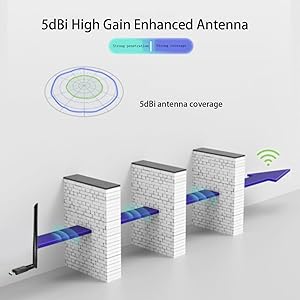
Image: A diagram illustrating the two operational modes: Station Mode, where the adapter receives Wi-Fi from a router, and AP Mode, where it transmits Wi-Fi from a modem-connected computer.
6. Údržba
To ensure the longevity and optimal performance of your CORN USB Wifi Adapter, follow these maintenance guidelines:
- Udržujte adaptér čistý a bez prachu. K čištění používejte měkký, suchý hadřík.
- Nevystavujte adaptér extrémním teplotám, vlhkosti nebo přímému slunečnímu záření.
- Do not drop or subject the adapter to physical shock.
- Ensure the antenna is securely attached but do not overtighten.
- When not in use for extended periods, consider unplugging the adapter.
7. Řešení problémů
If you encounter issues with your CORN USB Wifi Adapter, please refer to the following common solutions:
- Žádné připojení k Wi-Fi:
- Ujistěte se, že je adaptér bezpečně zapojený do portu USB.
- Verify that the drivers are correctly installed (refer to Section 4.2).
- Check if your computer's Wi-Fi is enabled.
- Restartujte počítač a bezdrátový router.
- Pomalá rychlost internetu:
- Ensure you are connected to the appropriate Wi-Fi band (5GHz for faster speeds, if available).
- Pro zlepšení signálu se přiblížte k bezdrátovému routeru.
- Zkontrolujte, zda nedochází k rušení jinými elektronickými zařízeními.
- Aktualizujte firmware routeru.
- Adapter Not Recognized / Driver Issues:
- Zkuste adaptér zapojit do jiného USB portu, nejlépe do USB 3.0.
- Reinstall the drivers from the provided CD or the manufacturer's webmísto.
- Ensure your operating system is supported (Mac OS 11.1+ and Linux are not supported).
- Zkontrolujte Správce zařízení (Windows) nebo Informace o systému (Mac), zda je adaptér uveden bez chyb.
- Přerušované připojení:
- Adjust the antenna's position for better signal reception.
- Ensure there are no physical obstructions between the adapter and the router.
- Check for conflicting network adapters or software.
8. Specifikace
| Číslo modelu | 5Bdi-1200Mbps USB wifi adapter |
| Hardwarové rozhraní | USB 3.0 |
| Rychlost přenosu dat | 1300 megabitů za sekundu (Mbps) |
| Data Link Protocol | IEEE 802.11ac |
| Frekvenční pásma | 2.4 GHz, 5.8 GHz |
| Antenna Gain | 5dBi |
| Kompatibilní zařízení | Laptop, Desktop, PC |
| Podporovaný OS | Windows 11/10/8/8.1/7/Vista/XP/2000, Mac OS 10.9-10.15 |
| Rozměry produktu | 0.75 x 0.49 x 0.06 inches (Adapter body) |
| Hmotnost položky | 2.4 unce |
| Barva | Černý |
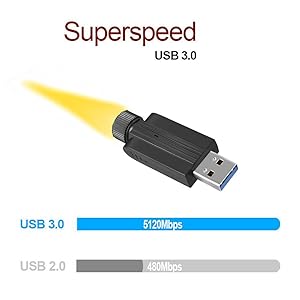
Image: Detailed dimensions of the USB Wifi Adapter, including the USB connector width, adapter body length, and total length with the antenna.
9. Informace o záruce
Specific warranty details for this product may vary by region and retailer. Please refer to the warranty card included in your package or contact your point of purchase for detailed warranty terms and conditions.
10. Zákaznická podpora
For further assistance, technical support, or inquiries regarding your CORN 1300Mbps USB Wifi Adapter, please contact the retailer or manufacturer directly. Refer to the product packaging or the manufacturer's official webstránky pro kontaktní informace.


