1. Úvod
This manual provides detailed instructions for the installation, operation, and maintenance of your XSDTS Smart Lock Digital Smart Lock Doorbell. This smart lock offers multiple unlocking methods including fingerprint, RFID card, digital key, mobile application (Tuya Wifi App), and traditional physical keys. It is designed for doors with a thickness between 35mm and 75mm and includes child safety features.
Klíčové vlastnosti
- Multiple unlocking methods: Fingerprint, RFID Card, Passcode, Tuya App, Mechanical Key.
- Integrated doorbell function.
- Remote access and control via Tuya Wifi App.
- Anti-peeping password function for enhanced security.
- Automatic locking feature.
- Indikátor baterie.
- Durable aluminum construction with polished finish.
- Suitable for door thicknesses from 35mm to 75mm.
2. Komponenty produktu
The XSDTS Smart Lock package includes the following items:
- Přední panel x 1
- Back panel x 1
- Plug lock x 1 (optional)
- 2 čipových karet
- Mechanical key x 2
- Sada šroubů x 1

Obrázek 2.1: Přesview of the XSDTS Smart Lock, showing the exterior and interior units, and the Tuya app interface for remote unlocking.

Figure 2.2: Detailed dimensions of the lock body and panels, indicating compatibility with door thicknesses between 35mm and 70mm.

Figure 2.3: Visual representation of the multiple unlocking methods: temporary password, IC card, standard password, fingerprint, manual key, and app unlock.
3. Nastavení a instalace
3.1 Pre-Installation Measurements
Before beginning installation, ensure your door meets the required specifications. Accurate measurements are crucial for proper fit and function.
- Measure the thickness of your door frame.
- Measure the length of the guide piece.
- Measure the width of the guide piece.
- Confirm the door aligns with the center of the lock.
- Measure the distance for the screw hole of the back panel.

Figure 3.1: Step-by-step guide for measuring your door to ensure compatibility and proper installation of the smart lock.
3.2 Instalace baterie
The smart lock requires 4 AA batteries (not included). Locate the battery cover on the back panel and insert the batteries according to the polarity indicators.
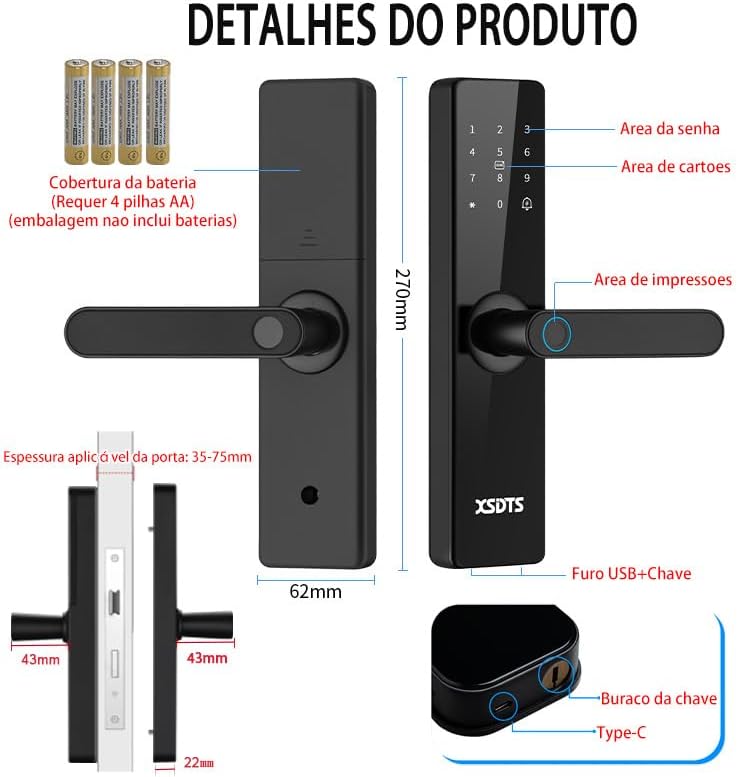
Figure 3.2: Illustration of the smart lock's components, including the battery cover, password area, card area, fingerprint area, USB port, and keyhole.
3.3 Počáteční nastavení a připojení aplikace
To utilize the smart features, download the Tuya Smart APP.

Figure 3.3: The Tuya Smart App interface, demonstrating features like app unlock, scene linkage, information sending, and record verification.
- Download the "Tuya Smart" app from your device's app store.
- Zaregistrujte se nebo se přihlaste ke svému účtu.
- Follow the in-app instructions to add your XSDTS Smart Lock. This typically involves putting the lock into pairing mode and connecting it to your Wi-Fi network.
- Once connected, you can manage users, generate temporary passwords, and view odemykání záznamů.
4. Ovládání inteligentního zámku
4.1 Metody odemykání
4.1.1 Odemknutí otiskem prstu
Přiložte zaregistrovaný prst na snímač otisků prstů. Zámek se odemkne, pokud bude otisk prstu rozpoznán.
Figure 4.1: Visual representation of the multiple unlocking methods, including fingerprint recognition.

Figure 4.2: Illustrates the speed and accuracy of the fingerprint recognition system: recognition speed ≤0.5s, error rate ≤0.001%, rejection rate ≤0.01%.
4.1.2 Odemknutí přístupovým kódem
Enter your registered passcode on the keypad. Press the '#' key to confirm.
Anti-Peeping heslo: To prevent others from guessing your password, you can enter random digits before or after your actual password. For example, if your password is "123456", you can enter "987123456098" and the lock will still recognize "123456".
4.1.3 Odemknutí RFID kartou
Present your registered RFID card to the card reading area on the lock.
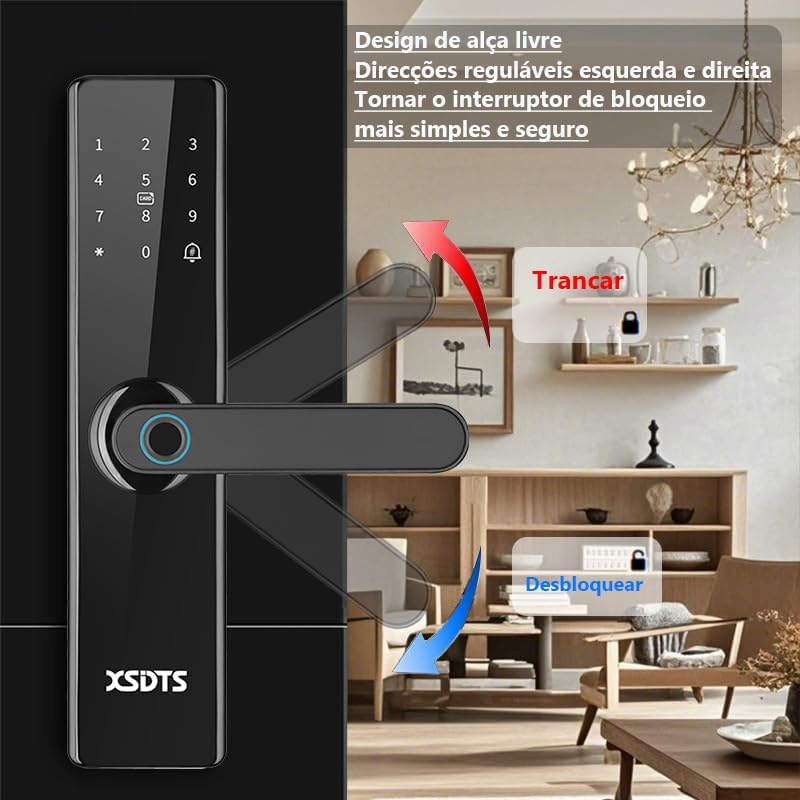
Figure 4.3: Demonstrates the use of an encrypted IC card for unlocking, highlighting dynamic encryption technology for enhanced security.
4.1.4 Odemknutí aplikace Tuya
Open the Tuya Smart App on your smartphone. Select your lock and use the unlock function within the app. You can also generate temporary passwords or send remote unlocking requests.
Figure 4.4: The Tuya Smart App interface, showing options for remote unlocking requests and managing security settings.
4.1.5 Odemknutí mechanickým klíčem
In case of battery depletion or system malfunction, use the provided mechanical keys to unlock the door. The keyhole is typically located at the bottom of the front panel.
Figure 4.5: Illustration showing the location of the USB port and the mechanical keyhole on the smart lock.
4.2 Zamykání dveří
The XSDTS Smart Lock features an auto-lock function. After closing the door, the lock will automatically engage.
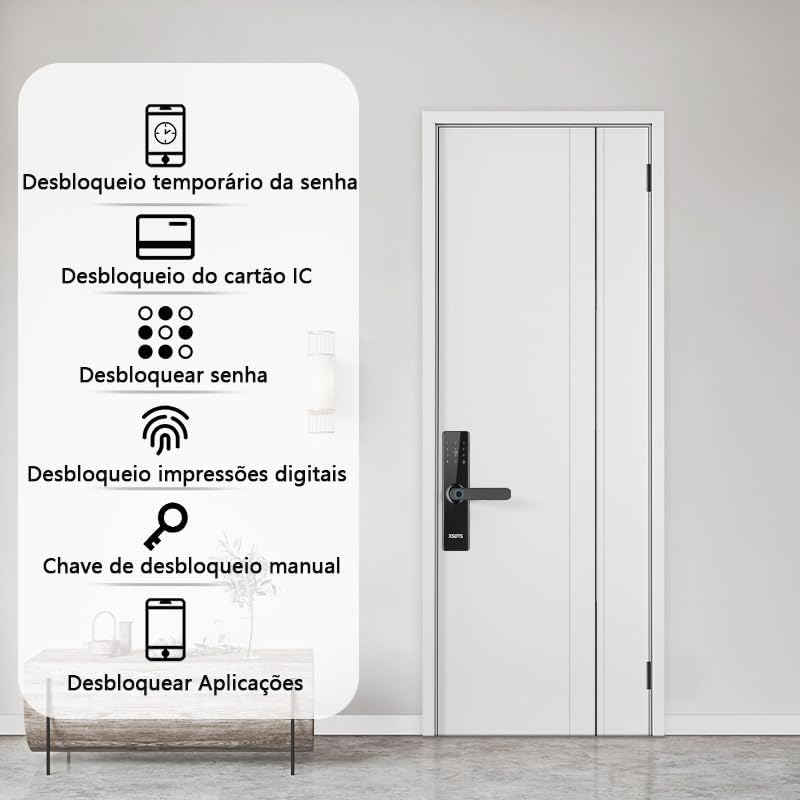
Figure 4.6: Demonstrates the free handle design, allowing the handle to be moved up to lock and down to unlock, making operation simpler and more secure.
4.3 Funkce zvonku
The smart lock has a built-in doorbell. When the doorbell button is pressed, it will alert you via the lock's speaker and potentially through the Tuya app, depending on your settings.
5. Údržba
5.1 Výměna baterie
When the battery indicator shows low power, replace all four AA batteries promptly. Do not mix old and new batteries.
5.2 Čištění
Clean the lock's surface with a soft, dry cloth. Avoid using abrasive cleaners or solvents that could damage the finish or electronic components.
5.3 Péče o snímač otisků prstů
Keep the fingerprint sensor clean and free of dirt or moisture to ensure optimal performance.
6. Řešení problémů
6.1 Zámek nereaguje
- Zkontrolujte stav baterie. Pokud je baterie vybitá, vyměňte ji.
- Ensure the lock is properly installed and all connections are secure.
- Use the mechanical key as a backup.
6.2 Otisk prstu nebyl rozpoznán
- Ujistěte se, že máte prst čistý a suchý.
- Zkuste změnit polohu prstu na senzoru.
- Pokud problém přetrvává, znovu zaregistrujte otisk prstu.
6.3 Problémy s připojením aplikací
- Ensure your Wi-Fi network is stable and the lock is within range.
- Restart your Wi-Fi router and the smart lock.
- Zkontrolujte aktualizace aplikací.
- Re-pair the lock with the Tuya app if necessary.
6.4 Lock Does Not Auto-Lock
- Verify that the auto-lock feature is enabled in the app settings.
- Zkontrolujte, zda se nenacházejí nějaké překážky, které brání úplnému zavření dveří.
7. Specifikace
| Atribut | Detail |
|---|---|
| Značka | XSDTS |
| Číslo modelu | F17 |
| Typ zámku | Závora |
| Materiál | Hliník |
| Barva | Černý |
| Dokončit | Leštěný |
| Rozměry produktu | 25 x 6 x 7.5 cm |
| Hmotnost položky | 2.5 kg |
| Kompatibilita tloušťky dveří | 35 mm až 75 mm |
| Kontrolní metoda | Application (Tuya Wifi App) |
| Zdroj napájení | 4 x AA baterie (nejsou součástí balení) |
| Speciální funkce | Anti-Peeping Password, Auto-Lock, Battery Indicator, Fingerprint, Passcode Unlock |
8. Informace o záruce
Konkrétní podrobnosti o záruce nejsou uvedeny v informacích o produktu. Obraťte se prosím na prodejce nebo oficiálního zástupce výrobce. webzáruční podmínky naleznete na webu.
9. Zákaznická podpora
For technical assistance, troubleshooting, or further inquiries, please contact XSDTS customer support through their official channels. Refer to the product packaging or the manufacturer's webstránky pro kontaktní informace.


