1. Konec produktuview
The CPVAN Remote Control (2nd Generation), model CP10 Pro, is designed for wireless operation of compatible CPVAN home security systems. This remote provides convenient control over your alarm system's functions from a distance.
Kompatibilita: This remote control is compatible with CPVAN CP2, CP2 Pro, CP7R, CP8, and CP9 Home Security Systems.

Obrázek 1: Přední strana view of the CPVAN remote control.
2. Klíčové vlastnosti
- Bezdrátový provoz: Provides convenient control of your alarm system without physical interaction with the main unit.
- Široká kompatibilita: Works with CPVAN CP2, CP2 Pro, CP7R, CP8, and CP9 alarm systems.
- Dálkové ovládání: Enables control of the motion sensor detector alarm from a significant range.
- Připraveno k použití: Comes with a pre-installed battery for immediate functionality.
- Ergonomický design: Features a comfortable and user-friendly form factor.
3. Obsah balení
- CPVAN Remote Control (2nd Generation)
- 1 x baterie CR2 (předinstalovaná)
4. Nastavení a párování
Spárování s novým dálkovým ovladačem
To integrate your new remote control with a CPVAN PIR motion sensor alarm, follow these steps:
- Ensure the PIR motion sensor alarm is powered ON.
- On the PIR motion sensor alarm, long press the Pairing button (often indicated by a signal icon) to enter pairing mode. The detector light will illuminate continuously.
- Press any button on your remote control. You will hear two beeps from the alarm to confirm successful pairing.
- Short press the Pairing button on the alarm again to exit pairing mode. Your remote has now been paired.

Image 2: Pairing process of the remote control with a motion sensor alarm.
5. Provoz
Funkce dálkového ovládání
The CPVAN remote control features four distinct buttons for managing your alarm system:
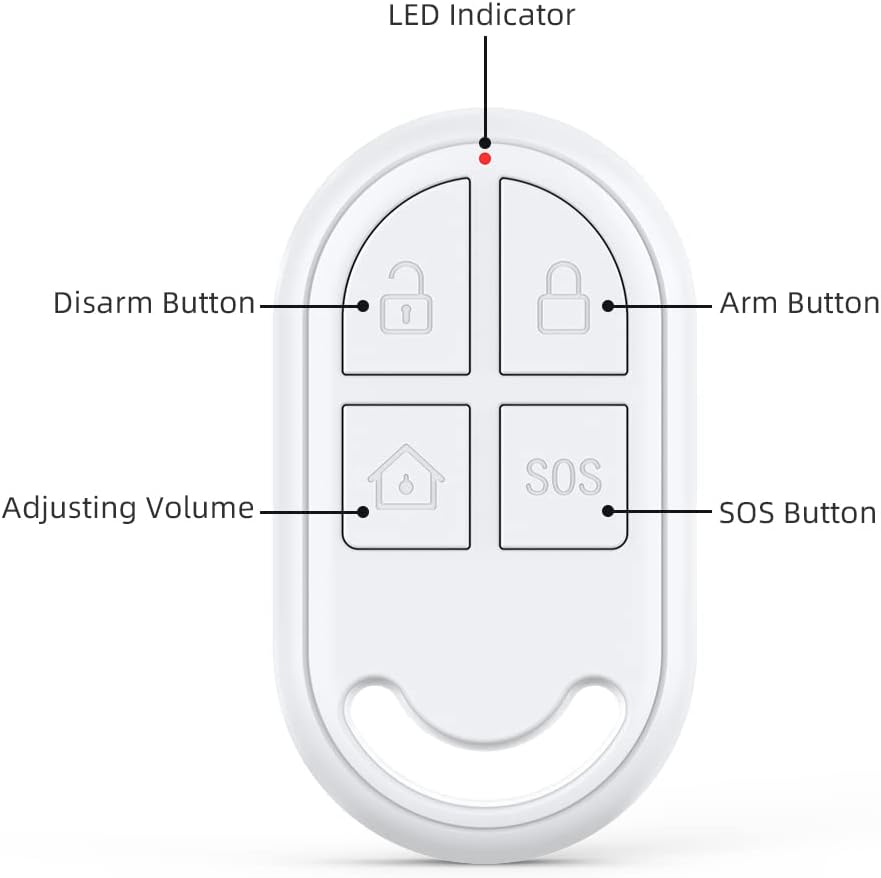
Image 3: Labeled buttons on the CPVAN remote control.
- Arm Button (Locked Padlock Icon): Activates the alarm system, placing it in armed mode.
- Disarm Button (Unlocked Padlock Icon): Deactivates the alarm system, turning off armed mode.
- Adjusting Volume Button (House Icon): Typically used to switch between different alarm modes or adjust volume settings on the connected alarm unit. Refer to your main alarm system manual for specific functions.
- SOS Button (SOS Text): Triggers an immediate emergency alarm. Use in situations requiring urgent attention.
- LED indikátor: A small light that illuminates to indicate button presses and operational status.
6. Údržba
Výměna baterie
The remote control is powered by one CR2 battery. When the remote's performance degrades or the LED indicator fails to light up upon button press, it may be time to replace the battery.
- Locate the battery compartment on the remote control. This is typically on the back or side, secured by a small screw or clip.
- Opatrně otevřete přihrádku.
- Vyjměte starou baterii CR2.
- Insert a new CR2 battery, ensuring correct polarity (+ and -).
- Bezpečně uzavřete přihrádku na baterie.
Typ baterie: 1 x CR2 (3 Volts, Lithium Manganese Dioxide)
7. Řešení problémů
- Dálkové ovládání nereaguje: Check the battery. Replace if necessary. Ensure the remote is within the operating range of the alarm system.
- Chyba párování: Ensure the alarm system is in pairing mode. Repeat the pairing steps carefully. Check if the remote's battery is charged.
- Náhodná aktivace: The remote keys can be sensitive. Avoid placing the remote in pockets or areas where buttons might be pressed inadvertently.
8. Technické specifikace
| Značka | CPVAN |
| Číslo modelu | CP10 Pro |
| Barva | Bílý |
| Zdroj napájení | Napájení z baterie |
| Kompatibilní zařízení | CPVAN CP2, CP2 Pro, CP7R, CP8, CP9 Home Security Systems |
| Rozměry (D x Š x V) | 2.46 x 0.43 x 1.38 palce |
| Technologie připojení | Bezdrátový |
| Hmotnost položky | 0.01 kilogramů (0.317 uncí) |
| svtage | 3 voltů |
| Typ baterie | 1 x CR2 (Lithium Manganese Dioxide) |
| Maximální dosah | 100 metrů |
| Speciální funkce | Ergonomický |

Image 4: Dimensions of the CPVAN remote control.
9. Zákaznická podpora
For further assistance, technical support, or warranty inquiries, please refer to the main manual of your CPVAN Home Alarm System or visit the official CPVAN website. You can also contact CPVAN customer service through the retailer where the product was purchased.
Výrobce: CPVAN
Číslo dílu: CP2-RC


