1. Úvod
This manual provides detailed instructions for the installation, operation, and maintenance of your EverBrite 88LED Under Cabinet Lighting. This versatile lighting solution features a motion sensor, remote control, adjustable color temperatures, and dimmable brightness, designed to enhance visibility in various indoor spaces.
2. Obsah balení
Ověřte prosím, zda jsou ve vašem balení obsaženy všechny níže uvedené položky:
- EverBrite 88LED Under Cabinet Light Bar
- Dálkové ovládání
- USB nabíjecí kabel
- Magnetic Mounting Bracket(s)
- Lepicí podložky
- Šrouby a nástěnné kotvy
- Uživatelská příručka

3. Vlastnosti produktu
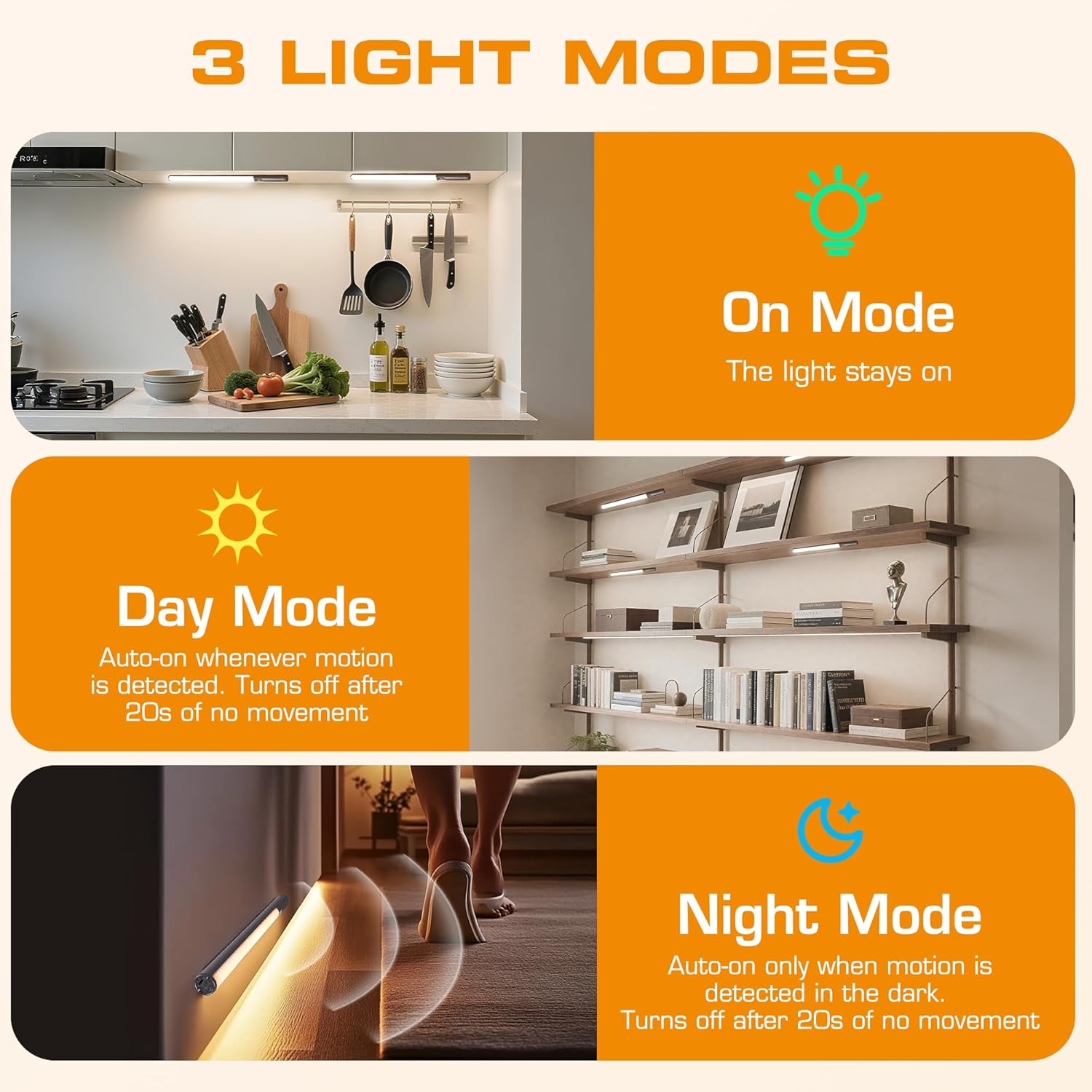
- 3 režimy osvětlení: On Mode (light stays on), Day Mode (motion-activated regardless of ambient light), Night Mode (motion-activated only in dark).
- 3 teploty barev: Warm Light (3000K), Natural Light (4000K), Cold Light (6500K).
- Stmívatelné: 10 brightness levels with short press, stepless dimming with long press.
- Duální ovládání: Operable via remote control or direct touch on the light bar.
- Snadná instalace: Multiple mounting options including magnetic, adhesive, and screw-in.
- Dobíjecí baterie: Kapacita 2600 mAh pro delší používání.
- Široká aplikace: Suitable for kitchens, closets, wardrobes, garages, stairwells, and more.
4. Nastavení a instalace
The EverBrite Under Cabinet Light offers flexible installation to suit various surfaces and needs.
- Vyberte si způsob montáže:
- Magnetický nástavec: For iron surfaces, simply attach the light bar directly. The light has built-in magnets.
- Lepicí montáž: For non-iron surfaces, peel the backing from the adhesive pads and attach them to the magnetic mounting bracket. Then, adhere the bracket to your desired surface. The light bar can then be magnetically attached to this bracket.
- Šroubová montáž: For a more permanent installation, use the provided screws and wall anchors. Determine the mounting location, drill two holes, insert anchors, and fasten the magnetic mounting bracket with screws. Attach the light bar magnetically.
- Umístění: Ensure the motion sensor is facing the area where movement is expected for optimal detection. The light bar can be rotated up to 90 degrees on its magnetic mount to direct illumination.


5. Nabíjení
The EverBrite light is equipped with a 2600mAh rechargeable Lithium-Ion battery.
- Najděte nabíjecí port USB-C na konci světelné rampy.
- Connect the provided USB charging cable to the light bar and a compatible USB power source (e.g., wall adapter, computer USB port).
- The indicator light will show charging status (refer to product for specific indicator behavior).
- A full charge provides approximately 25 hours of continuous light or up to 25 days in motion sensor mode (based on 1 hour of activation per day).


6. Návod k obsluze
Your EverBrite light can be operated using either the manual touch controls on the device or the included remote control.
6.1. Manual Control (On-Device)
The light bar features a switch and a touch sensor on one end for direct control.
- Přepínač režimu: Slide the switch to select between 'Off', 'Day Mode' (motion sensor always active), 'Night Mode' (motion sensor active only in dark), or 'On Mode' (light stays on continuously).
- Teplota barev: In 'On Mode', short press the touch sensor to cycle through the 3 color temperatures: Warm White (3000K), Natural White (4000K), and Cold White (6500K).
- Nastavení jasu: In 'On Mode', long press the touch sensor to activate stepless dimming. Release at your desired brightness level.

6.2. Dálkové ovládání
The remote control provides convenient access to all light functions from a distance.
- Zapnutí/vypnutí: Stiskněte tlačítko VYPNUTO button to turn the light off. Press the ON tlačítko pro jeho zapnutí.
- Režimy osvětlení: Use the dedicated buttons for ON (continuous light), DEN (motion sensor always active), or NOC (motion sensor active only in dark).
- Teplota barev: Vybrat WW (Teplá bílá), NW (Natural White), or CW (Cold White) to change the light color.
- Nastavení jasu: Short press the brightness buttons (sun icons) to cycle through 10 preset brightness levels. Long press for stepless dimming.
- Nastavení časovače: Stiskněte 15 min, 30 minnebo 60 min to set an automatic shut-off timer. Press the Časovač vypnutí button to cancel any active timer.

6.3. Motion Sensor Modes
The integrated motion sensor provides hands-free illumination.
- Denní režim: The light will turn on automatically when motion is detected, regardless of the ambient light level. It will turn off after 20 seconds of no movement.
- Noční režim: The light will turn on automatically only when motion is detected in dark conditions. It will turn off after 20 seconds of no movement.

7. Specifikace
| Funkce | Specifikace |
|---|---|
| Značka | EverBrite |
| Číslo modelu | E101115A |
| Zdroj napájení | Napájení baterií (1 lithium-iontová baterie je součástí balení) |
| Kapacita baterie | 2600 XNUMX mAh |
| Typ světelného zdroje | LED |
| Teploty barev | 3000K (Warm Light), 4000K (Natural Light), 6500K (Cold Light) |
| Kontrolní metoda | Dotykové ovládání, dálkové ovládání |
| Speciální funkce | Cordless, Motion Sensor, Dimmable |
| Typ instalace | Surface Mount (Magnetic, Adhesive, Screws) |
| Materiál | Hliník |
| Hmotnost položky | 9.9 unce |
| Rozměry balení | 16.3 x 1.97 x 1.65 palce |
| Vnitřní/venkovní použití | Krytý |
8. Údržba
To ensure the longevity and optimal performance of your EverBrite Under Cabinet Light, follow these simple maintenance guidelines:
- Čištění: Wipe the light bar and remote control with a soft, dry cloth. Avoid using abrasive cleaners or solvents, as these may damage the finish or electronic components.
- Péče o baterie: Recharge the battery when the light output diminishes. Avoid fully depleting the battery frequently to prolong its lifespan. Store the device in a cool, dry place if not in use for extended periods.
- Údržba senzoru: Keep the motion sensor lens clean and free from obstructions to ensure accurate detection.
9. Řešení problémů
If you encounter any issues with your EverBrite Under Cabinet Light, please refer to the following common problems and solutions:
- Světlo se nerozsvítí:
- Ujistěte se, že je baterie nabitá.
- Check the mode switch on the light bar; it should be set to 'On', 'Day Mode', or 'Night Mode'.
- If using the remote, ensure the light bar's main switch is in an active mode (not 'Off').
- Pohybový senzor nefunguje:
- Verify the light is set to 'Day Mode' or 'Night Mode'.
- In 'Night Mode', ensure the environment is sufficiently dark.
- Check for any obstructions blocking the sensor lens.
- Ensure the motion is within the 9.8ft (3m) detection range and 120-degree angle.
- Dálkové ovládání nereaguje:
- Ensure the light bar's main switch is in an active mode (not 'Off').
- Zkontrolujte baterii v dálkovém ovladači.
- Ujistěte se, že mezi dálkovým ovladačem a světelnou lištou nejsou žádné překážky.
- Light is not charging:
- Ensure the USB cable is securely connected to both the light bar and the power source.
- Zkuste jiný kabel USB nebo napájecí adaptér.
10. Záruka a podpora
Informace o záruce, technickou podporu nebo další pomoc získáte od oficiálního webnebo se obraťte přímo na jejich zákaznický servis. Uschovejte si doklad o koupi pro případ reklamace.


