Zavedení
This manual provides detailed instructions for the installation, operation, and maintenance of your GLEDOPTO WLED Digital Strip Controller (Model GL-C-008WL). This controller is designed to manage various LED strip types, offering extensive dynamic lighting modes and app control capabilities without the need for a separate hub.

Obrázek: Overview of the GLEDOPTO WLED Digital Strip Controller, showing its compact design and connectivity options.
Vlastnosti produktu
- Wide Voltage Kompatibilita: Supports DC 5-24V power input.
- Pokročilá čipová sada: Equipped with a 4MB ESP8266 Chip, allowing for official WLED firmware upgrades.
- Extensive Dynamic Modes: Over 100 dynamic lighting modes available via the WLED app.
- Broad LED Strip Compatibility: Compatible with RGB, RGBW, WS2812B, WS2811, SK6812, TM1814, WS2813, and WS2815 LED strip types.
- Hub-Free Operation: Direct WiFi APP control without the need for an additional hub.
- High IC Quantity Support: Supports up to 800 ICs (Integrated Circuits) for complex lighting setups.
Obsah balení
- 1 x GLEDOPTO WLED Digital Strip Controller (Model GL-C-008WL)
Note: LED strips and power supply are sold separately and are required for operation.
Specifikace
| Název produktu | Ovladač WLED páskových světel |
| Model č. | GL-C-008WL |
| svtage | DC 5-24V |
| Množství integrovaného obvodu | 800 Max |
| Celkový proud | 10A Max |
| Rozměry | Rozměr 89 x 48 x 23.5 mm |
| Provozní teplota | -20 až 45 °C |
| Podporované typy pásků | WS2811, SK6812, SM16703P, WS2812B, TM1814, WS2813, WS2815 |
| Kontrolní metoda | App Control (WLED App) |
| Konektivita | WiFi |

Image: Illustration indicating the maximum 800 ICs supported by the controller. It is important to ensure the power supply is adequate if the number of ICs is large.
Bezpečnostní informace
- Zajistěte napájení objtage matches the controller's specifications (DC 5-24V).
- Do not exceed the maximum total current of 10A. Overloading can damage the device and pose a fire hazard.
- Regulátor instalujte v suchém prostředí, mimo dosah vlhkosti a extrémních teplot.
- Před jakýmkoli zapojováním nebo odpojováním kabelů odpojte napájení.
- Uchovávejte mimo dosah dětí.
Nastavení
1. Pokyny pro zapojení
Carefully connect your LED strip and power supply to the controller as shown in the diagram below. The group of 'D' for GPIO2 is the default output and should be used first. The other group of 'D' is GPIO5, which can be configured via the app.

Image: Detailed wiring instructions for connecting the LED strip and power input to the controller's terminals. Note the GPIO2 and GPIO5 output groups.
- Power Input (V+, V-): Connect your DC 5-24V power supply to the V+ and V- terminals. Ensure correct polarity.
- LED Strip Output (G, D, V): Connect your LED strip to the output terminals. The default output is GPIO2.
- G: Země
- D: Data (for addressable LED strips)
- V: svtage (for LED strips requiring direct voltage připojení)
- Příprava drátu: For optimal connection, strip wires 9-10mm.
2. Instalace a připojení aplikace
The GLEDOPTO WLED Digital Strip Controller uses the WLED app for control. Hledat "WLED" in your device's app store (iOS/Android) and install it. Follow the in-app instructions to connect the controller to your WiFi network and add it to the app.
Návod k obsluze
1. Basic Button Function
The controller features a physical button for basic control:
- Krátký stisk: Toggles the LED strip On/Off.
- Long press (for 1 second): Switches the color or dynamic mode.

Image: Diagram illustrating the short press for On/Off and long press for color/mode switching on the controller's button.
2. Ovládání pomocí aplikace pro chytrý telefon
The WLED app provides comprehensive control over your LED strips. No gateway is required for app control.
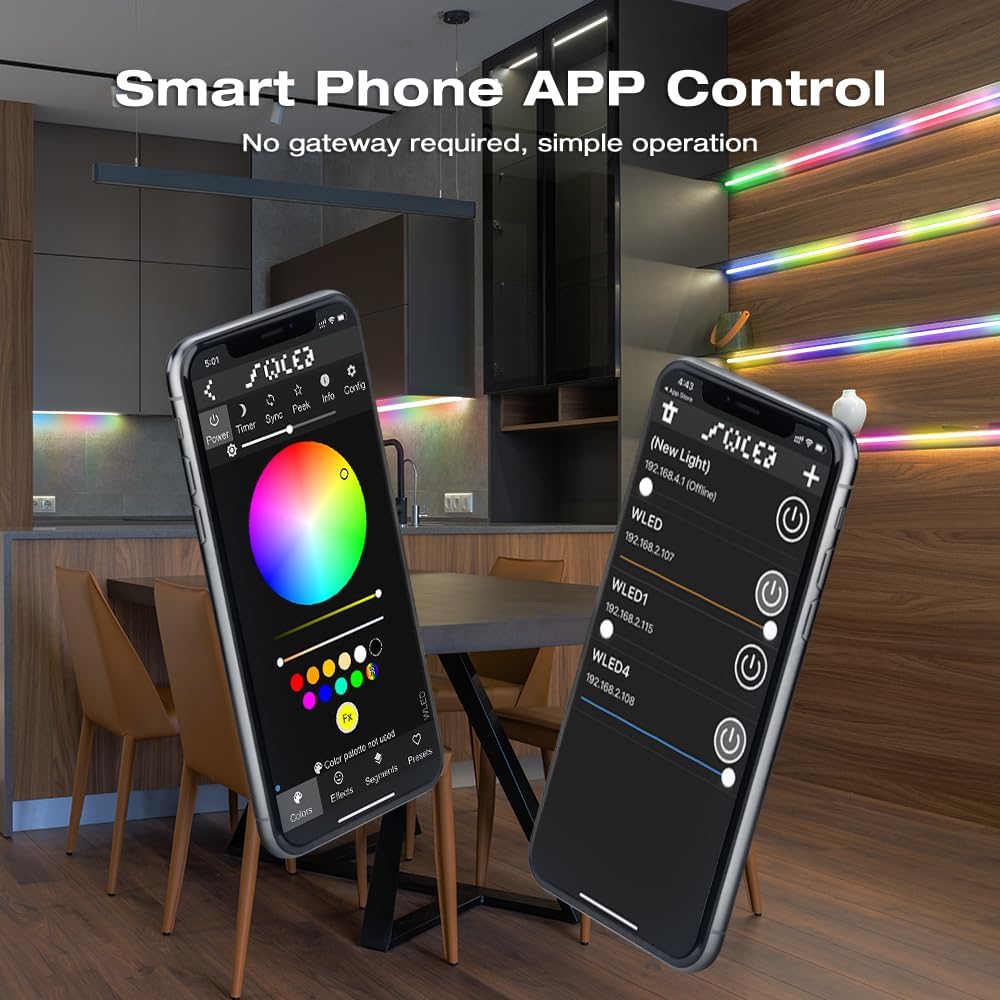
Image: Screenshots of the WLED smartphone application interface, demonstrating color selection, effects, and device management.
- Výběr barvy: Choose from a wide spectrum of colors using the color wheel or predefined palettes.
- Dynamické režimy: Access over 100 dynamic lighting modes for various effects and atmospheres.
- Segmentované ovládání barev: Personalize individual segments of your LED strip to display different colors simultaneously.

Image: Visual representation of segmented color control, allowing users to apply different colors to distinct sections of an LED strip.
Kompatibilita
The GLEDOPTO WLED Digital Strip Controller is designed for high compatibility with various types of addressable LED strips, including:
- WS2812B
- WS2811
- 6812 SK
- SM16703P
- TM1814
- WS2813
- WS2815
- Other RGB and RGBW addressable LED strips.

Obrázek: Přamples of various compatible LED strip types, including WS2812B, SM16703P, SK6812, and WS2811.
Údržba
The GLEDOPTO WLED Digital Strip Controller requires minimal maintenance.
- Čištění: Use a soft, dry cloth to wipe the controller. Do not use liquid cleaners or solvents.
- Prostředí: Ensure the controller is kept in a clean, dry environment within the specified operating temperature range (-20 to 45°C).
- Aktualizace firmwaru: Periodically check the WLED community or official GLEDOPTO channels for firmware updates to ensure optimal performance and access to new features.
Odstraňování problémů
- LED pásek nesvítí:
- Check power connections to the controller and LED strip. Ensure correct polarity (V+ to V+, V- to V-).
- Ověřte napájení objtage is within the DC 5-24V range and provides sufficient current for your LED strip (max 10A for controller).
- Confirm the LED strip is correctly connected to the data (D) and ground (G) pins of the controller.
- Ensure the correct LED strip type is selected in the WLED app configuration.
- Controller Not Connecting to WiFi/App:
- Ensure your smartphone is connected to a 2.4GHz WiFi network during the initial setup process.
- Restart the controller by disconnecting and reconnecting power.
- Check if the controller is within range of your WiFi router.
- If issues persist, try resetting the controller (refer to WLED documentation for specific reset procedures, often involving holding the button during power-up).
- Nesprávné barvy nebo efekty:
- Verify the LED strip type and color order settings in the WLED app match your specific strip.
- Ensure the number of ICs configured in the app matches the actual number of ICs on your LED strip.
Informace o záruce
GLEDOPTO products are typically covered by a limited warranty against defects in materials and workmanship. Please refer to the retailer's return policy or the official GLEDOPTO webKonkrétní záruční podmínky platné pro váš region a datum nákupu naleznete na webových stránkách. Uschovejte si doklad o koupi pro případ reklamace.
Podpora
For technical assistance, troubleshooting beyond this manual, or general inquiries, please visit the official GLEDOPTO website or contact their customer support. You may also find helpful resources and community support on the WLED project's official forums and documentation.
- GLEDOPTO Official Webmísto: www.gledopto.com (Poznámka: Toto je zástupný symbol URL, prosím ověřte si skutečného oficiálního webmísto.)
- WLED Project Documentation: kno.wled.ge


