1. Úvod
Thank you for choosing the ARROWMAX SES PRO Electric Precision Screwdriver. This cordless tool is designed for precision tasks, featuring smart motion control and a comprehensive set of 34 magnetic bits. It is ideal for electronics, laptops, glasses, and other delicate applications. This manual provides essential information for safe operation, setup, maintenance, and troubleshooting to ensure optimal performance and longevity of your device.
2. Bezpečnostní informace
Před použitím tohoto výrobku si pečlivě přečtěte všechna bezpečnostní varování a pokyny. Nedodržení těchto pokynů může vést k úrazu elektrickým proudem, požáru a/nebo vážnému zranění.
- Udržujte pracovní prostor čistý a dobře osvětlený. Nepořádek nebo tmavé prostory vedou k nehodám.
- Nepracujte s elektrickým nářadím ve výbušném prostředí, například v přítomnosti hořlavých kapalin, plynů nebo prachu. Elektrické nářadí vytváří jiskry, které mohou zapálit prach nebo výpary.
- Při práci s elektrickým nářadím držte děti a přihlížející mimo dosah. Rozptylování může způsobit ztrátu kontroly.
- Zabraňte náhodnému spuštění. Před připojením akumulátoru, zvednutím nebo přenášením nářadí se ujistěte, že je vypínač v poloze vypnuto.
- Nepřesahujte. Vždy udržujte správný postoj a rovnováhu. To umožňuje lepší kontrolu nad elektrickým nářadím v neočekávaných situacích.
- Správně se oblečte. Nenoste volné oblečení nebo šperky. Udržujte své vlasy a oděv mimo pohyblivé části. Volné oblečení, šperky nebo dlouhé vlasy mohou být zachyceny pohyblivými částmi.
- Používejte osobní ochranné prostředky. Vždy používejte ochranu očí. Ochranné prostředky, jako je protiprachová maska, protiskluzová bezpečnostní obuv, ochranná přilba nebo ochrana sluchu používané ve vhodných podmínkách, omezí zranění osob.
- Nepoužívané elektrické nářadí skladujte mimo dosah dětí a nedovolte osobám, které nejsou obeznámeny s elektrickým nářadím nebo s těmito pokyny, aby s elektrickým nářadím pracovaly.
- Údržba elektrického nářadí. Zkontrolujte, zda nejsou pohyblivé části vychýleny nebo zablokovány, zda nejsou některé části zlomené a zda nejsou jiné podmínky, které by mohly ovlivnit činnost elektrického nářadí. Je-li poškozeno, nechte elektrické nářadí před použitím opravit.
- Používejte elektrické nářadí, příslušenství, násadce atd. v souladu s těmito pokyny, s ohledem na pracovní podmínky a práci, kterou budete provádět. Použití elektrického nářadí k jiným než určeným činnostem může vést k nebezpečné situaci.
- Nabíjejte pouze nabíječkou specifikovanou výrobcem. Nabíječka, která je vhodná pro jeden typ baterie, může při použití s jinou baterií způsobit nebezpečí požáru.
- Nářadí nepoužívejte, pokud jej vypínač nezapíná a nevypíná. Jakékoli elektrické nářadí, které nelze ovládat vypínačem, je nebezpečné a musí být opraveno.
- Před seřizováním, výměnou příslušenství nebo před uložením elektrického nářadí odpojte akumulátor od nářadí. Taková preventivní bezpečnostní opatření snižují riziko náhodného spuštění elektrického nářadí.
3. Obsah balení
The ARROWMAX SES PRO Electric Precision Screwdriver package typically includes the following items:
- 1 x ARROWMAX SES PRO Electric Precision Screwdriver
- 1 x magnetické úložné pouzdro
- 34 x Magnetic Precision Bits (S2 Steel, 4mm)
- 1 x nabíjecí kabel USB-A na USB-C

Image: The ARROWMAX SES PRO Electric Precision Screwdriver, its magnetic bit case, and the included 34 precision bits.
4. Konec produktuview a Komponenty
Familiarize yourself with the main components of your ARROWMAX SES PRO screwdriver:

Image: Labeled diagram of the ARROWMAX SES PRO screwdriver's key components.
- Nabíjecí port typu C: Located at the top for recharging the internal battery.
- LED indikátor stavu: An OLED screen showing battery level, torque setting, and operational status.
- Vypínač: Used to turn the device on/off and adjust torque settings.
- Tělo z hliníkové slitiny: Odolná a lehká konstrukce.
- LED světla: Osvětluje pracovní prostor pro lepší viditelnost.
- Bit Installation Port: Where precision bits are inserted.
5. Nastavení
5.1 Nabíjení šroubováku
- Locate the USB-C charging port at the top of the screwdriver.
- Connect the provided USB-A to USB-C charging cable to the screwdriver and a compatible USB-A power adapter (not included).
- The LED Status Display will indicate the charging progress. A full charge allows for tightening approximately 900 screws.
- Důležitá poznámka: This electric screwdriver only supports USB-A to USB-C charging and is not compatible with USB-C PD (Power Delivery) chargers.

Obrázek: Overview of charging port, battery, torque adjustment, and OLED display.
5.2 Installing Precision Bits
- Select the appropriate precision bit from the magnetic storage case. The case features a pop-up design for easy access.
- Insert the bit firmly into the Bit Installation Port at the tip of the screwdriver. The magnetic holder will secure the bit in place.
- To remove a bit, simply pull it out.
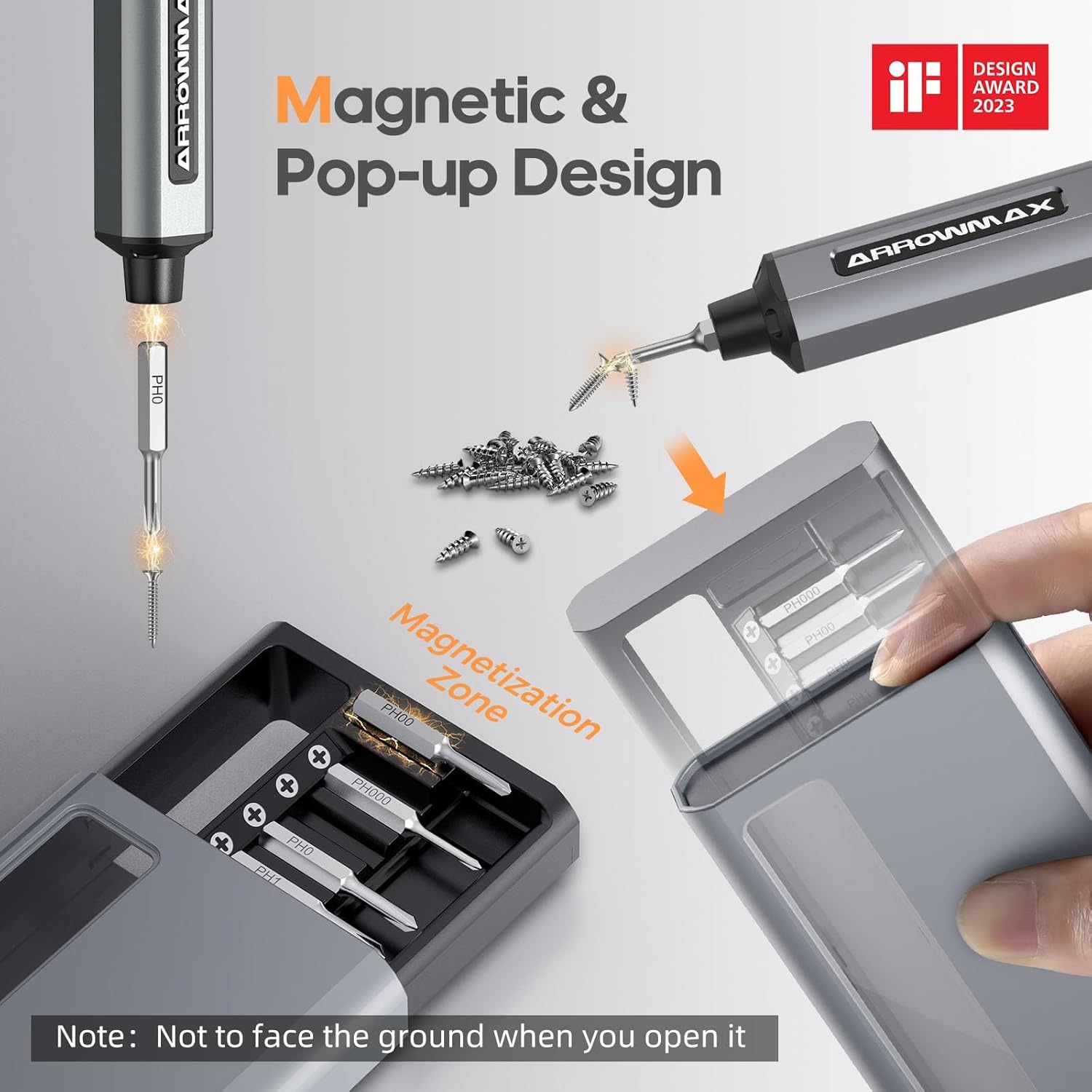
Image: Magnetic pop-up bit case design and bit magnetization zone.
6. Návod k obsluze
6.1 Zapnutí/vypnutí
Press and hold the Power Button for a few seconds to turn the screwdriver on or off. The OLED screen will illuminate upon activation.
6.2 Nastavení točivého momentu
The SES PRO offers 5 adjustable torque levels, including an auto-sensing mode, to suit various tasks. The electric torque ranges from 0.049 N.m to 0.30-0.35 N.m, with a manual torque of 3 N.m.
- With the screwdriver powered on, press the Power Button three times continuously to cycle through the torque settings.
- The OLED screen will display the current torque level (e.g., 1, 2, 3, 4, A for Auto-Sensing).
- Select a lower torque for delicate items like glasses or small electronics, and higher torque for more robust applications.
- For screws that are too tight for the electric motor, the screwdriver can be used in manual mode by applying direct force.
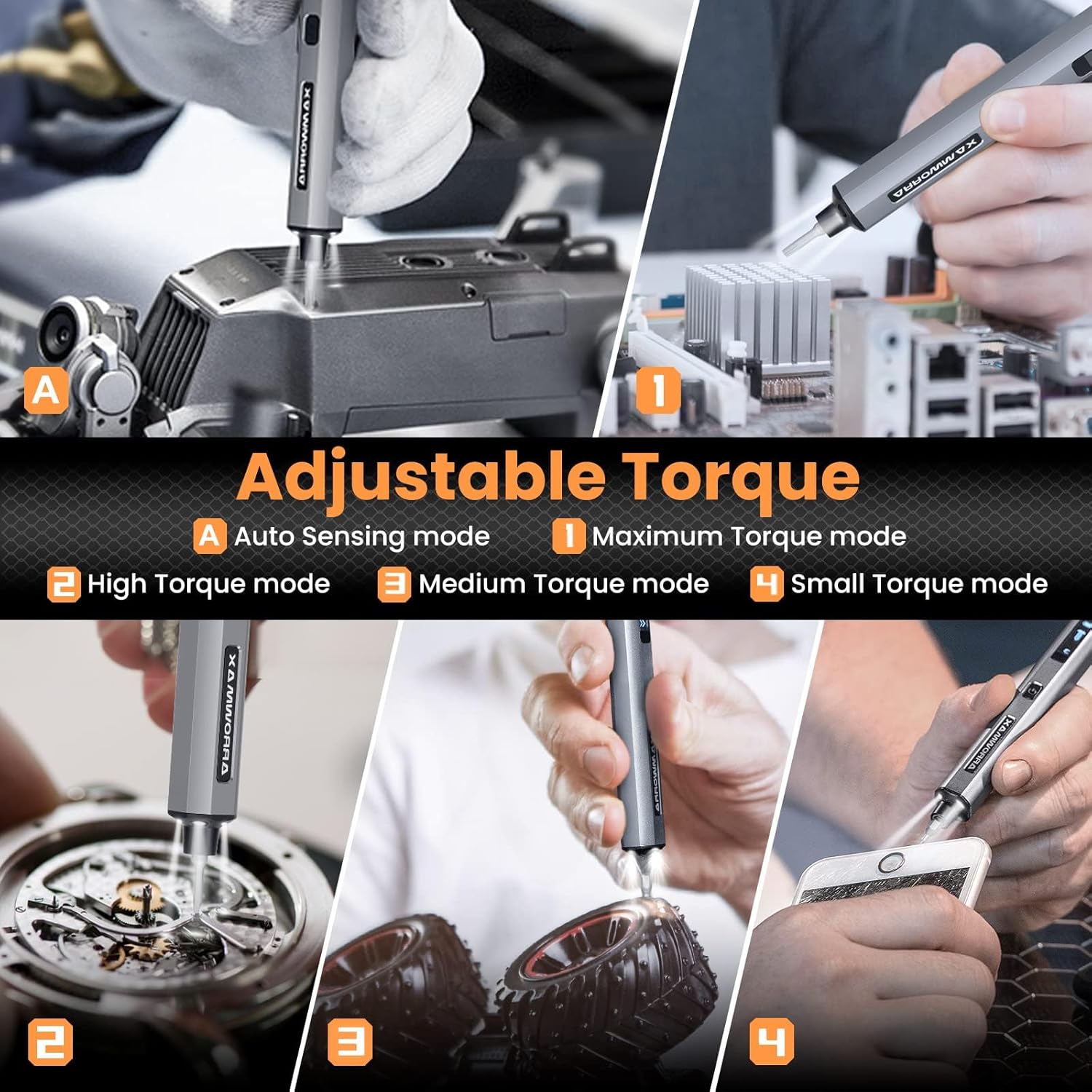
Image: Adjustable torque settings for various applications.
6.3 Body Sensory Dual-Mode (Forward/Reverse)
The SES PRO features a body sensory dual-mode for intuitive control of rotation direction.
- To drive a screw in (tighten), gently rotate your wrist in a clockwise direction while holding the screwdriver.
- To remove a screw (loosen), gently rotate your wrist in a counter-clockwise direction.
- The screwdriver's internal gyroscope detects your wrist movement and activates the motor accordingly.
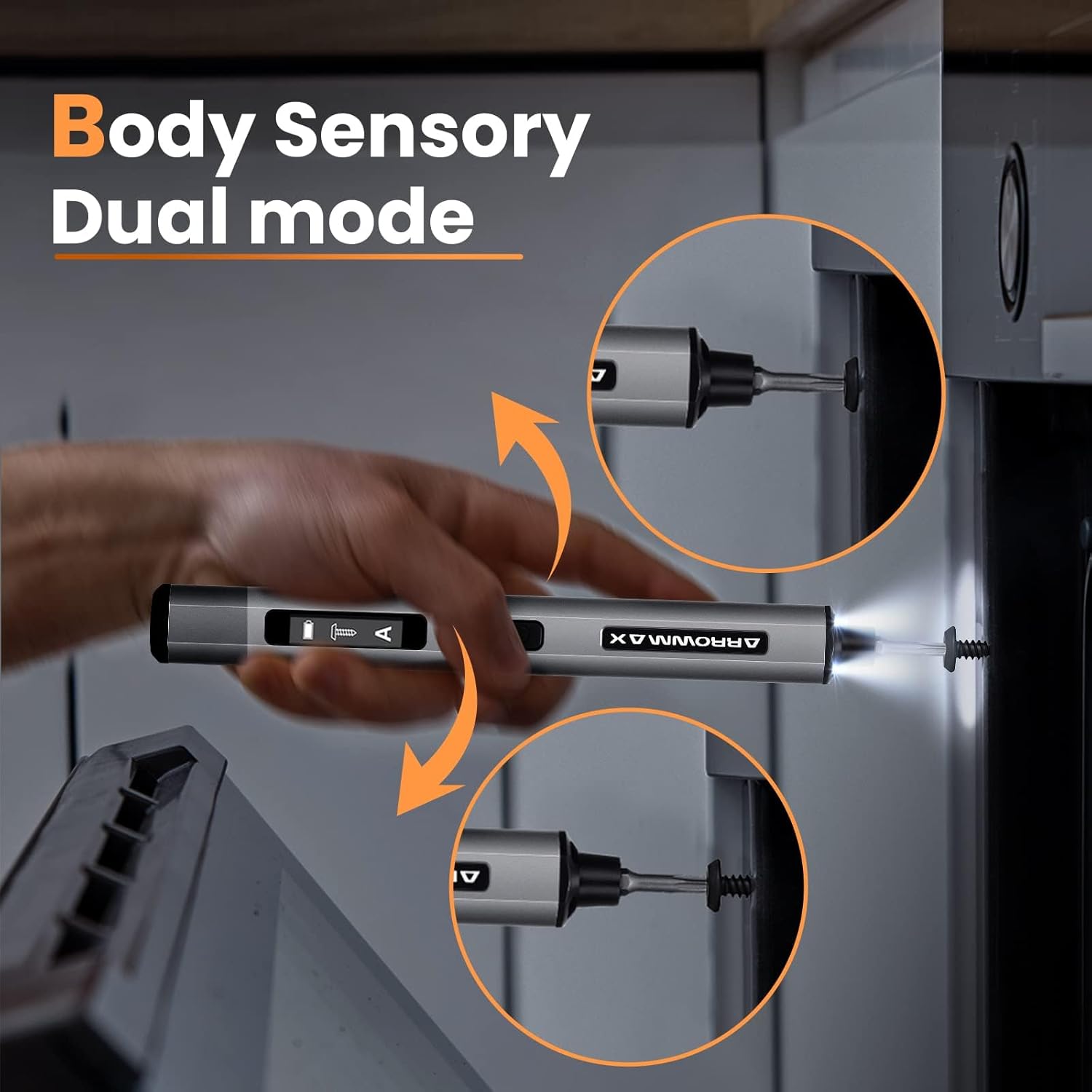
Image: Body sensory dual-mode in action for forward and reverse operation.
6.4 LED Work Lights
The integrated LED lights at the tip of the screwdriver automatically illuminate when the motor is active, providing clear visibility of your work area.
7. Údržba
7.1 Čištění
- Wipe the screwdriver body with a soft, dry cloth. Do not use abrasive cleaners or solvents.
- Ensure the bit installation port is free of debris.
7.2 Péče o baterii
- Chcete-li prodloužit životnost baterie, vyvarujte se častého úplného vybíjení.
- Pokud šroubovák nepoužíváte, skladujte jej na chladném a suchém místě.
- Recharge the battery periodically if stored for extended periods to prevent deep discharge.

Image: The SES PRO's long-lasting battery capacity.
7.3 Péče o bit
- Keep the precision bits clean and free of rust.
- Store bits securely in the magnetic case to prevent loss and damage.
8. Řešení problémů
If you encounter issues with your ARROWMAX SES PRO screwdriver, refer to the following common problems and solutions:
| Problém | Možná příčina | Řešení |
|---|---|---|
| Screwdriver does not turn on or respond. | Slabá baterie; zařízení je vypnuté. | Charge the screwdriver using the provided USB-A to USB-C cable. Ensure the power button is pressed to turn it on. |
| Screwdriver does not charge. | Incorrect charger type; faulty cable/adapter. | Ensure you are using a USB-A to USB-C cable and a standard USB-A power adapter. USB-C PD chargers are not supported. Try a different cable or adapter. |
| Motor lacks power or cannot loosen/tighten screws. | Low battery; incorrect torque setting; screw is too tight for electric mode. | Charge the screwdriver. Increase the torque setting. For very tight screws, manually loosen or tighten them first, then use the electric mode. |
| Directional control (forward/reverse) is inconsistent. | Improper wrist movement; gyroscope calibration issue. | Ensure clear and deliberate wrist movements. If issues persist, try restarting the device. |
| Bits fall out or are not held securely. | Bit installation port is dirty; bit is not fully inserted. | Clean the bit installation port. Ensure the bit is pushed in firmly until it clicks or feels secure. |
9. Specifikace
Key technical specifications for the ARROWMAX SES PRO Electric Precision Screwdriver:
| Funkce | Specifikace |
|---|---|
| Značka | ARROWMAX |
| Model | SES PRO (AM-199913-G) |
| Rychlost | 200 ot./min |
| Zdroj napájení | Napájení z baterie |
| svtage | 3.7 V (DC) |
| Elektrický točivý moment | 0.049 N.m - 0.30-0.35 N.m (Adjustable) |
| Ruční točivý moment | 3 Nm |
| Typ baterie | Lithium-iontová (500 mAh) |
| Nabíjecí port | USB-C (USB-A to USB-C charging only) |
| Hmotnost položky | 13.7 unce |
| Rozměry balení | 7.48 x 3.43 x 1.73 palce |
| Speciální funkce | OLED Screen, Smart Motion Control, Ergonomic Design, LED Lights |
10. Záruka a podpora
The manufacturer's warranty information for this product is not explicitly provided in the available data. For details regarding warranty coverage, duration, and terms, please refer to the documentation included with your purchase or contact the retailer where the product was acquired.
For technical support, product inquiries, or assistance with troubleshooting that is not covered in this manual, please visit the official ARROWMAX website or contact their customer service department. Contact information can typically be found on the product packaging or the manufacturer's official online channels.


