1. Úvod
Welcome to the user manual for your Sena R1 Smart Communications Cycling Helmet. This helmet is designed to enhance your cycling experience by integrating advanced communication features directly into your protective gear. With built-in speakers and a microphone, you can communicate with other riders, listen to music, and manage phone calls seamlessly while maintaining awareness of your surroundings. Please read this manual thoroughly to ensure proper use, optimal performance, and safety.

Figure 1: Sena R1 Smart Communications Cycling Helmet (Electric Tangerine)
2. Konec produktuview
The Sena R1 helmet combines safety with cutting-edge communication technology. Key features include:
- Built-in Speakers and Microphone: Enjoy clear audio for music, calls, and intercom without external devices.
- Skupinový interkom: Communicate with up to three other riders for enhanced group riding coordination.
- Bluetooth připojení: Easily pair with your smartphone for hands-free calling, GPS navigation, and music streaming.
- Comfortable and Secure Design: Features removable and washable padding, a durable nylon chinstrap, and a spin lock for a customized, snug fit.
- Integrace aplikace pro chytré telefony: Customize settings, manage friend groups, and adjust volume levels via the dedicated Sena Cycling App.

Figure 2: Sena R1 Helmet Integrated Features
3. Nastavení
3.1 Počáteční nabíjení
Before first use, fully charge your Sena R1 helmet. The helmet features a USB charging port, eliminating the need for disposable batteries.
- Locate the USB charging port at the back of the helmet (refer to Figure 3).
- Connect the provided USB cable to the helmet and a compatible USB power source (e.g., wall adapter, computer USB port).
- The LED indicator will show charging status. A full charge typically takes a few hours.
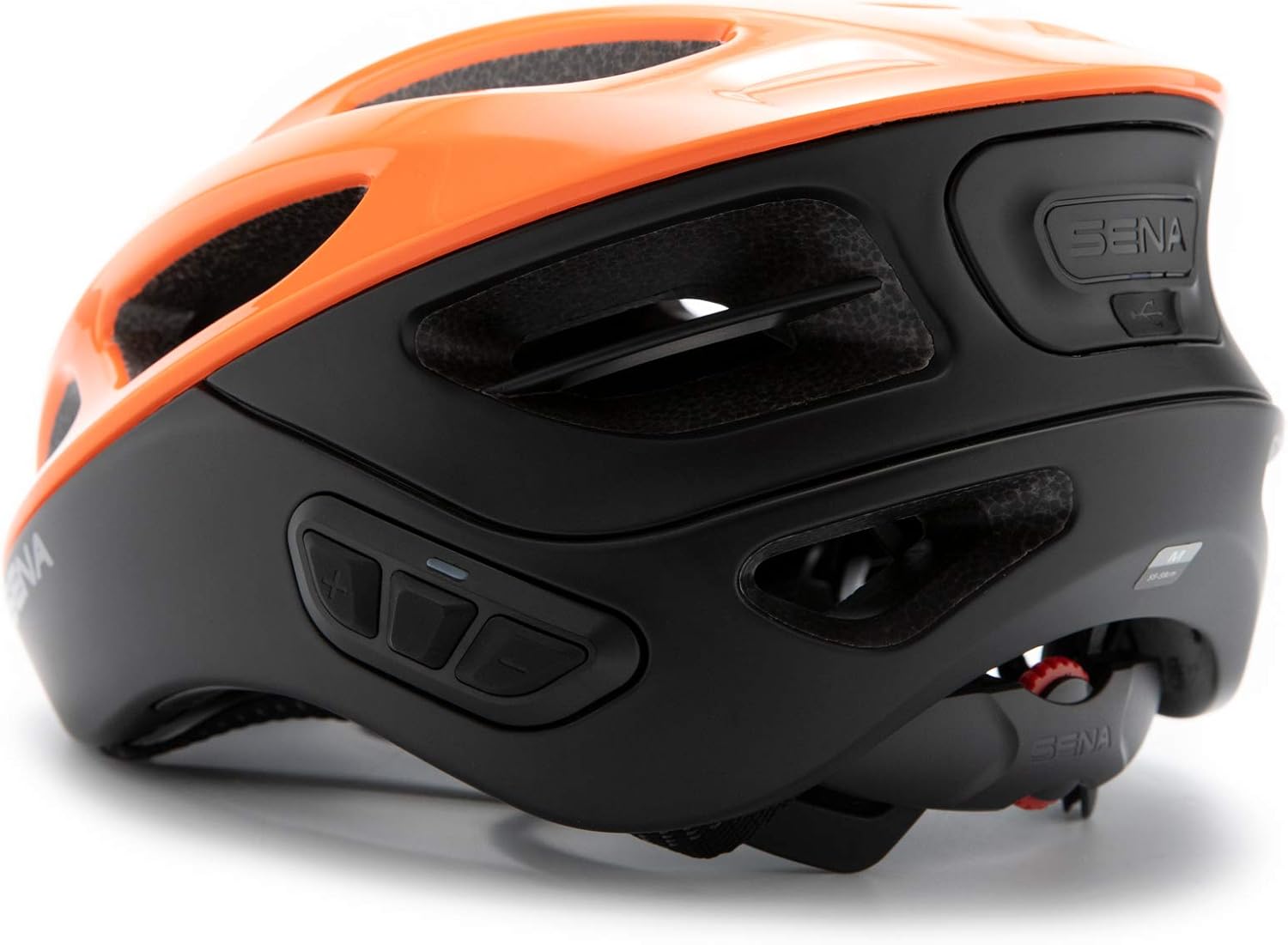
Figure 3: USB Charging Port Location
3.2 Helmet Sizing and Adjustment
Proper helmet fit is crucial for safety and comfort. Follow these steps to ensure your helmet fits correctly:
- Změřte si hlavu: Use a flexible tape measure to find the circumference of your head, approximately 1 inch above your eyebrows and at the top of your ears. Pull the tape snugly.
- Compare to Sizing Chart: Refer to the sizing guide below to determine your recommended helmet size.
- Nastavení voliče: Before placing the helmet on your head, open the dial adjustment at the back to its widest setting.
- Position Helmet: Place the helmet on your head. It should sit level, not too far forward or back.
- Tighten Dial: Tighten the dial adjustment at the back until the helmet feels snug but comfortable. It should not be overly tight, just secure enough to prevent excessive movement.
- Buckle Chin Strap: Fasten the chin strap. It should be loose enough to allow you to move your mouth, but tight enough that you can only fit about three fingers between your chin and the strap.
- Adjust Side Buckles: Adjust the side buckles so they sit flat against your head, just below your ears. The straps should be in front and behind your ears without touching them.
Video 1: Sena Cycling Helmet Size Guide. This video provides a detailed guide on how to measure your head, adjust the helmet for a proper fit, and check for security, ensuring maximum comfort and safety.
Průvodce velikostí
| Velikost | Obvod hlavy (cm) | Head Circumference (inches) |
|---|---|---|
| S | 50–55 | 19 5/8 - 21 3/4 |
| M | 55–59 | 21 3/4 - 23 3/8 |
| L | 59–63 | 23 3/8 - 24 3/4 |
4. Návod k obsluze
4.1 Zapnutí/vypnutí
- Zapnutí: Stiskněte a podržte tlačítko Střední tlačítko dokud neuslyšíte zvukovou výzvu.
- Vypnutí: Stiskněte a podržte tlačítko Střední tlačítko until you hear an audible prompt indicating power off.
4.2 Nastavení hlasitosti
- Increase Volume: Press the Tlačítko Plus (+).
- Decrease Volume: Press the Tlačítko mínus (-).
4.3 Párování Bluetooth (chytrý telefon)
To connect your Sena R1 helmet to your smartphone:
- With the helmet powered off, press and hold the Střední tlačítko until you hear the "Pairing" prompt. The LED will flash red and blue.
- On your smartphone, go to Bluetooth settings and select "Sena R1" from the list of available devices.
- Once paired, the LED will turn blue, and you will hear a confirmation.

Figure 4: Smartphone Connectivity via Sena Cycling App
4.4 Skupinový interkom
The R1 helmet supports communication with up to three other riders.
- Ensure all helmets are powered on and within range.
- To initiate intercom pairing, press and hold the Střední tlačítko on your helmet until you hear the "Intercom Pairing" prompt.
- Have the other riders do the same. The helmets will automatically connect when in pairing mode and within range.
- Once connected, you can speak freely with your group.

Figure 5: Group Intercom in Use
Video 2: R1 Bluetooth Integrated Smart Bicycle Helmet. This video demonstrates the integrated communication features of the Sena R1 helmet, including Bluetooth group intercom and music playback.
5. Údržba
5.1 Čištění helmy
- Otřete vnější stranu helmy měkkým hadříkemamp hadříkem. Nepoužívejte agresivní chemikálie ani abrazivní čisticí prostředky.
- The internal padding is removable and washable. Follow the care instructions on the padding label for cleaning.
- Ensure all components are completely dry before reassembling or storing the helmet.
5.2 Skladování
Store the helmet in a cool, dry place away from direct sunlight and extreme temperatures. Do not place heavy objects on top of the helmet.
6. Řešení problémů
6.1 Běžné problémy a řešení
| Problém | Možná příčina | Řešení |
|---|---|---|
| Žádná síla | Slabá baterie | Helmu plně nabijte pomocí dodaného USB kabelu. |
| Nelze spárovat Bluetooth | Helmet not in pairing mode; Device already paired to another helmet/phone | Ensure helmet is in pairing mode (flashing red/blue). Disconnect from other devices if necessary. Refer to Section 4.3. |
| Interkom se často odpojuje | Out of range; Obstructions; Low battery | Stay within recommended intercom range. Ensure clear line of sight. Charge helmet. |
| Špatná kvalita zvuku | Volume too low/high; Microphone/speaker obstruction | Adjust volume. Ensure microphone is positioned correctly and speakers are not obstructed by padding. |
6.2 Obnovení továrního nastavení
If issues persist, a factory reset may resolve them. Consult the full user manual (link in Warranty & Support section) for specific instructions on performing a factory reset.
7. Specifikace
| Funkce | Detail |
|---|---|
| Značka | Sena |
| Název modelu | R1 |
| Číslo modelu | R1-ET00S01 |
| Barva | Electric Tangerine |
| Velikost | Malý |
| Věkové rozmezí (popis) | Dospělý |
| Speciální funkce | Bluetooth |
| Vnější materiál | Polykarbonát (PC) |
| Vnitřní materiál | Expandovaný polystyren |
| Hmotnost položky | 380 gramů |
| UPC | 885465014218 |
| Zahrnuté komponenty | Cable, Helmet |
8. Záruka a podpora
8.1 Informace o záruce
The Sena R1 Smart Communications Cycling Helmet comes with a 2-letá záruka od data nákupu. Tato záruka se vztahuje na výrobní vady a zajišťuje, že váš výrobek bude při běžném používání fungovat dle očekávání. Uschovejte si prosím doklad o koupi pro případ uplatnění záruky.
8.2 Zákaznická podpora
Pro další pomoc, technickou podporu nebo dotazy týkající se záruky se prosím obraťte na následující zdroje:
- Official Sena Store: Navštivte Sena Store on Amazon pro informace o produktech a příslušenství.
- Uživatelská příručka (PDF): Komplexní PDF verze uživatelské příručky je k dispozici ke stažení. zde.
- Instalační manuál (PDF): For detailed installation instructions, download the PDF manual zde.
- Uživatelská příručka (PDF): K dispozici je další uživatelská příručka zde.


