1. Úvod
Thank you for choosing the BEAVERLAB TW1 Smart Digital Astronomy Telescope. This advanced instrument is designed to provide an immersive and accessible astronomical observation experience, suitable for both beginners and experienced stargazers. With its 500mm long focal length, 1600x maximum magnification, and smart features, the TW1 allows you to explore the cosmos and observe distant objects with remarkable clarity.
This manual provides essential information for the proper setup, operation, and maintenance of your telescope. Please read it thoroughly before first use to ensure optimal performance and longevity of your device.
2. Bezpečnostní informace
- Nikdy se nedívejte přímo do slunce through the telescope or its finderscope, even for an instant, without a proper solar filter. Permanent and irreversible eye damage, including blindness, can result.
- Do not leave the telescope unattended in direct sunlight. Sunlight concentrated through the telescope can cause damage to the instrument or ignite flammable materials.
- Keep the telescope away from water and high humidity to prevent damage to electronic components and optics.
- Handle the telescope with care. Avoid dropping or subjecting it to strong impacts, which can damage optical and mechanical parts.
- Uchovávejte mimo dosah malých dětí, abyste předešli nehodám.
- Use only the specified power source and accessories provided or approved by BEAVERLAB.
3. Konec produktuview
3.1. Schéma komponent
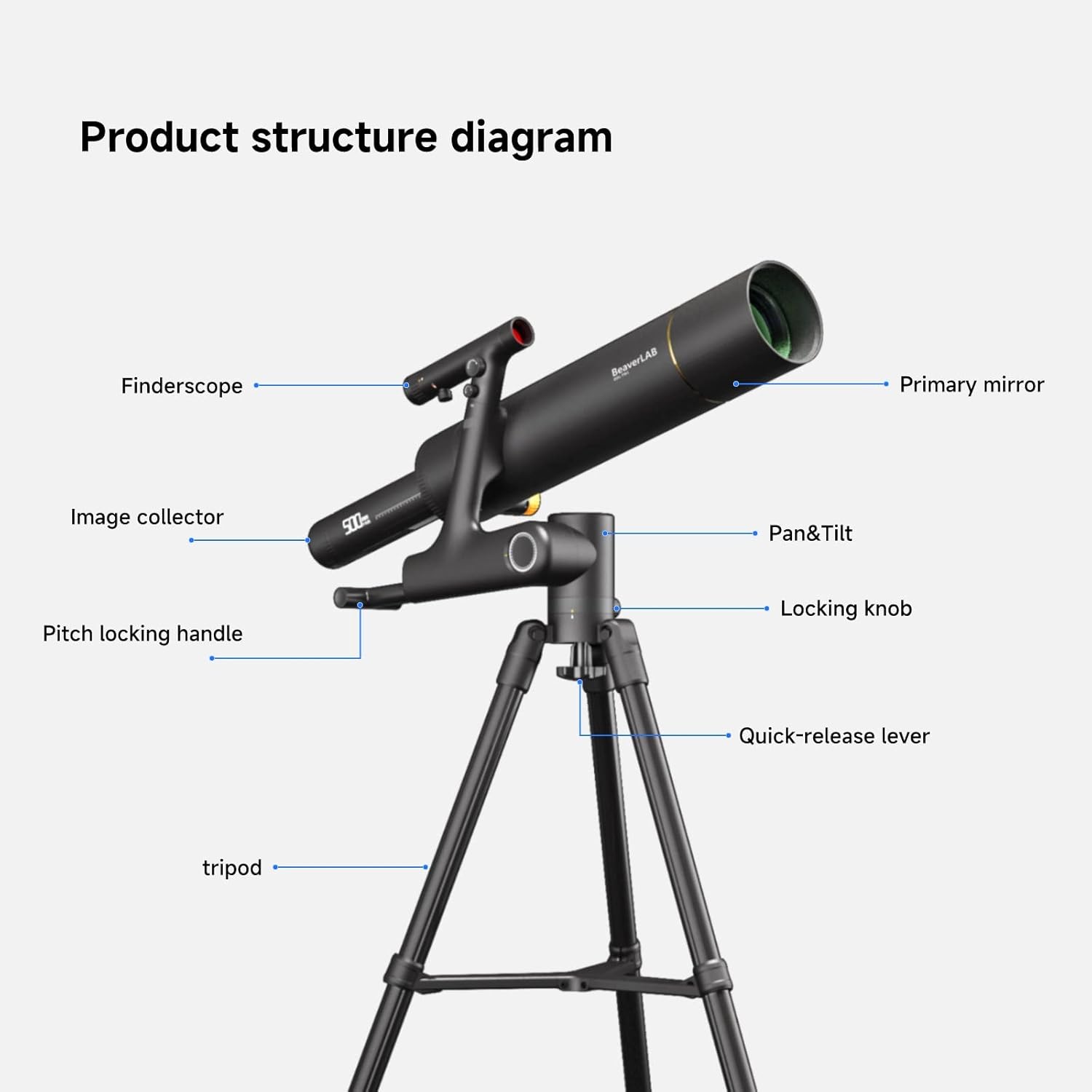
Figure 3.1: Labeled diagram illustrating the main components of the BEAVERLAB TW1 Smart Digital Astronomy Telescope, including the optical tube, finderscope, image collector, and tripod assembly with its various adjustment points.
- Primární zrcadlo: The main optical element that collects light.
- Hledáček: A small auxiliary telescope used for locating objects in the sky.
- Image Collector: The digital imaging unit that captures and processes the visual data.
- Pan & Tilt Mechanism: Allows for horizontal and vertical movement of the telescope.
- Zamykací knoflík: Secures the telescope's position after adjustment.
- Pitch Locking Handle: Adjusts and locks the vertical angle (pitch) of the telescope.
- Quick-release Lever: For rapid attachment and detachment of the telescope from the tripod.
- Stativ: The stable three-legged support structure for the telescope.
3.2. Obsah balení

Obrázek 3.2: Přesview of all items included in the BEAVERLAB TW1 Smart Digital Astronomy Telescope package.
Po otevření balení se prosím ujistěte, že jsou přítomny všechny následující položky:
- BEAVERLAB TW1 Smart Digital Astronomy Telescope Optical Tube
- Nastavitelný stativ
- Finderscope
- Adaptér pro smartphone
- USB nabíjecí kabel
- Přepravní taška
- Uživatelská příručka (tento dokument)
- Additional accessories (e.g., lens caps, cleaning cloth)
3.3. Rozměry

Figure 3.3: Assembled dimensions of the BEAVERLAB TW1 Telescope.
The assembled telescope has approximate dimensions of:
- Výška: 55.1 palců (přibližně 140 cm)
- Šířka základny: 39.3 palců (přibližně 100 cm)
4. Nastavení
Follow these steps to assemble your BEAVERLAB TW1 Telescope:
- Rozbalte komponenty: Carefully remove all components from the packaging and place them on a clean, flat surface.
- Set Up Tripod:
- Extend the tripod legs fully and spread them apart to form a stable base.
- Adjust the height of the tripod legs as desired, then secure them using the quick-release levers.
- Attach Telescope Tube:
- Align the mounting plate on the telescope tube with the quick-release mechanism on the tripod head.
- Secure the telescope tube to the tripod by engaging the quick-release lever until it clicks into place. Ensure it is firmly attached.
- Instalace Finderscope:
- Slide the finderscope into its bracket on the main telescope tube.
- Tighten the small screws on the bracket to hold the finderscope securely.
- Nabíjení baterie: Before first use, ensure the internal Lithium Ion battery is fully charged using the provided USB charging cable. Connect the cable to the telescope's charging port and a standard USB power adapter (not included). The charging indicator will show status.
5. Návod k obsluze
5.1. Zapnutí/vypnutí
Locate the power button on the telescope's main body. Press and hold the button for a few seconds to power on the device. The indicator light will illuminate. To power off, press and hold the power button again until the light turns off.
5.2. Connecting to the App (Wi-Fi)
The BEAVERLAB TW1 is designed to connect with your smartphone via Wi-Fi for enhanced control and viewIng.
- Stáhnout aplikaci: Download the official BEAVERLAB app from your smartphone's app store (iOS or Android).
- Povolit Wi-Fi: Ujistěte se, že je na vašem smartphonu povoleno Wi-Fi.
- Připojit: Open the BEAVERLAB app. The app will guide you to connect to the telescope's Wi-Fi network. Select the network named "BEAVERLAB_TW1_XXXX" (where XXXX is a unique identifier) and enter the default password if prompted (refer to app instructions or telescope label for default password).
- Žít View: Once connected, you will see a live view from the telescope's camera on your smartphone screen.
5.3. Focusing and Magnification
The TW1 features a 500mm focal length and offers up to 1600x magnification.
- Manuální ostření: Adjust the focus knob on the telescope tube until the image on your smartphone screen appears sharp and clear.
- Digital Magnification: The app allows for digital zoom to achieve higher magnifications up to 1600x. Use the zoom controls within the app to adjust.
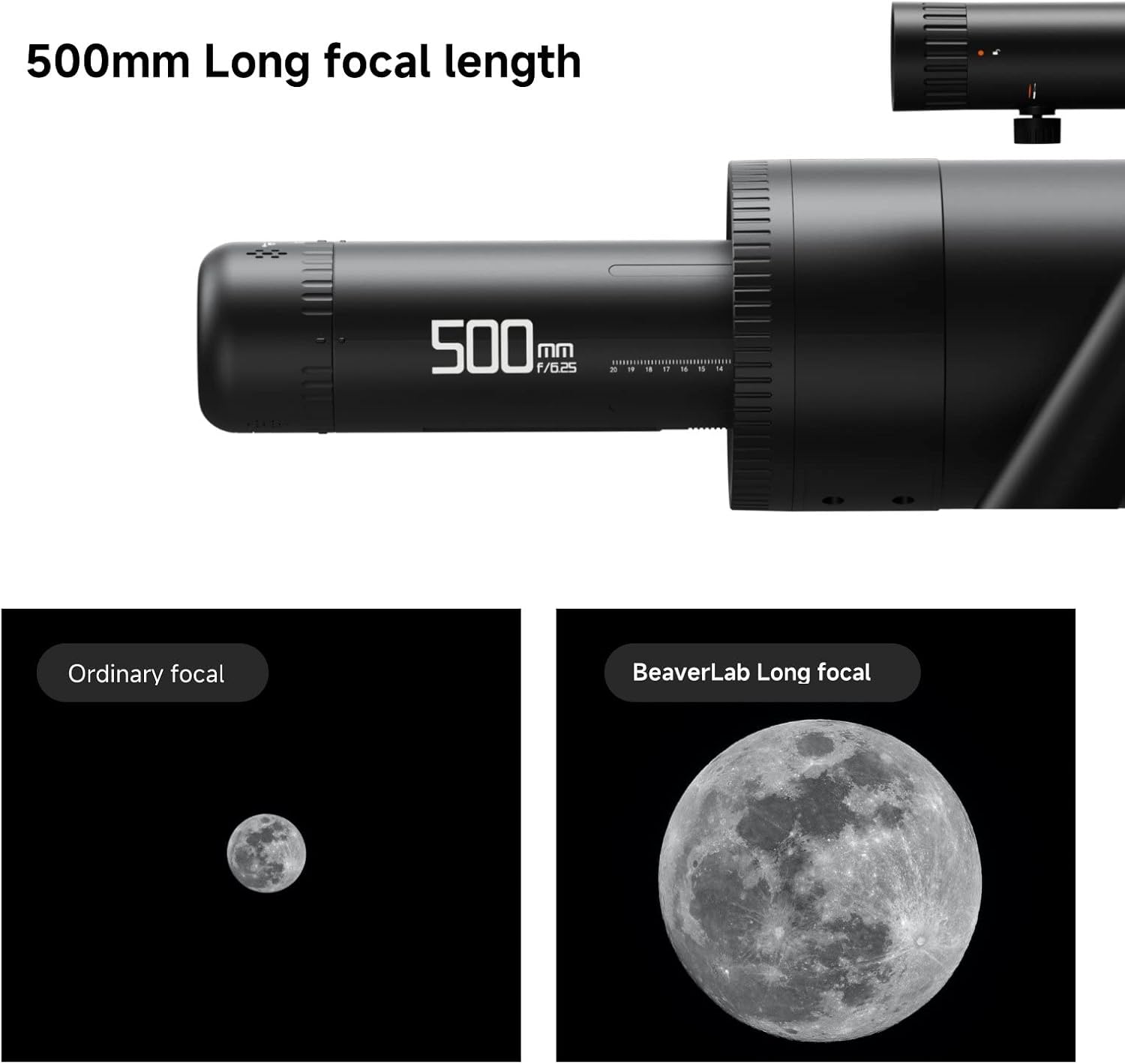
Figure 5.1: Illustration of the effect of 500mm long focal length on image size and detail.

Figure 5.2: Illustration of the f/6.1 large aperture's impact on image brightness and clarity.
5.4. Pokročilé funkce aplikace
The BEAVERLAB app provides several advanced features to optimize your viewzkušenosti:
- Automatic White Balance: Ensures accurate color representation.
- Kontrola expozice: Adjust image brightness for optimal viewv různých světelných podmínkách.
- RGB Compensation: Real-time adjustment for primary color balance.
- Úpravy obrázku: Fine-tune color, gamma, and clarity directly from the app interface.
- Pořízení fotografie/videa: Record images and videos of your observations directly to your smartphone.
5.5. Observation Tips
The TW1 telescope is versatile and can be used for various types of observation:
- Astronomické pozorování:

Figure 5.3: Astronomical observation of the Moon.
For stargazing, choose a location away from city lights. Allow your eyes to adjust to the darkness. Use the finderscope to initially locate celestial objects, then fine-tune with the main telescope and app controls. The 500mm focal length is ideal for detailed views of the Moon, planets, and brighter deep-sky objects.
- Bird Watching & Wildlife:
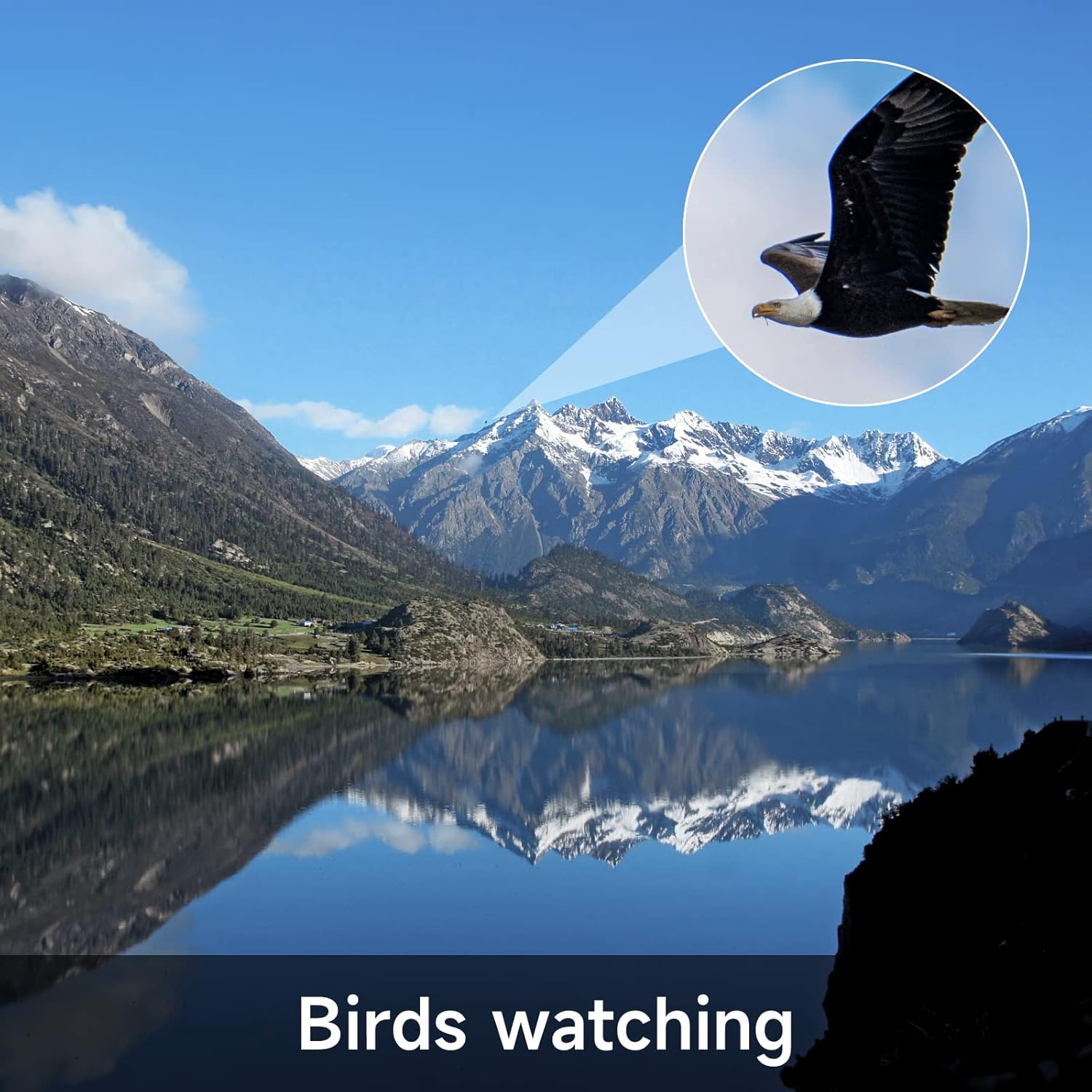
Figure 5.4: Bird watching with the BEAVERLAB TW1.
For terrestrial observations, ensure the telescope is level. Use the pan and tilt mechanism to track moving subjects. The high magnification allows for detailed observation of distant wildlife without disturbance.
- Sports Watching:

Figure 5.5: Sports event observation.
The TW1 can be used to get a closer view of distant sporting events. Set up the telescope in a stable position and use the pan and tilt controls to follow the action. The digital imaging allows for recording key moments.
6. Údržba
- Čištění optiky: Use a soft, lint-free cloth specifically designed for optical lenses to gently wipe dust from the primary mirror and finderscope lens. For stubborn smudges, use a small amount of optical cleaning fluid applied to the cloth, not directly to the lens.
- Čištění těla: Wipe the telescope body and tripod with a soft, damp hadříkem. Nepoužívejte abrazivní čisticí prostředky ani rozpouštědla.
- Skladování: When not in use, store the telescope in its carrying bag in a cool, dry place, away from direct sunlight and extreme temperatures. Ensure all lens caps are in place to protect the optics from dust and scratches.
- Péče o baterie: Pro dlouhodobé skladování nabijte baterii přibližně na 50 % každé několik měsíců, abyste ji udrželi v dobrém stavu.
7. Řešení problémů
| Problém | Možná příčina | Řešení |
|---|---|---|
| Dalekohled se nezapne. | Baterie je vybitá. | Charge the telescope battery using the provided USB cable. |
| Nelze se připojit k Wi-Fi. | Incorrect Wi-Fi password or telescope not in pairing mode. | Ensure the telescope is powered on. Verify the Wi-Fi password. Restart both the telescope and your smartphone. |
| Obraz je rozmazaný nebo nezaostřený. | Zaostřovací knoflík není správně nastavený. | Rotate the manual focus knob until the image on your smartphone screen is sharp. |
| No image on smartphone app. | App not properly connected or camera error. | Ensure Wi-Fi is connected. Close and reopen the app. Restart the telescope. |
| Obrázek je příliš tmavý/světlý. | Exposure settings in app are incorrect. | Adjust the exposure settings within the BEAVERLAB app. |
8. Specifikace
| Funkce | Detail |
|---|---|
| Číslo modelu | TW1 |
| Ohnisková vzdálenost | 500 mm (f/6.1) |
| Maximální zvětšení | 1600x |
| Průměr objektivu | 100 milimetrů |
| Typ zaměření | Manuální ostření |
| Finderscope Type | Reflex |
| Zdroj napájení | Napájení baterií (1 lithium-iontová baterie je součástí balení) |
| Kompatibilní zařízení | Smartphone (via Wi-Fi and dedicated app) |
| Rozměry produktu (smontovaný) | 27 x 16 x 7 palců (přibližně 68.6 x 40.6 x 17.8 cm) |
| Hmotnost položky | 13 libry (přibližně 5.9 kg) |
| Výrobce | Beaver Technology (Shenzhen) Co., Ltd. |
9. Záruka a podpora
BEAVERLAB products are manufactured to high-quality standards. For information regarding warranty coverage, technical support, or service inquiries, please refer to the warranty card included with your product or visit the official BEAVERLAB webstránky. Uschovejte si prosím doklad o koupi pro případ reklamace.
For further assistance, you may contact BEAVERLAB customer support through the contact information provided on their official webwebu nebo v aplikaci produktu.


