Zavedení
The MILLENNIUM M815 ChessGenius PRO is an intelligent chess computer designed for players of all levels, from beginners to advanced. It serves as a comprehensive chess trainer, offering various training options and adaptable difficulty levels to enhance your chess skills. This manual provides essential information for setting up, operating, and maintaining your ChessGenius PRO.
Bezpečnostní informace
Varování:
- Nevhodné pro děti do 4 let.
- Používejte pouze pod dohledem dospělé osoby.
Co je v krabici
Upon unpacking your MILLENNIUM M815 ChessGenius PRO, please ensure all components are present:
- Elektronická šachovnice
- 34 Chess Pieces (including 2 extra queens)
- Skladovací taška
- Rychlý průvodce
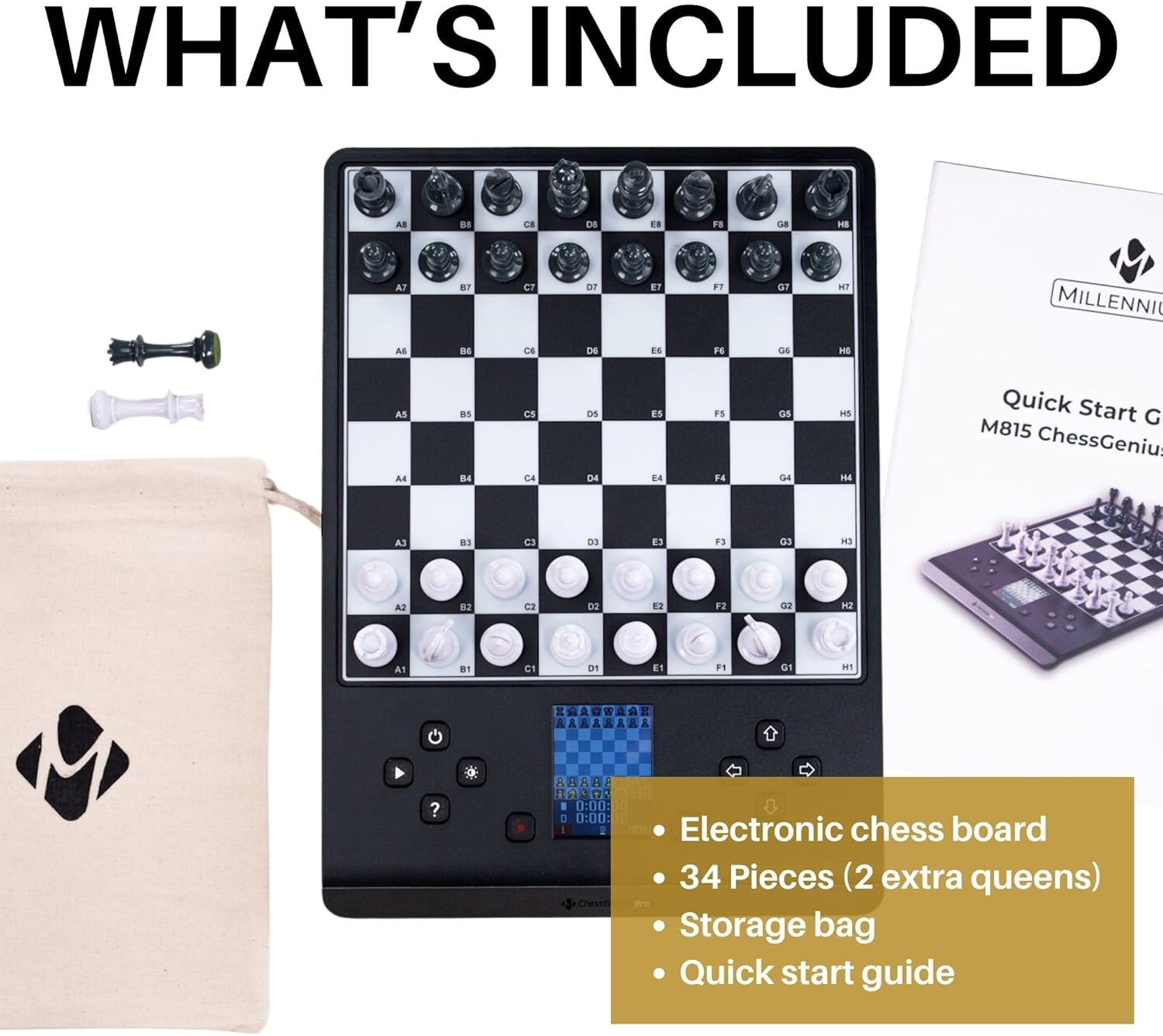
Figure 1: Included components of the ChessGenius PRO. The package contains the electronic chess board, a full set of chess pieces with two additional queens, a fabric storage bag for the pieces, and a quick start guide.
Nastavení
Napájení zařízení
The ChessGenius PRO can be powered by batteries for portability or an optional AC adapter for continuous play.
Instalace baterie
- Locate the battery compartment on the underside of the chess board.
- Otevřete kryt bateriového prostoru.
- Insert 4 x AA/LR06 batteries (not included), ensuring correct polarity (+/-).
- Bezpečně zavřete kryt bateriového prostoru.
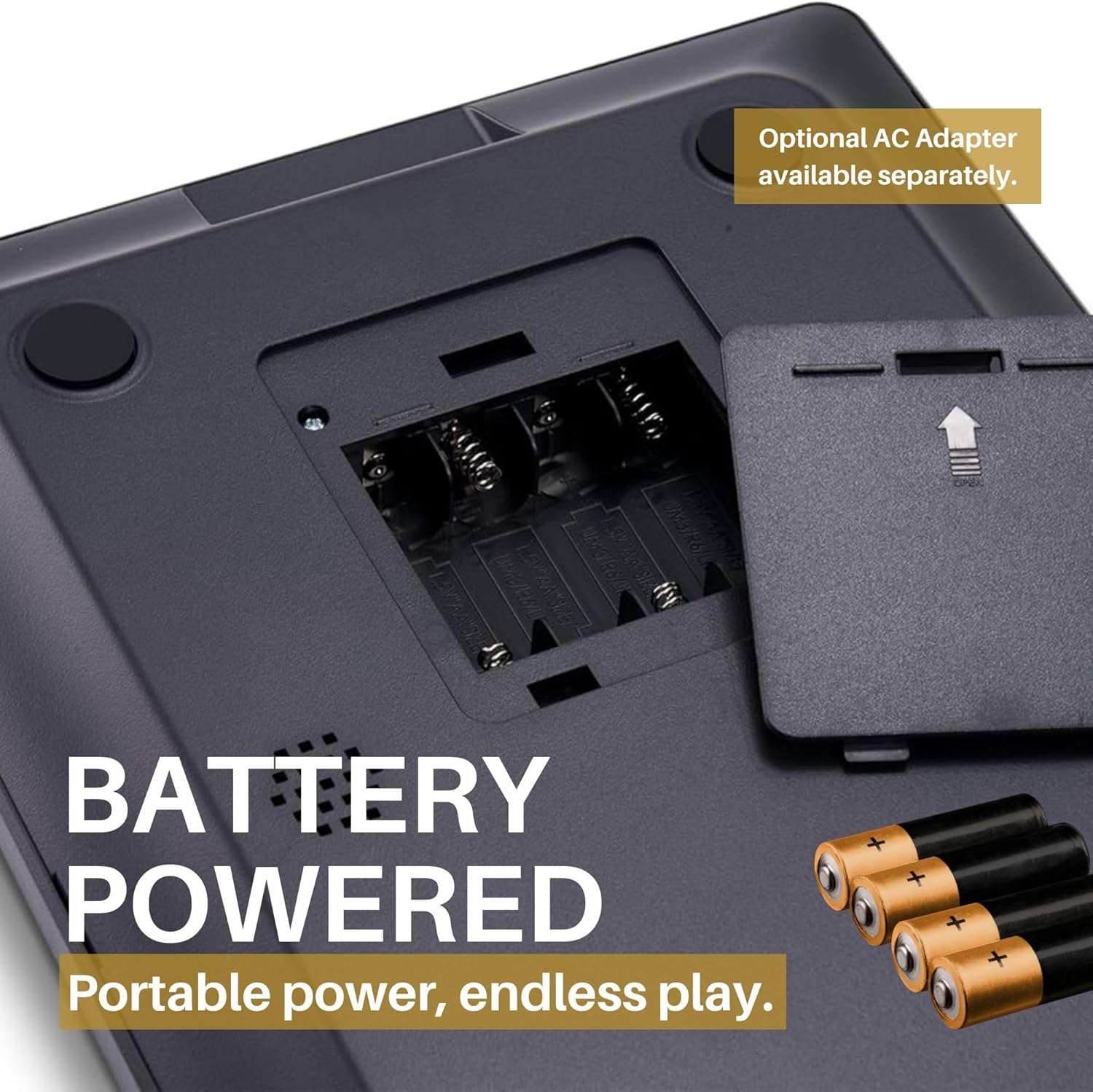
Figure 2: Battery compartment. The device requires four AA/LR06 batteries for operation, which are not included in the package. Ensure correct battery orientation during installation.
Using an AC Adapter (Optional)
An optional AC adapter can be purchased separately for direct power from a wall outlet. Connect the adapter to the designated port on the device.

Figure 3: Power flexibility. The ChessGenius PRO can be powered by 4 AA/LR06 batteries for portable use or via an optional AC adapter for home use.
Placing the Chess Pieces
Place the magnetic chess pieces on their starting positions on the board. The magnetic base ensures pieces remain stable during play, even when moving the board.

Figure 4: Magnetic pieces. The chess pieces are magnetic, ensuring they stay firmly in position on the board during play or transport.
Návod k obsluze
Spuštění hry
The intuitive menus and the dedicated PLAY button allow for quick game initiation. You can choose to play as White, Black, engage in a 2-player mode, or set up a game from a specific position.

Figure 5: Intuitive controls. The ChessGenius PRO features an intuitive menu system and a dedicated PLAY button for easy game setup and navigation.
Pochopení displeje
The integrated LCD color display shows your moves, the current board state, and provides visual cues for various functions.

Figure 6: LCD color display. The display provides clear visual feedback on the game state and prompts for your next move.
Playing Against the Computer
The AI adapts to your playing level, offering a realistic training partner with a playing strength of up to 2200 ELO. You can adjust the difficulty to match your skill, from beginner to master.

Figure 7: Practice strategies. The ChessGenius PRO allows users to practice and develop their chess strategies against an adaptive AI opponent.
Režim pro dva hráče
In two-player mode, the computer acts as an arbiter, ensuring adherence to chess rules. This is ideal for playing with a friend while still benefiting from the computer's rule enforcement.

Figure 8: Game modes. The ChessGenius PRO supports playing against the computer and a two-player mode where the computer enforces rules.
Features and Training Options
The ChessGenius PRO is equipped with various features to assist and train players:
- Move Suggestions: Receive hints for optimal moves.
- Bad Move Warnings: The computer alerts you to potentially poor moves, helping you learn from mistakes.
- Take-back Options: Undo moves to explore different strategies or correct errors.
- Tlačítko nápovědy: Press the '?' button to get assistance or suggestions during a game.
- Opening Names Display: The screen can display the names of chess openings as they occur, aiding in learning opening theory.

Figure 9: Help function. The '?' button provides immediate assistance and suggestions during gameplay.

Figure 10: AI learning functions. The ChessGenius PRO acts as a chess trainer, providing warnings for bad moves, suggesting optimal moves, and displaying opening names to optimize playing technique.
Údržba
To ensure the longevity and optimal performance of your ChessGenius PRO, follow these maintenance guidelines:
- Čištění: Wipe the board and pieces with a soft, dry cloth. Avoid using abrasive cleaners or solvents.
- Skladování: When not in use, store the chess pieces in the provided storage bag to prevent loss and damage. Keep the device in a cool, dry place away from direct sunlight and extreme temperatures.
- Péče o baterie: If the device will not be used for an extended period, remove the batteries to prevent leakage and potential damage to the electronics.
Odstraňování problémů
This section addresses common issues you might encounter with your ChessGenius PRO.
| Problém | Možná příčina | Řešení |
|---|---|---|
| Zařízení se nezapne. |
|
|
| Pieces do not register on the board. |
|
|
| Displej je tmavý nebo nečitelný. |
|
|
Specifikace
| Značka | TISÍCILETÍ |
| Model | M815 ChessGenius Pro 2024 |
| Doporučený věk | 3 years and up (Manufacturer recommended) |
| Počet hráčů | 2 |
| Jazyky | Spanish, English, Polish, German, Portuguese, French, Italian |
| Zdroj napájení | 4 x AA/LR06 batteries (not included) or optional AC adapter |
| Hlavní materiál | Plast |
| Barva | Černý |
| Rozměry produktu | 30L x 22W centimeters |
Záruka a podpora
MILLENNIUM products are designed for durability and performance. For any issues or inquiries, please refer to the following information:
- Dostupnost náhradních dílů: Spare parts are available for 1 year from the date of purchase.
- Zákaznická podpora: For technical assistance or warranty claims, please contact MILLENNIUM customer support through their official webwebu nebo kontaktních informací uvedených na obalu produktu.
Oficiální videa produktů
Pro tento produkt momentálně nejsou k dispozici žádná oficiální produktová videa od prodejce.


