1. Konec produktuview
The Vorago BSP-500-V2 is a portable Bluetooth speaker designed for robust performance and durability. It features IPX5 water resistance, making it suitable for various environments, including outdoor adventures and parties. This manual provides detailed instructions for setting up, operating, and maintaining your speaker.
Klíčové vlastnosti:
- True Wireless Stereo (TWS) Connectivity: Connect two BSP-500-V2 speakers for an immersive stereo sound experience.
- Prodloužená životnost baterie: Enjoy up to 7 hours of music playback at 70% volume, thanks to its 2000 mAh battery.
- Nabíjení USB Type-C: Convenient and modern USB-C port for charging.
- Všestranná konektivita: Supports Bluetooth for wireless streaming and a 3.5mm auxiliary input for wired connections.
- IPX5 voděodolnost: Chráněno proti nízkotlakým vodním paprskům z jakéhokoli směru.
Obsah balení:
- Bluetooth reproduktor Vorago BSP-500-V2
- Nabíjecí kabel USB typu C.
- 3.5mm audio kabel
- Uživatelská příručka (tento dokument)
Schéma produktu:

Obrázek 1.1: Přední strana view of the Vorago BSP-500-V2 Bluetooth speaker, showcasing its mesh grille and central Vorago logo.

Obrázek 1.2: Úhlové view of the speaker, highlighting its robust, rectangular design and integrated carrying strap.

Obrázek 1.3: Nahoře view showing the control panel with power, volume down, play/pause, and volume up buttons.
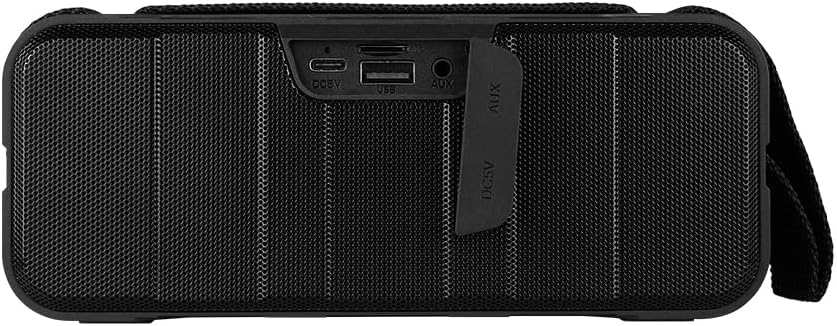
Obrázek 1.4: Zadní view of the speaker, showing the protective flap covering the input ports.

Figure 1.5: Close-up of the input ports, including DC 5V (USB-C), USB-A, and AUX (3.5mm) inputs, protected by a rubber cover.
2. Bezpečnostní informace
- Nevystavujte reproduktor extrémním teplotám (horkým ani nízkým).
- Vyvarujte se pádu reproduktoru nebo jej nevystavujte silným nárazům.
- Keep the speaker away from direct sunlight and heat sources.
- Reproduktor sami nerozebírejte, neopravujte ani neupravujte. Ztratíte tak záruku.
- Ensure the port cover is securely closed when using the speaker near water to maintain IPX5 water resistance.
- Do not immerse the speaker in water. IPX5 rating protects against splashes and light rain, not submersion.
- K nabíjení používejte pouze dodaný nabíjecí kabel nebo certifikovaný kabel USB typu C.
- Reproduktor čistěte měkkým, suchým hadříkem. Nepoužívejte abrazivní čisticí prostředky ani rozpouštědla.
3. Nastavení
3.1 Nabíjení reproduktoru
- Open the protective rubber cover on the rear of the speaker to access the charging port.
- Connect the USB Type-C end of the charging cable to the speaker's DC 5V port.
- Druhý konec kabelu USB připojte k napájecímu adaptéru USB (není součástí balení) nebo k portu USB počítače.
- Kontrolka nabíjení se během nabíjení rozsvítí a po úplném nabití zhasne.
- Once charging is complete, securely close the protective rubber cover to maintain water resistance.
3.2 Zapnutí/vypnutí
- Zapnutí: Stiskněte a podržte Tlačítko napájení on the top panel for approximately 3 seconds until you hear an audible prompt.
- Vypnutí: Stiskněte a podržte Tlačítko napájení for approximately 3 seconds until you hear an audible prompt.
3.3 Párování Bluetooth
- Ujistěte se, že je reproduktor zapnutý. Automaticky se přepne do režimu párování Bluetooth, což bude signalizováno blikající LED kontrolkou.
- Na svém zařízení (chytrý telefon, tablet, notebook) povolte Bluetooth a vyhledejte dostupná zařízení.
- Select "BSP-500-V2" from the list of found devices.
- Po úspěšném spárování reproduktor vydá zvukové potvrzení a LED kontrolka přestane blikat a zůstane svítit nepřetržitě.
- Reproduktor se po zapnutí automaticky znovu připojí k poslednímu spárovanému zařízení, pokud je zařízení v dosahu a je povoleno připojení Bluetooth.
3.4 Párování s pravým bezdrátovým stereo (TWS) systémem
TWS allows you to connect two BSP-500-V2 speakers together for a true stereo sound experience.
- Ensure both BSP-500-V2 speakers are powered on and not connected to any other Bluetooth device.
- Na jednom z reproduktorů (to bude primární reproduktor) dvakrát stiskněte Tlačítko Přehrát/PozastavitReproduktor se přepne do režimu párování TWS.
- The two speakers will automatically search for and connect to each other. You will hear an audible confirmation once they are successfully paired.
- Once TWS is established, connect your device to the primary speaker via Bluetooth as described in Section 3.3.
- To disconnect TWS, double-press the Tlačítko Přehrát/Pozastavit na kterémkoli z reproduktorů.
3.5 Přídavné (AUX) připojení
For devices without Bluetooth, you can use the 3.5mm audio cable.
- Open the protective rubber cover on the rear of the speaker.
- Připojte jeden konec 3.5mm audio kabelu k AUX portu reproduktoru.
- Druhý konec kabelu připojte k audio výstupnímu konektoru vašeho zařízení.
- Reproduktor se automaticky přepne do režimu AUX.
- Once disconnected, securely close the protective rubber cover.
4. Návod k obsluze
4.1 Funkce tlačítek:
| Tlačítko | Funkce (krátké stisknutí) | Funkce (dlouhý stisk) |
|---|---|---|
| Tlačítko napájení | N/A | Zapnutí/vypnutí |
| Tlačítko snížení hlasitosti | Snížit hlasitost | Předchozí stopa |
| Tlačítko Přehrát/Pozastavit | Přehrát/Pozastavit hudbu, Přijmout/Ukončit hovor | Reject Call, Double-press for TWS Pairing |
| Tlačítko pro zvýšení hlasitosti | Zvýšit hlasitost | Další stopa |
5. Údržba
- Čištění: Use a soft, dry, lint-free cloth to clean the speaker's surface. For stubborn dirt, slightly damphadřík vodou. Nepoužívejte agresivní chemikálie, čisticí rozpouštědla ani silné čisticí prostředky.
- Péče o odolnost proti vodě: Always ensure the rubber port cover on the back of the speaker is fully and securely sealed when using the speaker outdoors or near water. This maintains its IPX5 water resistance. After exposure to water, wipe the speaker dry before opening the port cover for charging or auxiliary connections.
- Skladování: When not in use for extended periods, store the speaker in a cool, dry place, away from direct sunlight and extreme temperatures. It is recommended to charge the speaker fully before storing and to recharge it every few months to maintain battery health.
- Péče o baterie: To prolong battery life, avoid fully discharging the battery frequently. Charge the speaker when the low battery indicator is active.
6. Řešení problémů
| Problém | Možná příčina | Řešení |
|---|---|---|
| Reproduktor se nezapne. | Slabá baterie. | Reproduktor plně nabijte pomocí dodaného kabelu USB typu C. |
| Nelze spárovat přes Bluetooth. | Speaker is not in pairing mode; Device's Bluetooth is off; Speaker is already connected to another device; Device is too far from speaker. | Ensure speaker is powered on and flashing (pairing mode). Turn on Bluetooth on your device. Disconnect from other devices. Move device closer to speaker (within 10 meters). |
| Žádný zvuk nebo nízká hlasitost. | Příliš nízká hlasitost reproduktoru nebo zařízení; Nesprávný vstupní režim; Reproduktor není připojen. | Increase volume on both speaker and connected device. Ensure correct mode (Bluetooth or AUX) is active. Verify successful Bluetooth pairing or AUX cable connection. |
| Zkreslení zvuku. | Příliš vysoká hlasitost; Zařízení je příliš daleko od reproduktoru; Rušení. | Reduce volume on speaker and/or device. Move device closer to speaker. Avoid obstacles between speaker and device. |
| Párování TWS selhalo. | Speakers are already paired to a device; Speakers are too far apart. | Ensure both speakers are disconnected from any Bluetooth devices. Place speakers close to each other during TWS pairing. |
7. Specifikace
| Funkce | Detail |
|---|---|
| Název modelu | BSP-500-V2 |
| Typ reproduktoru | Multimédia |
| Speciální funkce | Bluetooth |
| Doporučené použití | Pro hudební přehrávače |
| Kompatibilní zařízení | Notebook, MP3 přehrávač, chytrý telefon, tablet |
| Typ ovladače | Tlačítko |
| Konfigurace kanálů prostorového zvuku | 5.0 |
| Životnost baterie | 7 hodiny |
| Komponenty v ceně | Reproduktor |
| Rozměry produktu | 5 D x 15 Š x 18 V centimetrů |
| Hmotnost produktu | 1 kilogram |
| Vodotěsný | Ano (IPX5) |
| Kapacita baterie | 2000 XNUMX mAh |
| Ampživější typ | Aktivní |
| Zdroj napájení | Baterie |
| Frekvenční odezva | 180 Hz |
| Technologie připojení | Bluetooth |
| Režim zvukového výstupu | Stereo |
| Typ montáže | Stolní držák |
8. Záruka a podpora
The Vorago BSP-500-V2 Bluetooth Speaker comes with a limited warranty. Please refer to the warranty card included with your product for specific terms and conditions, or visit the official Vorago webpro více podrobností.
For technical support, troubleshooting assistance, or warranty claims, please contact Vorago customer service through their official channels. You can find more information and contact details on the Vorago Brand Store on Amazon nebo jejich úředník webmísto.
Uschovejte si prosím doklad o koupi pro účely záruky.


