1. Úvod
Thank you for choosing the EasySMX 9101 Wireless Controller. This manual provides detailed instructions on how to set up, operate, and maintain your controller to ensure an optimal gaming experience. Please read this manual thoroughly before use and keep it for future reference.
2. Konec produktuview
2.1 Obsah balení
- EasySMX 9101 Wireless Controller
- 2.4G USB přijímač
- Nabíjecí kabel USB-C
- Uživatelská příručka
2.2 Uspořádání ovladače

Figure 1: EasySMX 9101 Wireless Controller with key components labeled.
The EasySMX 9101 controller features a standard gamepad layout designed for comfortable and intuitive control. Key components include:
- Left Joystick (R3): For movement and camera control. Press down for R3 button.
- Directional-Pad (D-Pad): Pro přesné směrové zadávání.
- Right Joystick (R3): For camera control or specific in-game actions. Press down for R3 button.
- Funkční klávesy (A, B, X, Y): Standardní akční tlačítka.
- LB/RB Buttons: Left and Right Bumper buttons.
- LT/RT Buttons: Left and Right Trigger buttons.
- Tlačítko Turbo: Activates/deactivates turbo function for rapid firing.
- Tlačítko Zpět: Typically used for menu navigation or specific in-game functions.
- Tlačítko Start: Obvykle se používá k pozastavení her nebo přístupu k menu.
- Nabíjecí port: USB-C port for charging the controller.
- LED Indicators (LED 1, 2, 3, 4): Indicate connection status, player number, and charging status.
3. Nastavení
3.1 Nabíjení ovladače
Before first use, fully charge the controller. Connect the supplied USB-C cable to the controller's charging port and the other end to a USB power source (e.g., PC, USB wall adapter). The LED indicators will show charging status and turn off or change color when fully charged.
3.2 Wireless Connection (2.4G Receiver)
The EasySMX 9101 uses 2.4G wireless technology for a stable connection.
- Insert the 2.4G USB receiver into an available USB port on your device (PC, PS3, Android TV Box).
- Zapněte ovladač stisknutím tlačítka Domů.
- The controller will automatically attempt to connect to the receiver. The LED indicators will blink during pairing and become solid once connected.

Figure 2: Wireless connection setup using the 2.4G USB receiver.
3.3 Kabelové připojení
The controller can also be used in wired mode, which is required for Nintendo Switch compatibility.
- Připojte kabel USB-C k nabíjecímu portu ovladače.
- Connect the other end of the USB-C cable to a USB port on your device.
- The controller will automatically switch to wired mode and be recognized by your device.
3.4 Connecting to Specific Devices

Figure 3: EasySMX 9101 Wireless Controller compatibility across multiple platforms.
- PC (Windows): Insert the 2.4G USB receiver into a USB port. The system will automatically install the necessary drivers.
- PS3: Insert the 2.4G USB receiver into a USB port on the PS3 console.
- Android Mobile/Tablet/TV Box: Ensure your Android device supports OTG (On-The-Go) function. Use an OTG adapter (not included) to connect the 2.4G USB receiver to your device.
- Nintendo Switch/Switch Lite/Switch OLED: The controller works in wired mode only. Connect the controller to the Switch dock or console (with an adapter if needed) using the USB-C cable.
4. Návod k obsluze
4.1 Funkce Turbo
The Turbo function allows for rapid, continuous pressing of a button without repeatedly pressing it manually. To activate Turbo:
- Stiskněte a podržte Turbo tlačítko.
- While holding Turbo, press the action button (A/B/X/Y, LB/RB, LT/RT) you wish to assign the Turbo function to.
- Release both buttons. The assigned button will now have Turbo enabled.
To deactivate Turbo for a specific button, repeat the process: hold Turbo and press the assigned action button again.
4.2 Dvojité vibrace
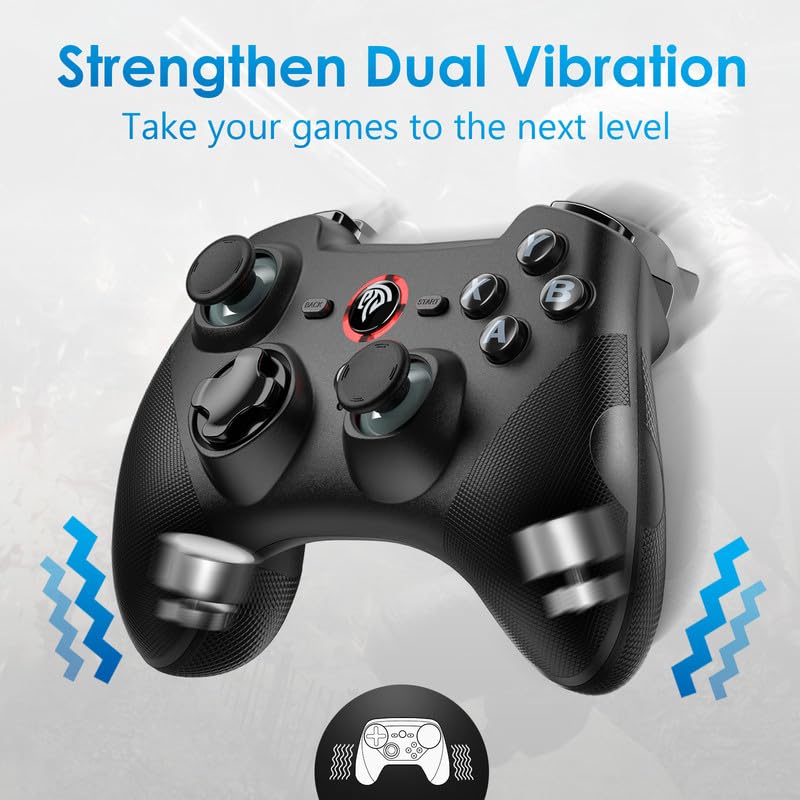
Figure 4: Illustration of the dual vibration motors within the controller.
The controller features built-in asymmetrical motors that provide dual vibration feedback, enhancing immersion by simulating in-game actions like bumps, shocks, and gunshots. The intensity of the vibration may vary depending on the game and platform.
4.3 Řízení spotřeby
The controller is equipped with a 600mAh rechargeable battery, providing up to 12 hours of playing time on a single charge. To conserve battery life, the controller has an automatic shut-off function. If there is no activity for approximately 5 minutes, the controller will automatically power off. To reactivate, press the Home button.
5. Údržba
- Čištění: K čištění ovladače používejte měkký, suchý hadřík. Nepoužívejte agresivní chemikálie ani abrazivní materiály.
- Skladování: Regulátor skladujte na chladném a suchém místě mimo dosah přímého slunečního záření a extrémních teplot.
- Péče o baterie: Avoid fully discharging the battery frequently. Charge the controller regularly, even if not in use, to maintain battery health.
- Zacházení: Zabraňte pádu ovladače na zem nebo jeho vystavení silným nárazům, mohlo by dojít k poškození vnitřních součástí.
6. Řešení problémů
| Problém | Možná příčina | Řešení |
|---|---|---|
| Ovladač se nepřipojuje bezdrátově. | Receiver not properly inserted; controller not powered on; interference; low battery. | Ensure receiver is fully inserted. Turn on controller. Move closer to receiver. Charge controller. Try a different USB port. |
| Red light around center button blinks continuously. | Indicates low battery or charging in progress, even if near full charge. | This is normal behavior for some charge states. Ensure controller is fully charged. If it persists, it may be a minor visual quirk. |
| Vibrace nefungují. | Game does not support vibration; vibration feature disabled in game settings; driver issue. | Check game settings for vibration options. Ensure game supports vibration. Reinstall controller drivers on PC if necessary. |
| Zařízení Android nerozpoznává ovladač. | OTG function not enabled/supported; faulty OTG adapter. | Ensure your Android device supports OTG and that the function is enabled in settings. Try a different OTG adapter. |
| Ovladač se často odpojuje. | Low battery; too far from receiver; wireless interference. | Charge controller. Reduce distance to receiver. Minimize other 2.4G wireless devices nearby. |
7. Specifikace
- Model: EasySMX 9101
- Konektivita: 2.4G bezdrátové, kabelové (USB-C)
- Kompatibilita: PC (Windows), PS3, Android (5.0+ with OTG), Smart TV, TV Box, Nintendo Switch/Switch Lite (Wired only)
- Baterie: Dobíjecí lithium-iontová baterie 600 mAh
- Doba hraní: Až 12 hodin
- Vibrace: Dual Asymmetrical Motors
- Rozměry: Přibližně 6.69 x 5.2 x 3.03 palce
- Hmotnost: Přibližně 11.4 unce
8. Záruka a podpora
The EasySMX 9101 Wireless Controller comes with an 18-month warranty from the date of purchase. This warranty covers manufacturing defects and issues arising from normal use. It does not cover damage caused by misuse, accidents, unauthorized modifications, or improper maintenance.
For technical support, warranty claims, or any questions regarding your EasySMX product, please contact EasySMX customer service through the retailer's platform or the official EasySMX webweb. Před kontaktováním podpory si prosím připravte doklad o koupi a číslo modelu produktu.


