Důležité bezpečnostní pokyny
Please read these instructions carefully before operating the unit and retain them for future reference.
- Nevystavujte tento spotřebič kapající nebo stříkající vodě.
- Nepokládejte na spotřebič předměty naplněné tekutinami, jako například vázy.
- Zajistěte dostatečné větrání. Neblokujte žádné větrací otvory.
- Neinstalujte v blízkosti zdrojů tepla, jako jsou radiátory, tepelné regulátory, kamna nebo jiná zařízení (včetně amplifikátory), které produkují teplo.
- Používejte pouze nástavce/příslušenství určené výrobcem.
- Odpojte tento spotřebič během bouřky nebo když jej nebudete delší dobu používat.
- Veškerý servis svěřte kvalifikovanému servisnímu personálu. Je -li zařízení jakýmkoli způsobem poškozeno, je nutná údržba.
Konec produktuview
The Muse M17CB is a compact dual PLL FM/MW digital alarm clock radio designed for reliable timekeeping and audio playback. It features a clear 0.9-inch white LED display with a dimmer function and a 24-hour time format. Users can set two independent alarms, choosing to wake up to either the radio or a buzzer. The digital tuner allows for 6 preset stations (3 FM and 3 MW) for quick access to your favorite broadcasts. Additional functions include SNAP, SLEEP, and SNOOZE for enhanced user convenience.
Přední View

Popis obrázku: This image displays the front of the Muse M17CB alarm clock radio. It features a prominent 0.9-inch white LED display showing "12:00". Above the display are various control buttons and two rotary knobs. The buttons include P.1, P.2, P.3, DIM., O/SOURCE, and a large SNOOZE button. The left rotary knob is for VOLUME, and the right is for TUNING/SET. A small "muse" logo tag is visible on the left side.
Ovládací prvky na horním panelu

Popis obrázku: Tento obrázek nabízí pohled shora dolů view of the Muse M17CB alarm clock radio, highlighting the control panel. It shows two large rotary knobs for Volume and Tuning/Set, along with several push buttons: P.1, P.2, P.3 (for radio presets), DIM. (dimmer), O/SOURCE (power/source selection), and a large circular SNOOZE button. The layout is clear and intuitive.
Připojení zadního panelu

Popis obrázku: This image shows the rear panel of the Muse M17CB alarm clock radio. It clearly displays the "AC~" power input socket, the "FM ANT." wire antenna, and an "AUX IN" 3.5mm jack for connecting external audio devices. A speaker grille is also visible on the right side.
Nastavení
Připojení napájení
- Unpack the Muse M17CB unit and all accessories.
- Connect the AC power cord to the "AC~" input on the rear of the unit.
- Zapojte druhý konec napájecího kabelu do standardní zásuvky ve zdi.
- LED displej se rozsvítí, což znamená, že jednotka je napájena.
Nastavení antény
- For optimal FM reception, fully extend the FM wire antenna located at the back of the unit.
- Adjust the position of the antenna for the best possible signal reception.
Návod k obsluze
Nastavení času
- Ujistěte se, že je jednotka zapnutá.
- Stiskněte a podržte TUNING/SET knob for approximately 2 seconds until the hour digits flash on the display.
- Otočte TUNING/SET knoflík pro nastavení hodin.
- Stiskněte tlačítko TUNING/SET knob once to confirm the hour; the minute digits will flash.
- Otočte TUNING/SET knob to adjust the minutes.
- Stiskněte tlačítko TUNING/SET knob again to confirm the minutes and exit time setting mode.
- Čas se zobrazuje ve 24hodinovém formátu.
Setting the Alarm (Alarm 1 and Alarm 2)
Jednotka je vybavena dvěma nezávislými alarmy (Alarm 1 a Alarm 2).
- Stiskněte tlačítko P.1 tlačítko (pro alarm 1) nebo P.2 button (for Alarm 2) once. The alarm icon and hour digits will flash.
- Otočte TUNING/SET knob to adjust the alarm hour.
- Stiskněte tlačítko TUNING/SET knob to confirm the hour; the minute digits will flash.
- Otočte TUNING/SET knob to adjust the alarm minutes.
- Stiskněte tlačítko TUNING/SET knob to confirm the minutes. The alarm source (radio or buzzer) will flash.
- Otočte TUNING/SET knob to select either Rádio or Bzučák as the alarm sound.
- Stiskněte tlačítko TUNING/SET knob to confirm the alarm source. The alarm volume will flash (if radio is selected).
- Otočte OBJEM knob to set the desired alarm volume (for radio alarm).
- Stiskněte tlačítko TUNING/SET knob to save the alarm settings. The corresponding alarm icon will appear on the display, indicating the alarm is active.
Chcete-li alarm deaktivovat, stiskněte příslušné tlačítko P.1 or P.2 tlačítko, dokud ikona alarmu nezmizí z displeje.
Radio Operation (FM/MW)
- Stiskněte tlačítko O/SOURCE button to turn on the radio. Press it repeatedly to cycle between FM, MW, and AUX modes.
- Otočte TUNING/SET knob to manually tune to a desired frequency.
- Pro automatické vyhledávání stanic stiskněte a podržte TUNING/SET knob for 2 seconds. The radio will scan and stop at the next available station.
Setting and Recalling Presets (P.1, P.2, P.3)
- Uložení předvolby: Tune to the desired station. Press and hold one of the preset buttons (P.1, P.2nebo P.3) for 2 seconds until the display confirms the preset is saved.
- Vyvolání předvolby: Briefly press the desired preset button (P.1, P.2nebo P.3) to tune to the stored station.
Funkce stmívače
Stiskněte tlačítko ZTLUMIT. button repeatedly to adjust the brightness of the LED display to your preference (e.g., High, Medium, Low, Off).
Funkce Snooze
Když zazní alarm, stiskněte velké PODŘIMOVAT tlačítko pro dočasné ztišení budíku. Budík se znovu spustí přibližně po 9 minutách.
Funkce spánku
The sleep function allows you to fall asleep to the radio, which will automatically turn off after a set period.
- Během přehrávání rádia stiskněte tlačítko P.3 button (often doubles as SLEEP function) repeatedly to cycle through available sleep timer durations (e.g., 90, 60, 30, 15 minutes, or OFF).
- Rádio se po uplynutí zvolené doby automaticky vypne.
SNAP Function
The specific operation of the SNAP function is not detailed in the provided product description. Please refer to the full printed manual included with your device for instructions on using the SNAP feature.
Pomocný vstup (AUX IN)
Připojte externí audio zařízení (např. MP3 přehrávač, chytrý telefon) k AUX IN jack on the rear of the unit using a 3.5mm audio cable. Press the O/SOURCE button repeatedly until "AUX" appears on the display to switch to auxiliary input mode. Audio from the connected device will play through the alarm clock's speaker.
Údržba
- Čištění: K čištění vnější strany jednotky používejte měkký, suchý hadřík. Nepoužívejte abrazivní čisticí prostředky, vosky ani rozpouštědla.
- Skladování: Pokud se přístroj delší dobu nepoužívá, odpojte jej ze zásuvky a uložte jej na chladném a suchém místě.
- Vyhněte se vlhkosti: Chraňte jednotku před vodou a vysokou vlhkostí.
Odstraňování problémů
| Problém | Možná příčina | Řešení |
|---|---|---|
| Není napájení / Displej vypnutý | Napájecí kabel není správně připojen. | Ensure the AC power cord is securely plugged into the unit and a working wall outlet. |
| Špatný příjem rádia | FM anténa není vysunutá nebo správně umístěná. | Fully extend and adjust the position of the FM wire antenna for better reception. Try moving the unit to a different location. |
| Alarm nezazní | Budík není aktivovaný nebo je nesprávně nastavený. | Verify that the alarm icon is displayed. Recheck alarm time and source settings. Ensure alarm volume is not set to minimum if radio alarm is selected. |
| Příliš jasný/tmavý displej | Je třeba upravit nastavení stmívače. | Stiskněte tlačítko ZTLUMIT. button repeatedly to cycle through brightness levels. |
Specifikace
- Model: M17CB
- Zobrazit: 0.9-inch White LED with Dimmer
- Formát času: 24 hodin
- Tuner: Digital FM/MW PLL
- Předvolby: 6 (3 FM + 3 MW)
- Budíky: Dual Alarm (Radio or Buzzer)
- Funkce: SNAP, SLEEP, SNOOZE
- Zdroj napájení: Napájení střídavým proudem
- Rozměry: 13 cm (délka) x 11 cm (šířka) x 6.5 cm (výška)
- Barva: Tyrkysový
- Materiál: Resin or Plastic
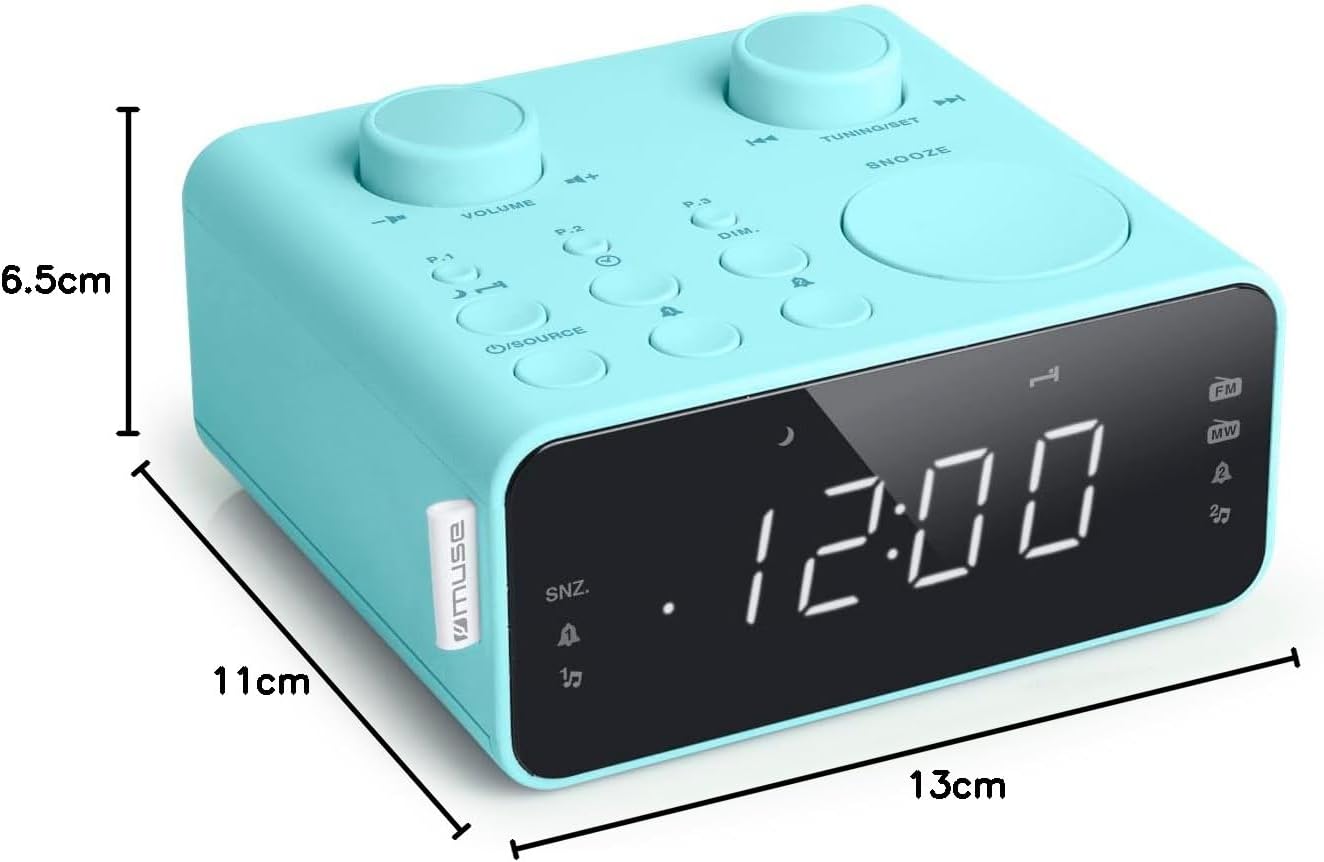
Popis obrázku: This image illustrates the dimensions of the Muse M17CB alarm clock radio. It shows the unit with measurements indicating a length of 13cm, a width of 11cm, and a height of 6.5cm.
Záruka a podpora
Informace o záruce a technickou podporu naleznete v záruční kartě dodané s produktem nebo na oficiálních webových stránkách společnosti Muse. webwebu. Uschovejte si účtenku jako doklad o koupi.
The product includes a user manual (as indicated by "Pièces incluses: Manuel du propriétaire").


