1. Úvod
This manual provides essential information for the safe and efficient operation of your HYUNDAI Smart TV 42-inch Full HD. Please read this manual thoroughly before using the television and retain it for future reference. This television features a 42-inch Full HD (1920x1080p) display, VIDAA operating system, and integrated smart applications such as Netflix, YouTube, and Prime Video. It also supports Screencast functionality for content sharing from mobile devices.
2. Bezpečnostní informace
Always follow basic safety precautions when using this television to reduce the risk of fire, electric shock, and injury. Ensure the television is placed on a stable surface. Do not block ventilation openings. Avoid exposing the television to rain or moisture. Disconnect the power cord during lightning storms or when unused for long periods. Refer to the full safety guidelines in the included safety sheet.
3. Nastavení
3.1 Vybalení a instalace stojanu
Carefully remove the television from its packaging. Attach the included stands to the bottom of the television using the provided screws. Ensure the stands are securely fastened before placing the TV upright.

Přední view of the HYUNDAI 42-inch Smart TV with its stand, displaying the VIDAA smart interface.
3.2 Připojení externích zařízení
Your television is equipped with multiple ports for connecting various devices:
- HDMI porty (3x): Připojte Blu-ray přehrávače, herní konzole nebo set-top boxy.
- USB porty (2x): Připojte paměťová zařízení USB pro přehrávání médií.
- Slot CI+: Vložte modul CI+ pro šifrované digitální kanály.
- RJ45 (Ethernet): Připojte se k domácí síti pro přístup k internetu.
- Optický výstup: Připojení k externímu audiosystému.
- Sluchátkový výstup: Připojte sluchátka pro soukromý poslech.

Strana view of the HYUNDAI 42-inch Smart TV, showing various input and output ports including HDMI and USB.
3.3 Průvodce počátečním nastavením
Upon first power-on, the TV will guide you through an initial setup process. This includes selecting your language, connecting to a Wi-Fi network, and scanning for available channels.
4. Provoz
4.1 Základní funkce televizoru
- Moc: Stisknutím tlačítka napájení na dálkovém ovladači zapnete nebo vypnete televizor.
- Objem: Pomocí tlačítek VOL +/- upravte hlasitost.
- kanály: Use the CH +/- buttons to change channels or the number buttons for direct channel selection.
- Vstupní zdroj: Press the SOURCE button to select between HDMI, USB, TV, and other inputs.
4.2 Funkce Smart TV (OS VIDAA)
Your HYUNDAI Smart TV runs on the VIDAA operating system, providing access to a variety of applications and features.

The HYUNDAI Smart TV displaying the VIDAA smart interface with various streaming app icons like Netflix, YouTube, Prime Video, and Disney+.
- Předinstalované aplikace: Access popular streaming services like Netflix, YouTube, and Prime Video directly from the home screen.
- App Store: Explore and download additional applications from the VIDAA App Store.
- Screencast: Use the Screencast feature to mirror content from your compatible smartphone or tablet to the TV screen.

A smartphone displaying a city skyline next to the HYUNDAI Smart TV, which is mirroring the same image, illustrating the Screencast feature.
5. Údržba
5.1 Čištění televizoru
Before cleaning, unplug the power cord from the wall outlet. Use a soft, dry cloth to wipe the screen and cabinet. For stubborn marks, lightly dampen the cloth with water or a mild, non-abrasive cleaner specifically designed for electronics. Never spray liquid directly onto the screen or cabinet.
5.2 Aktualizace softwaru
Televizor může dostávat aktualizace softwaru pro zlepšení výkonu a přidání nových funkcí. Pro automatické aktualizace se ujistěte, že je televizor připojen k internetu. Aktualizace můžete také zkontrolovat ručně v nabídce nastavení televizoru.
6. Řešení problémů
Pokud narazíte na problémy s televizorem, podívejte se na následující běžná řešení:
- Bez napájení: Zkontrolujte, zda je napájecí kabel bezpečně zapojený do televizoru i do zásuvky. Ujistěte se, že je zásuvka funkční.
- Žádný obraz/zvuk: Ověřte, zda je vybrán správný vstupní zdroj. Zkontrolujte všechna kabelová připojení (HDMI, anténa). Zkuste jiný kanál nebo vstupní zařízení.
- Žádné internetové připojení: Ensure your Wi-Fi router is on and functioning. Reconnect to the Wi-Fi network in the TV settings. For wired connections, check the Ethernet cable.
- Dálkové ovládání nefunguje: Vyměňte baterie v dálkovém ovladači. Ujistěte se, že mezi dálkovým ovladačem a infračerveným senzorem televizoru nejsou žádné překážky.
- Problémy s kvalitou obrazu: Upravte nastavení obrazu (jas, kontrast, ostrost) v nabídce televizoru. Ujistěte se, že vstupní zdroj poskytuje vysoce kvalitní signál.
If problems persist, consider performing a factory reset through the TV's settings menu (note: this will erase all personalized settings and data). For further assistance, contact customer support.
7. Specifikace
| Funkce | Specifikace |
|---|---|
| Číslo modelu | HY-TV42SFHD-001 |
| Velikost obrazovky | 42 palců (105 cm) |
| Rezoluce | Full HD (1920 1080 x XNUMX XNUMXp) |
| Operační systém | VIDAA |
| HDMI porty | 3 (version 1.4, 1x ARC) |
| USB porty | 2 (version 2.0) |
| Konektivita | Wi-Fi, RJ45 (Ethernet) |
| Speciální funkce | Smart TV, Netflix, YouTube, Prime Video, Screencast, CI+ |
| svtage | 230 voltů |
| Rozměry výrobku (Š x H x V) | 96.8 x 23.1 x 62.2 cm (s podstavcem) |
| Hmotnost | 6.15 kg |
| Třída energetické účinnosti | E |
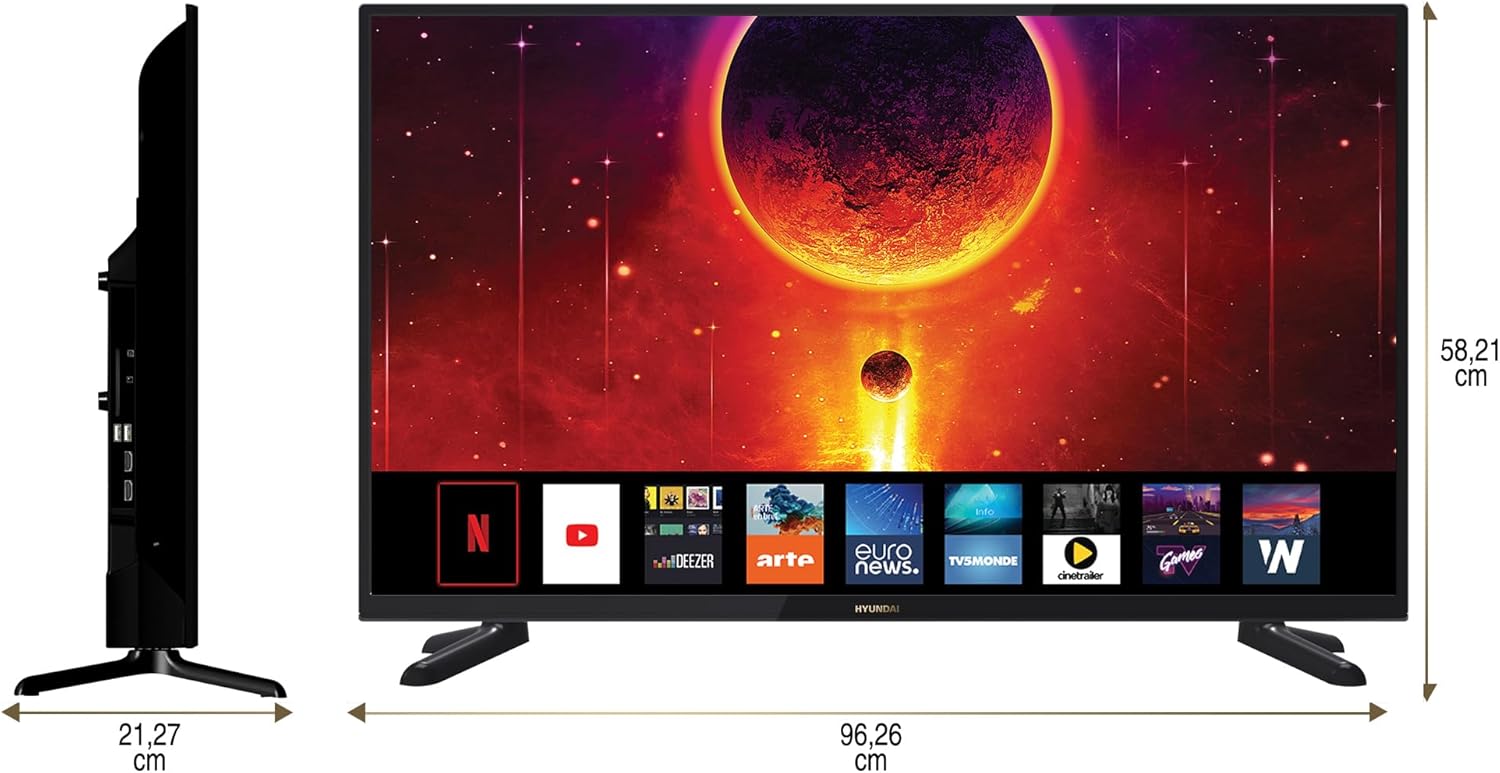
Diagram showing the dimensions of the HYUNDAI 42-inch Smart TV, with a width of 96.26 cm and a height of 58.21 cm.
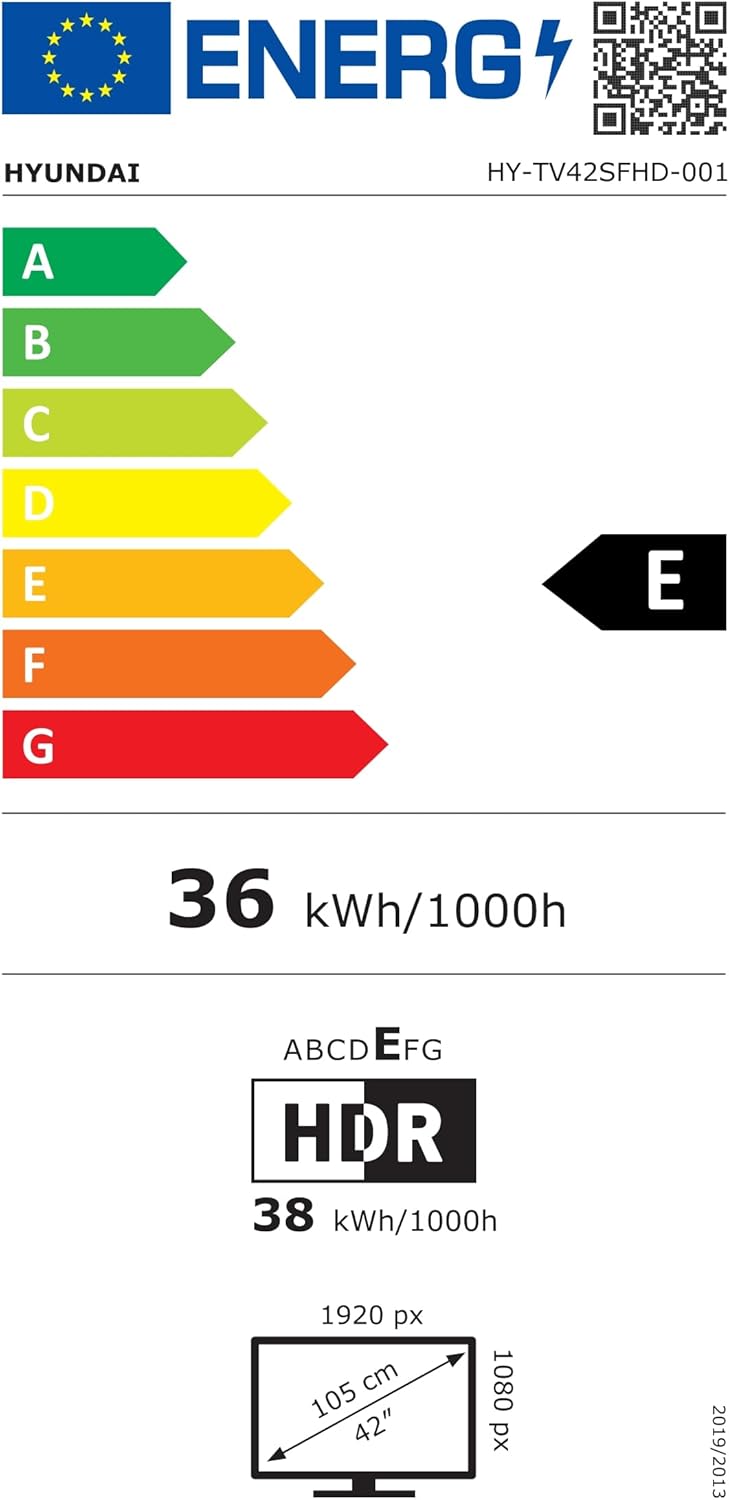
EU Energy Label for the HYUNDAI HY-TV42SFHD-001 television, showing an energy efficiency class of E and energy consumption of 36 kWh/1000h. For more details, visit eprel.ec.europa.eu/qr/1598831.
8. Záruka a podpora
8.1 Informace o záruce
Your HYUNDAI Smart TV is covered by a manufacturer's warranty. The specific terms and duration of the warranty may vary by region. Please refer to the warranty card included with your product or visit the official HYUNDAI webpodrobné záruční informace.
8.2 Zákaznická podpora
For technical assistance, troubleshooting not covered in this manual, or warranty claims, please contact HYUNDAI customer support. Contact details can typically be found on the official HYUNDAI webwebu nebo v dokumentaci dodané s vaším televizorem.