Zavedení
Děkuji za nákupasing the JTEMAN Cell Phone Stand with Wireless Bluetooth Speaker and Alarm Clock. This multi-functional device is designed to enhance your daily routine by combining essential features into one compact and stylish unit. It serves as a high-quality Bluetooth speaker, a reliable alarm clock with a clear display, and a stable, adjustable stand for your mobile devices. Please read this manual carefully to ensure proper use and optimal performance.
Bezpečnostní informace
- Nevystavujte zařízení extrémním teplotám, přímému slunečnímu záření nebo vysoké vlhkosti.
- Zabraňte pádu zařízení nebo jeho vystavení silným nárazům.
- Keep away from water and other liquids. If the device comes into contact with liquid, disconnect it immediately and allow it to dry completely before reuse.
- Nepokoušejte se zařízení rozebírat, opravovat ani upravovat sami. Veškerý servis svěřte kvalifikovanému personálu.
- Používejte pouze dodaný nabíjecí kabel nebo jeho certifikovaný ekvivalent.
- Uchovávejte mimo dosah dětí.
Obsah balení
- JTEMAN Cell Phone Stand with Wireless Bluetooth Speaker and Alarm Clock (Model: JT-L36)
- Nabíjecí kabel typu C.
- Uživatelská příručka
Konec produktuview
Familiarize yourself with the components and controls of your JTEMAN device:
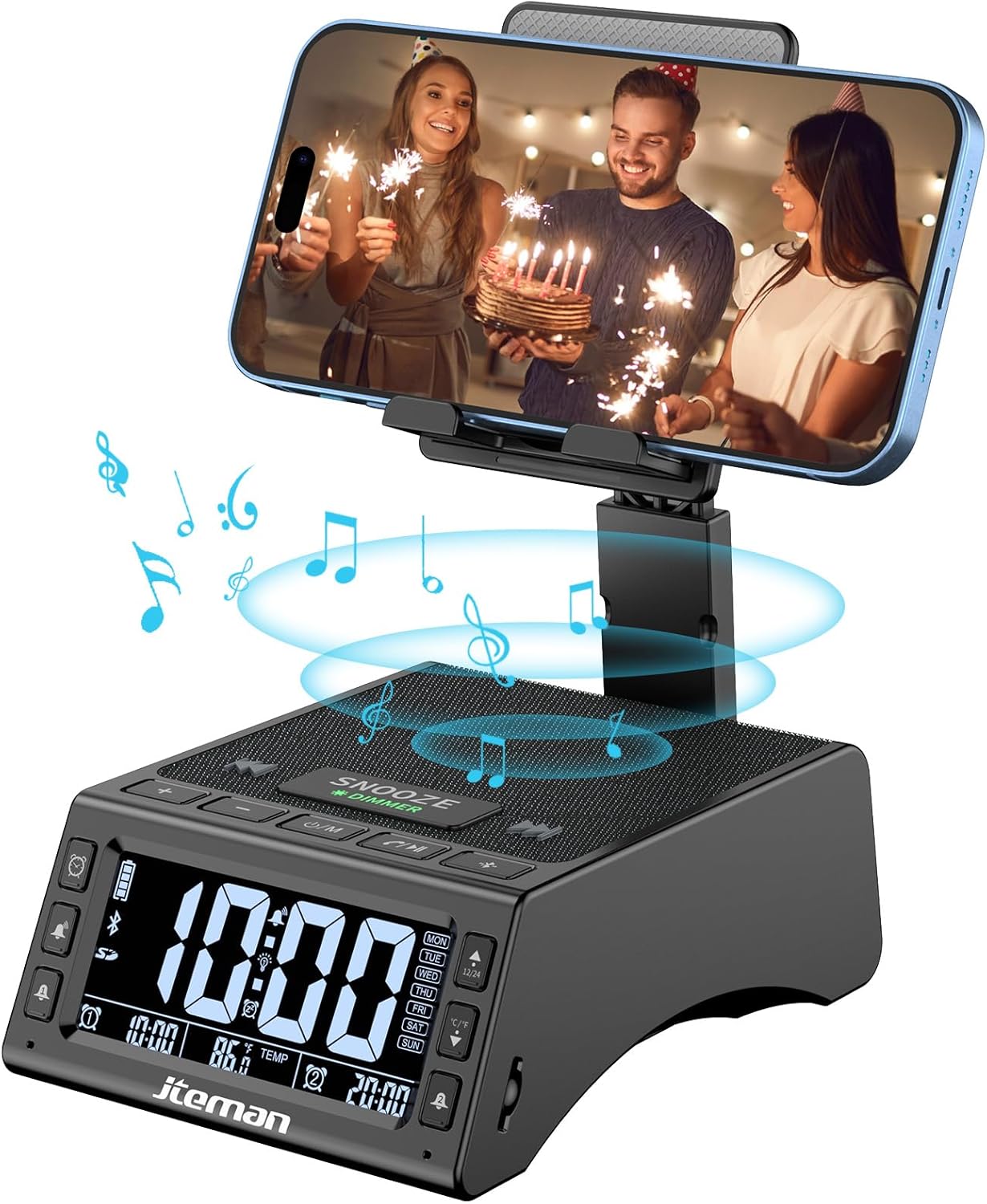
Obrázek 1: Přední strana view of the JTEMAN device with a smartphone on the adjustable stand, displaying the time and temperature.

Obrázek 2: Přesview highlighting the multi-functional aspects including Bluetooth speaker, 12/24H time display, temperature display, foldable phone stand, TF card support, microphone, charging station, dual alarm clocks, and 9 ringtones.
Ovládací prvky a porty:
- Displej: Shows time, temperature, day of the week, and alarm indicators.
- Tlačítko ODLOŽENÍ/ZTLUMENÍ: Press to snooze an active alarm (5 minutes); long press to adjust display brightness (4 levels).
- Power On/Off/Mode Button: Long press to power on/off; short press to cycle through modes (Bluetooth, TF Card).
- Play/Pause/Answer Button: Controls music playback; answers/ends calls.
- Tlačítko pro zvýšení hlasitosti/následující skladbu: Zvyšuje hlasitost; krátkým stisknutím přejdete na další skladbu.
- Tlačítko pro snížení hlasitosti/předchozí skladba: Snížení hlasitosti; krátké stisknutí pro předchozí skladbu.
- Tlačítko párování Bluetooth: Zahájí režim párování Bluetooth.
- Alarm 1 & Alarm 2 Buttons: For setting and managing dual alarms.
- Mikrofon: Pro handsfree volání.
- Vstupní port typu C: Pro nabíjení zařízení.
- Výstupní port typu C: Pro nabíjení externích zařízení.
- Slot na kartu TF: Pro přehrávání hudby přímo z TF karty.
- Nastavitelný stojan na telefon: Foldable and extendable for various viewing angles. Features anti-slip pads and base for stability.
Nastavení
1. Počáteční nabíjení
- Connect the provided Type-C charging cable to the Vstupní port typu C na zařízení.
- Connect the other end of the cable to a compatible USB power adapter (not included) and plug it into a wall outlet.
- The display will indicate charging status. Fully charge the device before first use.

Figure 3: The device connected via Type-C for charging itself and an external phone.
2. Nastavení času a data
- Upon powering on, the device should automatically synchronize the current time.
- If manual adjustment is needed, refer to the detailed instructions in the full user manual (included in the package).
- To switch between 12/24 hour format or °F/°C temperature display, use the dedicated buttons or refer to the full manual.

Figure 4: The HD display showing time, temperature, and alarm settings with brightness adjustment levels.
Návod k obsluze
1. Using the Phone Stand
- The integrated phone stand can be pulled up from the back of the unit.
- Upravte výšku a úhel stojanu podle svých preferencí viewing position. The stand is designed to be stable and strong, accommodating devices from 4.0 to 13 inches.
- When not in use, the stand can be folded back into the unit for a compact form factor.

Figure 5: Demonstrates the adjustable height and angle of the phone stand, along with its anti-slip features and foldable design.
2. Funkce Bluetooth reproduktoru
- Zapnutí: Long press the Power On/Off/Mode button. The device will enter Bluetooth pairing mode, indicated by a flashing Bluetooth icon on the display.
- Párování: On your smartphone or other Bluetooth-enabled device, search for “JT-L36” in the Bluetooth settings and select it to pair. A confirmation sound will indicate successful pairing.
- Přehrávání hudby: Once paired, you can play audio from your device through the JTEMAN speaker. Use the Play/Pause, Volume Up/Next Track, and Volume Down/Previous Track buttons to control playback.
3. Přehrávání z TF karty
- Insert a TF card (not included) with audio files into the TF Card Slot.
- The device will automatically switch to TF Card mode and begin playing music. If not, short press the Mode button to select TF Card mode.
4. Alarm Clock Features
- Nastavení budíků: Use the Alarm 1 and Alarm 2 buttons to set up to two independent alarms. Follow the on-screen prompts to set the time and alarm frequency (e.g., Mon-Fri, Sat-Sun, Mon-Sun).
- Funkce odložení: When an alarm sounds, press the large SNOOZE button on top to activate a 5-minute snooze.
- Nastavení jasu: Long press the SNOOZE/DIMMER button to cycle through four levels of display brightness, including an off setting for minimal light disturbance.
5. Hands-free volání
- When a call comes in while your phone is connected via Bluetooth, press the Play/Pause/Answer button to answer the call.
- Pro jasnou komunikaci použijte vestavěný mikrofon.
- Press the Play/Pause/Answer button again to end the call.
6. Nabíjení externích zařízení
- Connect your external device (e.g., smartphone, tablet) to the Výstupní port typu C on the JTEMAN unit using a compatible charging cable.
- The JTEMAN device will provide power to charge your external device.
Údržba
- Zařízení čistěte měkkým, suchým hadříkem. Nepoužívejte abrazivní čisticí prostředky ani rozpouštědla.
- Ujistěte se, že všechny porty jsou bez prachu a nečistot.
- Pokud zařízení delší dobu nepoužíváte, skladujte jej na chladném a suchém místě.
Odstraňování problémů
| Problém | Možná příčina | Řešení |
|---|---|---|
| Zařízení se nezapne. | Low battery; power adapter/cable issue. | Charge the device fully. Check power adapter and cable connections. |
| Z reproduktoru není slyšet žádný zvuk. | Volume too low; not paired correctly; wrong mode. | Increase volume on both device and connected phone. Re-pair Bluetooth. Ensure correct mode (Bluetooth/TF Card). |
| Párování Bluetooth selhalo. | Device too far; pairing mode not active; interference. | Ensure device is in pairing mode and within 10 meters. Turn off other Bluetooth devices. Try restarting both devices. |
| Alarm se nespustí. | Alarm not set; alarm volume too low; alarm disabled. | Verify alarm settings and ensure it's enabled. Increase alarm volume. |
| Phone not charging via output port. | Cable issue; device battery low; incompatible device. | Ensure the JTEMAN device is charged. Try a different charging cable. Confirm your phone is compatible with Type-C charging. |
Specifikace
| Značka | JTEMAN |
| Číslo modelu | JT-L36 |
| Rozměry produktu | 6.1 x 4.3 x 2.1 palce |
| Hmotnost položky | 1.26 libry |
| Barva | Černý |
| Hardwarové rozhraní | USB 2.0 |
| Celkový počet portů USB | 2 (Type-C Input, Type-C Output) |
| Kompatibilita | 4.0-13 inch devices |
Záruka a podpora
JTEMAN products are manufactured with high standards of quality. For specific warranty information, please refer to the warranty card included in your product packaging or visit the official JTEMAN website. If you encounter any issues or have questions not covered in this manual, please contact JTEMAN customer support through the contact information provided on the product packaging or webmísto.
Uschovejte si prosím doklad o koupi pro uplatnění záruky.


