1. Úvod
Welcome to the instruction manual for your new Sunstech CELT23 flip phone. This phone is specifically designed for ease of use, featuring large keys, a clear display, and essential functions like an SOS button for emergencies. Please read this manual carefully to understand how to operate your device safely and efficiently.
2. Konec produktuview
The Sunstech CELT23 is a clamshell-style mobile phone, offering simplicity and security. Its design prioritizes user comfort and accessibility.
Klíčové vlastnosti:
- Otočný design: Protects the screen and keypad when closed.
- Velké klávesy: Oversized buttons for easy dialing and texting.
- SOS tlačítko: Located on the back for emergency calls and SMS.
- 2.4palcový displej: Jasná obrazovka pro snadné viewIng.
- Rychlá volba: Assign contacts to speed dial keys.
- Loud Sound: Enhanced audio for calls and ringtones.
- FM rádio: Built-in radio for entertainment.
- Baterie 1100 mAh: Provides reliable battery life.
Phone Components:
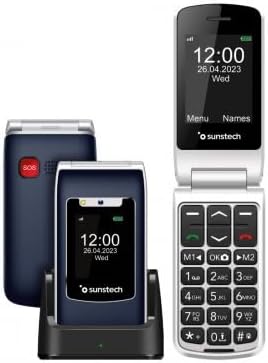
Popis obrázku: This image displays the Sunstech CELT23 flip phone in two states: open, showing the screen and large keypad, and closed, resting in its charging dock. The back of the closed phone, featuring the red SOS button, is also visible. This illustrates the phone's compact design and user-friendly interface.

Popis obrázku: This image shows the Sunstech CELT23 flip phone in its charging dock, with the phone in a closed position. The prominent red SOS button on the back of the phone is clearly visible, highlighting a key safety feature. The phone's external display is also visible, showing the time and date.

Popis obrázku: This image presents a collection of Sunstech CELT23 flip phones, showcasing different color options (blue and black) and configurations. Some phones are open, displaying their keypads and screens, while others are closed and placed in their charging docks. This provides a comprehensive view of the product's design and available variations.
3. Nastavení
3.1. Vložení SIM karty a baterie
- Otevřete telefon: Gently open the back cover of the phone.
- Vložte SIM kartu: Locate the SIM card slot. Carefully insert your activated SIM card into the designated slot, ensuring the gold contacts face downwards and the cut corner aligns correctly.
- Vložte baterii: Place the provided Lithium-ion battery into the battery compartment, aligning the contacts.
- Zavřít obal: Nasaďte zadní kryt zpět, dokud bezpečně nezacvakne na místo.
3.2. Nabíjení telefonu
- Používání nabíjecího doku: Place the phone into the charging dock, ensuring it sits firmly and the charging indicator light (if present) illuminates.
- Přímé nabíjení přes USB: Alternatively, connect the USB Type C cable to the phone's charging port and the other end to a compatible power adapter.
- První nabití: For optimal battery performance, fully charge the phone before its first use.
3.3. Zapnutí/vypnutí
- Zapnutí: Stiskněte a podržte tlačítko Napájení/Ukončení hovoru (obvykle červené), dokud se obrazovka nerozsvítí.
- Vypnutí: Stiskněte a podržte tlačítko Napájení/Ukončení hovoru, dokud se nezobrazí možnosti vypnutí, poté vyberte možnost „Vypnout“.
4. Návod k obsluze
4.1. Uskutečňování a přijímání hovorů
- Chcete-li zavolat:
- Otevřete telefon.
- Dial the number using the large keypad.
- Stiskněte zelené tlačítko pro zahájení hovoru.
- Chcete-li přijmout hovor:
- When the phone rings, open the flip or press the Green Call button.
- Chcete-li hovor ukončit, stiskněte červené tlačítko Ukončit hovor.
4.2. Odesílání SMS zpráv
- From the main menu, navigate to "Messages".
- Select "Write Message" or "New SMS".
- Zadejte číslo příjemce nebo jej vyberte z kontaktů.
- Napište zprávu pomocí klávesnice.
- Stiskněte tlačítko „Odeslat“.
4.3. Funkce nouzového volání SOS
The SOS button is designed for emergencies. When pressed, it will activate an audible warning signal and automatically dial up to 5 pre-set emergency contacts. It will also send a customizable emergency SMS message to these contacts.
- Nastavení kontaktů SOS:
- Přejděte do „Nastavení“ > „Nastavení SOS“.
- Přidejte až 5 telefonních čísel pro případ nouze.
- Customize the emergency SMS message if desired.
- Použití tlačítka SOS:
- In an emergency, press and hold the red SOS button on the back of the phone for a few seconds.
- The phone will emit an alarm and begin dialing your emergency contacts sequentially until one answers.
- An emergency SMS will also be sent to all pre-set contacts.
4.4. Rychlá volba
Pro rychlé vytáčení přiřaďte často volaná čísla konkrétním klávesám.
- Go to "Contacts" or "Settings" > "Speed Dial".
- Select an available key (e.g., M1, M2, or number keys 2-9).
- Assign a contact from your phonebook or enter a new number.
- To use, simply press and hold the assigned speed dial key.
4.5. FM rádio
To listen to the FM radio, ensure headphones are connected (they act as an antenna).
- Connect 3.5mm headphones to the phone's audio jack.
- Navigate to "Multimedia" or "Tools" > "FM Radio".
- Pomocí navigačních tlačítek můžete vyhledávat stanice nebo je ladit ručně.
5. Údržba
- Čištění: K čištění obrazovky a těla telefonu používejte měkký, suchý hadřík. Nepoužívejte tekuté čisticí prostředky.
- Péče o baterie:
- Vyhněte se extrémním teplotám.
- Nenechávejte baterii zcela vybitou po delší dobu.
- Používejte pouze originální nabíječku a baterii.
- Skladování: Telefon skladujte na chladném a suchém místě mimo dosah přímého slunečního záření a vlhkosti.
6. Řešení problémů
| Problém | Možná příčina / řešení |
|---|---|
| Telefon se nezapne. | Battery is discharged. Charge the phone. Battery not inserted correctly. Reinsert the battery. |
| Nelze uskutečňovat ani přijímat hovory. | No SIM card inserted or SIM card not activated. Check SIM card. Out of network coverage. Move to an area with better signal. |
| Během hovorů není slyšet žádný zvuk. | Volume is too low. Adjust the call volume using the side keys. Speaker/earpiece might be blocked. Clean gently. |
| Tlačítko SOS nefunguje. | SOS contacts not set up. Configure emergency contacts in SOS settings. |
7. Specifikace
- Značka: Sunstech
- Model: CELT23
- Typ produktu: Flip Phone
- Operační systém: RTOS
- Velikost obrazovky: 2.4 palce
- Rezoluce: 240 x 320
- Spojení: USB Type C, 3.5 mm Jack
- Speciální vlastnosti: SOS Button, FM Radio
- Složení baterie: Lithium-iontová
- Kapacita baterie: 1100 mAh (inferred from product description)
- Velikost RAM: 48 MB
- Kapacita úložiště: 128 GB (Note: This capacity is typically for external memory card support in basic phones)
- Rychlost CPU: 800 MHz
- Výrobce: SUNSTECH
- Země původu: Čína
8. Záruka a podpora
This product is manufactured by SUNSTECH. For specific warranty details, please refer to the warranty card included with your purchase or contact Sunstech customer support.
- Dostupnost náhradních dílů: 10 Years (as per manufacturer information).
- Aktualizace softwaru: Informace nejsou k dispozici.
For further assistance, please visit the official Sunstech webnebo kontaktujte jejich oddělení zákaznických služeb.


