Zavedení
This manual provides comprehensive instructions for the setup, operation, maintenance, and troubleshooting of your Poly Plantronics Savi 8420 Office DECT Headset System. Please read this manual thoroughly to ensure proper use and to maximize the performance and longevity of your device.
The Savi 8420 Office system is designed for business communication, offering seamless connectivity across multiple devices including desk phones, computers, and mobile phones via DECT and Bluetooth technologies.
Nastavení
Obsah balení
Ujistěte se, že jsou přítomny všechny komponenty:
- Kancelářský headset Savi 8420
- Základní stanice DECT
- USB kabel
- Telefonní kabel rozhraní
- Napájecí adaptér
Připojení základní stanice
The DECT base station serves as the central hub for your headset, connecting to your desk phone, computer, and mobile device.
- Připojení napájení: Connect the power adapter to the base station and plug it into a power outlet. The base station display will illuminate.
- Připojení k pevnému telefonu: Use the telephone interface cable to connect the base station to your desk phone. Refer to your desk phone's manual for specific port locations (typically the headset port or handset port).
- Připojení k počítači: Connect the USB cable from the base station to an available USB port on your computer. This enables PC audio and softphone integration.
- Mobile Device Pairing (Bluetooth): Activate Bluetooth on your mobile device. On the Savi 8420 base, press and hold the Bluetooth pairing button until the indicator light flashes. Select 'Poly Savi 8420' from your mobile device's Bluetooth list to pair.
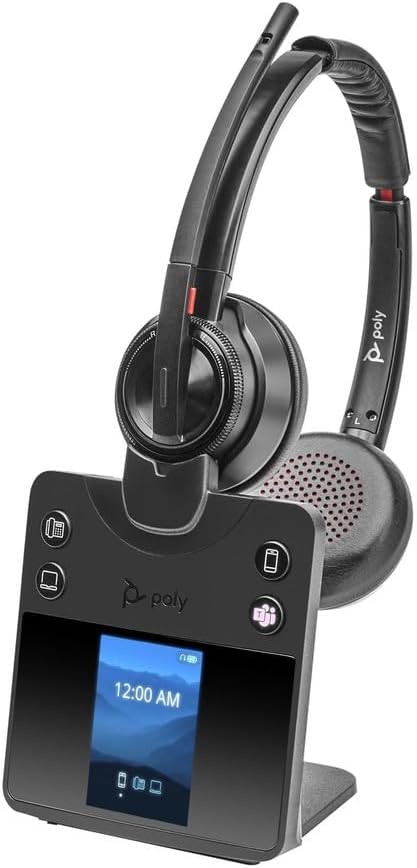
Image: The Poly Plantronics Savi 8420 Office DECT Headset System, showing the stereo headset docked on its black base station. The base station features a digital display and control buttons for phone, computer, and mobile connectivity.
Nabíjení náhlavní soupravy
Place the headset into the charging cradle on the base station. The headset will begin charging automatically. A full charge takes approximately 3 hours and provides up to 13 hours of talk time.
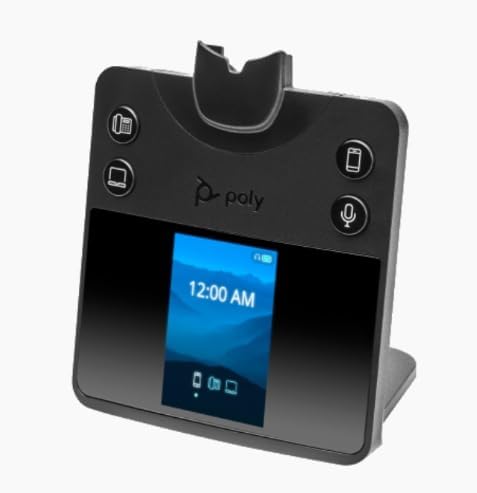
Image: The black Poly Plantronics Savi 8420 Office DECT Headset System base station, viewed from the front. It has a digital display showing '12:00 AM' and icons for phone, computer, and mobile connections. Control buttons are visible on either side of the display.
Návod k obsluze
Basic Call Management
- Přijímání / ukončování hovorů: Press the call control button on the headset or the corresponding phone/computer/mobile button on the base station.
- Nastavení hlasitosti: Use the volume controls on the headset or the base station to adjust listening volume.
- Ztlumit: Press the mute button on the headset to mute or unmute your microphone. The base station display may indicate mute status.
Přepínání mezi zařízeními
The Savi 8420 Office system allows you to seamlessly switch between connected devices. Use the dedicated buttons on the base station (phone, computer, mobile) to select the active audio source.
Pokročilé funkce
- Aktivní potlačení hluku (ANC): The headset features Active Noise Cancellation to reduce background noise for improved focus. Refer to the headset controls for ANC activation.
- Mikrofon: The integrated microphone is designed for clear voice transmission. Ensure the microphone boom is positioned correctly for optimal performance.
- Dálkové ovládání: The headset offers remote control capabilities for call management, allowing you to move freely while on a call.
Údržba
Čištění
Regular cleaning helps maintain the performance and hygiene of your headset system.
- Otřete náhlavní soupravu a základnovou stanici měkkým, suchým a antistatickým hadříkem.
- Vyhněte se používání agresivních chemikálií, čisticích rozpouštědel nebo silných čisticích prostředků.
- Do not immerse any part of the system in water.
Péče o baterie
The headset contains a rechargeable Lithium Ion battery. To prolong battery life:
- Před prvním použitím náhlavní soupravu plně nabijte.
- Vyhněte se extrémním teplotám.
- Store the headset in a cool, dry place if not used for extended periods.
Odstraňování problémů
If you experience issues with your Savi 8420 Office system, refer to the following common solutions:
- No Audio/Headset Not Working:
- Ensure the base station is powered on and the headset is charged.
- Verify the correct device (phone, PC, mobile) is selected on the base station.
- Zkontrolujte, zda jsou všechny kabely pevně připojeny.
- For PC connection, ensure the Savi 8420 is selected as the default audio device in your computer's sound settings.
- For mobile connection, re-pair the Bluetooth connection if necessary.
- Difficulty Switching Between PC and Phone:
- Ensure both the PC and phone connections are properly established and recognized by the base station.
- Confirm that the base station's firmware is up to date. Check the manufacturer's support webstránky pro nejnovější aktualizace.
- A brief delay or lag can occur during switching; allow a few seconds for the connection to stabilize.
- Bluetooth Connectivity Issues (Mobile):
- Ensure your mobile device is within range of the base station.
- If the headset connects to your mobile device when you are far away, consider disabling Bluetooth on your mobile device when not in use or when you are out of the intended range.
- Remove and re-pair the Bluetooth connection on both the base station and your mobile device.
- Base Station Display Brightness:
- The base station display is designed to be continuously on. There are no user-adjustable settings for dimming or turning off the screen.
Specifikace
| Název modelu | Savi 8420-M Office |
| Číslo modelu položky | 2-221104-201 |
| Značka | Plantronics (Poly) |
| Technologie připojení | DECT |
| Technologie bezdrátové komunikace | DECT, Bluetooth 5.2 |
| Zahrnuté komponenty | Headset, Base Station, Cables |
| Kompatibilní zařízení | Telephones, Computers, Mobile Devices |
| Doba nabíjení | 3 hodiny |
| Životnost baterie | 13 hodiny |
| Kontrolní metoda | Vzdálený |
| Speciální funkce | Microphone Included, Active Noise Cancellation |
| Tvar sluchátka | Over-ear cup |
| Rozměry produktu | 7.4 x 4.7 x 8.2 palce |
| Hmotnost položky | 1.76 liber (0.8 kilogramů) |
| UPC | 017229181946 |
Informace o záruce
This Poly Plantronics product is covered by a manufacturer's limited warranty. Specific warranty terms and conditions, including duration and coverage details, are typically provided with your product packaging or can be found on the official Poly webstránky. Uschovejte si prosím doklad o koupi pro případ reklamace.
Zákaznická podpora
For further assistance, technical support, or to inquire about service, please visit the official Poly website or contact their customer service department. You may need your product model number (2-221104-201) and serial number when contacting support.


