1. Úvod
The docooler V8 Finder 2 is a professional digital satellite signal finder meter designed for efficient and accurate installation and adjustment of satellite dishes. It features a high-definition LCD display, supports various DVB standards, and includes advanced functions like spectrum analysis and automatic angle calculation. This manual provides comprehensive instructions for operating and maintaining your device.
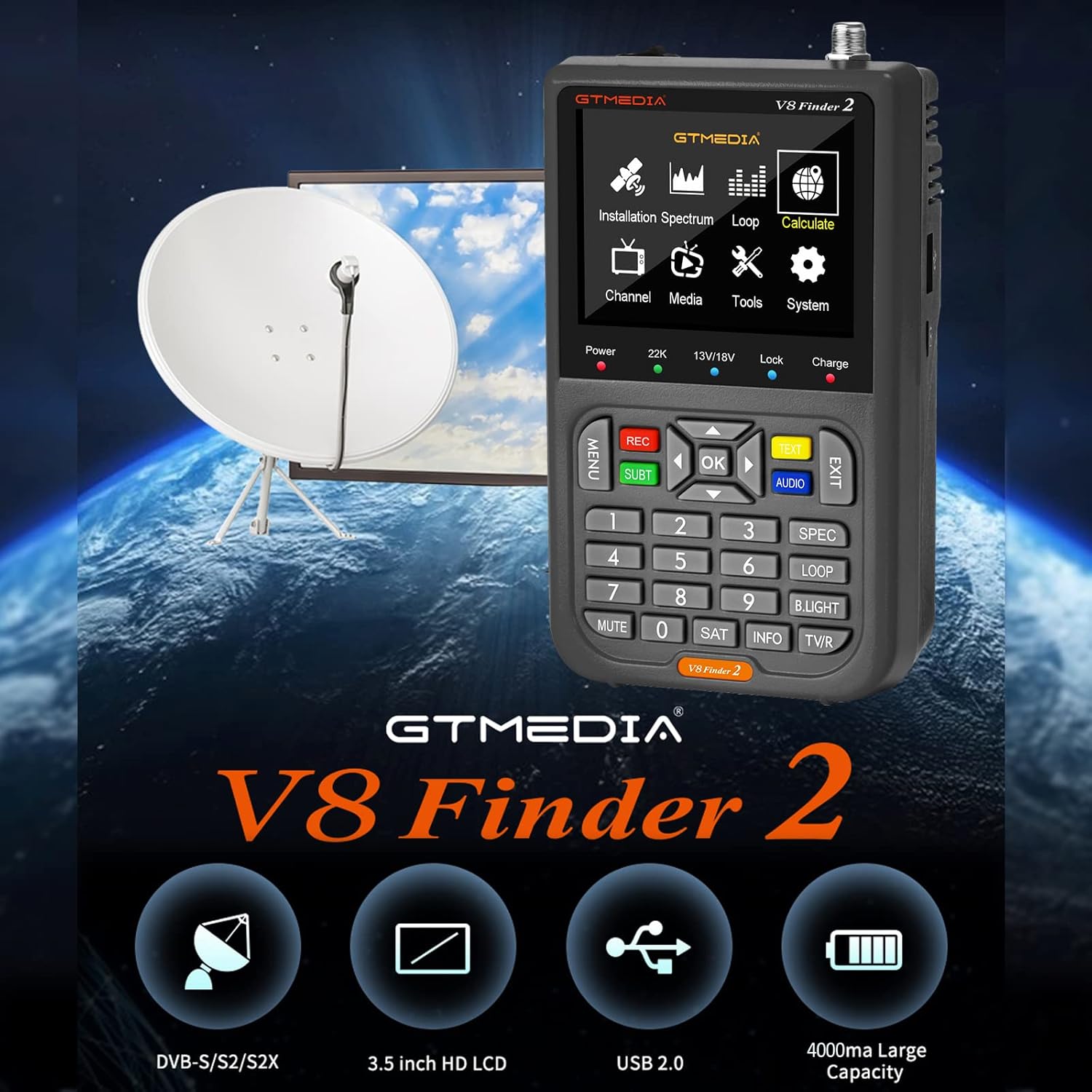
Figure 1: docooler V8 Finder 2 in use with a satellite dish, highlighting its core function.
2. Bezpečnostní informace
Před použitím tohoto produktu si pečlivě přečtěte všechna bezpečnostní varování a pokyny, abyste zajistili bezpečný provoz a předešli poškození.
- Nevystavujte zařízení dešti nebo vlhkosti.
- Nevystavujte extrémním teplotám. Zařízení používejte v doporučených podmínkách prostředí.
- Nerozebírejte ani se nepokoušejte o opravu zařízení sami. Veškerý servis svěřte kvalifikovanému personálu.
- Používejte pouze dodané nebo doporučené nabíjecí příslušenství.
- Při provozu zařízení zajistěte dostatečné větrání.
- Udržujte zařízení mimo dosah silných magnetických polí.
3. Konec produktuview
The V8 Finder 2 is a compact and powerful tool for satellite signal detection. Familiarize yourself with its components and features.
3.1 Rozložení zařízení

Obrázek 2: Přední strana view of the V8 Finder 2, showing the LCD display and control panel.
The front panel features a 3.5-inch high-definition LCD screen for displaying signal information, menus, and media. Below the screen are navigation buttons, numeric keypad, and function keys for various operations.
3.2 Porty a připojení
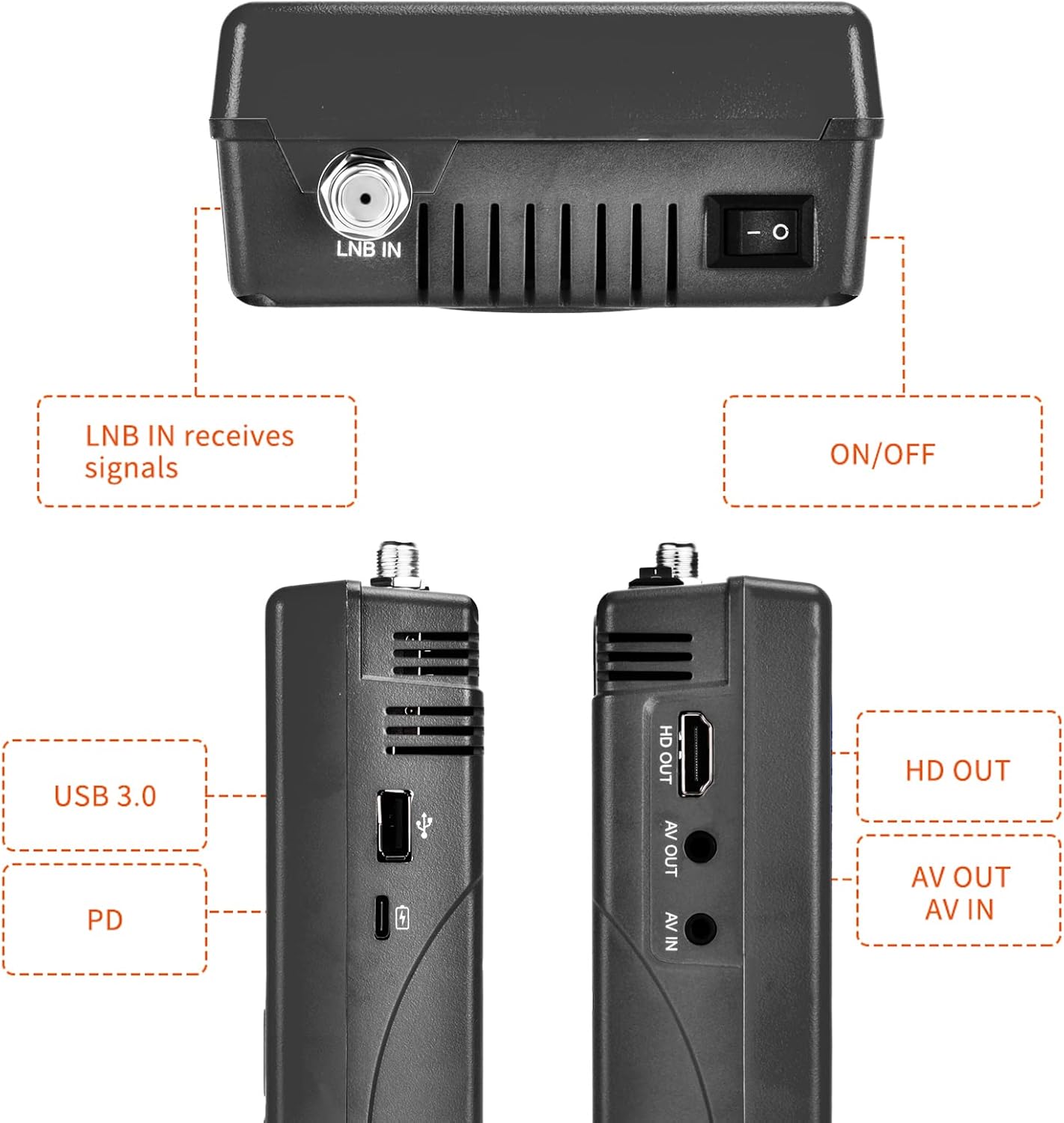
Obrázek 3: Boční a horní strana views illustrating the various input and output ports.
- LNB IN: Connects to the LNB of your satellite dish for signal reception.
- Přepínač ON/OFF: Zapne nebo vypne zařízení.
- USB port (USB 3.0): For software updates and connecting a 2.4G USB Wi-Fi dongle for YouTube functionality.
- PD (Power Delivery) / Type-C Charging Port: For charging the device and supports reverse charging.
- HD OUT: Výstup pro multimediální rozhraní s vysokým rozlišením pro připojení k externímu displeji.
- AV OUT: Analog Video output for connecting to older displays.
- AV IN: Analog Video input for connecting external video sources.
3.3 Klíčové vlastnosti
- 3.5-inch High-Definition LCD Display.
- Full compatibility with DVB-S2X/S2/S, MPEG-2/MPEG-4.
- H.264 (8-bit) hardware decoding support.
- Digital measurement for signal strength and quality.
- Spectrum Analyzer and Loop Search functions.
- Supports Auto, Blind, Manual, or NIT scanning.
- Audible tone for signal lock.
- Automatic calculation of AZ, EL angles.
- DISEQC 1.0/1.1/1.2, Unicable, 0/22kHz tone support.
- Vestavěný reproduktor.
- 7.4V/4000mAh Li-ion battery with Type-C fast charging and reverse charging.
- Software upgrade via USB port.

Figure 4: Visual representation of the V8 Finder 2's main features.
4. Nastavení
Before first use, ensure the device is fully charged and familiarize yourself with the package contents.
4.1 Obsah balení

Figure 5: Items included in the V8 Finder 2 product package.
Ověřte, zda jsou přítomny všechny položky:
- docooler V8 Finder 2 Device
- Uživatelská příručka
- USB kabel (typ C)
- Power Adapter (if included, not explicitly listed in JSON but implied by charging)
- F-connector adapter (if included)
4.2 Nabíjení zařízení
The device is equipped with a 7.4V/4000mAh Li-ion battery. For optimal performance, fully charge the device before first use.
- Connect the provided USB Type-C cable to the PD/Type-C charging port on the device.
- Connect the other end of the USB cable to a compatible USB power adapter (not explicitly listed as included, but standard for Type-C charging) or a powered USB port.
- The charging indicator on the device will illuminate. Charging is complete when the indicator changes color or turns off (refer to device screen for battery status).
The device supports multi-protocol fast charging and Type-C reverse charging, allowing it to act as a power bank for other devices.
5. Návod k obsluze
This section details the steps for using the V8 Finder 2 to locate and optimize satellite signals.
5.1 Zapnutí/vypnutí
- To power on, slide the ON/OFF switch located on the top of the device to the 'ON' position.
- Chcete-li přístroj vypnout, přepněte vypínač do polohy „VYPNUTO“.
5.2 Připojení k satelitní anténě
- Ensure the V8 Finder 2 is powered off.
- Connect the coaxial cable from your satellite dish's LNB (Low Noise Block) to the LNB IN port on the V8 Finder 2.
- If connecting to a receiver or TV, use the HD OUT or AV OUT porty.
5.3 Signal Finding and Optimization
The V8 Finder 2 provides various modes for signal acquisition and analysis.
- Vyberte satelit: From the main menu, navigate to the "Installation" or "Satellite Setup" section. Select the desired satellite from the pre-programmed list or add a new one.
- Nastavení talíře: Slowly adjust the azimuth (horizontal) and elevation (vertical) of your satellite dish. Observe the signal strength and quality indicators on the V8 Finder 2's display. The device will emit an audible tone when a signal is locked.
- Spektrální analyzátor: Use the "Spectrum" function to visualize the signal spectrum, which can help identify interference or weak signals.
- Výpočet úhlu: The device can automatically calculate the AZ (Azimuth) and EL (Elevation) angles for your location, assisting in precise dish alignment.
- Skenování kanálu: Once a strong signal is acquired, perform an "Auto Scan," "Blind Scan," "Manual Scan," or "NIT Scan" to find available channels.

Figure 6: The V8 Finder 2 display showing signal decoding capabilities.
5.4 Media Playback and Other Functions
- Média: The device supports media playback. Connect a USB drive to the USB port to access compatible audio or video files.
- YouTube (via Wi-Fi): Connect a 2.4G USB Wi-Fi dongle to the USB port to enable YouTube functionality.
- AV IN/OUT: Use the AV IN port to display video from an external source on the V8 Finder 2 screen. Use AV OUT or HD OUT to display the V8 Finder 2's screen on an external monitor or TV.

Figure 7: Illustration of AV IN and AV OUT functionality, connecting the device to a television.
6. Údržba
Proper maintenance ensures the longevity and optimal performance of your V8 Finder 2.
- Čištění: K čištění zařízení používejte měkký, suchý hadřík. Nepoužívejte tekuté čisticí prostředky ani aerosoly.
- Skladování: Přístroj skladujte na chladném a suchém místě mimo dosah přímého slunečního záření a extrémních teplot.
- Péče o baterie: To preserve battery life, avoid fully discharging the battery frequently. If storing for extended periods, charge the battery to about 50% every few months.
- Aktualizace softwaru: Pravidelně kontrolujte aktualizace softwaru na stránkách výrobce website. Updates can improve performance and add new features. Use the USB port for software upgrades.
7. Řešení problémů
If you encounter issues with your V8 Finder 2, refer to the following common problems and solutions.
| Problém | Možná příčina | Řešení |
|---|---|---|
| Zařízení se nezapne. | Slabá baterie; Vypnuto. | Charge the device fully. Ensure the ON/OFF switch is in the 'ON' position. |
| Nebyl zjištěn žádný signál. | Incorrect LNB connection; Dish misalignment; Incorrect satellite selected. | Check LNB cable connection. Re-align the satellite dish. Verify the correct satellite is selected in the device settings. |
| Weak or unstable signal. | Fine-tuning needed; Obstruction; LNB issue. | Make small adjustments to the dish. Check for any physical obstructions. Inspect LNB for damage. |
| Nelze se připojit k Wi-Fi. | No 2.4G USB Wi-Fi dongle connected; Incorrect Wi-Fi settings. | Ensure a compatible 2.4G USB Wi-Fi dongle is inserted. Verify Wi-Fi network settings and password. |
| Display issues. | Software glitch; Hardware fault. | Restart the device. If the problem persists, consider a software update or contact support. |
8. Specifikace
Technical specifications for the docooler V8 Finder 2.
- Zobrazit: 3.5palcový LCD displej s vysokým rozlišením
- Kompatibilita: DVB-S2X/S2/S, MPEG-2/MPEG-4
- Dekódování videa: H.264 (8-bit)
- Baterie: 7.4 V / 4000 XNUMX mAh Li-ion
- Nabíjecí port: Type-C (supports fast charging, reverse charging)
- Konektivita: USB (for software update, 2.4G Wi-Fi dongle), HD OUT, AV OUT, AV IN
- Rozměry: Přibližně 155 mm x 95 mm x 45 mm
- Hmotnost: 530 g
- Podpora DISEQC: 1.0/1.1/1.2, Unicable
- Tone Support: 0/22 kHz
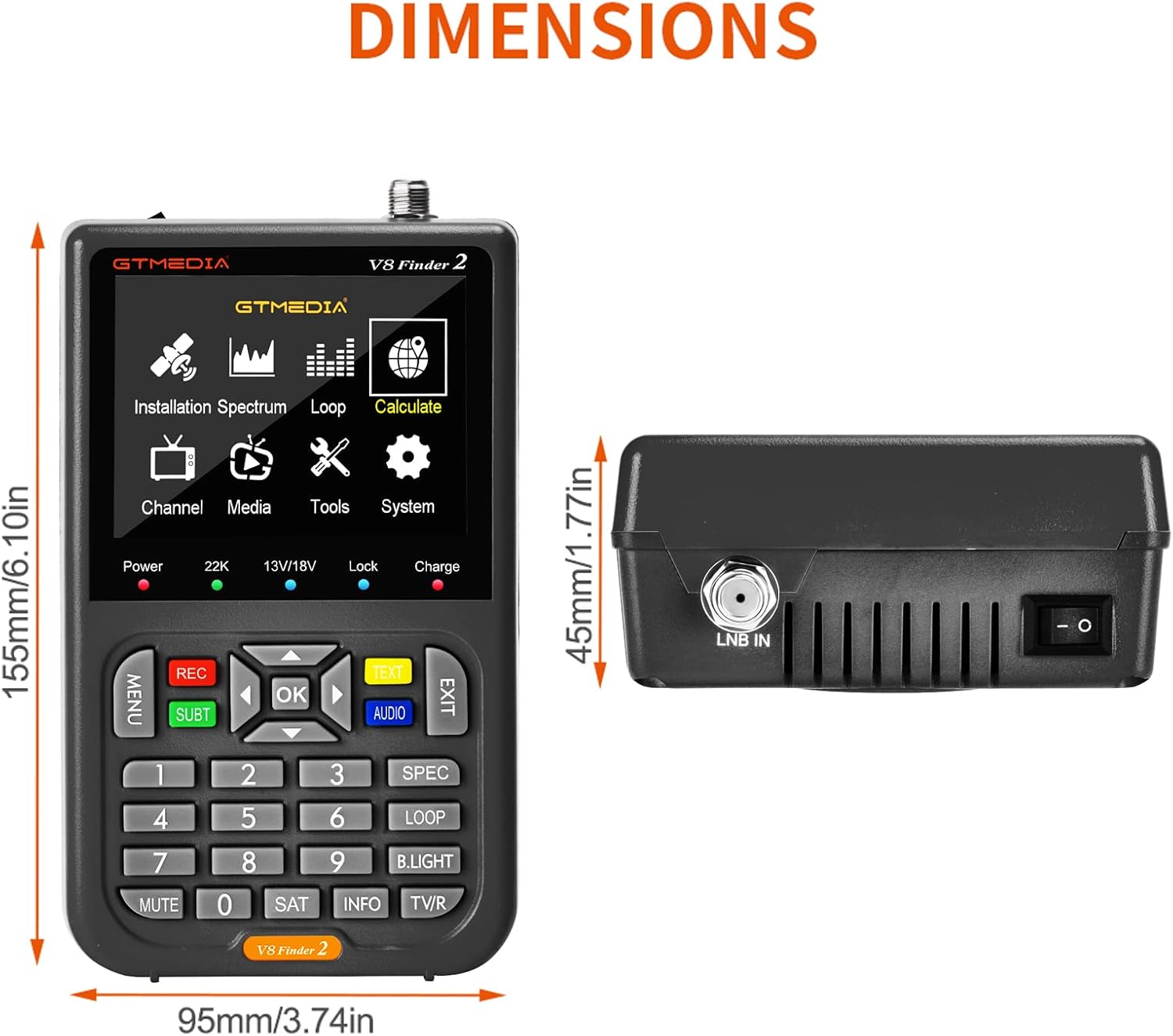
Figure 8: Physical dimensions of the V8 Finder 2.
9. Záruka a podpora
For warranty information and technical support, please refer to the product warranty card included in your package or visit the official docooler webUschovejte si účtenku jako doklad o koupi pro případ reklamace.
Výrobce: Docooler
Značka: chladič doktoru
For further assistance, please contact docooler customer service.


