1. Úvod a konecview
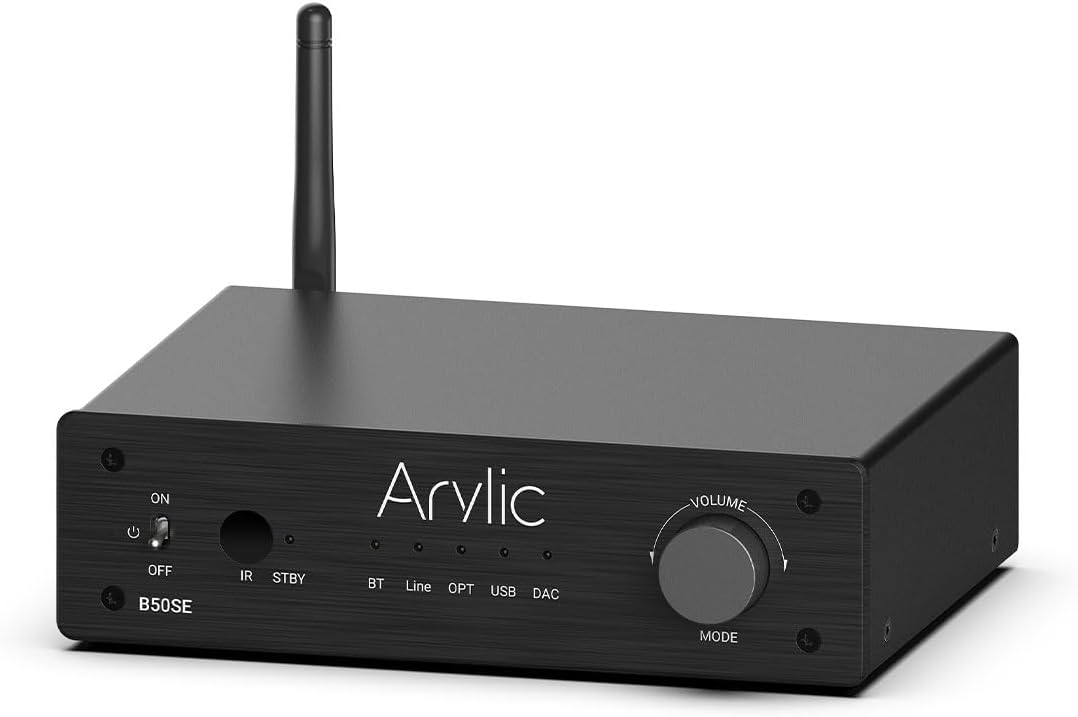
The Arylic B50 SE is a versatile Bluetooth 5.1 stereo audio amplifier designed for home audio systems. It delivers 50W x 2 powerful output, supporting 2.1 channel configurations with a dedicated subwoofer output. Featuring the TPA3116D2 chip, it ensures stable and high-quality audio transmission with long-range Bluetooth connectivity. Control is made easy through the intuitive Go Control APP and integrated EQ settings, providing an enhanced listening experience for various audio sources.
2. Vlastnosti produktu
- Výkonný výstup: Delivers 50W x 2 stereo output, suitable for various home speakers.
- 2.1 Channel Support: Includes a dedicated subwoofer output for building a 2.1 home cinema system.
- Pokročilé Bluetooth 5.1: Ensures stable, long-range (up to 10 meters) wireless audio streaming with low latency.
- TPA3116D2 Chip: Utilizes the TPA3116D2 amplifier chip for high efficiency, stable performance, and built-in overheat, overcurrent, and short-circuit protection.
- Více audio vstupů: Supports Bluetooth, Line-in (RCA), Optical, and USB DAC inputs for versatile connectivity.
- Go Control APP: Intuitive mobile application for comprehensive control, including input selection, volume adjustment, EQ customization, and USB song list management.
- Easy Control EQ: Offers preset and customizable equalizer settings via the app or remote control for optimized sound.

3. Obsah balení
Pečlivě zkontrolujte balíček, abyste se ujistili, že jsou všechny položky přítomny a v dobrém stavu:
- Arylic B50 SE Bluetooth Ampdoživotní
- Napájecí adaptér
- Dálkové ovládání
- Anténa Bluetooth
- Uživatelská příručka (tento dokument)
4. Rozvržení a ovládací prvky produktu
4.1 Přední panel
- Přepínač ON/OFF: Přepíná ampvýkon zvlhčovače.
- IR: Infračervený přijímač pro dálkové ovládání.
- STBY: Standby indicator light.
- BT/Line/OPT/USB/DAC Indicators: Lights indicating the currently selected input mode.
- Volume/MODE Knob: Rotates to adjust volume; press to cycle through input modes.
4.2 Zadní panel
- DC vstup: Port pro připojení napájení.
- Speaker (L/R): Terminals for connecting passive left and right speakers.
- SW výstup: RCA výstup pro připojení aktivního subwooferu.
- Line In (RCA): RCA input for connecting analog audio sources.
- Optický vstup: Optical (Toslink) input for connecting digital audio sources.
- USB: USB-A port for connecting USB storage devices for music playback.
- DAC: USB-B port for connecting to a computer as a USB DAC.
- Resetovat: Button to reset the device. Press twice in Bluetooth Receiver mode to disconnect all Bluetooth connections. Press and hold to perform a factory reset.
- BT: Konektor antény pro Bluetooth.

5. Nastavení a připojení
Follow these steps to set up your Arylic B50 SE ampživější:
- Připojení reproduktorů: Connect your passive stereo speakers to the L (Left) and R (Right) speaker terminals on the rear panel. Ensure correct polarity (+ to + and - to -).
- Připojení subwooferu (volitelné): If using an active subwoofer, connect its input to the 'SW Out' RCA port on the ampživější.
- Připojení zdrojů zvuku:
- Line-in: Use an RCA cable to connect your analog audio source (e.g., CD player, turntable with pre-amp) to the 'Line In' RCA ports.
- Optický: Use an optical (Toslink) cable to connect digital audio sources (e.g., TV, game console) to the 'Optical In' port.
- USB DAC: Connect your computer to the 'DAC' USB-B port using a USB cable.
- USB disk: Insert a USB storage device (flash drive) into the 'USB' USB-A port for direct music playback.
- Connect Bluetooth Antenna: Screw the provided Bluetooth antenna into the 'BT' connector on the rear panel.
- Připojte napájení: Plug the power adapter into the 'DC Input' port on the amplifier, then plug the adapter into a wall outlet.
- Zapnutí: Flip the ON/OFF switch on the front panel to the 'ON' position.


6. Návod k obsluze
6.1 Výběr vstupu
Stiskněte tlačítko Volume/MODE knob on the front panel to cycle through the available input modes: Bluetooth (BT), Line-in (Line), Optical (OPT), USB, and DAC. The corresponding indicator light will illuminate.
6.2 Ovládání hlasitosti
Otočte Volume/MODE knob clockwise to increase volume and counter-clockwise to decrease volume. Volume can also be controlled via the remote control or the Go Control APP.
6.3 Funkce dálkového ovládání
Dodávané dálkové ovládání poskytuje pohodlný přístup k různým funkcím:
- Zapnutí/vypnutí
- Výběr vstupu: Dedicated buttons for Phono In, Line In, Optical In, ARC, BT RX.
- Základní ovládací prvky přehrávání: Přehrát/Pozastavit, Další/Předchozí skladba.
- Zvýšení/snížení hlasitosti
- Předvolby EQ: Buttons for Flat, Classic, Pop, Jazz, Rock, Vocal.
- Treble/Bass Control: Adjust treble and bass levels.

7. Párování Bluetooth
To connect your Bluetooth device to the Arylic B50 SE:
- Zajistěte amplifier is powered on and the input mode is set to Bluetooth (BT). The BT indicator light will blink, indicating it's in pairing mode.
- On your mobile device (smartphone, tablet, laptop), go to Bluetooth settings and search for available devices.
- Vybrat "Arylic B50 SE" ze seznamu zařízení.
- Once connected, the BT indicator light on the amplifier will become solid. You can now stream audio wirelessly.
The Arylic B50 SE features Bluetooth 5.1 for a stable connection and supports long-distance transmission, typically over 10 meters (33 feet), allowing for flexible placement within your home.

8. Go Control APP
The Go Control APP provides advanced control and customization options for your Arylic B50 SE ampživější.
8.1 Stažení aplikace
Download the "Go Control" app from your device's app store (Google Play Store for Android, Apple App Store for iOS).
8.2 Funkce aplikace
- Ovládání Bluetooth: Manage Bluetooth connections and playback directly from the app.
- Customize Theme: Personalize the app's appearance with different color schemes.
- Přizpůsobit EQ: Adjust sound settings with a graphic equalizer or select from preset EQ modes (Flat, Classical, Pop, Jazz, Rock).
- USB Stick Song List: Browse and select songs directly from a connected USB storage device.
- Aktualizace firmwaru: Check for and install the latest firmware for your ampživější.

9. Přehrávání z USB
The Arylic B50 SE supports direct music playback from a USB storage device.
- Insert a USB flash drive containing your music files into the 'USB' port on the rear panel.
- Přepněte amplifier's input mode to USB.
- Use the Go Control APP to browse your music library and select tracks for playback. The app allows you to filter and manage playlists.

10. Optický vstup
For high-fidelity digital audio, connect your source device using the optical input.
- Connect an optical (Toslink) cable from your source device (e.g., TV, Blu-ray player, game console) to the 'Optical In' port on the ampživější.
- Přepněte amplifier's input mode to OPT.
- Ensure your source device's audio output is set to PCM/Stereo, as the amplifier may not support Dolby Digital or DTS formats.

11. Řešení problémů
| Problém | Možná příčina | Řešení |
|---|---|---|
| Žádná síla | Napájecí adaptér není připojen nebo je vadný. | Ujistěte se, že je napájecí adaptér bezpečně připojen k amplifier and a working power outlet. Check the power switch. |
| Žádný zvuk | Incorrect input selected; volume too low; speaker connections loose; faulty audio cable. | Verify the correct input mode is selected. Increase volume. Check all speaker and audio cable connections. Test with a different audio source or cable. |
| Nestabilní nebo výpadky Bluetooth připojení | Zařízení je příliš daleko od amplifier; interference; multiple devices trying to connect. | Přesuňte zařízení Bluetooth blíže k amplifier. Avoid placing amplifier near other wireless devices. Disconnect other Bluetooth devices. Try resetting Bluetooth on both devices. |
| Go Control APP cannot connect | Bluetooth not enabled on phone; app permissions; amplifier not in Bluetooth mode. | Ensure Bluetooth is enabled on your phone and the amplifier is in BT mode. Grant necessary permissions to the app. Restart the app and ampživější. |
| Dálkové ovládání nefunguje | Batteries low/dead; IR receiver blocked; remote not pointed correctly. | Replace batteries. Ensure no obstructions between remote and amplifier's IR receiver. Point remote directly at the ampživější. |
12. Specifikace
| Funkce | Specifikace |
|---|---|
| Výstupní výkon | 50W x 2 |
| Kanály | 2.1 kanál |
| Verze Bluetooth | 5.1 |
| Vstupy | Bluetooth, Line-in (RCA), Optical, USB DAC, USB Disk |
| Výstupy | Speaker L/R, Subwoofer Out |
| Ampliifier Chip | TPA3116D2 |
| Rozměry (D x Š x V) | 14.53 x 9.13 x 2.64 palce |
| Hmotnost položky | 3.61 libry |
| Kontrolní metody | Front Panel Knob, Remote Control, Go Control APP (Android, iOS) |
13. Bezpečnostní informace
Pro zajištění bezpečného provozu a prodloužení životnosti vašeho zařízení si prosím přečtěte a dodržujte tyto bezpečnostní pokyny:
- Nevystavujte toto zařízení dešti nebo vlhkosti.
- Nepokládejte na spotřebič předměty naplněné tekutinami, jako například vázy.
- Zajistěte dostatečné větrání. Neblokujte žádné větrací otvory.
- Neinstalujte v blízkosti zdrojů tepla, jako jsou radiátory, tepelné regulátory, kamna nebo jiná zařízení (včetně amplifikátory), které produkují teplo.
- Používejte pouze nástavce/příslušenství určené výrobcem.
- Odpojte tento spotřebič během bouřky s blesky nebo když jej nebudete delší dobu používat.
- Veškeré opravy svěřte kvalifikovanému servisnímu personálu. Servis je nutný, pokud bylo zařízení jakýmkoli způsobem poškozeno, například je poškozen napájecí kabel nebo zástrčka, pokud do zařízení vnikla tekutina nebo do něj spadly předměty, zařízení bylo vystaveno dešti nebo vlhkosti, nefunguje normálně. , nebo byla vypuštěna.
14. Záruka a podpora
Arylic products are designed and manufactured to the highest quality standards. This product is covered by a limited warranty from the date of purchase. For detailed warranty terms and conditions, please refer to the warranty card included with your product or visit the official Arylic webmísto.
For technical support, troubleshooting assistance, or service inquiries, please contact Arylic customer support through their official website or the contact information provided in your product packaging. You may also find additional resources and FAQs on the Arylic support page.
A comprehensive Instructions for Use (IFU) document is also available in PDF format for further details: Stáhnout uživatelskou příručku v PDF


